
Téléchargement pour Tapo RV50 Pro Omni
- Récapitulatif Produit
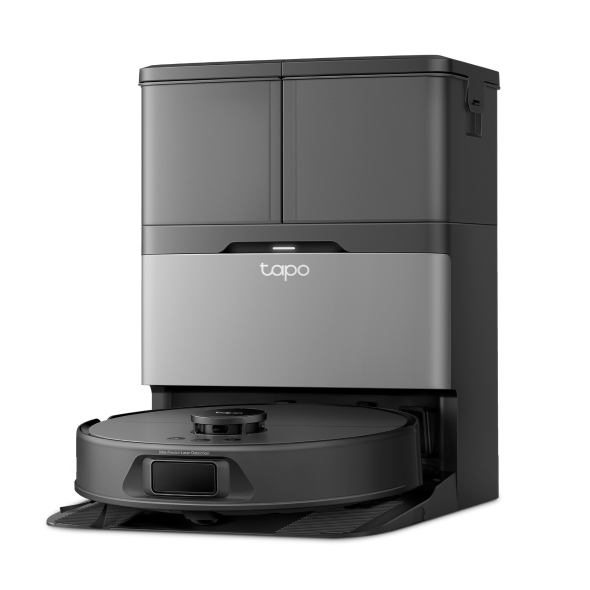 Aspirateur robot laveur + station d'accueil auto-nettoyante avancée
Vidéo d'installation
-
How to set up your Tapo robot vacuum with the all-in-one dock: Tapo RV50 Pro Omni
This video will show you how to set up your Tapo robot vacuum with the all-in-one dock and connect to your home Wi-Fi.
Plus Pli -
How to Replace the Mop Cloth: Tapo RV50 Pro Omni
-
How to Replace the Side Brush: Tapo RV50 Pro Omni/Tapo RVA110
-
How to Replace the Main Brush Cover: Tapo RV50 Pro Omni/Tapo RVA110
-
How to Replace the Sponge Filter: Tapo RV50 Pro Omni/Tapo RVA110
-
How to Replace the Main Brush: Tapo RV50 Pro Omni/Tapo RVA110
-
How to Clean the Detachable Base: Tapo RV50 Pro Omni
-
How to Clean Cleaning Tray: Tapo RV50 Pro Omni
-
How to Clean the Main Wheels: Tapo RV50 Pro Omni
-
How to Clean the Charging Contacts: Tapo RV50 Pro Omni
-
How to Clean the Sensors: Tapo RV50 Pro Omni
-
How to Clean the Caster Wheel: Tapo RV50 Pro Omni
-
How to Clean the Side Brush: Tapo RV50 Pro Omni
-
How to Clean the Main Brush: Tapo RV50 Pro Omni
-
How to Clean the Filter: Tapo RV50 Pro Omni/Tapo RVA110/Tapo RVA520
-
How to Empty the Dustbin (Autp-Empty/Manually): Tapo RV50 Pro Omni
-
How to Replace the Dust Bag: Tapo RV50 Pro Omni: Tapo RV50 Pro Omni/Tapo RVA210
-
How to Install the Tapo Cleaning Solution: Tapo RV50 Pro Omni/Tapo RVA450
FAQs
- Appareils TP-Link Matter : Guide d’installation, compatibilité avec les hubs et conseils
- Comment connecter mon appareil Tapo (prise, caméra, ampoule connectée) à Google Home
- Comment vérifier la stabilité de la connexion réseau d'une caméra Tapo
- Comment renommer votre pièce dans un robot aspirateur
- Que dois-je faire si je ne reçois pas l'e-mail de vérification pour l'enregistrement de mon identifiant TP-Link ou la réinitialisation de mon mot de passe ?
- TP-Link ID : Explication de ce que c'est et comment en créer un
- Pourquoi je ne peux pas m’inscrire sur le compte TP-Link ?
- Comment trouver la version matérielle d'un appareil TP-Link ?
- Comment trouver la référence de votre appareil TP-Link ?
- Comment remplir le réservoir d'eau du robot aspirateur
- Foire aux questions sur le robot aspirateur Tapo
- Fonctionnalités prises en charge dans différents écosystèmes pour les appareils certifiés TP-Link Matter
- Comment nettoyer les capteurs de votre robot aspirateur
- Que puis-je faire si j'oublie mon mot de passe du compte cloud piur les produits Tapo
- Comment faire fonctionner mes appareils Tapo avec IFTTT
- Impossible de trouver ou d'ajouter l'appareil TP-Link sur les applications TP-Link après la mise à jour des appareils Apple vers iOS14
- Que faire si la mise à jour du firmware de mes appareils Tapo a échoué ?
- Comment remplacer la brosse latérale de l'aspirateur robot Tapo
- Comment utiliser la fonction Accueil et la fonction Chambre dans l'application Tapo
- Réponses à toutes vos questions sur le robot aspirateur TP-Link
- Comment configurer des routines pour les appareils Tapo via l'application Alexa
- Que dois-je faire si le bac de nettoyage déborde ou si le Tapo Dock n'aspire pas l'eau sale du bac de nettoyage ?
- Que dois-je faire si le ventilateur d'aspiration de mon robot aspirateur signale des erreurs ?
- Comment réinitialiser le robot aspirateur Tapo
- Comment connecter votre robot aspirateur à votre WiFi domestique
- How to replace the sponge filter in the clean water tank of my Tapo Robot Vacuum
- Comment définir l'ordre de nettoyage pour l'aspirateur robot Tapo
- Guide des accessoires pour aspirateur robot Tapo
- Pourquoi y a-t-il des dépôts dans mon réservoir d'eau sale ?
- Foire aux questions sur les aspirateurs robots Tapo série RV50
- Pourquoi est-ce que je reçois un e-mail « Nous avons remarqué une nouvelle connexion » ?
- Comment remplacer le couvercle de la brosse principale du robot aspirateur Tapo
- Comment remplacer la brosse principale de votre robot aspirateur
- Comment nettoyer le plateau de nettoyage et la base amovible du robot aspirateur Tapo
- Comment nettoyer les roues principales de votre robot aspirateur
- Comment nettoyer les contacts de charge de votre aspirateur robot
- Comment nettoyer la brosse latérale de votre robot aspirateur
- Comment nettoyer la brosse principale de votre robot aspirateur
- Comment nettoyer le filtre de votre robot aspirateur
- Comment remplacer le sac à poussière de votre robot aspirateur Tapo
- Comment installer le module anti-odeurs dans le réservoir d'eau sale du robot aspirateur Tapo
- Comment remplacer le module anti-odeurs dans le réservoir d'eau sale de l'aspirateur robot Tapo
- Comment remplacer la solution nettoyante du robot aspirateur Tapo
- Comment nettoyer la roulette de votre robot aspirateur
- Questions générales sur la géolocalisation Kasa
- Où trouver le numéro de série de vos appareils TP-Link ?
- How to troubleshoot if Tapo RV50 series Robot Vacuum work abnormally
- Dépannage en cas d'échec de la configuration d'un appareil Matter
- Questions sur Matter autour des aspirateurs robots Tapo
- Pourquoi mon robot aspirateur tombe-t-il dans les escaliers ?
- Que dois-je faire si je ne peux pas faire fonctionner mon appareil Kasa avec Alexa ou Google Home ?
- Comment configurer la fonction de notification pour les appareils Tapo & Kasa sur l'application Tapo
- Comment nettoyer le réservoir d'eau sale de l'aspirateur robot Tapo
- Comment remplacer le filtre de votre robot aspirateur
- Comment configurer un appareil Matter avec Alexa, Google, Apple ou SmartThings
- Les questions les plus fréquemment posées sur les ventes de TP-Link
- Comment puis-je supprimer mon compte cloud TP-Link ?
- Comment dissocier les comptes tiers de votre identifiant TP-Link
- Que faire si mon aspirateur robot Tapo a des chemins de nettoyage désordonnés/chaotiques/anormaux
- Où puis-je trouver le numéro de code de configuration Matter pour mes appareils TP-Link ?
- Comment vérifier s'il s'agit du problème matériel de ma prise ou mon ampoule connectée WiFi
- Pourquoi TP-Link requiert-il mon adresse e-mail?
- Comment utiliser un tapis imperméable sur les sols en bois ou les moquettes pour l'aspirateur robot Tapo
- Que faire si l'aspirateur robot Tapo affiche une carte superposée/inclinée/déformée
- Comment créer une carte 3D dans l'application Tapo pour Pad
- Comment puis-je vérifier la progression du nettoyage du robot aspirateur
- Comment utiliser l'aspirateur robot pour nettoyer avec la commande à distance
- Que dois-je faire si je ne peux pas faire fonctionner les appareils intelligents Tapo (prise, caméra, ampoule) avec Alexa ou Google Home
- Que dois-je faire si l'appareil intelligent s'affiche hors ligne après avoir modifié ou réinitialisé le routeur ?
- Comment créer une cartographie complète de ma maison via votre robot aspirateur Tapo
- Qu'est-ce que la fonction Point and Go pour les robots aspirateurs Tapo ?
- Comment configurer un appareil Matter connecté avec un autre système de maison intelligente
- Que dois-je faire si la roue principale de mon robot aspirateur signale des erreurs ?
- Que dois-je faire si mon robot aspirateur nettoie plusieurs fois la même zone ?
- Comment dépanner votre robot aspirateur Tapo lorsqu'il ne peut pas ramasser tous les débris
- Qu'est-ce que le nettoyage personnalisé du robot aspirateur ?
- Qu'est-ce que le nettoyage avancé de toute la maison de l'aspirateur robot ?
- Le LiDAR du robot aspirateur signale des erreurs ou est coincé/emmêlé
- Que dois-je faire si une erreur de batterie du robot aspirateur se produit ?
- Que dois-je faire si le pare-chocs avant de mon robot aspirateur se coince ?
- Que dois-je faire si la brosse latérale de mon robot aspirateur se coince ?
- Que dois-je faire si la brosse principale de mon robot aspirateur se coince ?
- Que dois-je faire si la pompe à eau du robot aspirateur signale des erreurs ?
- Conseils si problèmes sur robots aspirateurs équipés de la navigation LiDAR
- Comment remplacer la serpillière sur votre robot aspirateur
- Comment nettoyer la serpillère de votre robot aspirateur
- Comment gérer les problèmes de bruit anormal lors du nettoyage
- Échec de charge de votre robot aspirateur
- Comment dépanner le robot aspirateur Tapo la configuration échoue ou qu'il ne parvient pas à se connecter au Wi-Fi
- Le nettoyage programmé de votre robot aspirateur ne fonctionne pas
- Si le robot aspirateur consomme de l'énergie lorsqu'il est placé sur la station
- Dois-je charger complètement mon robot aspirateur avant la première utilisation ?
- Comment puis-je programmer mon robot aspirateur pour qu'il nettoie régulièrement ?
- Comment nettoyer le bac à poussière de votre robot aspirateur
Firmware Release Note
Consultez la FAQ pour mettre à jour le micrologiciel.
|
Tapo RV50 Pro Omni(EU)_V1_1.2.4 Build 260310 |
|---|
| Date de publication: 2026-03-18 |
|
Modifications and Bug Fixes: |
|
Tapo RV50 Pro Omni(EU)_V1_1.2.3 Build 260202 |
|---|
| Date de publication: 2026-02-28 |
|
Modifications and Bug Fixes: |
|
Tapo RV50 Pro Omni(EU)_V1_1.2.2 Build 260112 |
|---|
| Date de publication: 2026-01-16 |
|
Modifications and Bug Fixes: |
|
Tapo RV50 Pro Omni(EU)_V1_1.2.1 Build 260105 |
|---|
| Date de publication: 2026-01-13 |
|
Modifications and Bug Fixes: |
|
Tapo RV50 Pro Omni(EU)_V1_1.2.0 Build 251222 |
|---|
| Date de publication: 2026-01-04 |
|
Modifications and Bug Fixes: |
|
Tapo RV50 Pro Omni(EU)_V1_1.1.1 Build 250926 |
|---|
| Date de publication: 2025-10-09 |
|
Modifications and Bug Fixes: |