
Download für Tapo C665G KIT
- Produktübersicht
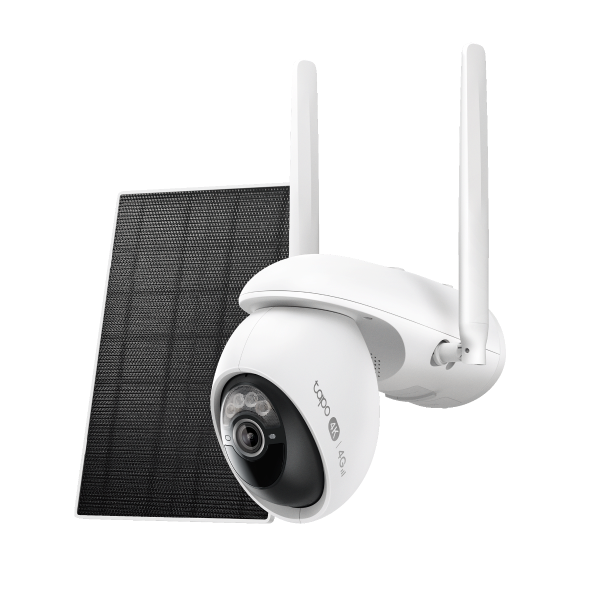 Tapo C665G KIT 4K 4G LTE Überwachungskamera Solar 360°
Setup Video
-
How to Set Up Your Solar-Powered Pan/Tilt Wi-Fi/4G Security Camera Kit | Tapo C665GKIT
Tapo C665G KIT features Enhanced AI Detections with 4K resolution and 18x digital zoom, allowing it to recognize faces, people, pets, and vehicles with incredible precision and detail. With Starlight Color Night Vision and solar charging, it ensures vivid, round-the-clock surveillance without maintenance worries. Designed for versatility, the camera supports 4G LTE and dual-band Wi-Fi, making it perfect for outdoor locations where Wi-Fi may be unreliable.
More Fold -
How to Mount Your Solar-Powered Pan/Tilt Wi-Fi/4G Security Camera Kit | Tapo C665GKIT
Tapo C665G KIT features Enhanced AI Detections with 4K resolution and 18x digital zoom, allowing it to recognize faces, people, pets, and vehicles with incredible precision and detail. With Starlight Color Night Vision and solar charging, it ensures vivid, round-the-clock surveillance without maintenance worries. Designed for versatility, the camera supports 4G LTE and dual-band Wi-Fi, making it perfect for outdoor locations where Wi-Fi may be unreliable.
More Fold
Häufig gestellte Fragen
- Set Privacy Zone for Tapo Camera and Doorbell
- So überprüfen Sie die Stabilität der Netzwerkverbindung einer Tapo-Kamera
- How to connect my Tapo / Kasa smart device to Google Home
- Wie registriere ich ein TP-Link-Produkt mit meiner TP-Link-ID?
- Wie kann man eine Tapo Kamera zurücksetzen ?
- Recommended Carriers with Tapo 4G Camera
- Was passiert, wenn ich mich nicht anmelden kann oder die TP-Link ID nicht aktiviere?
- Wie finde ich die Hardware Version auf einem TP-Link Gerät?
- Wie finde ich die Modellnummer meines TP-Link Geräts?
- Was sollte ich tun, wenn ich Tapo Camera nicht konfigurieren kann?
- Tapo Care Stornierung und Rückerstattung
- How to update or change the payment method for Tapo Care or Kasa Care
- Frequently asked questions about Face Management
- Wie kann ich neue Kameras zu meinem Tapo Care Plan hinzufügen?
- Was kann ich tun, wenn ich meine Tapo-Kamera in der Tapo-App nicht finde?
- How to use Encrypt microSD Card Function on Tapo Camera
- How to fix no sound or audio quality issues on Tapo Camera/Doorbell
- Warum muss ich TP-Link-Apps in IOS 14 lokale Zugriffsrechte erteilen?
- How to make Tapo devices work with IFTTT
- Was kann ich tun, wenn ich mein Passwort für das Cloud-Konto vergessen habe (Tapo Smart Plug, Smart Camera, Smart Bulb)?
- Was kann ich tun, wenn ich die E-Mail nicht erhalte beim Registrieren eines Cloud-Kontos oder beim Zurücksetzen meines Passworts?
- Wie geht man vor, wenn die Firmwareaktualisierung bei einem Tapo-Gerät fehlschlägt?
- Wie installiere ich eine SD-Karte für meine Tapo-Kamera?
- Was sollte ich tun, wenn die SD-Karte von TP-Link-Kameras nicht formatiert/erkannt werden kann?
- Wie kann ich die Videoaufnahmen der Kamera auf der SD-Karte auf einem Computer abspielen?
- Wie bearbeite ich den Heim- und Auswärtsmodus für Tapo-Kameras?
- What should I do if I encounter issues while playing back videos from an SD card?
- How to configure Home feature and Room feature in Tapo app
- Why do I receive a "We Noticed a New Login" email?
- What should I do if Tapo/Kasa notifications are delayed or not working?
- General Questions about Tapo/Kasa Geofencing
- Wie finde ich die Seriennummer auf TP-Link-Geräten?
- How can I enable the 24/7 Capture on Battery Camera?
- What is Video Summary
- Was kann ich tun, wenn ich mein Kasa-Gerät nicht mit Alexa / Google Home arbeiten lassen kann?
- How to use Alexa Snapshot with Tapo Cameras
- So konfigurieren Sie die Benachrichtigungsfunktion für die Tapo & Kasa-Geräte in der Tapo-App
- How to fix a flickering issue on Live View of the Tapo Camera
- How to set up routines for Tapo devices via Alexa app
- How to stream Tapo / Kasa Camera on Google device
- Why cannot I receive the SMS verification code from Tapo app?
- Wie kann man eine Tapo Kamera einrichten
- General questions about Pan & Tilt feature of TP-Link Camera
- The most frequent asked questions about TP-Link Sales
- Wie kann ich mein TP-Link Cloud-Konto löschen?
- Wie kann ich beim Kauf von Tapo Care eine 3DS-Authentifizierung durchführen?
- How to unlink third-party accounts from your TP-Link ID
- How to verify if it’s the hardware issue of TP-Link smart home
- Warum benötigt TP-Link meine E-Mail-Adresse?
- How to create 3D Map in the Tapo App for Pad
- TP-Link Smart-Geräte können nicht mit Google Home verwendet werden
- Tapo/Kasa Devices are showing offline after changing or resetting the router.
- Was ist die TP-Link ID und wie erstellt man eine TP-Link ID?
Firmware Release Note
Refer the FAQ to update firmware.
|
Tapo C665G(EU)_V1_1.2.5 Build 260130 |
|---|
| Datum der Veröffentlichung: 2026-02-26 |
|
Modifications and Bug Fixes: |
|
Tapo C665G(EU)_V1_1.2.4 Build 251218 |
|---|
| Datum der Veröffentlichung: 2026-01-26 |
|
Modifications and Bug Fixes: |
|
Tapo C665G(EU)_V1_1.2.3 Build 251211 |
|---|
| Datum der Veröffentlichung: 2025-12-25 |
|
Modifications and Bug Fixes: |
|
Tapo C665G(EU)_V1_1.2.2 Build 251111 |
|---|
| Datum der Veröffentlichung: 2025-12-03 |
|
Modifications and Bug Fixes: |
|
Tapo C665G(EU)_V1_1.2.1 Build 250923 |
|---|
| Datum der Veröffentlichung: 2025-11-03 |
|
Modifications and Bug Fixes: |
Von United States?
Erhalten Sie Produkte, Events und Leistungen speziell für Ihre Region