
Download für Tapo RV50 Pro Omni
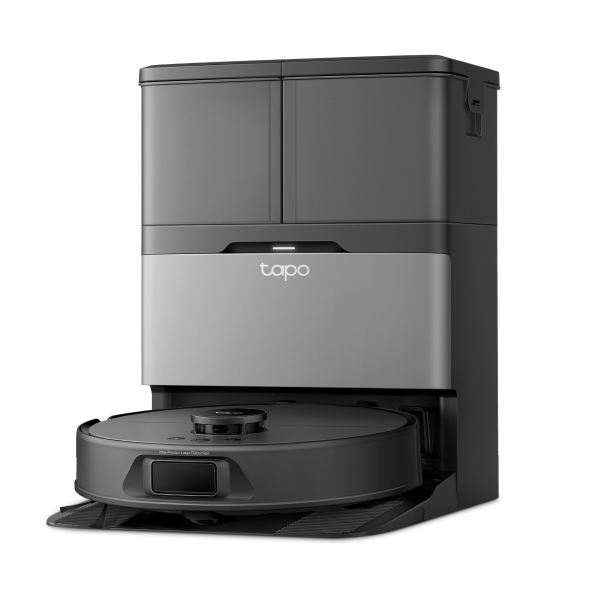 Saug- und Wischroboter + selbstreinigende All-in-One Dockingstation
Setup Video
-
How to set up your Tapo robot vacuum with the all-in-one dock: Tapo RV50 Pro Omni
This video will show you how to set up your Tapo robot vacuum with the all-in-one dock and connect to your home Wi-Fi.
More Fold -
How to Replace the Mop Cloth: Tapo RV50 Pro Omni
-
How to Replace the Side Brush: Tapo RV50 Pro Omni/Tapo RVA110
-
How to Replace the Main Brush Cover: Tapo RV50 Pro Omni/Tapo RVA110
-
How to Replace the Sponge Filter: Tapo RV50 Pro Omni/Tapo RVA110
-
How to Replace the Main Brush: Tapo RV50 Pro Omni/Tapo RVA110
-
How to Clean the Detachable Base: Tapo RV50 Pro Omni
-
How to Clean Cleaning Tray: Tapo RV50 Pro Omni
-
How to Clean the Main Wheels: Tapo RV50 Pro Omni
-
How to Clean the Charging Contacts: Tapo RV50 Pro Omni
-
How to Clean the Sensors: Tapo RV50 Pro Omni
-
How to Clean the Caster Wheel: Tapo RV50 Pro Omni
-
How to Clean the Side Brush: Tapo RV50 Pro Omni
-
How to Clean the Main Brush: Tapo RV50 Pro Omni
-
How to Clean the Filter: Tapo RV50 Pro Omni/Tapo RVA110/Tapo RVA520
-
How to Empty the Dustbin (Autp-Empty/Manually): Tapo RV50 Pro Omni
-
How to Replace the Dust Bag: Tapo RV50 Pro Omni: Tapo RV50 Pro Omni/Tapo RVA210
-
How to Install the Anti Odor Module in the Dirty Water Tank: Tapo RV50 Pro Omni/Tapo RVA420
-
How to Install the Tapo Cleaning Solution: Tapo RV50 Pro Omni/Tapo RVA450
Häufig gestellte Fragen
- Warum fällt mein Saugroboter die Treppe herunter?
- Antworten auf alle Ihre Fragen über den TP-Link Saugroboter
- Ersetzen Sie die Seitenbürste meines Saugroboters
- So ersetzen Sie die Abdeckung der Hauptbürste eines Saugroboters
- Ersetzen Sie die Hauptbürste meines Saugroboters
- So reinigen Sie die Haupträder Ihres Saugroboters
- So reinigen Sie die Ladekontakte Ihres Saugroboters
- So reinigen Sie die Sensoren Ihres Saugroboters
- So reinigen Sie das Laufrad meines Saugroboters
- So reinigen Sie die Seitenbürste Ihres Saugroboters
- Reinigen Sie die Hauptbürste meines Saugroboters
- Den Filter meines Saugroboters reinigen
- So installieren Sie das Anti-Geruchsmodul im Schmutzwassertank des Tapo-Roboterstaubsaugers
- So ersetzen Sie das Anti-Geruchsmodul im Schmutzwassertank des Tapo-Roboterstaubsaugers
- So ersetzen Sie die Reinigungslösung des Tapo-Roboterstaubsaugers
- Ersetzen Sie den Staubbeutel meines Staubsaugerroboters
- Why do I receive a "We Noticed a New Login" email?
- How to optimize and edit Map of Tapo Robot Vacuum
- Why are there deposits in my dirty water tank?
- Frequently asked questions about Tapo RV50 series Robot Vacuum
- So reinigen Sie die Auffangschale und den abnehmbaren Sockel des Tapo-Staubsaugerroboters
- Wie behebt man Störungen, wenn der Staubsaugerroboter der Tapo RV50-Serie nicht ordnungsgemäß funktioniert?
- So reinigen Sie den Schmutzwassertank des Tapo-Roboterstaubsaugers
- Den Filter meines Saugroboters austauschen
- Wie füllt man den Wassertank für den Saugroboter?
- How to set cleaning order for Tapo Robot Vacuum
- Tapo Robot Vacuum Accessory Guide
- General Questions about Tapo/Kasa Geofencing
- Wie finde ich die Seriennummer auf TP-Link-Geräten?
- Troubleshooting for Tapo/Kasa Matter configuration on third-party platform
- Matter QAs for Tapo Robot Vacuum
- What should I do if the cleaning tray overflows or Tapo dock is not sucking dirty water from the cleaning tray?
- Was kann ich tun, wenn ich mein Kasa-Gerät nicht mit Alexa / Google Home arbeiten lassen kann?
- So konfigurieren Sie die Benachrichtigungsfunktion für die Tapo & Kasa-Geräte in der Tapo-App
- How to connect my Tapo / Kasa smart device to Google Home
- How to set up routines for Tapo devices via Alexa app
- So richten Sie das Matter-Gerät mit Alexa, Google, Apple oder SmartThings ein
- Was ist die TP-Link ID und wie erstellt man eine TP-Link ID?
- The most frequent asked questions about TP-Link Sales
- Wie kann ich mein TP-Link Cloud-Konto löschen?
- So überprüfen Sie die Stabilität der Netzwerkverbindung einer Tapo-Kamera
- F&A für TP-Link Matter-fähige Geräte
- How to unlink third-party accounts from your TP-Link ID
- Where can I find the Matter setup code number for my TP-Link devices?
- How to verify if it’s the hardware issue of TP-Link smart home
- Was passiert, wenn ich mich nicht anmelden kann oder die TP-Link ID nicht aktiviere?
- Warum benötigt TP-Link meine E-Mail-Adresse?
- How to create 3D Map in the Tapo App for Pad
- How to use the Home feature and Room feature in the Tapo App
- TP-Link Smart-Geräte können nicht mit Google Home verwendet werden
- Tapo/Kasa Devices are showing offline after changing or resetting the router.
- So fügen Sie Ihr Matter-zertifiziertes Gerät zu mehreren Controllern hinzu
Firmware Release Note
Refer the FAQ to update firmware.
|
Tapo RV50 Pro Omni(EU)_V1_1.2.0 Build 251222 |
|---|
| Datum der Veröffentlichung: 2026-01-04 |
|
Modifications and Bug Fixes: |
|
Tapo RV50 Pro Omni(EU)_V1_1.1.6 Build 251127 |
|---|
| Datum der Veröffentlichung: 2025-12-08 |
|
Modifications and Bug Fixes: |
|
Tapo RV50 Pro Omni(EU)_V1_1.1.1 Build 250926 |
|---|
| Datum der Veröffentlichung: 2025-10-09 |
|
Modifications and Bug Fixes: |
Von United States?
Erhalten Sie Produkte, Events und Leistungen speziell für Ihre Region