
Скачать для Deco BE3600
Vx.0=Vx.6/Vx.8/Vx.9 (например: V1.0=V1.6/V1.8/V1.9)
Vx.x0=Vx.x6/Vx.x8/Vx.x9 (например: V1.20=V1.26/V1.28/V1.29)
Vx.30=Vx.32/Vx.33 (например: V3.30=V3.32/V3.33)
- Обзор продукции
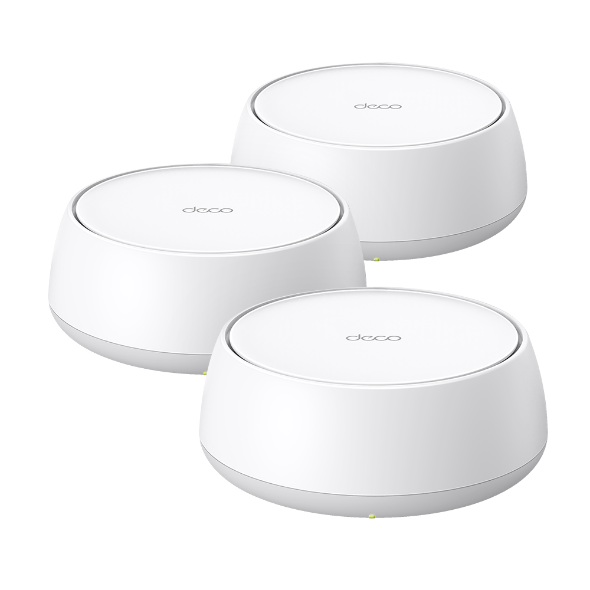 BE3600 Mesh-система Wi-Fi 7
FAQ
- Интернет-соединение нестабильно или внезапно перестает работать при подключении к сети Deco
- Что означают разные цвета светодиодов?
- Как узнать версию устройства TP-Link?
- Как узнать модель устройства TP-Link
- Использование функции QoS на Deco M5
- How to connect computers/phones to a wireless network
- Introduction to UPnP feature on TP-Link Router and Deco
- Что делать, если я не получаю электронное письмо при регистрации облачной учетной записи или сбросе пароля?
- Не удаётся найти или добавить устройство TP‑Link в приложениях TP‑Link после обновления устройств Apple до iOS 14
- How to configure Wi-Fi Access Control on TP-Link Deco
- How to configure USB Sharing on Deco
- How to set up Device Isolation on TP-Link Router/Deco
- How to collect system log of Deco app
- Troubleshooting Guide of DDNS function on TP-Link Wi-Fi Router, LTE Gateway Router or Deco Router
- Why do I receive a "We Noticed a New Login" email?
- How to change Time settings on TP-Link Deco
- How to export the log of Deco device
- Как найти серийный номер на устройствах TP-Link?
- What should I do when email shows that the link expired when I register cloud account or reset my password?
- Why did I receive an email titled "Potential Vulnerabilities Detected in Your Account"?
- Getting to know your Deco app
- How to select a preferred signal source on the Deco App
- How to get configuration files from an OpenVPN service provider
- How do I block or manage APP traffic with HomeShield Advanced Parental Control on a TP-Link Router/Deco?
- How to use Deco Lab on your Deco
- How to configure Camera Security on your Deco
- How to delete a network on the Deco app
- How to set up an IoT network on TP-Link Deco
- How to change Channel and Channel Width on Deco APP
- How to share network on the Deco App
- How to set up WireGuard VPN Client on Windows PC and MacBook
- How to set up WireGuard VPN Server on Deco APP
- How to set up WireGuard VPN Client on Deco APP
- How to set up WireGuard VPN Client on Android Phone and iPhone
- How to set up PPTP VPN Client on Windows PC
- How to set up PPTP VPN Server on Deco APP
- How to set up PPTP VPN Client on Deco APP
- How to set up PPTP VPN Client on Android Phone
- How to set up OpenVPN Client on Windows PC and MacBook
- How to set up OpenVPN Server on Deco APP
- How to set up OpenVPN Client on Deco APP
- How to set up OpenVPN Client on Android Phone and iPhone
- How to set up L2TP/IPSec VPN Client on Android Phone and iPhone
- How to set up L2TP / IPsec VPN Client on Windows PC and MacBook
- How to set up L2TP/IPsec VPN Server on Deco APP
- How to set up L2TP/IPsec VPN Client on Deco APP
- How to turn on Two-Factor Authentication (2FA) in Deco app
- How to Create Static Routing on TP-Link Deco
- What’s the ECO mode and how do you configure it on Deco?
- How to install and activate Avira Prime after you subscribe Homeshield Total Security Package
- Can Deco Mesh, OneMesh, EasyMesh and Omada Mesh products work together?
- Why is my MLO network performance not as good as expected?
- How to choose right TP-Link product for your internet service
- Should I use Dynamic IP or PPPoE?
- How do I set up my Deco with Singtel?
- How to add a Matter device on your Deco
- Общие вопросы по Deco
- Распространённые вопросы по Wi-Fi 7
- How to use Deco with your existing router
- How to choose the right Deco
- How to remove a Parental Control profile on the Deco
- How to extend guest network when there is a switch between Decos
- What should I do if I failed to login Deco App?
- Почему на iOS 14 появляется предупреждение о низком уровне безопасности при подключении к Wi‑Fi устройству TP‑Link?
- Why did I receive a new device connection alert when a known device joined the network?
- How to delete an offline device on the Deco app
- How to use DDNS features on a Deco router
- How to connect Deco with Starlink
- Abnormal LED lights and bad ports on the TP-Link Deco
- Cannot connect to Deco Wi-Fi
- How to configure the Reboot Schedule feature on the Deco
- В чем разница между учетной записью владельца и учетной записью администратора?
- Что делать, если вы не можете подключиться к своему Deco M5 удаленно?
- Что такое домашняя Wi-Fi система Deco?
- General question about the Wi-Fi range of Deco
- Why is a device displayed as an unknown device on the Deco app?
- Что делать, если я хочу использовать Deco вместе с моим основным роутером?
- Нормально ли, что мой Deco нагревается?
- Может ли мой принтер подключиться к сети Deco?
- Почему в сети Wi-Fi Deco отображается, что "Интернет может быть не доступен" на моем мобильном устройстве, если я нахожусь рядом с устройством Deco?
Прошивка (микропрограмма)
Обновление прошивки может устранить проблемы, которые могли быть в предыдущей версии, и улучшить её текущую производительность.
Как обновить
ВАЖНО: Чтобы избежать сбоев при обновлении, пожалуйста, ознакомьтесь со следующим перед началом процесса обновления.
- Пожалуйста, обновляйте прошивку с локального официального сайта TP-Link, соответствующего месту покупки вашего устройства TP-Link. В противном случае это может привести к аннулированию гарантии. При необходимости нажмите здесь, чтобы сменить сайт.
- Пожалуйста, проверьте версию аппаратного обеспечения вашего устройства для выбора соответствующей версии прошивки. Обновление неправильной прошивки может повредить устройство и привести к аннулированию гарантии.
Как узнать версию устройства TP-Link? - НЕ отключайте питание во время процесса обновления, так как это может привести к необратимому повреждению устройства.
- Чтобы избежать проблем с отключением беспроводной сети во время обновления прошивки, рекомендуется загружать прошивку при проводном подключении, если только ваше устройство TP-Link не имеет портов LAN/Ethernet.
- Рекомендуется остановить все интернет-приложения на компьютере или просто отключить интернет-кабель от устройства перед обновлением.
- Используйте программное обеспечение для распаковки, такое как WinZIP или WinRAR, для извлечения загруженного файла перед обновлением.
|
Deco BE3600(EU)_V1_1.1.1 Build 20251024 |
Скачать | |
|---|---|---|
| Дата публикации: 2026-01-15 | Язык: Многоязычный | Размер файла: 38.12 MB |
|
Новые функции/улучшения: Исправлены ошибки: |
||
|
Deco BE3600(EU)_V1_1.1.0 Build 20250718 |
Скачать | |
|---|---|---|
| Дата публикации: 2025-08-21 | Язык: Многоязычный | Размер файла: 37.71 MB |
|
Новые функции/улучшения: Исправлены ошибки: Примечание: Данная прошивка не может быть откатена до предыдущей версии. |
||
|
Deco BE3600(EU)_V1_1.0.2 Build 20250319 |
Скачать | |
|---|---|---|
| Дата публикации: 2025-06-16 | Язык: Многоязычный | Размер файла: 37.42 MB |
|
Выпущена первая прошивка. |
||
Использование стороннего программного обеспечения в продуктах TP-Link
Стандартное программное обеспечение (прошивка) продуктов TP-Link может быть заменено сторонним ПО, таким как DD-WRT. TP-Link не обязан предоставлять какое-либо обслуживание или поддержку для такого ПО, а также не гарантирует производительность и стабильность работы сторонних прошивок. Повреждение продукта в результате использования стороннего ПО ведет к аннулированию гарантии на продукт.
Исходный код открытого программного обеспечения для разработчиков (GPL)
Обратите внимание: продукты TP-Link частично содержат программный код, разработанный третьими сторонами, включая программный код, подпадающий под действие Стандартной общественной лицензии GNU («GPL»), Версии 1/Версии 2/Версии 3 или Меньшей стандартной общественной лицензии GNU («LGPL»). Вы можете использовать соответствующее программное обеспечение при условии соблюдения условий лицензии GPL.
Вы можете ознакомиться, распечатать и загрузить соответствующие условия лицензии GPL здесь. Вы можете получить GPL-исходные коды соответствующего программного обеспечения, используемого в продуктах TP-Link, для прямой загрузки и дополнительную информацию, включая список программного обеспечения TP-Link, содержащего код под лицензией GPL, в Центре кода GPL.
Соответствующие программы распространяются БЕЗ КАКИХ-ЛИБО ГАРАНТИЙ; без даже подразумеваемой гарантии ТОВАРНОЙ ПРИГОДНОСТИ или ПРИГОДНОСТИ ДЛЯ КОНКРЕТНОЙ ЦЕЛИ. Подробнее см. в соответствующих Стандартных общественных лицензиях GNU.
GPL Код
From United States?
Получайте информацию о продуктах, событиях и услугах для вашего региона.