
Deco Placement Guide: Where to Place Your Deco Mesh Wi-Fi Units
Choosing the right location for your Deco units is one of the most important steps in getting fast, reliable whole-home mesh Wi-Fi coverage. TP-Link Deco placement is not an exact science, and you may need to experiment with different locations for your satellite Deco units to find what works best in your home. Use this Deco placement guide to get the most out of your mesh system.
Key Takeaways
- Use the Deco app's guided layout tool to determine where to place satellite Deco units based on your home's floor plan.
- Check signal strength between Deco units during placement: the app lets you verify connection quality from the source Deco before locking in a satellite unit's position.
- Place Deco units at the same height as the source Deco unit.
- Keep Deco units in an open area away from walls, metal objects, and appliances such as microwaves, Bluetooth devices, and USB 3.0 devices, which can interfere with the 2.4 GHz band.
- If your home has wired Ethernet, using it as a backhaul connection between Deco units provides a more stable and faster connection than a wireless backhaul.
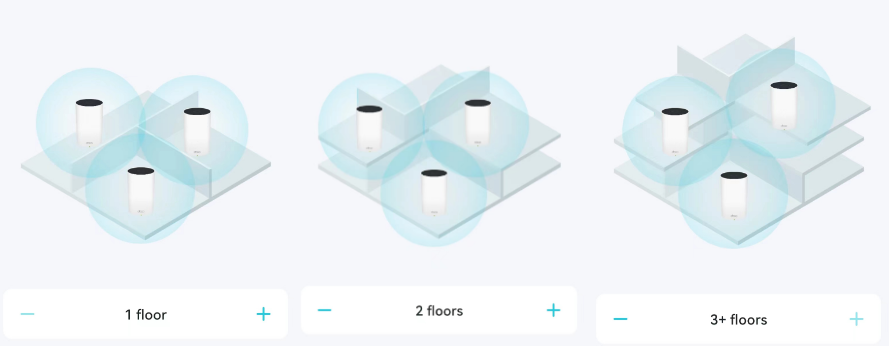
1. Place Your Deco According to Your Home's Layout
When setting up your satellite Deco, the Deco app will guide you through placement based on the layout you select for your home. If you are new to Deco and want to learn how the system works, see what a Deco Whole-Home Wi-Fi system is and how it works. For help completing initial setup, see how to set up your Deco.
2. Check the Signal Strength Between Deco Units
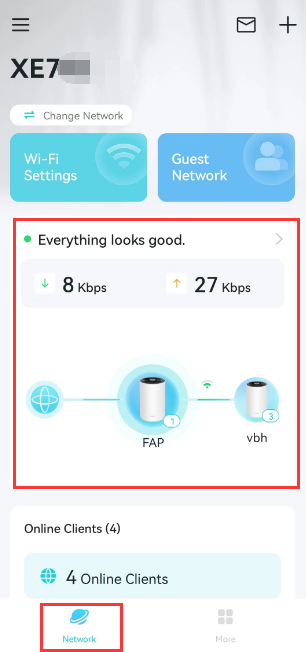
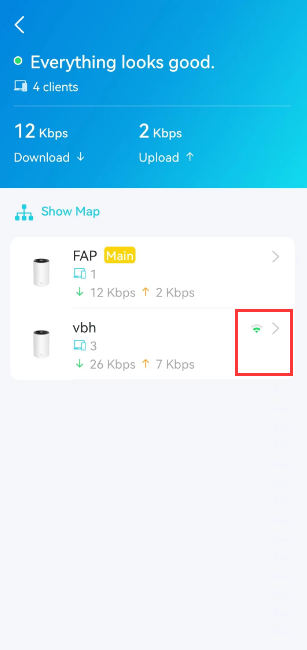
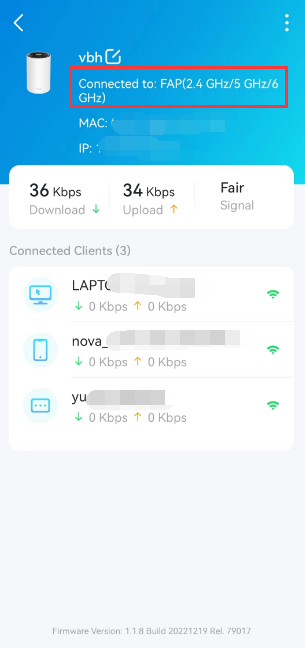
For the best experience, verify that the connection between your Deco units is strong when they connect over Wi-Fi. When placing a satellite Deco unit, tap Network > Everything looks good > the satellite unit to check its signal strength from the source Deco before finalizing the unit's location. The recommended signal strength is 2 bars.
3. Follow These Tips When Placing Your Satellite Deco
To get the most out of your setup and avoid common signal issues, keep these tips in mind when positioning your satellite Deco units:
- Place your satellite Deco at the same height as the source Deco. 1-1.5 ft off the floor is ideal.
- Keep your Deco in an open area away from walls and metal objects such as metal file cabinets. Metal, walls, and floors can all interfere with wireless signals, and the closer your Deco is to these obstructions, the weaker the connection.
- Move your Deco away from electric devices such as microwaves, Bluetooth devices, and USB 3.0 devices. These can add interference on the 2.4 GHz band and reduce Wi-Fi range.
4. Consider a Wired Ethernet Backhaul Connection
If your home is wired with Ethernet, connecting your Deco units using Ethernet cables is always an option. A wired connection is more stable and faster than a wireless backhaul, making it a strong choice for delivering reliable Wi-Fi throughout your home. For details on typical connection structures and setup steps, see Deco Ethernet Backhaul: Setup, Wiring Rules, and Troubleshooting.
Is this faq useful?
Your feedback helps improve this site.
_Overview_normal_20211130005649t.png)



TP-Link Community
Still need help? Search for answers, ask questions, and get help from TP-Link experts and other users around the world.