
How to Use a Waterproof Mat on Wood Floors or Carpets with Tapo Robot Vacuum
You can use waterproof mats on wood floors or carpets to prevent moisture damage and charging issues.
Notes:
1. If you have attached the waterproof pad to the carpet, avoid moving it to maintain the adhesive's grip.
2. If the pad loses its stickiness over time, use double-sided tape or other adhesives yourself.
3. Remember to clean or replace the mop regularly.
Use This Pad on Wood Floors, Carpets, or Other Surfaces.
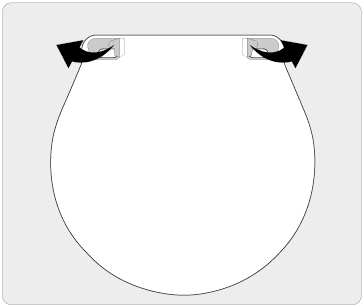
1. Tear off the two adhesive liners on the front.
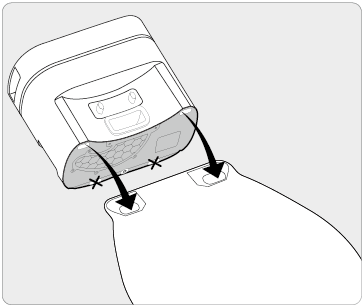
2. Align the pad with the dock's two front feet and press down firmly for 15s.
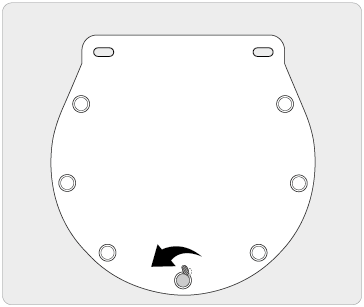
3. Tear off all seven adhesive liners on the back to prevent slipping.
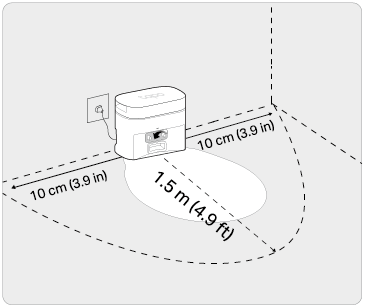
4. Position the dock against the wall and press firmly on the pad for 15s to secure.
1. Tear off the pad's adhesive.

2. Align the pad with the two front feet on the bottom of the dock and press down firmly.

3. Tear off all double-sided adhesives on the back of the pad and fix the pad to the floor to prevent slippage.

1. Tear off the pad's adhesive.

2. Align the pad with the bottom of the dock and press down firmly.
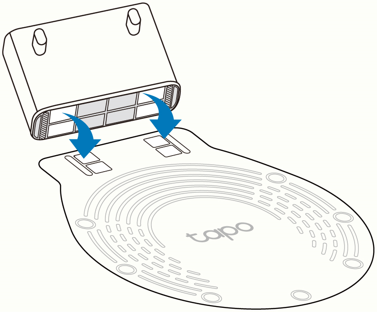
3. Tear off all double-sided adhesives on the back of the pad and fix the pad to the floor to prevent slippage.

Get to know more details of each function and configuration please go to Download Center to download the manual of your product.
Is this faq useful?
Your feedback helps improve this site.



TP-Link Community
Still need help? Search for answers, ask questions, and get help from TP-Link experts and other users around the world.