
How to Turn Off Wi-Fi on Your TP-Link Router: Button and Web Interface Methods
This guide covers two methods for disabling the Wi-Fi radio on a TP-Link wireless router without turning off the router itself. You can either press the physical Wi-Fi button on the router or log in to the web interface to disable the wireless radio. Disabling Wi-Fi turns off the wireless signal only — the router stays on, and any wired connections remain unaffected. This is a useful option if you need to turn off Wi-Fi without disabling the router entirely.
Key Takeaways
- There are two ways to disable Wi-Fi on a TP-Link router: either press the physical Wi-Fi button or log in to the web interface and disable the wireless radio.
- Pressing the Wi-Fi button disables the wireless signal immediately. If the Wi-Fi lights on the router turn off, Wi-Fi has been disabled successfully.
- Disabling Wi-Fi via the web interface requires logging in to tplinkwifi.net and navigating to the wireless settings. The exact path varies depending on your router's interface version.
- Disabling Wi-Fi does not turn off the router. Wired connections remain active, and the router continues to function normally.
How to Turn Off Wi-Fi
Method 1: Press the Wi-Fi Button to Disable Wi-Fi
Press the Wi-Fi button on your TP-Link wireless router.
Note: If the Wi-Fi lights on the router turn off, Wi-Fi has been disabled successfully.
Method 2: Disable Wi-Fi via the Web Interface
Via the TP-Link web interface of the TP-Link wireless router.
Step 1. Log in to the TP-Link router's web interface at tplinkwifi.net.
Step 2.
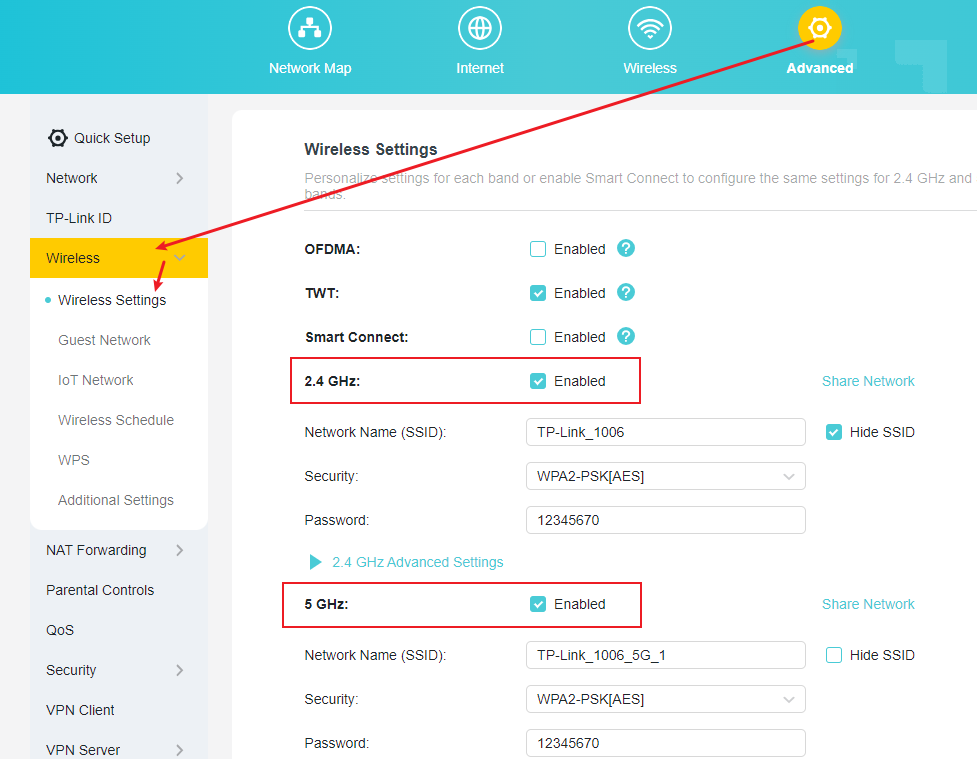
Case 1: If your web interface looks like the picture below, please go to Advanced > Wireless > Wireless Settings to disable the 2.4G/5G Wireless Radio.
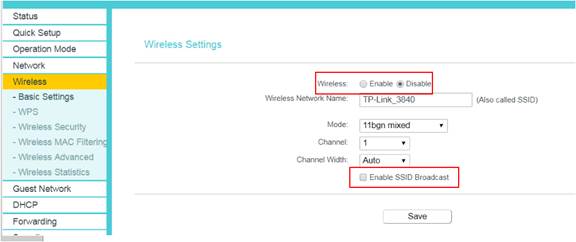
Case 2: If your web interface looks like the picture below, please go to Wireless >Basic Settings to disable Wireless and SSID Broadcast.
For more details on each function and configuration, visit the Download Center to find the manual for your product.
Ищете больше информации?
Полезен ли этот FAQ?
Ваши отзывы помогают улучшить этот сайт.

TP-Link Community
Still need help? Search for answers, ask questions, and get help from TP-Link experts and other users around the world.
From United States?
Получайте информацию о продуктах, событиях и услугах для вашего региона.