
Descarga para Tapo C645D KIT
- Visión General
- Manual
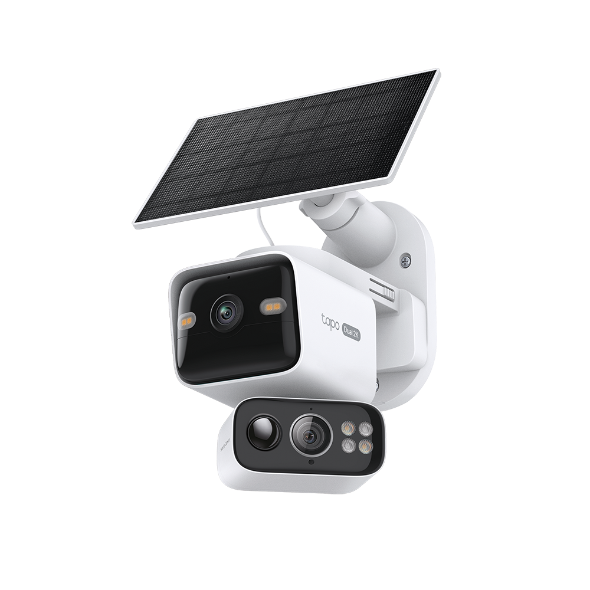 Cámara de Seguridad Inteligente con Doble Lente 360º con Panel Solar
Vídeo de configuración
-
How to Mount Your Solar-Powered Dual-Lens Pan/Tilt Security Camera Kit | Tapo C645D KIT & TC93D KIT
Elevate your home security with the Solar-Powered Dual-Lens Pan/Tilt Security Camera Kit. Benefit from effortless solar power and ensure comprehensive protection with two 2K 3MP lenses that double the coverage, allowing you to capture more with just one device. Experience enhanced visibility and clarity using the telephoto lens, along with features like Synchronized Smart Tracking and One-Tap Smart Focus for a broader and clearer view.
Más Carpeta -
How to Set Up Your Solar-Powered Dual-Lens Pan/Tilt Security Camera Kit | Tapo C645D KIT
Elevate your home security with the Solar-Powered Dual-Lens Pan/Tilt Security Camera Kit. Benefit from effortless solar power and ensure comprehensive protection with two 2K 3MP lenses that double the coverage, allowing you to capture more with just one device. Experience enhanced visibility and clarity using the telephoto lens, along with features like Synchronized Smart Tracking and One-Tap Smart Focus for a broader and clearer view.
Más Carpeta
Preguntas Frecuentes
- Cómo configurar la cámara Tapo
- Cómo configurar la zona de privacidad para tu cámara Tapo
- Cómo comprobar y mejorar la estabilidad de la conexión de red de los dispositivos inteligentes Tapo&Kasa
- Cómo conectar mi dispositivo Tapo (enchufe, cámara y bombilla inteligente) a Google Home
- Cómo reestablecer a valores de fábrica mi cámara Tapo
- ¿Qué pasa si no me registro o activo el ID de TP-Link?
- Cómo encontrar la versión de hardware en un dispositivo de TP-Link
- Cómo encontrar el número de modelo de su dispositivo TP-Link
- ¿Qué debo hacer si no consigo configurar Tapo Camera?
- Cancelación y reembolso de Tapo Care
- Cómo actualizar o cambiar el método de pago de Tapo/Kasa Care
- Cómo agregar nuevas cámaras a mi plan Tapo Care
- ¿Qué puedo hacer si no puedo encontrar mi cámara Tapo en la aplicación Tapo?
- How to configure the Smart Dual Tracking feature for Tapo Dual-Lens Camera
- How to configure the Tap to Focus feature for Tapo Dual-Lens Camera
- How to use Encrypt microSD Card Function on Tapo Camera
- How to fix no sound or audio quality issues on Tapo Camera/Doorbell
- Qué hacer si me olvido de la contraseña de la cuenta cloud (Enchufe Tapo, cámara, bombilla)
- Qué hacer si no recibo el mail de registro de mi cuenta cloud o al resetear mi contraseña
- Cómo hacer que mis dispositivos Tapo funcionen con IFTTT
- ¿Por qué necesito dar permiso de acceso local a las aplicaciones de TP-Link en IOS 14?
- Qué hacer si falla la actualización de firmware de mis equipos Tapo (enchufe, cámara y bombilla inteligente)?
- Cómo instalar una tarjeta SD para mi cámara Tapo
- ¿Qué debo hacer si la tarjeta SD no se puede formatear/reconocer?
- ¿Cómo puedo ver las grabaciones de video de la cámara desde la tarjeta SD en un ordenador?
- Cómo editar los modos Home y Away de las cámaras Tapo&Kasa en la aplicación Tapo
- ¿Qué debo hacer si tengo problemas al ver videos reproducidos desde una tarjeta SD?
- Cómo utilizar la función Inicio y la función Habitación en la aplicación Tapo
- Why do I receive a "We Noticed a New Login" email?
- What should I do if Tapo/Kasa notifications are delayed or not working?
- Preguntas generales sobre Tapo/Kasa Geofencing
- Cómo encontrar el número de serie en dispositivos TP-Link
- How to adjust Image Style and Image Brightness on Tapo Camera
- How can I enable the 24/7 Capture on Battery Camera?
- Cómo usar la función de fotografía panorámica temporizada en la aplicación Tapo
- What is Video Summary
- No puedo hacer que mis dispositivos inteligentes TP-Link funcionen con Alexa
- How to use Alexa Snapshot with Tapo Cameras
- Cómo configurar la función de notificación para los dispositivos Tapo y Kasa en la aplicación Tapo
- How to fix a flickering issue on Live View of the Tapo Camera
- How to set up routines for Tapo devices via Alexa app
- How to stream Tapo / Kasa Camera on Google device
- How to improve video clarity and quality of Tapo Camera
- Why cannot I receive the SMS verification code from Tapo app?
- Frequently asked questions about the SD Card Encryption feature
- General questions about Pan & Tilt feature of TP-Link Camera
- Cómo conectar cámaras y timbres WiFi de Tapo con Tapo Hub
- Las preguntas más frecuentes sobre TP-Link Ventas
- ¿Cómo puedo eliminar mi cuenta en la nube de TP-Link?
- ¿Cómo puedo realizar la autenticación 3DS al comprar Tapo Care?
- How to unlink third-party accounts from your TP-Link ID
- Cómo verificar si se trata de un problema de hardware del dispositivo de domótica TP-Link
- ¿Porqué TP-Link necesita mi email?
- Cómo crear un mapa 3D en la aplicación Tapo para iPad
- Qué debo hacer si no consigo que los dispositivos inteligentes Tapo funcionen con Alexa o Google Home
- Los dispositivos Tapo/Kasa se muestran sin conexión después de cambiar o restablecer el enrutador.
- ¿Qué es una ID de TP-LINK y cómo crear una ID de TP-LINK?
Firmware Release Note
Refer the FAQ to update firmware.
|
Tapo C645D KIT(EU)_V1_1.1.7 Build 260116 |
|---|
| Fecha de Publicación: 2026-03-11 |
|
Modifications and Bug Fixes: |
|
Tapo C645D KIT(EU)_V1_1.1.6 Build 251222 |
|---|
| Fecha de Publicación: 2026-01-07 |
|
Modifications and Bug Fixes: |
|
Tapo C645D KIT(EU)_V1_1.1.4 Build 251023 |
|---|
| Fecha de Publicación: 2025-12-10 |
|
Modifications and Bug Fixes: |
|
Tapo C645D KIT(EU)_V1_1.1.3 Build 250911 |
|---|
| Fecha de Publicación: 2025-10-15 |
|
Modifications and Bug Fixes: |