Wi-Fi 7 USB Adapters: What's Available and What to Look For
Adding Wi-Fi 7 to your PC or laptop doesn't require a new computer. A Wi-Fi 7 USB adapter, also called a USB wireless adapter or wireless adapter, plugs into a USB port and upgrades your wireless performance for gaming, streaming, calls, and browsing. It works regardless of your device's built-in Wi-Fi generation, making it a more affordable way to get Wi-Fi 7 than replacing your whole setup.
Not every Wi-Fi 7 USB adapter is the same. They vary by band, antenna type, and use, so there are solutions for upgrading an older laptop or a newer PC. This guide breaks down what to look for, then compares the options so you can find the right fit.
Key Takeaways
- A Wi-Fi 7 USB adapter adds Wi-Fi 7 to almost any PC or laptop with a USB port, no matter its wireless generation.
- You'll need a Wi-Fi 7 router to reach Wi-Fi 7 speeds; without one, the adapter connects at a lower generation instead.
- Tri-band Wi-Fi 7 USB adapters support faster connections with the 6 GHz band, Multi-Link Operation, and 4096-QAM.
- USB 3.0 is standard on current Wi-Fi 7 USB adapters, since USB 2.0 can bottleneck speed regardless of the standard.
What Is a Wi-Fi 7 USB Adapter?
A Wi-Fi 7 USB adapter is a small device that plugs into a USB port, giving your PC or laptop wireless access to Wi-Fi 7. It's the newest widely available standard. A Wi-Fi 7 USB adapter works no matter your device's chip generation, because Wi-Fi support comes from the adapter's own chip, not something a driver update can add.
A Wi-Fi 7 adapter adds three real upgrades over Wi-Fi 6 or 6E:
- 6 GHz access on tri-band models,
- Multi-Link Operation (MLO), and
- 4096-QAM.
On tri-band models, 6 GHz access gives you a clearer, less crowded band to connect on. MLO uses multiple bands at once instead of one, so a congested band is less likely to cause lag spikes. 4096-QAM (4K-QAM) fits more data into every signal, delivering faster real-world speeds when your signal is strong, without needing extra bandwidth. Most adapters are plug-and-play; you simply connect and install the driver.
Device Compatibility for Wi-Fi 7 USB Adapters
Compatibility depends on the adapter's drivers, not your computer's age. Most current Wi-Fi 7 USB adapters, including TP-Link, support Windows 10 and 11.
Mac compatibility varies by manufacturer and model, so confirm support first if you're shopping for a Wi-Fi 7 USB adapter for your Mac. No TP-Link model supports macOS today.
Core Features of a Wi-Fi 7 USB Adapter
A Wi-Fi USB adapter earns the Wi-Fi 7 label through a specific set of upgrades. Look for these on any model:
- Multi-Link Operation (MLO) keeps your network fast when one band gets congested by connecting bands at once, as long as your router and operating system also support it.
- 4096-QAM adds speed without more bandwidth by fitting more data into each signal.
- Wider channels on the 6 GHz band help most with 4K streaming or large downloads. Current Wi-Fi 7 USB adapters run on 160 MHz channels, while 320 MHz is available today on PCIe cards.
- WPA3 is the latest Wi-Fi security protocol, keeping your network strongly protected with up-to-date encryption.
- USB 3.0 keeps up with Wi-Fi 7 speeds.
- Tri-band support adds the 6 GHz band, where fewer devices compete for space.
Advanced Wi-Fi 7 USB Adapter Features
These advanced Wi-Fi 7 USB adapter features are what separate a good pick from the best Wi-Fi 7 USB adapter for your setup.
Start with the USB version: USB 2.0 can bottleneck real-world speed no matter how fast the Wi-Fi standard is, so look for USB 3.0.
Antenna type comes down to a trade-off between size and range. Internal antennas keep things compact, which works well for a laptop, while external high-gain antennas reach further if your signal is weak or your desktop sits far from the router. If you need that extra range, the larger size is worth it.
Speed is worth a look too, since it varies by band and model, so it's smart to compare listed Wi-Fi speeds instead of relying on the Wi-Fi 7 label alone. Tri-band models add a 6 GHz band, while dual-band models skip it.
Everyday Uses for a Wi-Fi 7 USB Adapter
Picking a Wi-Fi 7 USB adapter for PC use comes down to how you'll use it, not just theoretical top speed.
Gaming
Wi-Fi 7's lower latency and Multi-Link Operation give you a real edge in gaming. Instead of waiting out a congested band, your connection instantly shifts to a cleaner one, cutting lag spikes.
Streaming
Wi-Fi 7's added bandwidth keeps your 4K stream smooth even with several devices online. Wider channels and the 6 GHz band mean less competition for bandwidth.
Video Conferencing
Dropped calls and freezing video often signal an overloaded network. Multi-Link Operation keeps your call on a stable band even when other devices are active.
Everyday Browsing and Multitasking
Even without gaming or streaming, Wi-Fi 7 adds stability to everyday use. Your connection stays responsive while you open tabs, download files, and run a video call at once.
TP-Link's Wi-Fi 7 USB Adapter Lineup
TP-Link's Wi-Fi 7 USB adapter lineup includes models with the features discussed above. Comparing a USB Wi-Fi 7 adapter by band, antenna type, and use makes the advantages of each one easy to understand:
|
Model |
Bands |
Antenna Type |
Best Use |
|
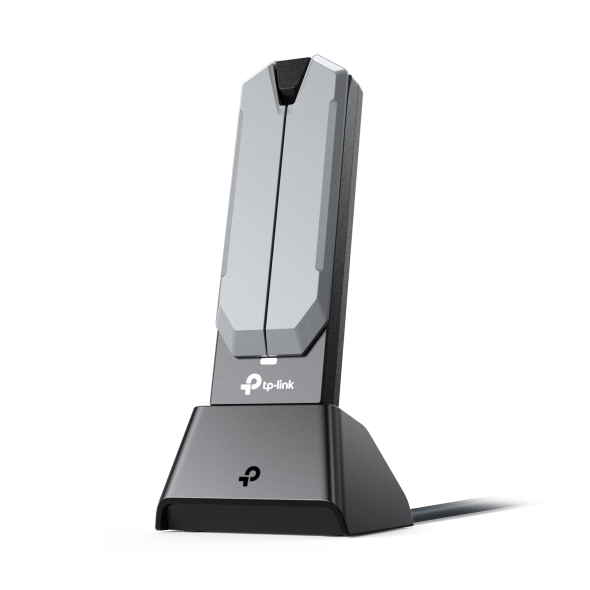
Archer TBE401UH |
2.4, 5, and 6 GHz |
2× external high-gain, detachable cradle |
Desktops positioned away from the router |
|
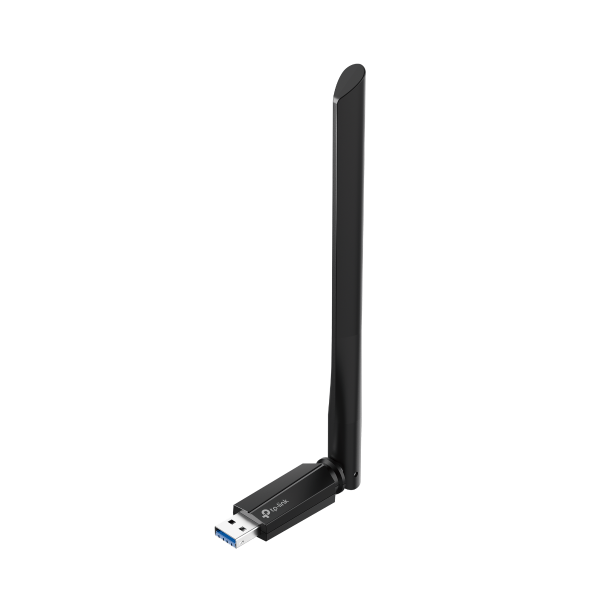
Archer TBE400U Plus |
2.4, 5, and 6 GHz |
1× adjustable external high-gain |
Desktops that want maximum throughput |
|
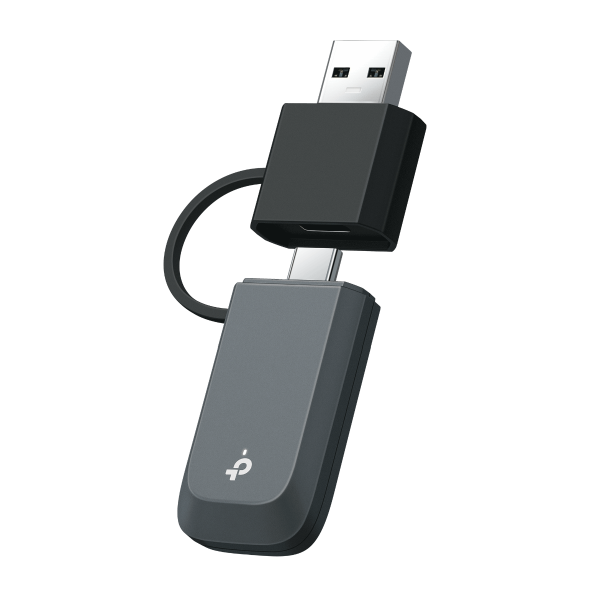
Archer TBE400U |
2.4, 5, and 6 GHz |
Internal, mini design |
Laptops and travel, USB-A or USB-C |
|
Archer TBE6500U |
2.4, 5, and 6 GHz |
Internal high-performance antennas, compact vented design |
Compact desktops or travel needing full tri-band speed |
|
Archer TBE6500UH |
2.4, 5, and 6 GHz |
2× high-gain antennas, detachable cradle |
Desktops far from the router needing maximum range |
|
Archer TBE3600U |
2.4 and 5 GHz |
Internal high-performance antennas, compact vented design |
Budget-friendly Wi-Fi 7 for laptops or travel |
Archer TBE401UH
The Archer TBE401UH pairs Wi-Fi 7 speed with flexibility in where you place it. Its detachable cradle and cable let the antenna move away from your desktop tower, useful if it lacks a clear line of sight to the router. Other features include:
- Wi-Fi 7 speeds: up to 2882 Mbps (6 GHz), 2594 Mbps (5 GHz), 688 Mbps (2.4 GHz)
- Two high-gain antennas with a detachable cradle
- USB 3.0, Windows 10/11
Archer TBE400U Plus
The Archer TBE400U Plus is built for maximum throughput if your desktop has a clear line of sight to the router. Its adjustable antenna trades the TBE401UH's cradle for a higher 5 GHz speed. This model offers:
- Wi-Fi 7 speeds: up to 2882 Mbps (6 GHz), 2882 Mbps (5 GHz), 688 Mbps (2.4 GHz)
- One adjustable high-gain antenna
- USB 3.0, Windows 10/11 (64-bit)
Archer TBE400U
The Archer TBE400U trades external antennas for a mini design suited to laptops, travel, or anywhere a bulky antenna isn't practical. Its dual Type-A and Type-C ports let you switch between a desktop and a laptop without a separate adapter. You also get:
- Wi-Fi 7 speeds: up to 2882 Mbps (6 GHz), 2882 Mbps (5 GHz), 688 Mbps (2.4 GHz)
- Multi-Link Operation (MLO) for reduced latency
- USB 3.0 for faster data transfer
- WPA3 security, Windows 10/11 (64-bit)
TP-Link also offers additional Wi-Fi 7 USB adapters worth a look. The Archer TBE6500U and Archer TBE6500UH bring tri-band speed in a compact and a high-gain build, while the Archer TBE3600U offers dual-band Wi-Fi 7 for a more affordable option.
Find the Right Wi-Fi 7 USB Adapter for Your Setup
You don't need to replace your PC or laptop to get Wi-Fi 7; a USB adapter is a practical way to add it. The right model depends on how you'll use it and how much antenna range you need.
Browse TP-Link's Wi-Fi 7 USB adapter lineup to compare the options. If you also need a router to reach these speeds, TP-Link's Wi-Fi 7 routers are a good place to start.
Frequently Asked Questions
What is a Wi-Fi 7 USB adapter?
A Wi-Fi 7 USB adapter connects your computer to Wi-Fi 7 networks over a standard USB port instead of an internal card. Since Wi-Fi generation depends on the wireless chip, it works even if your PC or laptop's built-in hardware only supports Wi-Fi 5 or 6.
Is a Wi-Fi 7 USB adapter as fast as a PCIe Wi-Fi 7 card?
For most home setups, yes, in practice. USB 3.0 has enough bandwidth to support Wi-Fi 7 speeds without becoming the bottleneck. A PCIe card, the type installed inside a desktop's case, connects directly to the motherboard instead of sharing USB bandwidth with other connected devices, giving it a slight edge in busy setups.
Do I need a Wi-Fi 7 router to use a Wi-Fi 7 USB adapter?
Yes, to get Wi-Fi 7 speeds specifically. The adapter works with any router, but it only reaches Wi-Fi 7's higher speeds and added stability when paired with a Wi-Fi 7 router. Without one, your connection runs at the router's Wi-Fi generation instead.
Do Wi-Fi 7 USB adapters work with Mac?
It depends on the manufacturer and the specific model, not just the brand. TP-Link's current Wi-Fi 7 USB adapter lineup is built for Windows only, so Mac isn't supported yet. If you use a Mac, check the system requirements before buying, since this can change by model over time.
Can I use a Wi-Fi 7 USB adapter on a newer PC that already has Wi-Fi 6?
Yes. A Wi-Fi 7 USB adapter works alongside or replaces your computer's built-in Wi-Fi 6 hardware. It's one of the easiest ways to add Wi-Fi 7 without replacing the whole PC, and once installed, it takes over as your wireless connection.
What's the difference between a tri-band and a dual-band Wi-Fi 7 adapter?
A tri-band Wi-Fi 7 adapter adds the 6 GHz band on top of 2.4 and 5 GHz. That gives you access to Wi-Fi 7's cleanest, least congested spectrum. A dual-band Wi-Fi 7 adapter skips the 6 GHz band entirely, so you miss out on that advantage.