Wi-Fi Extender vs. Booster: A Guide to Understanding Home Wi-Fi Coverage
You've probably Googled "Wi-Fi booster" looking for a fix for your dead zone and come back more confused than when you started. Wi-Fi booster, Wi-Fi extender, Wi-Fi repeater: the terms show up everywhere, often to describe the exact same device. So, are a Wi-Fi booster and a Wi-Fi extender the same thing?
Here's the short answer: "Wi-Fi booster" is an umbrella term for any device that improves your Wi-Fi signal. A Wi-Fi extender is the specific device type that most products marketed as boosters actually are. If you searched "Wi-Fi extender vs booster" trying to figure out which one you need, the answer is: they're most likely the same device.
Read on to understand what each term actually means, how extenders compare to repeaters and mesh systems, and how to figure out which one fits your home.
Key Takeaways
- "Wi-Fi booster" is an informal umbrella term, not a specific product category. It describes any device that improves Wi-Fi signal, including extenders, repeaters, and mesh nodes.
- A Wi-Fi extender is what most "booster" products actually are. It picks up your router's signal and rebroadcasts it to reach dead zones.
- Wi-Fi repeaters work similarly to extenders, but rebroadcast on the same channel, which can reduce available bandwidth. The terms are often used interchangeably.
- A mesh Wi-Fi system uses multiple nodes to create one unified whole-home network, making it a more comprehensive solution for larger homes with multiple dead zones.
- For one or two dead zones in a small to medium home, a Wi-Fi extender is likely the most practical fix. If coverage issues span multiple floors or a large space, mesh Wi-Fi is worth considering.
Wi-Fi Extender vs. Wi-Fi Booster: Are They the Same Thing?
Stroll around any electronics store, and you'll find shelves of products labeled "Wi-Fi booster," but they're not all the same type of device. "Booster" is an informal marketing term, not an official product category. Manufacturers use it to describe extenders, repeaters, and even mesh systems, which is exactly why the terminology gets so confusing. A Wi-Fi extender is the specific device type behind most of those labels, and knowing that makes it a lot easier to find what you need.
If you're wondering how a Wi-Fi booster works, the answer depends on which device type is behind the label. Most commonly, it's an extender picking up and rebroadcasting your router's signal.
What Is a Wi-Fi Extender?
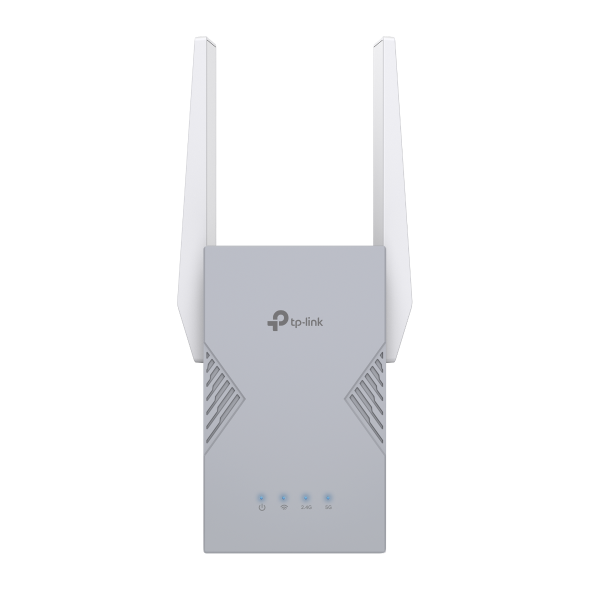
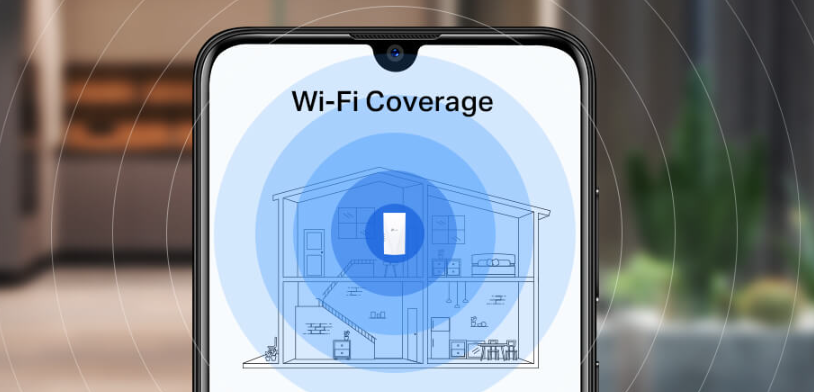
Picture your router's signal as a ripple spreading out from a single point. The further you get from the router, the weaker it gets until it doesn't reach at all. A Wi-Fi extender plugs into an outlet between your router and the dead zone, picks up the existing signal, and rebroadcasts it into that area. The room that used to losedrop connection now gets coverage.
Older or entry-level extenders (and most Wi-Fi repeaters, which we'll cover next) rebroadcast using the same wireless channel they receive on. This can reduce available bandwidth because the device is sending and receiving on the same frequency. Better extenders, especially dual-band and tri-band models, use a dedicated backhaul channel to handle this differently. Backhaul is just the connection between the extender and your router: one band handles that link, while a separate band broadcasts to your devices, largely avoiding the bandwidth hit. That said, performance still depends on the strength of the signal the extender receives from your router.
The takeaway is that if your router covers most of your home well and you've got a specific room or area that drops signal, a Wi-Fi extender is a straightforward, affordable fix. The main difference between a Wi-Fi booster and an extender is that “"'booster”"' is a marketing label, while 'extender' is what the device actually is. Most products sold as boosters are simply extenders.
What Is a Wi-Fi Repeater?
Technically, a Wi-Fi repeater receives your existing Wi-Fi signal and rebroadcasts it on the same wireless channel. Because the device is both receiving and transmitting on the same frequency, it can cut the available bandwidth roughly in half. This means the connection you get at the far end of the repeater's range may be noticeably slower than what you'd get closer to your router.
In practice, "repeater" and "extender" are used interchangeably by most manufacturers and product listings. When comparing a Wi-Fi repeater vs. an extender, the label matters less than the specs: look for whether the device has a dedicated band for communicating with the router, as described above. That's what separates a higher-performing extender from a basic single-band device, regardless of what it's called on the box.
What Is a Mesh Wi-Fi System?
A mesh Wi-Fi system is a different approach to whole-home coverage. Instead of one router trying to reach every corner of your home, a mesh system uses multiple nodes, typically two or three, that work together as a single unified network. Your devices connect to whichever node gives them the strongest signal as you move through the house.
Mesh systems are sometimes marketed under the "booster" umbrella, but they're a distinct product category. They're more comprehensive than a standalone extender, better suited to larger or more complex homes, and more expensive.
Wi-Fi Extender, Repeater, and Mesh: A Quick Comparison
Here's a side-by-side look at the three device types:
|
Device Type |
How It Works |
Best For |
|
Wi-Fi Extender |
Connects to your router's signal and rebroadcasts it to expand coverage. Better models use a dedicated band for the router connection. |
One or two dead zones in a small to medium home |
|
Wi-Fi Repeater |
Receives and rebroadcasts your Wi-Fi signal on the same channel, which can reduce bandwidth. Term often used interchangeably with "extender." |
One dead zone in a smaller home or lower-traffic use case |
|
Mesh Wi-Fi System |
Multiple nodes work together as one unified network. Devices connect to the nearest node automatically. |
Larger homes, multiple floors, or multiple dead zones throughout |
When comparing a Wi-Fi extender vs. repeater, the practical difference comes down to whether the device has a dedicated backhaul channel. Many products use both terms loosely, so it's worth checking the specs rather than relying on the label.
Wi-Fi Extender vs. Mesh Wi-Fi: When Should You Upgrade?
If you have one or two dead zones in a small or medium home, a Wi-Fi extender is likely all you need. It's faster to set up, more affordable, and works well when your router already covers most of your space.
Mesh Wi-Fi makes more sense when your coverage issues span multiple rooms, floors, or the entire home. A mesh system replaces your router entirely and provides consistent coverage throughout, with your devices roaming between nodes automatically. When the nodes are positioned correctly, that transition is seamless. You won't notice when your device switches from one to another.
Want to go deeper on how mesh works? The mesh Wi-Fi guide on the TP-Link blog covers everything you need to decide if it's the right fit.
Which TP-Link Range Extender Is Right for You?
TP-Link's range extender lineup offers options for Wi-Fi 5, Wi-Fi 6, and Wi-Fi 7 setups, so whether you're looking for an affordable fix for a single dead zone or maximum Wi-Fi 7 performance across a larger home, there's a model built for your situation. You can browse the full lineup in the TP-Link Wi-Fi booster buying guide.
Here are three options to consider depending on your setup.
BE10000 Tri-Band Wi-Fi 7 Range Extender (RE653BE)
The RE653BE is TP-Link's highest-performance range extender, built for larger homes on Wi-Fi 7 that need strong, fast coverage well beyond the router's reach.
It's a tri-band Wi-Fi 7 extender operating across 6 GHz, 5 GHz, and 2.4 GHz bands. The addition of the 6 GHz band means less congestion from neighboring networks, and dedicated high-speed channels for your devices. Multi-Link Operation (MLO), a Wi-Fi 7 feature, lets devices connect across multiple bands at the same time for faster speeds and more stable connections under heavy use. The 2.5 Gbps wired port supports high-speed wired connections for a smart TV, gaming console, or desktop.
This extender is a strong fit for households that stream 4K, video conference, and game across multiple devices simultaneously. It's also a good option for homes where the dead zone is far from the router, such as an upper floor, a far area of the home, or a detached garage. It's EasyMesh-compatible, so it can also work as part of a broader whole-home mesh setup if you want to expand coverage further.
BE3200 Dual-Band Wi-Fi 7 Range Extender (RE223BE)
The RE223BE is a dual-band Wi-Fi 7 extender operating on the 5 GHz and 2.4 GHz bands. It supports MLO and includes a Gigabit Ethernet port for wired device connections.
It's a good fit for homes with a Wi-Fi 7 router that have one or two dead zones to address. Think: a room where streaming drops, a floor that gets an inconsistent signal, or an area where newer Wi-Fi 7 devices like recent smartphones or laptops aren't getting the connection quality they're capable of. Its compact, plug-in design makes it easy to position in a hallway or stairwell where it can bridge the gap between your router and the dead zone. EasyMesh compatibility means it can grow into a larger mesh setup if your coverage needs change.
AX1800 Wi-Fi 6 Range Extender (RE615X)
The RE615X is a dual-band Wi-Fi 6 extender for households that need to address a specific dead zone on a Wi-Fi 6 network. It includes a Gigabit Ethernet port, which is handy if you're adding coverage to a home office or a room with a desktop or smart TV.
It's a practical, approachable option for smaller homes or a single dead zone. If you have a room that consistently drops signal and your router is handling everything else fine, the RE615X covers everyday needs like streaming, video calls, and browsing without overcomplicating your setup. It's EasyMesh-compatible, so if your coverage needs grow, you can pair it with a compatible router and expand from there.
Find the Right Fit for Your Home
Whether you're searching for a Wi-Fi booster or extender, the device most people actually need is a range extender: a practical solution for eliminating dead zones without replacing your router.
If your coverage needs are more extensive, a mesh system is worth considering as an upgrade path. And if you want to explore other ways to improve your home network beyond coverage, the 10 Ways to Boost Your Home Wi-Fi guide is a useful next read.
Browse TP-Link's range extender collection to find the option that fits your router, your home, and your budget.
Frequently Asked Questions
What is the difference between a Wi-Fi booster and a Wi-Fi extender?
Wi-Fi booster is an informal umbrella term for any device that improves your Wi-Fi signal, including extenders, repeaters, and mesh nodes. A Wi-Fi extender is a device that picks up your router's signal and rebroadcasts it to extend coverage into areas your router can't reach. Most products sold as "Wi-Fi boosters" are actually Wi-Fi extenders. You may also see the term "Wi-Fi network extender" used for the same type of device.
Do Wi-Fi extenders really work?
Yes, Wi-Fi extenders work well for expanding coverage into dead zones: a back bedroom, a basement, or a room on the far side of your home. Performance depends on the quality of the signal the extender receives from your router and on the extender's own hardware. Models with a dedicated backhaul band, which handles the router connection separately from the band used by your devices, generally deliver better real-world results.
What is the difference between a Wi-Fi extender and a mesh system?
A Wi-Fi extender plugs into an existing outlet and rebroadcasts your router's signal to extend coverage in a specific area. Your router stays in place, and the extender adds coverage where your router falls short. A mesh system replaces your router entirely and uses multiple nodes that work together as one unified network. Mesh provides more consistent whole-home coverage and handles devices moving between areas more smoothly, but it's a larger investment.
Is a Wi-Fi extender or mesh better for my home?
It depends on the scope of your coverage issue. For most homes with one or two dead zones, a Wi-Fi extender is the more practical and affordable fix. Your existing router stays in place, and you're adding coverage where it falls short. If gaps are spread across multiple floors or throughout a larger home, mesh Wi-Fi provides a more complete solution.
Will a Wi-Fi extender slow down my Internet?
A Wi-Fi extender doesn't reduce the speed of your overall Internet service. Devices connected through an extender may experience slightly slower wireless speeds than those close to the router, especially with older or entry-level extenders that share a single band for both receiving and rebroadcasting. Models with a dedicated backhaul band minimize this effect significantly. The speed you experience also depends on how strong the signal is between your router and the extender.
Do I need a Wi-Fi extender or a new router?
If your router performs well in most of your home, but one or two specific areas have a weak signal, a Wi-Fi extender is a cost-effective solution. If your router is several years old and performance has declined throughout your home, upgrading the router itself may make a bigger difference. Dead zones in a newer home with a current router are a good signal that an extender is the right next step.