
Matter QAs for Tapo L730
This page is your central resource for frequently asked questions about Matter support on the Tapo L730. It covers most things, from setup and troubleshooting to advanced features after integrating with third‑party tools, and you can use the links to jump directly to your topic.
Part 1: Installation and Connectivity
TP-Link Matter Devices: Setup Guide, Hub Compatibility, and Tips
How to set up a Matter device with Alexa, Google, Apple, or SmartThings
How to add your Matter-Certified device to multiple controllers
Where can I find the Matter setup code number for my TP-Link devices?
Part 2: Third-Party Features
General FAQs
Features supported in different ecosystems for TP-Link Matter-Certified devices
QAs
Q1: Does the Tapo S310D support Matter?
A1: No, the Tapo S310D does not support Matter.
Once your Tapo L730 lights are added to a third-party app via Matter, you can control basic functions—such as turning them on/off, adjusting brightness, and adjusting color temperature —directly through the platform without needing the Tapo S310D as an intermediary.
The Tapo S310D is included in the kit to provide an enhanced user experience, offering advanced features like preset switching and reliable local control that functions even if your internet is down (requires adding the lights as Tapo S310D's Controlled Devices in the Tapo app).
Part 3: Troubleshooting
General FAQs
Troubleshooting for Tapo/Kasa Matter configuration on third-party platform
Troubleshooting for Tapo/Kasa Matter configuration on third-party platform
What should I do if my third-party Matter device shows offline in Tapo app?
QAs
Q1: Why is my Tapo S310D unable to control the Tapo L730 within the same kit?
A1: By default, products within the same kit are pre-paired at the factory and can be used directly out of the box. However, if the devices have been reset or if a product was missed during the initial configuration, they will become disconnected from the preset group.
If this happens, please ensure that both the Tapo S310D and Tapo L730 are configured within the Tapo app. Once configured, you should assign the Tapo L730 to the Tapo S310D’s control group in the app settings.
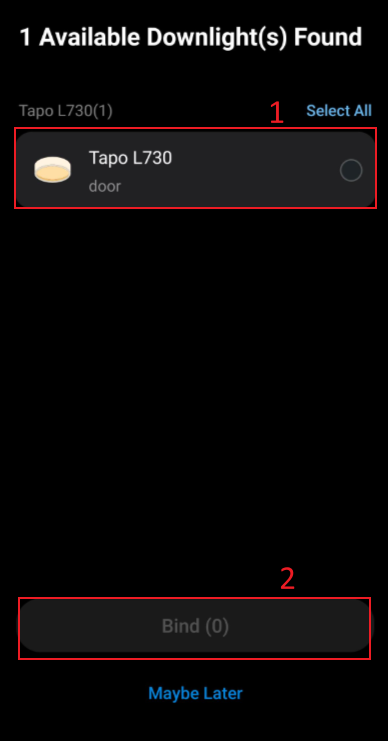
- If you have not configured the Tapo S310D in the Tapo app yet: Configure the Tapo L730 in the Tapo app first, and then configure the Tapo S310D. When configuring the Tapo S310D, select the available lights to bind them to the switch.
- If you have already configured the Tapo S310D in the Tapo app: Go to the Tapo S310D management interface and select the available lights to add to the Controlled Devices list.
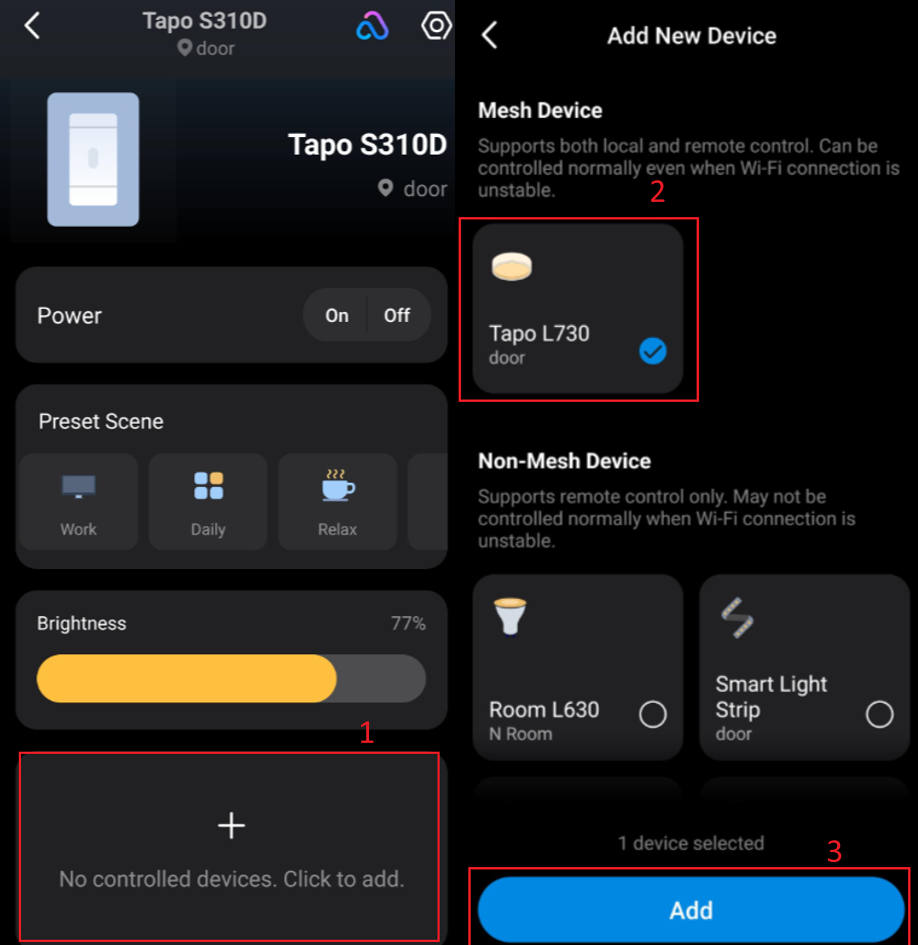
Note: We recommend adjusting all control relationships between the Tapo S310D and the Tapo L730 in the Tapo app to ensure the most reliable local Bluetooth control.
Q2: Why am I unable to set the color for the Downlight?
A2:
- The Downlight (Main Light): Supports Color Temperature and Brightness across all platforms, including Google Home, Alexa, Apple Home, SmartThings, and Home Assistant.
- The Ring Light (Side Light): Supports RGB Color, Color Temperature, and Brightness across all platforms, including Google Home, Alexa, Apple Home, SmartThings, and Home Assistant.
Notes:
1. Due to a UI design issue in the Samsung SmartThings app, the downlight may incorrectly display a color picker that is non-functional, as the downlight does not support color adjustment.
2. A known limitation exists when utilizing third-party applications, wherein the color temperature may fail to adjust to its minimum specification of 2700K. Please be advised that this limitation will remain unaddressed for the Home Assistant platform. For all other third-party ecosystems, a resolution is scheduled for deployment in an upcoming official firmware release (anticipated version: 1.0.17).
Q3: Why does the light fail to respond correctly to voice commands via Apple Home?
A3: When adjusting the light's color temperature through the Apple Home voice assistant, Apple Home incorrectly sends a "Power Off" command to the light, causing it to turn off. This is an issue with Apple Home, and we are actively communicating with Apple Home to find a solution.
Q4: Why is there a delay or inconsistent response when I control a group of Tapo L730 through a third-party app?
A4: This is typically due to how third-party platforms process group commands, which can sometimes lead to latency, causing lights to respond at different times. For the best performance, we recommend using the Tapo app for group control. To enable this, please ensure both your Tapo S310D and Tapo L730 lights are configured, and add the Tapo L730 lights as Controlled Devices for the Tapo S310D in the Tapo app.
The Tapo L730 and Tapo S310D feature optimized BLE Mesh technology, which allows them to communicate as a synchronized group. This local optimization ensures much faster response times and superior consistency compared to third-party control.
Tìm kiếm thêm
Câu hỏi thường gặp này có hữu ích không?
Phản hồi của bạn giúp cải thiện trang web này.


TP-Link Community
Still need help? Search for answers, ask questions, and get help from TP-Link experts and other users around the world.