
Frequently Asked Questions About Alexa+ When Using Tapo Robot Vacuums
Q1. What’s the difference between Alexa and Alexa+?
- Alexa: You can only use set commands like "Turn on" or "Turn off" to start or stop the robot vacuum. If you say it slightly differently, it won't get it. Plus, it forgets what you just said right after—every command is a fresh start.
- Alexa+: It is a huge upgrade powered by generative AI and large language models (LLMs). It features advanced conversational capabilities and can track context across multiple questions, so you can just chat with it naturally.
Q2. If I buy a Tapo robot vacuum, can I start using Alexa+ right away?
No. The robot vacuum itself doesn't run Alexa+; you need an Amazon device that supports it. The Alexa+ works on lots of devices—like Echo speakers, Fire TVs, and Fire tablets (even certified refurbished and used devices). If you don’t have one yet, you can check out the compatible list and grab one here: Amazon Alexa+ Store.
Q3. How do I connect the Tapo robot vacuum to Alexa+? And how do I subscribe?
• To connect: Open your Alexa app, search for the Tapo Skill, and link Amazon with your Tapo account. Or open the Tapo app and go to Me > Third-Party Services > Amazon Alexa to link your Tapo with Amazon. For detailed instructions, refer to How to Connect Tapo and Kasa Devices to Amazon Alexa.
• To subscribe: You can check the Alexa app for subscription details. Alexa+ is usually included for free with an active Amazon Prime membership. If you don't have Prime, you can subscribe to the standalone Alexa+ Standard plan directly through the Amazon or Alexa app, or by visiting the Amazon Alexa+ Activation Page. You can also just tell your Echo device, "Alexa, upgrade!" for upgrade.
Q4. Are there any restrictions of Alexa+?
Note that the limitations below come from Alexa itself, not your Tapo robot vacuum:
• Location and Language Limits
Alexa+ is currently available in English for customers in the U.S. and Canada, and in Spanish for customers in Mexico. Alexa+ will expand to more countries and languages over time. In the U.S., device language must be set to “English United States” to use Alexa+ on your device. To change your language settings, go to the Alexa app, or on-device by going to Settings > Device options > Device Language.
• Device Limits
It only works on devices that officially support Alexa+. Alexa+ will work across various Echo devices, Fire TV and Fire tablets, including certified refurbished and used devices. If you don’t have one yet, you can check out the compatible list and grab one here: Amazon Alexa+ Store.
Q5. How can I start using Alexa+?
To get started, you just need to follow these 3 simple steps:
1) Get the right device: Make sure you have an Amazon device that supports Alexa+, like an Echo speaker or a Fire TV. Check out the compatible list and grab one here: Amazon Alexa+ Store.
2) Check your Alexa+ access: See if you already have access to the Alexa+ service. Alexa+ is included for free with an active Amazon Prime membership. If you don't have Prime, you can subscribe to the standalone Alexa+ Standard plan directly through the Amazon or Alexa app, or by visiting the Amazon Alexa+ Activation Page. You can also just tell your Echo device, "Alexa, upgrade!" for upgrade.
3) Link your robot vacuum: Once your Amazon account and Alexa+ are good to go, you can link your Amazon account with Tapo account:
Option 1: Open your Alexa app, search for the Tapo Skill, and link Amazon with your Tapo account.
Option 2: Open your Tapo app, go to Me > Third-Party Services > Amazon Alexa to link Tapo with Amazon account.
For detailed instructions, refer to How to Connect Tapo and Kasa Devices to Amazon Alexa
Q6. Which Tapo robot vacuums currently support Alexa+?
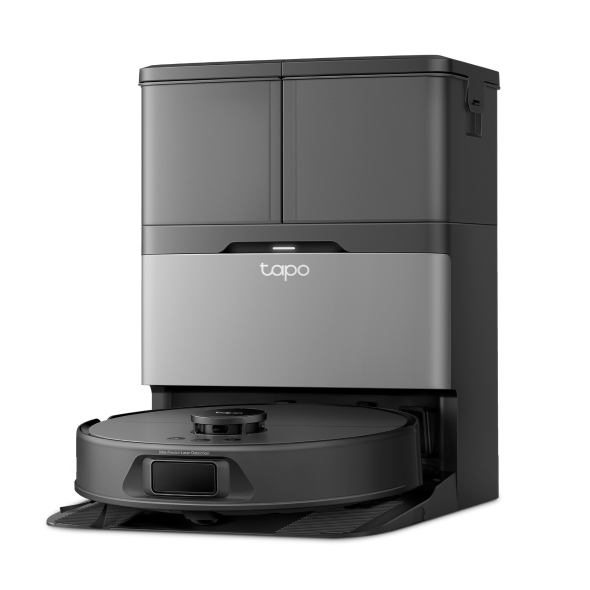
Tapo is actually one of the very first robot vacuum brands to team up with Alexa+! Right now, the models that support it are the Tapo RV30 Max Plus Gen2, Tapo RV50 Omni, and Tapo RV50 Pro Omni.
Q7. What can I actually do with Alexa+ on my Tapo robot vacuum?
Since Alexa+ understands natural speech, you don't need to memorize strict commands. You can just talk to it normally! Here are some cool things it can do:
• All the Basics: It still handles all the standard voice commands you’re used to, like “Turn the robot vacuum on”.
• Clean Specific Rooms: You can tell it exactly where and how to clean. For example, you can say, "Ask [vacuum name] to vacuum the [room name]."
-Quick heads-up: The cleaning mode has to be something your robot vacuum can actually do (for example, a vacuum-only model can't mop). Also, the robot vacuum can only clean the room on the current map. The room name needs to match your app map exactly—if you named your bedroom "Room 1" in the app, you’ll need to say "Room 1" instead of "bedroom." Update the room name after re-mapping.
• It Just Gets You (Natural Language): You don't have to say a magic phrase anymore. Thanks to the built-in AI, you can just say, "The bathroom is a bit dirty," and your robot vacuum will head over to sweep and mop the bathroom automatically (as long as the room and modes are set up in your map).
• Schedule Cleaning Easily: You can use Alexa Routines to set up cleaning schedules, whether it's a one-time clean or a recurring weekly routine.
• Chitchat & Empathy: It talks back like a real person! For instance, if you complain, "The last cleanup wasn't very clean," Alexa+ will actually ask you, "Would you like me to have it clean that area again?"
• Remembers the Conversation: It follows the flow of a real conversation. You can ask follow-up questions or check in on how the last cleaning job went without having to restart the conversation from scratch.
Q8. Everyday Commands & Examples (How to talk to Alexa+)
|
User Action |
What you can say (Utterances) |
|
Start Cleaning |
Alexa, start vacuuming. Alexa, clean the bedroom and office. Alexa, start mopping with my robot. Alexa, the bathroom is a bit dirty. (AI natural speech) Alexa, I spilled some coffee in the living room. (AI natural speech) |
|
Pause Cleaning |
Alexa, pause vacuuming the living room. Alexa, pause cleaning. Alexa, pause mopping with my robot. |
|
Resume Cleaning |
Alexa, resume vacuuming. Alexa, resume cleaning. Alexa, resume mopping. |
|
Stop Cleaning |
Alexa, stop vacuuming. Alexa, stop cleaning. Alexa, stop mopping. |
|
Dock/Recharge |
Alexa, send robot home. Alexa, start charging my robot. Alexa, dock my robot. |
|
Empty Dustbin |
Alexa, empty robot dustbin. |
|
Schedule a Clean |
Alexa, vacuum the kitchen every Monday at 9 AM. Alexa, clean the living room in 20 minutes. |
|
Clean Again (Feedback) |
Alexa, the last cleanup wasn't very clean. (Alexa+ will offer to re-clean) |
|
User Query |
What you can say (Utterances) |
|
Current Status |
Alexa, what is robot’s current status? Alexa, what is robot doing right now? Alexa, is robot running? |
|
Current Cleaning Time |
Alexa, how long has robot been running? |
|
Current Location |
Alexa, where is my robot? Alexa, where is robot cleaning? Alexa, what room is robot in? Alexa, is robot in bedroom? |
|
Available Rooms |
Alexa, which rooms are available to clean? Alexa, what rooms are mapped? Alexa, what rooms are on robot’s map? |
|
Multi-turn conversation |
User: "Did the vacuum finish the hallway?" Alexa+: "Yes, it finished 10 minutes ago." User: "Great, send it to the kitchen next." |
Looking For More
Is this faq useful?
Your feedback helps improve this site.

TP-Link Community
Still need help? Search for answers, ask questions, and get help from TP-Link experts and other users around the world.