
How to Delete a Network on the Deco App
How you delete a Deco network depends on whether it's still active or no longer in use. This page covers both scenarios so you can follow the right steps in the Deco app for your situation.
Key Takeaways
- If the Deco network you want to delete is no longer in use (for example, the device was replaced or reset), deleting it from the Deco app only removes the entry from the app. It does not affect any currently active network.
- Deleting an old inactive Deco network from the app works like clearing a cached entry and can be done by selecting the old network and tapping Delete Network.
- If the Deco network you want to delete is still active, deleting it from the Deco app acts as a soft reset: the Deco unit will return to initial setup mode, its LED will cycle through flashing yellow, solid yellow, then flashing blue, and the device will stop working.
- For an active network, you must be connected to that network's Wi-Fi before proceeding with the deletion in the Deco app.
Here, we will introduce the different scenarios of deleting a deco network on the Deco app.
Scenario 1: The Network to Be Deleted Is No Longer in Use
For example, the original Deco was replaced, or you have reset the original Deco and set it up as another network.
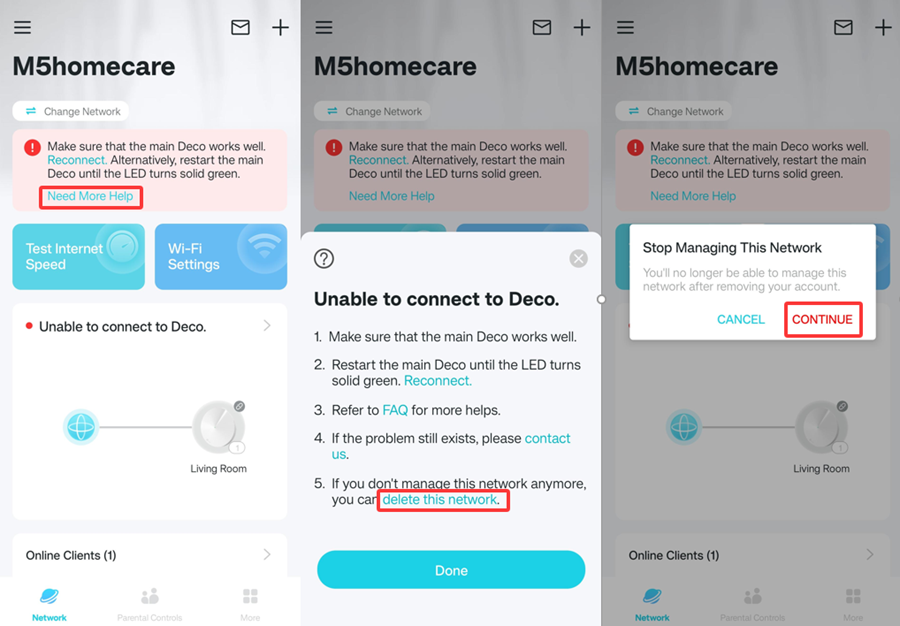
At this moment, deleting the old Deco network from the app will not stop the current new network from working well, and it is more like clearing the old caches.
You can select the old Deco network on the Deco app, then click on “Delete Network,” which shows in the following picture, to delete this network.
Scenario 2: The Network You Want to Delete Is Working Well on the Deco App
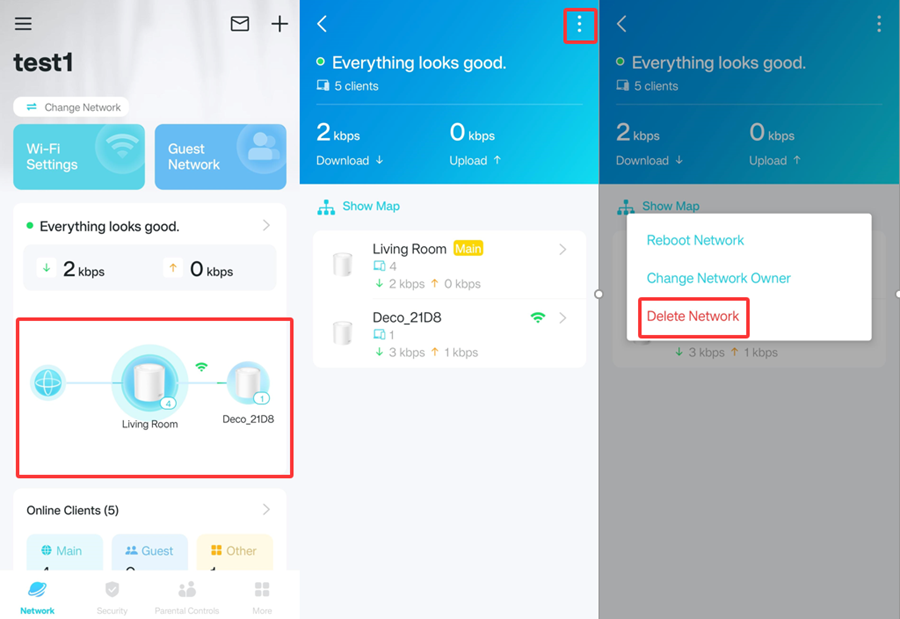
For example, you want to remove the Deco network on the Deco app, then reconfigure the Deco to work with a new modem in a different house.
In this case, deleting the network from the Deco app is more like a soft reset that will restore Deco to the initial setup mode, and the LED light on the Deco will turn to flash yellow > solid yellow > flashing blue. In this way, Deco will stop working.
Before proceeding, connect your device to this network's Wi-Fi. The Deco app must be able to reach the active network to initiate the soft reset.
Is this faq useful?
Your feedback helps improve this site.


_Overview_normal_20211130005706l.png)