
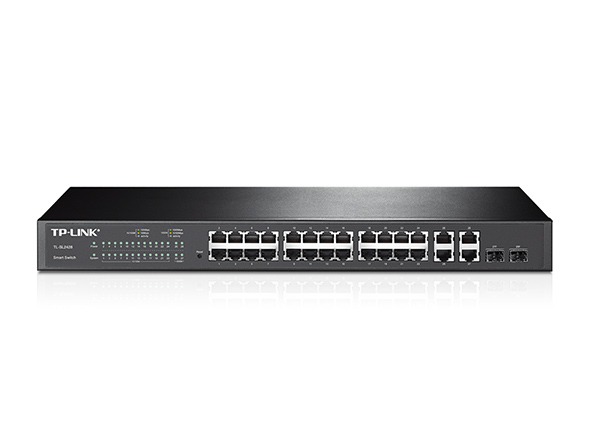

TL-SL2428
End of Life24-Port 10/100Mbps + 4-Port Gigabit Smart Switch
- 24 10/100Mbps RJ45 Ports, 4 10/100/1000Mbps RJ45 Ports and 2 Combo Gigabit SFP Slots
- Integrated security strategy including 802.1Q VLAN, Port Security and Storm control help protect LAN area investment
- L2/L3/L4 QoS and IGMP snooping optimize voice and video application
- WEB/CLI managed modes, SNMP, RMON bring abundant management features
What This Product Does
TP-LINK Smart Switch TL-SL2428 is a cost-effective product solution for the small and medium business. TL-SL2428 has useful security features. The Storm Control feature protects against Broadcast, Multicast and Unknown unicast Storm. Quality of Service (QoS, L2 to L4) provides enhanced traffic management capabilities to move your data smoother and faster. Anymore, the easy-to-use web management interfaces, along with SNMP and RMON, mean faster setup and configuration with less downtime. For workgroup and departments requiring cost-sensitive layer 2 switch and gigabit capability, TP-LINK smart switch TL-SL2428 provides you the ideal access-edge solution.
Advanced QoS features
To integrate voice, data and video service on one network, the switch applies rich QoS policies. Administrator can designate the priority of the traffic based on a variety of means including Port Priority, 802.1P Priority and DSCP Priority, to ensure that voice and video are always clear, smooth and jitter free.In conjunction with the Voice VLAN the switch supports, the voice applications will operate with much smoother performance.
Abundant Layer 2 features
For more application of layer 2 switches, TL-SL2428 supports a complete lineup of layer 2 features, including 802.1Q tag VLAN, Port Isolation, Port Mirroring, STP/RSTP/MSTP, Link Aggregation Group and 802.3x Flow Control function. Any more, the switches provide advanced features for network maintenance such as Loop Back Detection, Cable Diagnostics and IGMP Snooping. IGMP snooping ensures the switch intelligently forward the multicast stream only to the appropriate subscribers while IGMP throttling&filtering restrict each subscriber on a port level to prevent unauthorized multicast access.
Enterprise Level Management Features
TL-SL2428 is easy to use and manage. It supports various user-friendly standard management features, such as intuitive web-based Graphical User Interface(GUI) or SNMP (v1/2/3) and RMON support enables the switch to be polled for valuable status information and send traps on abnormal events.
Related Cases
-
Soborka ISP
TP-Link Helps ISP Soborka Provide Better Service for Subscribers
Soborka ISP
TP-Link Helps ISP Soborka Provide Better Service for Subscribers
“TP-Link’s products offer tremendous value, which allowed us to reduce the cost of updating our large network without compromising performance. Our customers are much more satisfied with the network since the upgrade. It has done a lot to improve our reputation.” —Soborka's CEO
-
Kelder

-
Tuin

-
Garage

Echt Ononderbroken Roamen
Deco stations werken samen om een enkel draadloos netwerk te creëren. Je telefoon of tablet zal automatisch met de Deco verbinden die de snelste verbinding kan voorzien wanneer je je door je huis verplaatst. Dit zorgt voor een echte ononderbroken online ervaring. Ondersteuning voor IEEE 802.11r en 802.11k/v betekend dat het wisselen tussen Deco stations zo vloeiend verloopt dat je het niet merkt, zelfs tijdens het streamen.


-
Adaptive Path Selection
TP-Link Mesh technologie kiest dynamisch de juiste route en band voor jouw data. Gegarandeerd een snelle verbinding ongeacht waar je je in huis bevindt.


-
Zelf herstellend
Als er een probleem is met een Deco station zal het systeem automatisch de route van de data wijzigen om er voor te zorgen dat je online blijft.
Wi-Fi + Powerline
Powerline verbindingen gebruiken je elektriciteitsnet in huis om de Deco stations met elkaar te verbinden. Zo heb je geen last van dikke vloeren of muren.
De combinatie van powerline en draadloze verbindingen zorgen voor een verbetering tot 60% in netwerk snelheid vergeleken met een enkel draadloze verbinding.
- Snelheidswinst
- 60%
- Standaard Wi-Fi Systeem
- Hybride Wi-Fi Systeem
- Powerline
- Notitie: Wi-Fi + powerline is enkel beschikbaar op de Deco P7
IoT Mesh
In tegenstelling tot traditionele smart hubs biedt de TP-Link Mesh Technologie dekking door het hele huis voor IoT apparaten met Wi-Fi, Bluetooth en Zigbee geïntegreerd in één enkel systeem. Geniet van de magie van je smart home in iedere kamer met TP-Link Mesh Technologieen zeg je andere hubs gedag.
- - - - Wi-Fi
- - - - Zigbee
- - - - Bluetooth
Waarom is TP-Link Mesh Technologie een
toonaangevende oplossing?
| Complete Vergelijking | |||
| Model Number | TP-Link Deco | Netgear Orbi | Google WiFi |
| Wireless Backhaul | Tri-Band(2.4G+5G_1+5G_2)¹ | Single-Band(5G_1 Only) | Dual-Band(2.4G+5G) |
| Mesh Protocol Supported | IEEE 802.11k/v/r | IEEE 802.11k/v | IEEE 802.11s |
| True Seamless Roaming | √ | × | × |
| APS(Adaptive Path Selection) | √ | × | √ |
| IoT Mesh | √² | × | × |
| Powerline Backhaul | √³ | × | × |
| Wireless + Powerline Bandwidth | √⁴ | × | × |
| Band Steering | √ | √ | √ |
| AP Steering | √ | √ | √ |
| Self-Healing | √ | √ | √ |
| Notities: 1&2: enkel op de Deco M9 Plus 3&4: Enkel op de Deco P7 Op basis van specificaties Dec. 2017 | |||
Deco Series
Alle Deco
-
 Nieuw
NieuwDeco BE85
BE19000 tri-band whole home mesh wifi 7-systeem
-
 Nieuw
NieuwDeco BE65
BE9300 whole home mesh wifi 7-systeem
-

Deco X50-PoE
AX3000 whole home mesh wifi 6-systeem met PoE
-

Deco X50-5G
5G AX3000 whole home mesh wifi 6 gateway (beschikbaarheid afhankelijk van regio)
-

Deco XE75
AXE5400 Tri-band Mesh Wifi 6E-systeem
-

Deco XE200
AXE11000 whole home mesh wifi-systeem
-

Deco X60
AX5400 dual-band Wi-Fi 6 Mesh System
-
_Overview_normal_20211225093625r.png) Nieuw
NieuwDeco X50
AX3000 Whole Home Mesh Wifi 6-systeem
-

Deco X20
AX1800 dual-band Wifi 6 Mesh System
-
_normal_20230201014412u.png)
Deco M4
AC1200 dual-band Wifi 5 Mesh System
Deco Netwerkmanagement met één druk op de knop
De Deco app biedt de meest eenvoudige manier voor installatie, monitoren en beheer van je Deco Whole Home Mesh wifisysteem op jouw iOS of Android apparaten.
Installatie is nu nog makkelijker
Pak Deco uit, installeer de app en volg dan simpelweg de aanwijzingen op het scherm. De Deco app verzorgd de rest en binnen enkele minuten ben je online.
-
Verbindt de Deco met je modem en zet beide apparaten aan
-
Download en start de Deco app
-
Volg de aanwijzingen in de app om jouw Deco te configureren.
Simpel beheer
Deco maakt het makkelijk om van waar dan ook jouw Wifinetwerk te beheren, of je nu op de bank zit, aan het werk, of onderweg bent.
-
Simpel Beheer Dashboard
Bekijk de status van je netwerk, check de aangesloten apparaten en benut alle functies die Deco te bieden heeft.
-
Meerdere Deco’s, één app
De Deco app beheert al je Deco netwerken en daarmee verbonden apparaten.
-
Houdt aangesloten apparaten in de gaten
Bekijk de lijst met alle aangesloten apparaten en pauzeer en start de internettoegang, test de snelheid en blokkeer of geef prioriteit aan deze apparaten.
-
Beheer op afstand
Pas zelfs als je niet thuis bent wifi-instellingen aan, beheer het ouderlijk toezicht en geef familieleden toegang tot het beheer van Deco.
Uitgebreid ouderlijk toezicht
Gebruiksvriendelijk en intuïtief ouderlijk toezicht maakt het eenvoudig om jouw kinderen veilig het internet te laten verkennen.
-
Creëer eenvoudig een profiel voor ieder familielid en stel gepersonaliseerde regels en tijdschema’s in. Voeg apparaten toe aan de profielen zodat de regels worden toegepast op alle apparaten van dat familielid.
-
Bescherm je familie met de one-touch beveiligingsinstellingen om content te blokkeren die ongeschikt is voor de leeftijd van het kind.
-
Stel tijdslimieten in voor ieder familielid waarop ze het internet op kunnen.
-
Via Inzichten heb je zicht op welke websites je kinderen bezoeken en hoe veel tijd ze er spenderen. Het is een handige manier om in de gaten te houden of je kinderen veilig online zijn en plezier hebben.
-
Pauzeer de Wifi per familielid om samen te kunnen genieten van bijvoorbeeld het avondeten en spelletjesavonden.
Een intuïtieve app vol handige features
Maandelijks gebruiksrapport
Krijg iedere maand een uitgebreid overzicht van de details van jouw netwerk inclusief verbruik,
geblokkeerde content, beveiligingsdreigingen en meer.
Home Automation
Maak je leven makkelijker met uitgebreide home automation functies en stembesturing.
*Momenteel enkel beschikbaar op de Deco M9 Plus
Flexibele snelkoppelingen
Stuur smart home apparaten aan met een enkele klik op je telefoon of tablet.
*Momenteel enkel beschikbaar op de Deco M9 Plus
Bescherm je netwerk
Ingebouwde antivirus beschermt je tegen malafide websites en beschermt je online betalingen.
*Momenteel enkel beschikbaar op de Deco M9 Plus, Deco P7 en Deco M5
Prioriteer je apparaten
Kies welke apparaten altijd voorrang moeten krijgen of stel de voorrang in voor een bepaalde tijd zodat online games, videobellen of andere gewenste activiteiten geen hinder ondervinden van ander verkeer.
Stel voorkeursapplicaties in
Stel eenvoudig meer bandbreedte beschikbaar voor de applicaties die voor jou het belangrijkste zijn.
*Momenteel enkel beschikbaar op de Deco M9 Plus, Deco P7 en Deco M5
Deel Wifi met vrienden
Stel eigen wifiprofielen in voor gasten en deel eenvoudig het wachtwoord zodat zij makkelijk online
kunnen en niet met het hoofdnetwerk hoeven te verbinden.
Check je snelheid
Doe een speedtest om er zeker van te zijn dat je de internetsnelheden haalt waar je voor betaald.
Bekijk ook ieder apparaat in je netwerk en zie hoeveel bandbreedte ze gebruiken.
Onze support laat je niet zitten
Heb je vragen over Deco? Hulp is altijd dichtbij. Vind je antwoorden in de Deco app of neem met een enkele klik contact met ons op.
Support| Standaarden en protocollen | IEEE 802.3i, IEEE 802.3u, IEEE 802.3ab, IEEE802.3z, IEEE 802.3ad, IEEE 802.3x, IEEE 802.1d, IEEE 802.1s, IEEE 802.1w, IEEE 802.1q, IEEE 802.1p |
|---|---|
| Interface | 24 10/100Mbps RJ45 Ports (Auto Negotiation/Auto MDI/MDIX) 4 10/100/1000Mbps RJ45 Ports (Auto Negotiation/Auto MDI/MDIX) 2 Combo Gigabit SFP Slots |
| Netwerkmedia | 10BASE-T: UTP category 3, 4, 5 cable (maximum 100m) 100BASE-TX/1000Base-T: UTP category 5, 5e or above cable (maximum 100m) 1000BASE-X: MMF, SMF |
| Ventilator Aantal | Fanless |
| Uitgangsvermogen | 100~240VAC, 50/60Hz |
| Energieverbruik | Maximum: 12.48W (220V/50Hz) |
| Afmetingen ( B x D x H ) | 17.3*7.1*1.7 in.(440*180*44 mm) |
| Montage | Rack Mountable |
| Bandbreedte/Backplane | 12.8Gbps |
|---|---|
| Packet Forwarding Tarief | 9.5Mpps |
| MAC Address Table | 8k |
| Kwaliteit van de Dienst (QoS) | Support 802.1p CoS/DSCP priority Support 4 priority queues Queue scheduling: SP, WRR, SP+WRR Port/Flow-based Rate Limiting Voice VLAN |
|---|---|
| L2-Functionaliteit | IGMP Snooping V1/V2/V3 802.3ad LACP (Up to 6 aggregation groups, containing 4 ports per group) Spanning Tree STP/RSTP/MSTP BPDU Filtering/Guard TC/Root Protect Loop back detection 802.3x Flow Control |
| VLAN | Supports up to 512 VLANs simultaneously (out of 4K VLAN IDs) |
| LijstToegangsbeheer | L2~L4 package filtering based on source and destination MAC address, IP address, TCP/UDP ports |
| Veiligheid | SSH v1/v2 SSL v2/v3/TLSv1 Port Security Broadcast/Multicast/Unknown-unicast Storm Control |
| Management | Web-based GUI and CLI management SNMP v1/v2c/v3, compatible with public MIBs and TP-LINK private MIBs RMON (1, 2, 3, 9 groups) CPU Monitoring Port Mirroring Time Setting: SNTP Firmware Upgrade: TFTP & Web System Diagnose: VCT SYSLOG & Public MIBS |
| Certificatie | CE, FCC, RoHS |
|---|---|
| Pakketinhoud | TL-SL2428; Power Cord; Installation Guide; Resource CD; Rackmount Kits; Rubber Feet |
| Systeemvereisten | Microsoft® Windows® XP, Vista™ or Windows 7, MAC® OS, NetWare®, UNIX® or Linux. |
| Omgeving | Operating Temperature: 0℃~40℃ (32℉~104℉); Storage Temperature: -40℃~70℃ (-40℉~158℉) Operating Humidity: 10%~90% non-condensing Storage Humidity: 5%~90% non-condensing |