펌웨어 업데이트를 통해 이전 펌웨어 버전의 문제를 해결하고 현재 성능을 향상시킬 수 있습니다.
업그레이드 방법
중요사항: 업그레이드 실패를 방지하기 위하여 업그레이드 프로세스를 진행하기 전에 다음 사항을 읽으십시오.
TP-Link 장치를 구매한 지역의 로컬 공식 웹사이트에서 펌웨어를 업그레이드하십시오. 그렇지 않으면 보증에 위배됩니다. 여기를 클릭하여 사이트를 변경할 수 있습니다.
펌웨어 버전에 대한 장치의 하드웨어 버전을 확인하십시오. 잘못된 펌웨어로 인해 장치가 손상되고 보증을 무효화시킬 수 있습니다. (일반적인 경우 Vx.0=Vx.6/Vx.8 (예:V1.0=V1.6/V1.8); Vx.x0=Vx.x6/Vx.x8 (예:V1.20=V1.26/V1.28) TP-Link 장치의 하드웨어 버전을 확인하는 방법
업그레이드를 하는 동안 전원을 끄지 마십시오. 이는 제품에 영구적인 손상을 일으킬 수 있습니다.
펌웨어 업그레이드를 하는 동안 무선 연결 끊김 문제를 방지하려면TP-Link 장치에 LAN/이더넷 포트가 없는 경우를 제외하고 유선 연결로 펌웨어를 업데이트하는 것이 좋습니다.
업그레이드를 하기 전에 컴퓨터의 모든 인터넷 응용 프로그램을 중단하거나 간단히 인터넷 선 연결을 끊는 것이 좋습니다.
WinZIP 또는 WinRAR와 같은 압축 해제 소프트웨어를 사용하여 업그레이드를 하기 전에 다운로드한 파일의 압축을 해제합니다.
Please upgrade firmware/software from the local TP-Link official website of the purchase location for your TP-Link device, otherwise it may cause upgrade failure or mistakes and be against the warranty.
Please upgrade firmware/software from the local TP-Link official website of the purchase location for your TP-Link device, otherwise it may cause upgrade failure or mistakes and be against the warranty.
Please upgrade firmware/software from the local TP-Link official website of the purchase location for your TP-Link device, otherwise it may cause upgrade failure or mistakes and be against the warranty.
Please upgrade firmware/software from the local TP-Link official website of the purchase location for your TP-Link device, otherwise it may cause upgrade failure or mistakes and be against the warranty.
Please upgrade firmware/software from the local TP-Link official website of the purchase location for your TP-Link device, otherwise it may cause upgrade failure or mistakes and be against the warranty.
Please upgrade firmware/software from the local TP-Link official website of the purchase location for your TP-Link device, otherwise it may cause upgrade failure or mistakes and be against the warranty.
Please upgrade firmware/software from the local TP-Link official website of the purchase location for your TP-Link device, otherwise it may cause upgrade failure or mistakes and be against the warranty.
Please upgrade firmware/software from the local TP-Link official website of the purchase location for your TP-Link device, otherwise it may cause upgrade failure or mistakes and be against the warranty.
Please upgrade firmware/software from the local TP-Link official website of the purchase location for your TP-Link device, otherwise it may cause upgrade failure or mistakes and be against the warranty.
버그 수정:
1. 웹 필터에서 일부 웹사이트가 잘못 분류되던 문제를 수정했습니다. 예를 들어, YouTube와 같은 스트리밍 및 미디어 웹사이트가 채팅 및 메시징으로 잘못 분류되던 문제가 있었습니다.
2. 여러 VPN 관련 문제를 수정했습니다.
3. 주소 예약(Address Reservation)과 IP & MAC 바인딩(IP & MAC Binding) 간의 충돌 문제를 해결했습니다.
Please upgrade firmware/software from the local TP-Link official website of the purchase location for your TP-Link device, otherwise it may cause upgrade failure or mistakes and be against the warranty.
Please upgrade firmware/software from the local TP-Link official website of the purchase location for your TP-Link device, otherwise it may cause upgrade failure or mistakes and be against the warranty.
Please upgrade firmware/software from the local TP-Link official website of the purchase location for your TP-Link device, otherwise it may cause upgrade failure or mistakes and be against the warranty.
새로운 기능/개선 사항:
1. 시스템 안정성과 보안이 향상되었습니다.
버그 수정:
1. 일부 상황에서 자녀 보호 기능의 카테고리 차단이 제대로 작동하지 않던 버그를 수정하였습니다.
2. 일부 상황에서 IPv6 방화벽 규칙이 적용되지 않던 버그를 수정하였습니다.
참고:
이 펌웨어는 이전 버전으로 되돌릴 수 없습니다.
Please upgrade firmware/software from the local TP-Link official website of the purchase location for your TP-Link device, otherwise it may cause upgrade failure or mistakes and be against the warranty.
개선 사항 및 버그 수정:
1. IPv6 통신 규칙이 정상적으로 적용되지 않는 문제를 수정했습니다.
2. 웹 필터에서 쇼핑 웹사이트가 차단되지 않는 문제를 수정했습니다.
3. Speedtest에서 발생하는 비정상적인 문제를 해결했습니다.
4. 장치의 보안을 더욱 강화했습니다.
Please upgrade firmware/software from the local TP-Link official website of the purchase location for your TP-Link device, otherwise it may cause upgrade failure or mistakes and be against the warranty.
수정 및 개선 사항:
1. Homeshield QoS는 사용자가 앱 QoS 우선순위를 보다 유연하게 설정할 수 있도록 앱 QoS를 추가했습니다.
2. 자녀 보호 기능을 지원하여 SafeSearch 및 YouTube 제한 기능을 추가했습니다. 시간 통계, 보상 시간 기능, 웹 페이지 사용자 경험을 최적화했습니다.
3. Homeshield 구독 분할 관리와 호환되어 사용자의 유료 구독 상태에 따라 필요한 소프트웨어 모듈만 실행합니다.
4. 웹 UI를 최적화했습니다.
참고:
1. 이 버전 업그레이드는 되돌릴 수 없으며, 이전 펌웨어로 다운그레이드할 수 없습니다.
Please upgrade firmware/software from the local TP-Link official website of the purchase location for your TP-Link device, otherwise it may cause upgrade failure or mistakes and be against the warranty.
Please upgrade firmware/software from the local TP-Link official website of the purchase location for your TP-Link device, otherwise it may cause upgrade failure or mistakes and be against the warranty.
Please upgrade firmware/software from the local TP-Link official website of the purchase location for your TP-Link device, otherwise it may cause upgrade failure or mistakes and be against the warranty.
Please upgrade firmware/software from the local TP-Link official website of the purchase location for your TP-Link device, otherwise it may cause upgrade failure or mistakes and be against the warranty.
참고:
1. EasyMesh를 새롭게 지원합니다.
2. 공유기 이후에 Deco가 이더넷 백홀을 구축할 수 없는 버그를 수정했습니다. EasyMesh 기능을 비활성화하면 이더넷 백홀에서 Deco가 작동할 수 있습니다.
3. Microsoft 메일함을 사용하여 시스템 로그를 보낼 수 없는 문제를 해결합니다.
4. 시스템 보안을 개선했습니다.
Please upgrade firmware/software from the local TP-Link official website of the purchase location for your TP-Link device, otherwise it may cause upgrade failure or mistakes and be against the warranty.
수정된 버그
1. 자녀 보호 콘텐츠 필터링을 위해 규칙을 최적화했습니다;
2. 클라이언트 유형 인식 기능을 최적화하여 클라이언트의 정확성을 향상시킵니다;
3. 경우에 따라 자녀 보호 콘텐츠 필터링이 적용되지 않는 버그를 수정했습니다;
4. 트래픽 통계가 부정확한 버그를 수정했습니다;
5. VLAN 브리지에서 lan 포트 모드가 변경된 후 클라이언트가 IP 주소를 얻지 못할 수 있는 버그를 수정했습니다.
Please upgrade firmware/software from the local TP-Link official website of the purchase location for your TP-Link device, otherwise it may cause upgrade failure or mistakes and be against the warranty.
수정된 버그:
1. 경우에 따라 IP 및 MAC 바인딩 기능을 활성화한 후 ARP 항목이 사라지는 버그를 수정했습니다.
2. 웹 UI의 번역 오류를 수정했습니다;
3. 자녀 보호 기능을 활성화한 후 VPN 클라이언트가 작동하지 않는 버그를 수정했습니다.
4.MacOS13.1에서 Time Machine 기능을 사용할 때 USB 저장소 경로를 찾을 수 없는 버그를 수정했습니다.
참고: 이 펌웨어를 업데이트한 후에는 이전 펌웨어 버전으로 다운그레이드할 수 없습니다.
Please upgrade firmware/software from the local TP-Link official website of the purchase location for your TP-Link device, otherwise it may cause upgrade failure or mistakes and be against the warranty.
Please upgrade firmware/software from the local TP-Link official website of the purchase location for your TP-Link device, otherwise it may cause upgrade failure or mistakes and be against the warranty.
Please upgrade firmware/software from the local TP-Link official website of the purchase location for your TP-Link device, otherwise it may cause upgrade failure or mistakes and be against the warranty.
Please upgrade firmware/software from the local TP-Link official website of the purchase location for your TP-Link device, otherwise it may cause upgrade failure or mistakes and be against the warranty.
Please upgrade firmware/software from the local TP-Link official website of the purchase location for your TP-Link device, otherwise it may cause upgrade failure or mistakes and be against the warranty.
TP-Link 제품의 일부 공식 펌웨어는 DD-WRT와 같은 타사 펌웨어로 대체 될 수 있습니다. TP-Link는 타사 펌웨어의 성능 및 안정성을 보장하지 않으며 유지 보수 또는 지원을 제공 할 의무가 없습니다. 타사 펌웨어를 사용하여 제품이 손상되면 제품 무상보증이 무효화됩니다.
프로그래머용 오픈 소스 코드(GPL)
참고: TP-Link 제품에는 GNU 일반 공중 사용 허가서 (“GPL“), 버전 1/버전 2/버전 3 또는 GNU 약소 일반 공중 사용 허가서 ("LGPL")의 적용을 받는 소프트웨어 코드를 포함하여 타사가 개발한 소프트웨어 코드가 부분적으로 포함되어 있습니다. 다음 GPL 라이선스 조건에 각 소프트웨어 조건을 사용할 수 있습니다.
여기에서 각 GPL 라이선스 조건을 검토, 인쇄 및 다운로드할 수 있습니다. GPL 코드 센터에서 GPL 소프트웨어 코드가 포함된 TP-Link 소프트웨어 목록을 포함하여 TP-Link 제품에 대한 직접 다운로드 및 세부사항에 사용되는 각 소프트웨어의 GPL 소스 코드를 받습니다.
각 프로그램은 상품성 또는 특정 목적의 적합성에 대한 묵시적 보증도 없이 그대로 배포됩니다. 자세한 내용은해당 GNU 일반 공중 사용 허가서를 참조하십시오.
앱
TP-Link Tether
TP-Link Tether는 iOS 또는 Android 장치를 통해 네트워크에 액세스하는 가장 쉬운 방법을 제공합니다. TP-Link Tether와 호환 장치를 확인해 보세요.
참고: Tether를 사용하려면 TP-Link 장치의 펌웨어를 최신 버전으로 업데이트하세요.

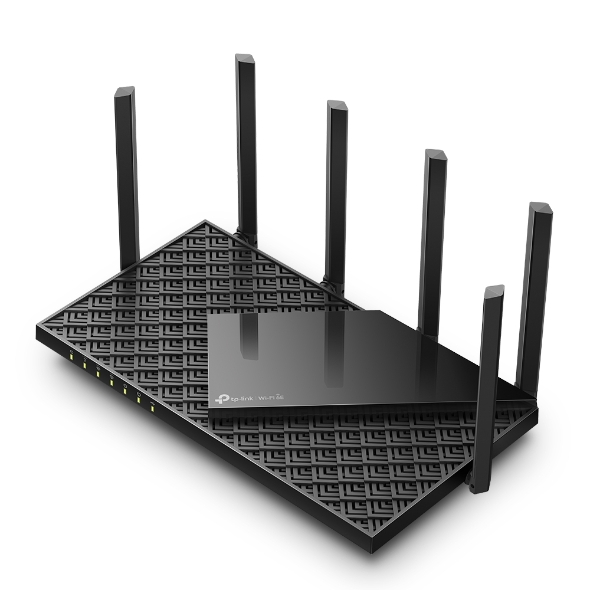 AXE5400 트라이 밴드 기가비트 Wi-Fi 6E 공유기


