
So stellen Sie die Vorwahl auf dem TP-Link DSL-Modemrouter ein
 383
383Einleitung
Dieser FAQ-Artikel enthält eine Schritt-für-Schritt-Anleitung zur Konfiguration der Vorwahlfunktion auf einem TP-Link DSL-Modemrouter. Diese Funktion fügt bei Anrufen automatisch die Vorwahl hinzu, sodass Sie für Ortsgespräche nicht die vollständige internationale Vorwahl wählen müssen.
Anforderungen
- VX800v(DE) v1 oder VX231v(DE) v1
- Ein PC oder mobiles Gerät
Fehlerbehebung
Schritt 1. Öffnen Sie einen Webbrowser auf Ihrem Computer oder Smart-Gerät, rufen Sie http://tplinkmodem.net oder http://192.168.1.1 auf und geben Sie das auf dem Produktaufkleber angegebene Standardpasswort ein, um sich anzumelden.Melden Sie sich auf der Konfigurationsseite des VoIP-Modem-Routers an. Siehe FAQ "Zugriff auf die Konfigurationsseite".
Schritt 2. Navigieren Sie zu „Erweitert“ > „Telefonie“ > „Telefonnummer“ und suchen Sie die Einstellungen für die Vorwahl.
Hinweis: Wir empfehlen Benutzern, die Anrufe in ein bestimmtes Gebiet tätigen, diese Funktion zu aktivieren. Nach der Aktivierung dieser Funktion wird allen von Ihnen getätigten Anrufen die Vorwahl vorangestellt.
Aktivieren Sie den Status und geben Sie die Vorwahl entsprechend Ihrer Situation ein (z. B. 04934202). Klicken Sie auf „Speichern“, um die Konfiguration zu speichern.
Durch Eingabe der Ländervorwahl und der Vorwahl in den Einstellungen können Sie Ortsgespräche führen, ohne die vollständige internationale Vorwahl wählen zu müssen. Wenn Sie jedoch Nummern in anderen Ländern oder Regionen anrufen, müssen Sie weiterhin die vollständige Ländervorwahl und Vorwahl eingeben.
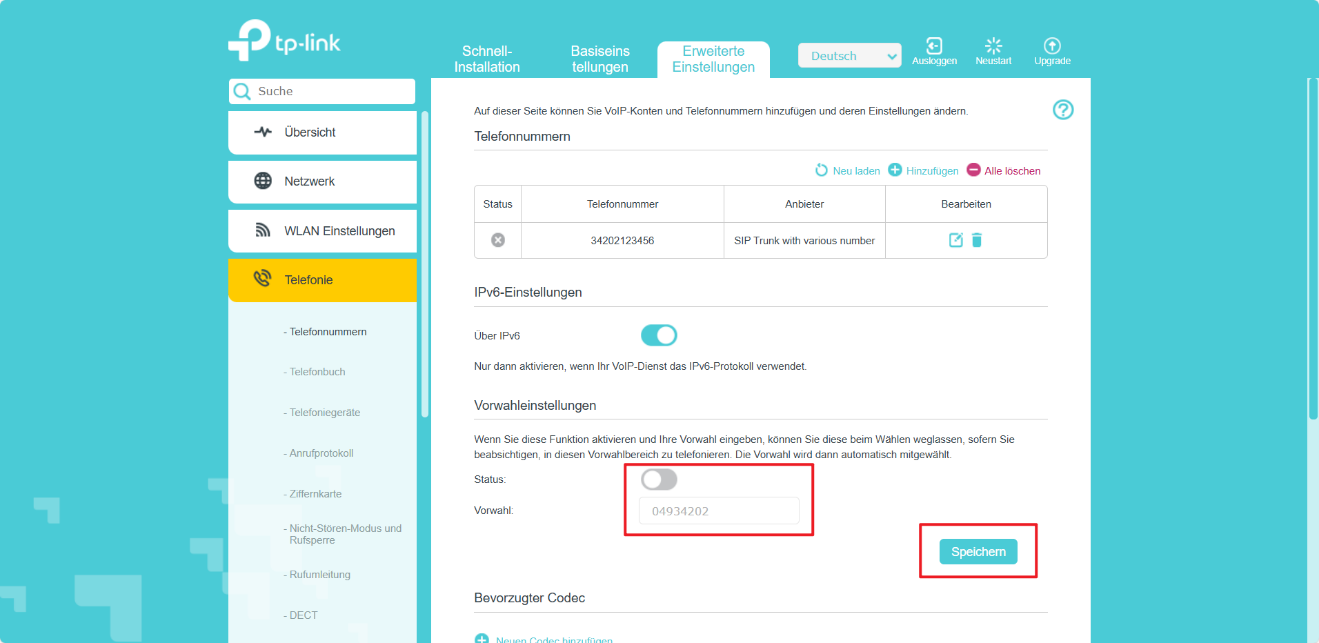
Schritt 3. Nachdem Sie Ihre Konfiguration gespeichert haben, werden Ihre Einstellungen korrekt angewendet, und Sie können Anrufe tätigen, ohne die Vorwahl einzugeben.
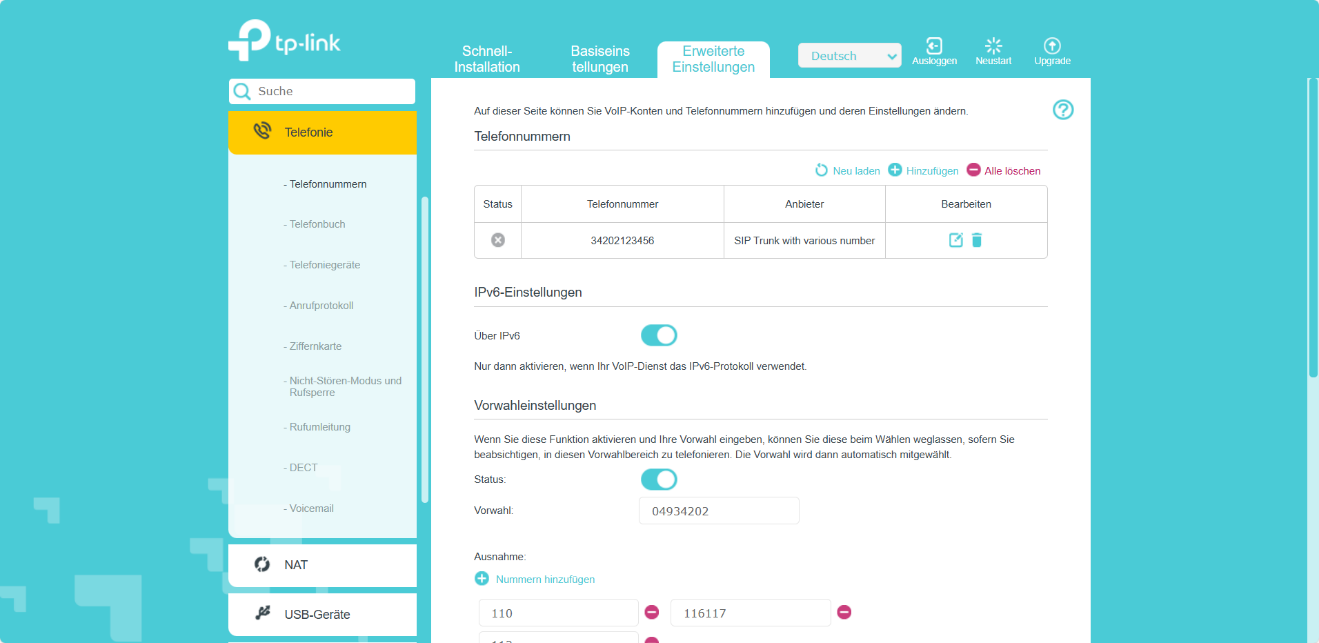
Wenn Sie Ihr VoIP neu konfigurieren müssen, lesen Sie bitte den Abschnitt „So richten Sie meine VoIP-Funktion auf dem VoIP-Modemrouter ein“.
Nachdem Sie diese Schritte ausgeführt haben, können Sie wieder normal telefonieren.
QA
F1: Was tun, wenn nach der Einstellung der Vorwahl auf dem TP-Link DSL-Modem-Router keine Anrufe getätigt werden können?
Überprüfen Sie, ob die Vorwahl oder die Ländervorwahl doppelt angegeben ist.
- Bitte überprüfen Sie Ihre lokale Vorwahl und aktualisieren Sie sie auf die richtige.
- Wenn die Ländervorwahl „+49“ oder „049“ in der Vorwahl und auch in den registrierten Nummern als „+49“ oder „049“ verwendet wird, entfernen Sie „+49“ oder „049“ aus den registrierten Nummern.
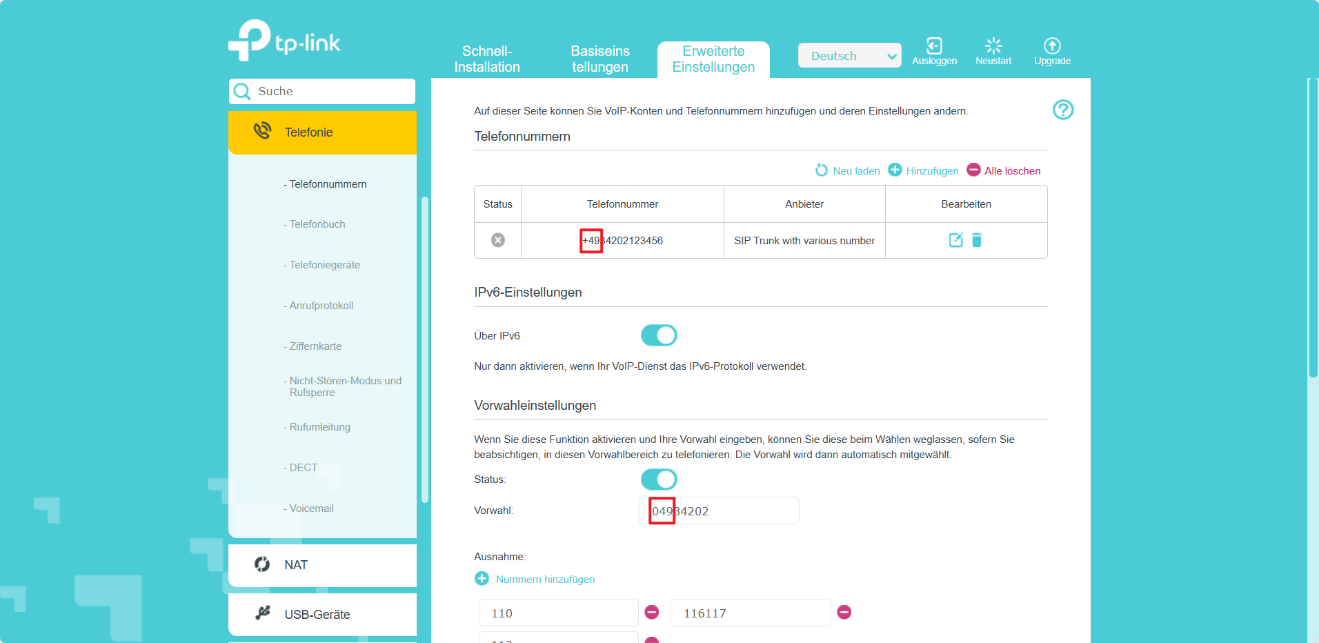
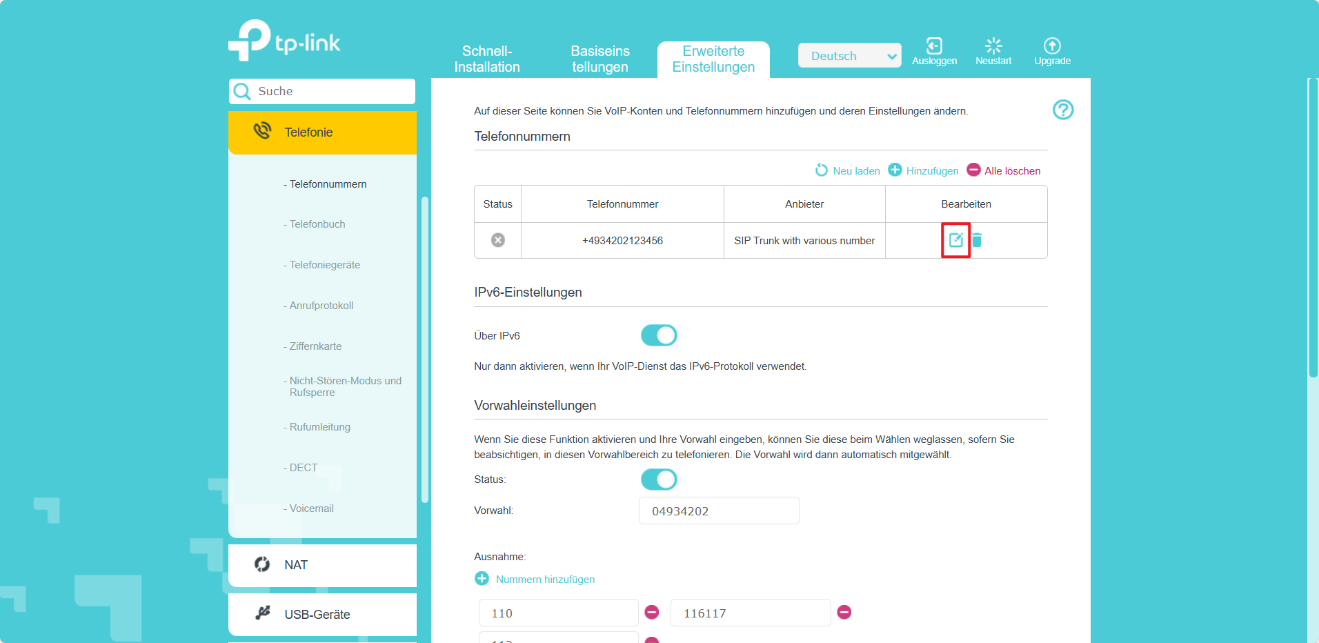
- Klicken Sie auf das Symbol „Ändern“ im Abschnitt „Telefonnummern“, um das Nummernformat anzupassen.
Weitere Informationen zu den einzelnen Funktionen und Konfigurationen finden Sie im Download-Center , wo Sie das Handbuch zu Ihrem Produkt herunterladen können.
Finden Sie diese FAQ hilfreich?
Mit Ihrer Rückmeldung tragen Sie dazu bei, dass wir unsere Webpräsenz verbessern.

1_normal_20220824061744p.png)
Von United States?
Erhalten Sie Produkte, Events und Leistungen speziell für Ihre Region