
Tapo S200B(EU)1.20 Setup Guide
Tapo S200B Smart Button Setup Guide
Welcome to the setup guide.
To ensure equal access for all users, we offer this accessible setup guide. This guide is designed to meet accessibility needs, enabling a successful setup. It will introduce the smart button's appearance and then guide you through the setup process.
Step 1. Know about your Smart Button
In this section, we will describe the device's appearance, including its ports, buttons, and labels.
1. You can find your button in the package.
2. Next, place your button on a horizontal surface, such as on a shelf or desktop. Ensure the indented side of the product is facing upward.
3. After positioning your button correctly, we will introduce your device in a certain order.
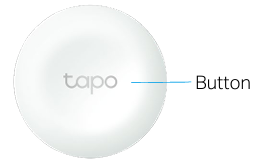
Button: The product itself functions as a clickable button. You can tap or rotate to control lights and appliances with custom Smart Actions.
To reset the button, press and hold the button for 5 seconds. The LED will turn solid on for 10s. Quickly press the button 3 times while the LED is solid on.
Product "Label": The product label is through laser engraving on the back panel of your device.
Here we will introduce the other accessory in the package box:
CR2032 battery: A small, coin-shaped lithium battery used to power the button.
3M adhesives: You can attach the included 3M adhesives to the back panel and position the button at your preferred location.
Step 2. Set Up
1. Get the Tapo app from the App Store or Google Play, then log in. Or you can visit https://www.tapo.com/app/download-app to download the Tapo app.

2. Remove the battery insulation tab to power up your button. Wait 2 seconds for the smart button to start up. You can hear a clicking sound.
3. Tap the + button in the app. Select Switches/Buttons and then your model. Follow the app instructions to complete setup.
If you need help, please visit https://www.tapo.com/support/ for technical support, the user guide, FAQs, warranty & more.
For details on Tapo app accessibility, please check Accessibility Support.
English: Safety Information
Keep the device away from water, fire, humidity or hot environments.
Do not use damaged charger or USB cable to charge the device.
Do not use any other chargers than those recommended.
Do not use the device where wireless devices are not allowed.
Adapter shall be installed near the equipment and shall be easily accessible.
Use only power supplies which are provided by manufacturer and in the original packing of this product. If you have any questions, please don't hesitate to contact us.
For indoor use only.
Do not disassemble, repair or modify the product.
Do not use the product if the casing has been broken. Danger of electric shock.
Never touch the product with wet hands.
Do not expose to heavy rain or any type of moisture.
Do not place near automatically controlled devices such as fire alarms. Radio waves emitted from this product may cause such devices to malfunction resulting in an accident.
Observe restrictions on using wireless products in fuel depots, chemical plants or when blasting operations are in progress.
Do not use liquid to clean the product. Only use a dry cloth.
Never put metal objects inside the product. If a metal object enters the product turn off the circuit breaker and contact an authorised electrician.
This product is not intended to be used when providing medical care. Consult the manufacturer of any personal medical devices, such as pacemakers or hearing aids to determine if they are adequality shielded from external RF (radio frequency) energy.
Do not use this product in health care facilities. Hospitals or health care facilities may be using equipment that could be sensitive to external RF energy.
Do not use this product near water for example near a bath tub, wash bowl, kitchen sink or laundry tub, in a wet basement or near a swimming pool.
The product should be kept free from excessive smoke, dust or high temperature and vibration.
This product should not be exposed to direct sunlight
Do not place heavy objects on top of the product.
When you leave the product unused for a long time unplug the product from the power outlet.
This product may interfere with other electronic products such as TV, radios, personal computers, phones or other wireless devices.
Operating Temperature: 0 °C ~ 40°C (32°F ~ 104°F)
Please read and follow the above safety information when operating the device. We cannot guarantee that no accidents or damage will occur due to improper use of the device. Please use this product with care and operate at your own risk.
Von United States?
Erhalten Sie Produkte, Events und Leistungen speziell für Ihre Region