Scarica per T1600G-52TS
Modelli e versioni variano a seconda dell'area geografica.
Per prodotti in uso in Italia, utilizzare solo risorse presenti sul sito
http://www.tp-link.it .
È strettamente necessario verificare modello e versione hardware prima di scaricare ed installare ogni firmware.
- Product Overview
- Documento
-
- Rackmount Switch(EU1_12 Languages)_ Installation Guide
- 802.1X Client Software_User Guide
- Switches(EU1_13Languages)_Quick Installation Guide
- Rackmount Switch(EU2_16 Languages)_ Installation Guide
- 802.1X Client Software_User Guide
- T1600G-52TS_V1_IG
- T1600G-52TS(UN)_V1_CLI
- T1600G-52TS(UN)_V1_Configuration Guide
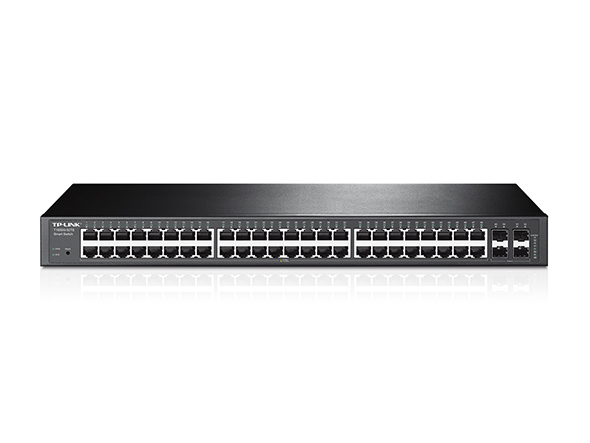 Switch SmartManaged L2+ JetStream 48 Porte Gigabit con 4 Porte SFP
MIBs Files
|
T1600G-52TS(UN)_V1_MIB_160412 |
Download | |
|---|---|---|
| Data di pubblicazione: 2016-04-12 | Lingua: English | Dimensioni file: 181 KB |
Sistema operativo: Win2000/XP/2003/Vista/7/8/8.1/10/Mac/Linux |
||
|
Notes: For T1600G-52TS(UN)_v1 |
||
802.1X Client
|
TP-LINK_802.1X_Client_Software |
Download | |
|---|---|---|
| Data di pubblicazione: 2017-09-05 | Lingua: English | Dimensioni file: 5.5MB |
Sistema operativo: Win2000/XP/2003/Vista/7/8/8.1/10 |
||
|
|
||
FAQs
- Cosa devo fare se non riesco ad accedere alla pagina di gestione Web del mio interruttore TP-Link?
- How to Achieve AAA Authentication Through TACACS + Server on the Switch
- What Is the Difference Between Voice VLAN and Auto VoIP
- Come configurare OpenSSH 7.0 (e versioni successive) per accedere a switch intelligenti e gestiti?
- Come bloccare dispositivi sconosciuti per accedere allo switch utilizzando IP Source Guard
- Come configurare la VLAN vocale per ottimizzare la trasmissione del traffico vocale su switch intelligenti e gestiti TP-Link utilizzando la nuova GUI?
- Come configurare il DHCP Relay di uno switch TP-Link?
- Hai dubbi sull'effetto della funzionalità QoS degli Switch TP-Link?
- What Are the SNMP OIDs Used to Display CPU and Memory Utilization on TP-Link T1600/T2600 Series Switches
- Come configurare il default gateway degli switch smart e managed utilizzando la vecchia GUI?
- Perché la versione del firmware non cambia dopo l'aggiornamento negli switch serie T?
- How to Configure MAC ACL on Smart/Managed Switches
- How to Change the IP Address of Smart and Managed Switches Using the Old GUI and CLI
- How to Block an illegal client with Certain IP address from getting access to the network using TP-Link Managed Switches
- How to Build Up a Multi-Nets Network via Multi-Nets NAT Feature on TP-Link Router with L2+/L3 Switches
- How to Test the Jumbo Frame Pass-Through Feature on TP-Link Switches
- How to Limit the Port Rate of Incoming Traffic Using ACL
- Come configurare la VLAN 802.1q su Smart Switch?
- How to Configure Port Isolation on Layer 2 Managed Switches Through Web Browser
- How to Configure Extended IP ACL
- Come aggiornare il firmware di uno switch tramite il Menu di Avvio
- How to Configure Port Mirror on TP-Link Smart Switches and L2 Managed Switches
- How to Configure LACP on Smart/Managed Switches
Firmware
Un aggiornamento firmware può risolvere problemi, aumentare le performance o introdurre nuove funzionalità.
Come aggiornare
- È strettamente necessario verificare modello e versione hardware prima di scaricare ed installare ogni firmware.
- È possibile installare solamente firmware creati per modello e versione hardware in uso.
- Il caricamento di un firmware non appropriato può danneggiare irrimediabilmente il dispositivo e ne invalida la garanzia.
- Assicurarsi di non interrompere l’alimentazione del dispositivo e del computer durante l’aggiornamento.
- I firmware sono scaricabili esclusivamente in formato compresso: è necessario estrarre il firmware aprendo l’archivio compresso tramite un software di decompressione e salvandolo sul desktop.
|
T1600G-52TS(UN)_V1_160412 |
Download | |
|---|---|---|
| Data di pubblicazione: 2016-04-12 | Lingua: English | Dimensioni file: 13.99 MB |
|
Modifications and Bug Fixes: 1.enhanced the performace of the Voice VLAN2.Add new features in the SNMP. 3.Add new IPv6 features including IPv6 ACL, IPv6 Static Routing and IPv6 QoS 4.Add DHCP relay function 5.Add AAA authentication function 6.Add some other new features that will enhace the performace of the switch Notes: 1.For T1600G-52TS(UN)_v1;2.Upgrading the firmware will only upgrade the backup image; 3.Your device’s configuration won't be lost after upgrading. |
||
Codice Open Source (GPL)
I prodotti TP-LINK contengono software sviluppato da terze parti, incluso software distribuito con licenza GPL (GNU General Public Licence versione 1, 2 o 3) o con licenza LGPL (GNU Lesser General Public License): l'utilizzo di questo software è possibile entro limiti e condizioni stabiliti dalla tipologia di licenza con la quale è distribuito e specificate a questo link. È possibile ottenere il codice sorgente soggetto a GPL e la lista dei prodotti che utilizzano tale codice all'interno del Centro sorgenti GPL.
I relativi software sono distribuiti con formula di TOTALE ESCLUSIONE DI GARANZIA; non sono pertanto garantite COMMERCIABILITÀ e/o IDONEITÀ PER QUALSIASI UTILIZZO SPECIFICO.
Per ulteriori informazioni consultare il testo GNU General Public License.