

_EU_1.0_Overview_1_1_normal_20220513061811a.jpg)

_EU_1.0_Overview_5_normal_20220513060721m.jpg)
_EU_1.0_Overview_4_normal_20220513060722j.jpg)
_EU_1.0_Overview_3_package_normal_20220513061823z.jpg)
_EU_1.0_Overview_1_1_large_20220513061811w.jpg)

_EU_1.0_Overview_5_large_20220513060721a.jpg)
_EU_1.0_Overview_4_large_20220513060722a.jpg)
_EU_1.0_Overview_3_package_large_20220513061823z.jpg)
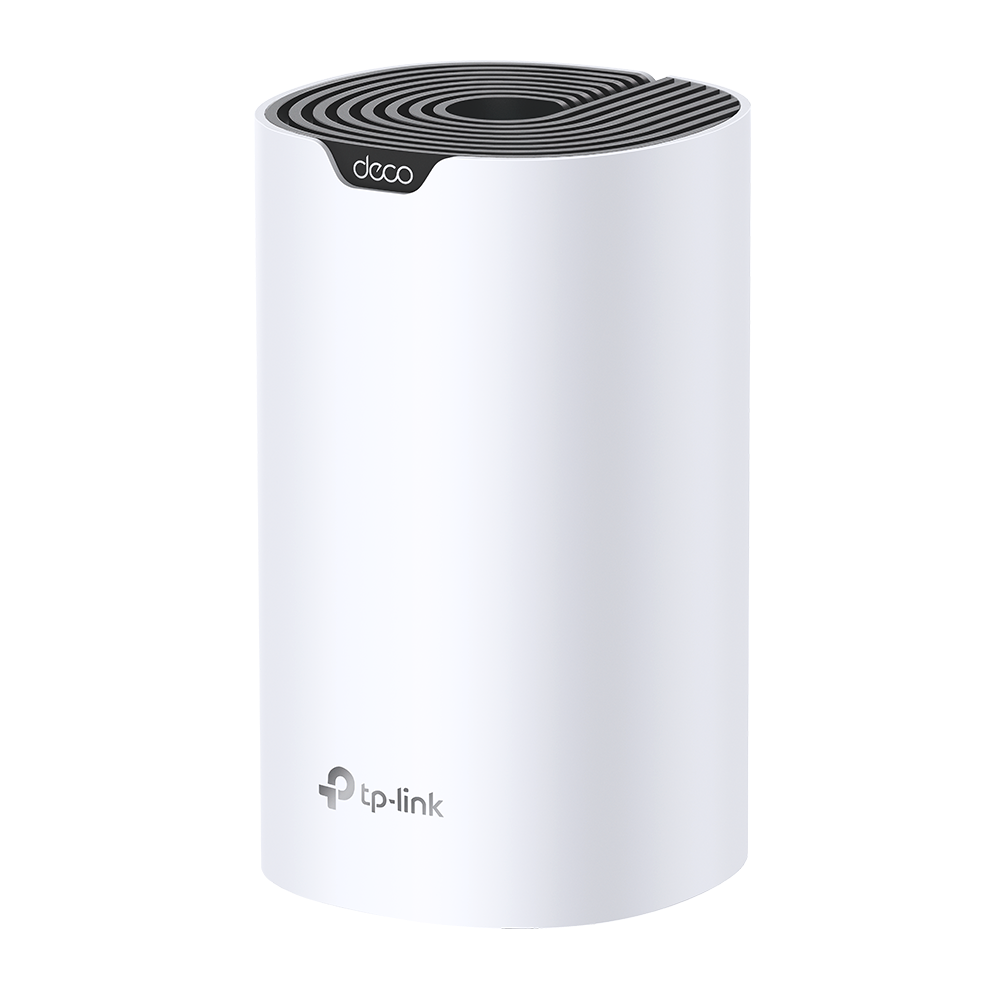
Deco S7
AC1900 Whole Home Mesh Wi-Fi System
1900 Mbps WiFi Speed – Enjoy binge watching your favorite series in 4K with combined speeds of up to 1900 Mbps (600 Mbps on 2.4 GHz and 1300 Mbps on 5 GHz ) with 3×3 MU-MIMO technology.† ‡
Connect 100+ Devices – Deco handles traffic from even the busiest of networks, providing lag-free connections for over 100 devices.†
Boosted Seamless Coverage – With advanced Deco Mesh Technology, units work together to form a unified network with a single network name. Devices automatically switch between Decos as you move through your home for the fastest possible speeds. §
Full Gigabit Ethernet – 3× Gigabit WAN/LAN Ethernet ports provide solid internet access at high speeds.△
Robust Parental Controls – Limit online time and block inappropriate websites according to unique profiles you create for each family member.
Two Modes in One – Works as a router or access point for a flexible home network.
Easy Setup – Setup is easier than ever with the Deco app there to walk you through every step.


Fast. Stable. Everywhere.
Whole Home Mesh Wi-Fi System
AC1900 Dual-Band Wi-Fi
Deco S7

WiFi Dead Zone Killer
3×3
MU-MIMO
Parental Controls
Seamless Roaming
Two Modes in One
Connect
100+
Devices
AC1900
Superior Speed
1300 Mbps
5 GHz
600 Mbps
2.4 GHz
Full Gigabit
Ports
WiFi Dead Zone Killer
Deco S7 offers a simple way to guarantee a strong WiFi signal in every corner of your home up to 2,100 square feet (1-pack). † Wireless connections and an optional Ethernet backhaul work together to link Deco units, providing even faster network speeds and truly seamless coverage.
Want more coverage? Simply add another Deco.
Stay Fast with Seamless Roaming
TP-Link Mesh means Deco units work together to form one unified network. Your phone or tablet automatically connects to the fastest Deco as you move through your home, creating a truly seamless WiFi experience.§


Stable Connections,
for More Devices
Deco S7 provides lag-free connections to over 100 devices†.Experience fast networking for all devices and applications from browsing, downloading, streaming, to gaming.
Dual Band Speeds up to 1900 Mbps
Web Browsing
720P Streaming
Smart Home Devices
1080P Streaming
IP Camera Streaming
4K Streaming
High-speed Downloading
2-in-1 Router and
Access Point Modes
Flexible and multifunctional, Deco S7 includes a variety of features allowing it to serve as a router or access point. Just choose the mode that best suits your actual network demands and enjoy maximum wireless flexibility.
-
Router (Default)
Instantly generate a private
wireless network. -
Access Point
Create Wi-Fi access for any
existing wired network.
WiFi Made Easy
-

App-Based Setup
Installing Deco S7 is fast and easy. Just unpack the system, download the Deco app, and follow its on-screen directions.
-

Easy Management
Manage your WiFi at home or away with the Deco app. See all your connected devices, prioritize them, and set up a guest network with just a few taps.
-

Voice Control
Pair with Alexa to control Deco S7 with simple voice commands. Enjoy the convenient life.
Robust Parental Controls
Simple, intuitive parental controls make it easy to
keep your children safe while they’re online.
-
Easily create a profile for each family member and set custom time limits and online time allowances.
-
Keep your family safe online with one-touch security settings that block websites based on age-appropriateness.
-
Set limits on how much time each person in your family can spend online.
-
Check out which sites your children visit and how much time they spend on each to ensure your children are safe while they’re having fun online.
-
Take a break from Wi-Fi for dinner and family game nights. Just tap a button to suspend internet access for everyone in your home.
All Decos Can
Work Together
Deco S7 is compatible with every other Deco model to
form a Mesh network. Expand Mesh Wi-Fi coverage
anytime by simply adding more Decos.

5GHz_2 Dedicated Wireless Backhaul

5GHz_1 Wireless Connection

2.4GHz Wireless Connection
-
5GHz_1 Wireless Connection
-
2.4GHz Wireless Connection
-
Мазе

-
Двор

-
Гараж

Истински непрекъснат роуминг
Модулите на Deco работят заедно, за да образуват една обединена мрежа. Вашият телефон или таблет автоматично се свързва към най-бързия Deco при вашето придвижване в дома, за наистина непрекъсната онлайн работа. Поддръжката на IEEE 802.11r както и на 802.11k/v означава, че превключването от един модул Deco на друг е толкова плавно, че е незабележимо, дори когато стриймвате.


-
Адаптивен избор на пътека
TP-Link Mesh технологията динамично избира най-добрия маршрут и лента за вашите данни, като гарантира бърза връзка независимо дали сте си у дома.


-
Самолекуване
Ако един Deco модул има проблем, системата ще пренасочи автоматично данните към другите Deco, за да се увери, че оставате онлайн.
Wi-Fi + Powerline
Powerline връзките използват електрическата инсталация на вашия дом, за да свържат модулите, преминавайки и през най-дебелите стени и тавани.
Комбинацията powerline и безжични връзки постига до 60% по-високи скорости на мрежата, отколкото само безжичните връзки.
- Boosted speeds
- 60%
- Standard Wi-Fi System
- Hybrid Wi-Fi System
- Powerline
- Забележка:Wi-Fi + Powerline е само за Deco P7
IoT Mesh
За разлика ор традиционните интелигентни хъбове, TP-Link Mesh технологията осигурява пълно IoT покритие на дома с Wi-Fi, Bluetooth и Zigbee интегрирани в една единствена система. Наслаждавайте се на магията на вашия умен дом във всяка стая с TP-Link Mesh технологията. Кажете довиждане на безбройните хъбове.
- - - - Wi-Fi
- - - - Zigbee
- - - - Bluetooth
Deco серия
Deco
-
 Нов
НовDeco BE85
BE19000 Tri-Band Whole Home Mesh WiFi 7 System
-
 Нов
НовDeco BE65
BE9300 Whole Home Mesh WiFi 7 System
-
 Очаквайте скоро
Deco XE200
AXE11000 Whole Home Mesh Wi-Fi 6E System
-

Deco XE75
Wi-Fi 6E Mesh система Tri-Band AXE5400 с покритие за целия дом
-
 Hot
HotDeco X60
Следващо поколение Wi-Fi 6 | AX3000 Whole Home Mesh Dual-Band Gigabit система
-
 Очаквайте скоро
Deco X50-5G
5G AX3000 Whole Home Mesh WiFi 6 Gateway (Availability based on regions)
-
 Нов
НовDeco X50-PoE
AX3000 Whole Home Mesh WiFi 6 System with PoE
-
 Hot
HotDeco X50
AX3000 Mesh Wi-Fi 6 система за целия дом
-
 Hot
HotDeco X20
AX1800 Wi-Fi 6 Mesh система за целия дом
-
 Hot
HotDeco S7
AC1900 Mesh Wi-Fi система за целия дом
-
_normal_20230201014412u.png) Hot
HotDeco M4
AC1200 Gigabit Mesh Wi-Fi система за целия дом
Приложението TP-Link Deco е достъпно на български език
Приложението TP-Link Deco е достъпно на български език и предлага най-лесния начин за конфигуриране, управление и наблюдение на Wi-Fi Mesh Deco системата за целия дом чрез iOS или Android устройства.
Началната настройка стана много по-лесна
Разопаковайте Deco, инсталирайте приложението и просто следвайте онлайн инструкциите. Приложението Deco ще се погрижи за останалото, и ще накара вашата мрежа да бъде готова и в действие за броени минути.
-
Свържете Deco към вашия кабелен модем и включете и двете устройства
-
Изтеглете и пуснете приложението Deco
-
Следвайте инструкциите вприложението, за да конфигурирате вашата Deco система.
Опростено управление
С Deco управлението на вашата Wi-Fi е лесно и се извършва отвсякъде, независимо дали сте на канапето, на работа или където и да било между дома и офиса.
-
Опростено табло за управление
Разгледайте работното състояние на вашата мрежа, проверете свързаните устройства и се възползвайте от всички функции, които предлага вашият рутер.
-
Множество Deco модули, едно приложение
Приложението Deco управлява всички ваши Deco мрежи и устройства свързани към вашата Deco Wi-Fi система.
-
Проверете свързаните устройства
Вижте списъка на свързаните устройства с възможността да направите пауза и възобновите интернет достъпа, проверете скоростта на интернета и поставете приоритети или блокирайте определените устройства.
-
Отдалечено управление
Поемете дистанционнно управлението на мрежата с докосване на телефона, независимо къде се намирате.
Мощни функции за родителски контрол
С опростените, интуитивни функции на родителския контрол лесно можете да държите в безопасност децата си, когато са онлайн.
-
Създайте с лекота профил на всеки член на вашето семейство и поставете индивидуални лимити с определени часове и време прекарвано онлайн. Определете устройствата за всеки профил, така че правилата да важат да отделните устройства, както и за членовете на семейството.
-
поддържайте семейството си в безопасност онлайн с с едно докосване чрез настройките за сигурност, които блокират съдържание свързано с това доколко то е подходящо за дадена възраст.
-
Пиставете лимити колко време всеки член на семейството може да прекарва онлайн.
-
С Поглед отвътре (Insights) можете да проверявате кои сайтове посещават вашите деца и колко време прекарват във всеки от тях. Това е чудесен начин да знаете, че вашите деца са в безопасност и че се забавлявай онлайн.
-
TaНаправете пауза от Wi-Fi за вечеря и за времето за семейни игри. Просто докоснете един бутон, за да спрете интернет достъпа за всеки в дома.
Интуитивно приложение пълно с функции
Отчет на месечното потребление
Вижте пълен списък с подробности за вашата мрежа всеки месец, включително използване, блокирано съдържание,
заплахи за сигурността и още други.
Автоматизация на дома
Направете лесен живота си с мощна автоматизация и инструментите за гласово управление.
*В момента само за Deco M9 Plus
Гъвкави кратки пътища
Управлявайте гъвкаво всички устройства от вашия телефон или таблет само с едно докосване.
*В момента само за Deco M9 Plus
Защитете вашата мрежа
Вграденият антивирус помага да се защитите от зловредни уебсайтове и да поддържате сигурни вашите онлайн плащания.
*В момента само за Deco M9 Plus, Deco P7 и Deco M5
Поставете приоритети на вашите устройства
Изберете кои устройства да имат винаги най-бързите връзки или поставете приоритет за конкретен интервал от време.
Поставете приоритети на приложенията
Заделете повече пропускателна способност за дейностите, които са най-важни за вас, с прости контроли.
*В момента само за Deco M9 Plus, Deco P7 и Deco M5
Споделете Wi-Fi мрежата с приятели
Създайте отделни Wi-Fi профили за гостите и споделете паролата,
за да ги улесните как да бъдат онлайн.
Проверете вашата скорост
Пуснете тест на скоростта, за да гарантирате, че получавате интернет скоростите, за които плащате.
Разгледайте всяко устройство във вашата мрежа и вижте колко пропускателна способност (мрежов капацитет) използва то.
Нашата техническа поддръжка е винаги налице за вас
Имате въпроси за серия Deco? Помощта е винаги само на един клик разстояние. Можете да намерите отговори на български език на най-често задаваните въпроси в приложението Deco и да се свържете с нас винаги, когато имате нужда от помощ.
Техническа поддръжка| Standards and Protocols | Wi-Fi 5IEEE 802.11ac/n/a 5 GHzIEEE 802.11n/b/g 2.4 GHz |
|---|---|
| WiFi Speeds | AC19005 GHz: 1300 Mbps (802.11ac)2.4 GHz: 600 Mbps (802.11n) |
| WiFi Range | 1-2 Bedroom Houses (1-pack) TP-Link Mesh TechnologyOptional Ethernet backhaul works together to link Deco units to provide seamless coverage3× Antennas (Internal)Multiple antennas form a signal-boosting array to cover more directions and large areasBeamformingConcentrates wireless signal strength towards clients to expand WiFi range |
| WiFi Capacity | Medium Dual-BandDistribute devices to different bands for optimal performanceMU-MIMOSimultaneously communicates with multiple MU-MIMO clients |
| Working Modes | Router ModeAccess Point Mode |
| Network Security | SPI FirewallAccess Control |
|---|---|
| Guest Network | 1× 5 GHz Guest Network1× 2.4 GHz Guest Network |
| WiFi Encryption | WPA-PersonalWPA2-Personal |
| Ethernet Ports | 3× Gigabit Ports*Per Deco UnitSupports WAN/LAN auto-sensing |
|---|---|
| Бутони | Reset Button |
| Protocol | IPv4IPv6 |
|---|---|
| Parental Controls | URL FilteringTime Controls |
| WAN Type | Dynamic IPStatic IPPPPoEPPTPL2TP |
| Quality of Service | QoS by Device |
| Cloud Service | OTA Firmware UpgradeTP-Link IDDDNS |
| NAT Forwarding | Port ForwardingUPnP |
| IPTV | IGMP ProxyIGMP SnoopingBridgeTag VLAN |
| DHCP | Address ReservationDHCP Client ListServer |
| DDNS | TP-Link |
| Management Features | Deco App |
| Network Services Enabled by Default | Web Server Manage and configure device through web (HTTP/HTTPS)• Port: 80/443 Protocol: TCP DNS DNS• Port: 53 Protocol: TCP & UDP DHCP Server IP address assignment (DHCP)• Port: 67 Protocol: UDP App management Manage and configure device through app• Port: 22 Protocol: TCP• Port: 20001 Protocol: TCP• Port: 30001 Protocol: TCP• Port: 20002 Protocol: UDP |
|---|---|
| WiFi Transmission Power | CE:<20 dBm (2.4 GHz)<23 dBm (5 GHz)FCC:<30 dBm (2.4 GHz)<30 dBm (5 GHz) |
|---|---|
| Dimensions (W×D×H) | 6.4 × 3.6 × 3.6 in(162.3 × 90.7 × 90.7 mm) |
|---|---|
| Package Content | Deco S7 (3-pack)3 Deco S7 Units1 RJ45 Ethernet Cable3 Power AdaptersQuick Installation GuideDeco S7 (2-pack)2 Deco S7 Units1 RJ45 Ethernet Cable2 Power AdaptersQuick Installation GuideDeco S7 (1-pack)1 Deco S7 Unit1 RJ45 Ethernet Cable1 Power AdapterQuick Installation Guide |
| Сертификати | CE, FCC, NCC, BSMI, JRF, JPA, VCCI |
|---|---|
| Системни изисквания | Android 5.0 or later iOS 9.0 or later *Note: The minimum system requirements will be updated alongside updates to the app, subject to official website information. |
| Околна среда | Operating Temperature: 0℃~40℃ (32℉ ~104℉)Storage Temperature: -40℃~60℃ (-40℉ ~140℉)Operating Humidity: 10%~90% non-condensingStorage Humidity: 5%~90% non-condensing |
†Maximum wireless transmission rates are the physical rates derived from IEEE Standard 802.11 specifications. Range, coverage, and maximum quantity of connected devices are based on test results under normal usage conditions. Actual wireless data throughput. wireless coverage, and quantity of connected devices are not guaranteed and will vary as a result of 1) environmental factors, including building materials, physical objects, and obstacles, 2) network conditions, including local interference, volume and density of traffic, product location, network complexity, and network overhead, and 3) client limitations, including rated performance, location, connection quality, and client condition.
‡Use of MU-MIMO requires clients that also support MU-MIMO.
§Clients need to support 802.11k/v and may require additional setup. Performance may vary depending on the client device.
△All WAN/LAN ports will operate as either WAN or LAN ports. Only one port can serve as a WAN port at a time.
Actual network speed may be limited by the rate of the product's Ethernet WAN or LAN port, the rate supported by the network cable, Internet service provider factors and other environmental conditions.