
Tapo H110(EU) V1.0&1.6 Setup Guide
Tapo H110 Smart IR & IoT Hub Setup Guide
Welcome to the setup guide.
To ensure equal access for all users, we offer this accessible setup guide. This guide is designed to meet accessibility needs, enabling a successful setup. It will introduce the smart hub's appearance and then guide you through the setup process.
Step 1. Know about your smart IR & IoT hub
In this section, we will describe the device's appearance, including its ports, buttons, and labels.
1. You can find your hub, 3M Adhesive, and Type-C Power Cable in the package.
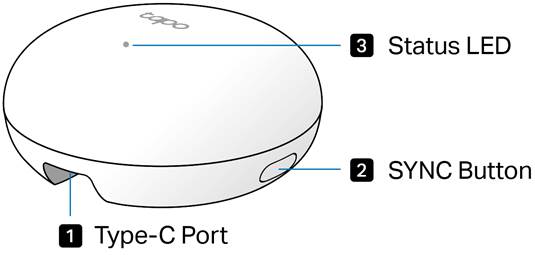
2. Next, place your hub on a horizontal surface, such as on a shelf or desktop. Ensure that the Type-C port is facing you and the SYNC button is on the right.
3. After positioning your hub correctly, we will introduce the ports, buttons, and labels on your device in a certain order.
Type-C port: Located at the bottom of the product. Plug the provided Type-C power cable into the port, then connect it to a 5V/2A (or higher) power adapter to power the hub.
SYNC button: Located on the right side of the device. Press for one second to enter pairing mode to connect your Tapo accessory. Press and hold for 5 seconds to reset Wi-Fi settings while retaining other configurations. Press and hold for 10 seconds to restore your hub to factory default settings.
Status LED: Located at the center of the top panel of the product. It shows your device status. You can check the device status in the Tapo app.
Product label: The product label is on the bottom of the hub.
Here we will introduce the other accessory in the package box:
Type-C power cable: A slim USB-A to USB-C cable with a small, reversible connector, used to connect to the power port and power the hub.
3M adhesives: You can attach the included 3M adhesives to the back panel and position the hub at your preferred location.
Step 2. Set Up
1. Get the Tapo app from the App Store or Google Play, then log in. Or you can visit https://www.tapo.com/app/download-app to download the Tapo app.

2. Plug in the provided Type-C power cable, then connect it to a 5V/2A (or higher) power adapter to power the hub. Wait 2 seconds for the hub to start up. You can hear a clicking sound.
3. Tap the + button in the app and select your hub model. Follow the app instructions to complete setup.
If you need help, please visit https://www.tapo.com/support/ for technical support, the user guide, FAQs, warranty & more.
For details on Tapo app accessibility, please check Accessibility Support.
English: Safety Information
• Keep the device away from water, fire, humidity or hot environments.
• Do not attempt to disassemble, repair, or modify the device. If you need service, please contact us.
• Do not use the device where wireless devices are not allowed.
• This equipment can be powered only by equipment that complies with Power Source Class 2 ( PS2) or Limited Power Source(LPS) defined in the standard of IEC 62368-1.
• Operating Temperature: -10 °C ~ 40°C (14°F ~ 104°F)
Please read and follow the above safety information when operating the device. We cannot guarantee that no accidents or damage will occur due to improper use of the device. Please use this product with care and operate at your own risk.