
下載 M8550
- Product Overview
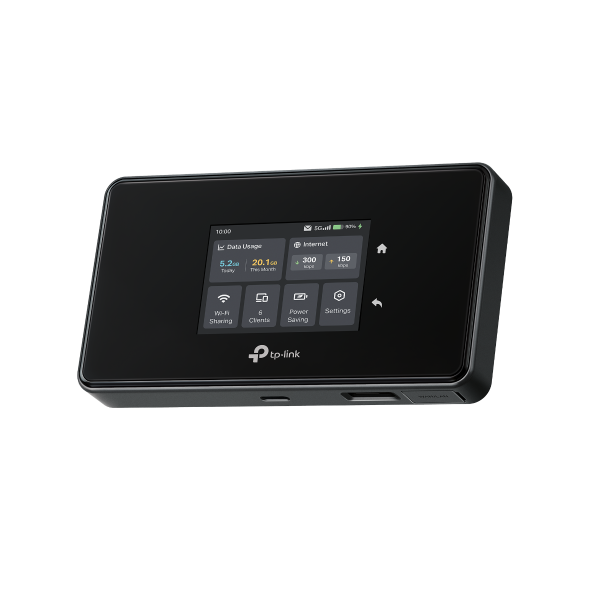 5G AXE3600 行動路由器 (Wi-Fi蛋)
ISP 檔案
An ISP file upgrade can update ISP information into the latest verison to improve it's current compatibility.
To Upgrade
IMPORTANT: To prevent upgrade failures, please read the following before proceeding with the upgrade process
- Please upgrade ISP file from the local TP-Link official website of the purchase location for your TP-Link device, otherwise it will be against the warranty. Please click here to change site if necessary.
- Please verify the hardware version of your device for the firmware version. Wrong ISP file upgrade may damage your device and void the warranty. (Normally V1.x=V1)
如何查看 TP-Link 產品的硬體版本? - Do NOT turn off the power during the upgrade process, as it may cause permanent damage to the product.
- To avoid wireless disconnect issue during ISP file upgrade process, it's recommended to upload ISP file with wired connection unless there is no LAN/Ethernet port on your TP-Link device.
- It's recommended that users stop all Internet applications on the computer, or simply disconnect Internet line from the device before the upgrade.
- Use decompression software such as WinZIP or WinRAR to extract the file you download before the upgrade.
|
ISP_upgrade_M8550(EU) |
下載 | |
|---|---|---|
| 發佈日期: 2025-11-19 | 語言: 英語 | 檔案大小: 68.11 KB |
作業系統: Windows/Mac OS/Linux |
||
|
|
||
常見問題
- 如何變更TP-Link設備管理的使用者名稱或密碼?
- 怎麼看TP-Link產品的序號?
- 如何查看 TP-Link 產品的硬體版本?
- 如何找到TP-Link設備的產品型號呢?
- How to set up the TP-Link 5G Mobile Wi-Fi on the Tether app
- 如何變更3G行動Wi-Fi分享器的無線設定?
- 如何在不同作業系統連接到我的無線網路呢?
- 在註冊雲端帳戶或重設密碼時,我沒有收到E-mail
- 將Apple設備更新到iOS14後,無法在TP-Link應用程式中找到或添加TP-Link設備
- How to use Storage Sharing function with M8550
- 如何使用4G行動Wi-Fi分享器(M7350,M7300)透過USB線上網?
- Troubleshooting for Wi-Fi disconnecting issue on TP-Link MiFi devices
- 為什麼我的 TP-Link MiFi 設備會很快耗盡電量以及該如何解決?
- How to upgrade firmware of TP-Link 5G Mobile Wi-Fi
- How to install external antennas on M8550
- 註冊雲端帳號或重設密碼時,郵件顯示連結已過期怎麼辦?
- How to prevent lithium battery swelling
- How to back up and restore the configuration file of TP-Link 5G Mobile Wi-Fi
- 如何登入4G行動WiFi分享器(M7450,M7350,M7200)的管理介面(新logo)?
- 如果我的TP-Link行動Wi-Fi無法偵測到SIM卡該怎麼辦?
韌體
韌體更新可以解決前版韌體可能有的一些問題並改善它目前的效能。
若要更新
重要:若要防止韌體升級失敗,請在繼續在升級程序前閱讀以下內容
- 請在您購買地點的當地官方網站下載韌體並對您的TP-Link設備進行升級,否則將違反保固條款。如果有需要,請點選 這裡 以變更網站。
- 為了合適的韌體版本,請確認您設備目前的硬體版本。錯誤的韌體更新可能會損壞您的設備並使保固失效。( 一般來說,V1.x=V1)
- 非常重要,更韌體升級期間請勿關閉設備的電源, 因為這很可能會導致產品的永久性損壞。
- 除非在TP-Link設備沒有LAN/Ethernet連接埠的狀況下,否則請不要使用無線連接更新韌體。對於LTE-MiFi,建議您透過USB連接埠進行升級。
- 建議您停止電腦上所有的網際網路應用程式,或在升級前簡單地中斷網際網路線路即可。
- 在升級前請使用解壓縮軟體,例如:WinZIP 或 WinRAR 解壓縮您下載的檔案。
|
M8550(EU)_V1_250814 |
下載 | |
|---|---|---|
| 發佈日期: 2025-09-08 | 語言: 多語言 | 檔案大小: 186.60 MB |
|
New Features/Enhancements: Notes: |
||
|
M8550(EU)_V1_250704 |
下載 | |
|---|---|---|
| 發佈日期: 2025-07-23 | 語言: 多語言 | 檔案大小: 186.82 MB |
|
New Features/Enhancements: Bug Fixes: |
||
|
M8550(EU)_V1_1.1.0 Build 250426 |
下載 | |
|---|---|---|
| 發佈日期: 2025-06-26 | 語言: 多語言 | 檔案大小: 167.35 MB |
|
Modifications and Bug Fixes: |
||
若要在TP-Link產品上使用第三方韌體
一些TP-Link產品的官方韌體可以被第三方韌體替換,例如:DD-WRT。TP-Link沒有義務提供任何維護或支持,也不保證第三方固件的性能和穩定性。使用第三方韌體後,將使產品的保固失效。
供程式人員的開放原始碼(GPL)
請注意:TP-Link的產品部分包含由第三方開發的程式碼,包括:受GNU通用公共許可證(“GPL”),版本1 /版本2 /版本3或GNU較寬鬆通用公共許可證(“LGPL”)制約的程式碼。您可以使用相應的軟體條件來遵循GPL許可條款。
在此您可以查看、列印與下載對應的GPL許可條款。 您將收到TP-Link產品中用於直接下載的相關軟件的GPL原始以及進一步的資訊,包含在GPL碼中心下包含GPL程式碼的TP-Link軟體列表。
各自的程序分發沒有任何擔保; 甚至沒有對適銷性或特定用途的適用性的暗示保證。請參閱各自的GNU通用公共許可證了解更多詳情。