
How to Register a Product on TP-Link Product Registration System
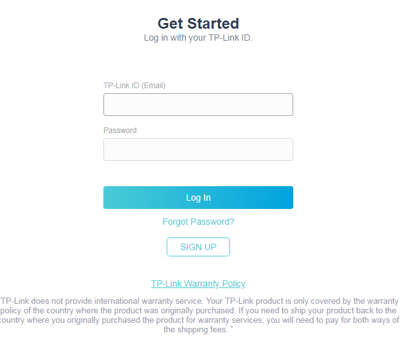
Step 1: Log into the Product Registration System: https://myproducts.tp-link.com/uk/login
*If you have not yet created a TP-Link ID click here.
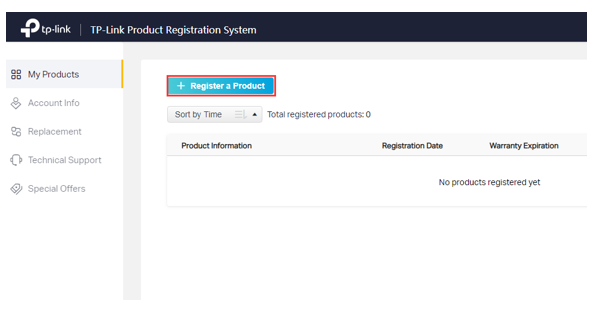
Step 2: Click on Register a Product.
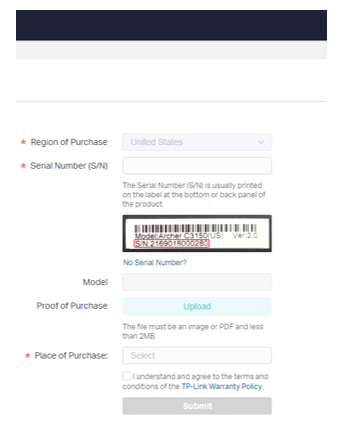
Step 3: Enter the serial number and place of purchase in the registration form, the product model will populate automatically. If you have proof of purchase, upload it during this step, this allows you to enter a purchase date as well. Check the box to confirm you understand and agree to the terms and conditions of the TP-Link Warranty Policy, then click Submit.
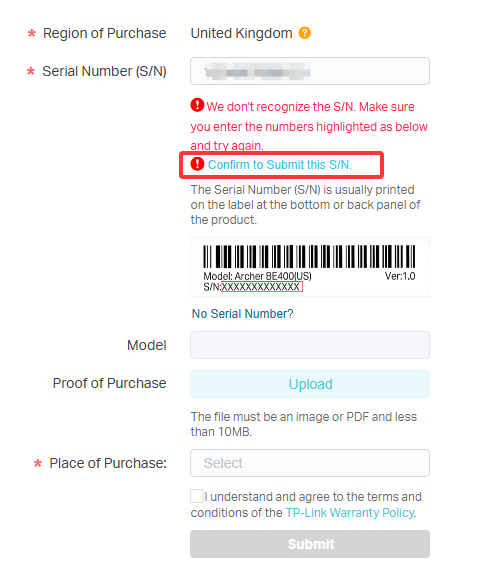
- If you see the error “We don’t recognize the S/N”, make sure the product was purchased from an authorized TP-Link reseller in the United Kindom and that the serial number is entered correctly. Once confirmed, click Confirm to Submit this S/N and continue registration.
- If your product does not have a serial number, such as the USB adapter, click No Serial Number? Then enter the product model, upload proof of purchase, select the place of purchase, enter the purchase date, and click Submit.
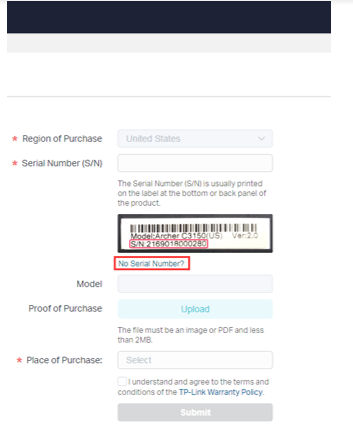
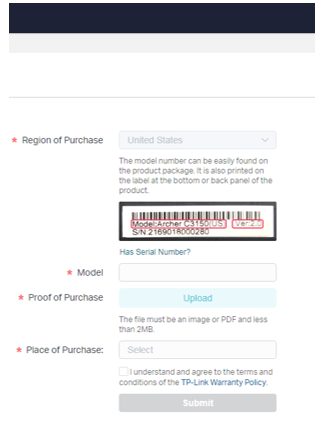
To view your products, go to the My Products page
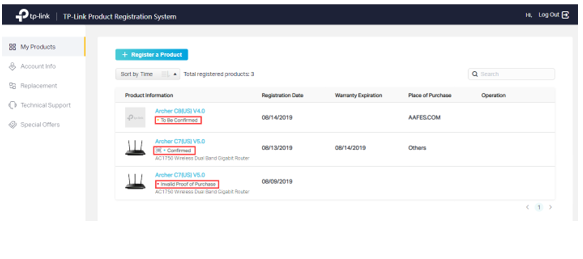
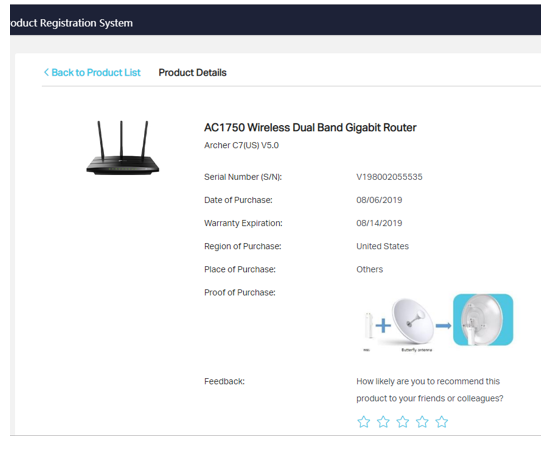
To view more details about a specific product, click on the blue color model number under ‘My Products’. Product Details will be listed here.
Related FAQs
- How to Find the Serial Number (S/N) on Your TP-Link Device
- How to set up the Mac OS to obtain an IP address automatically
- What should I do if I don’t receive the verification email for TP-Link ID registration or password reset?
- Getting to Know the New TP-Link Registration System
- How to Check Status of a Replacement on the TP-Link Registration System
- How to Create a TP-Link Account (Product Registration System)
Looking For More
Is this faq useful?
Your feedback helps improve this site.
What’s your concern with this article?
- Dissatisfied with product
- Too Complicated
- Confusing Title
- Does not apply to me
- Too Vague
- Other
Thank you
We appreciate your feedback.
Click here to contact TP-Link technical support.
Recommend Products

This Article Applies to:
- ER603WP-4G-Outdoor
- ER701-5G-Outdoor
- ER703WP-4G-Outdoor
- ER706W-4G
- ER706WP-4G
- Archer MR200
- Archer MR500
- Archer MR505
- Archer MR515
- Archer MR600
- Archer MX700
- Archer NX200
- Archer NX210
- Archer NX500
- Archer NX500-Outdoor
- Archer NX505
- Archer NX600
- TL-MR100
- TL-MR100-Outdoor
- TL-MR100P
- TL-MR105
- TL-MR108
- TL-MR3020
- TL-MR6400
- TL-MR6500v
- OJB-100
- SG2005P-PD
- SG2008
- SG2008P
- SG2016P
- SG2206MP
- SG2210MP
- SG2210P
- SG2218
- SG2218P
- SG2428LP
- SG2428P
- SG2452LP
- SG3210
- SG3428
- SG3428MP
- SG3452
- SG3452P
- SX3206HPP
- SX3832
- SX3832MPP
- SG3428X
- SG3428XMP
- SG3428XMPP
- SG3452X
- SG3452XMPP
- SG3452XP
- SG5428X
- SG5428XMPP
- SG5452X
- SG5452XMPP
- SG6428X
- SG6428XHP
- SG6654X
- SG6654XHP
- TL-WA1201
- TL-WA1801
- TL-WA3001
- TL-WA801N
- SG2210XMP-M2
- SG3210XHP-M2
- SG3218XP-M2
- SG3428X-M2
- SG3428XPP-M2
- MC210CS
- TL-FC111A-20
- TL-FC111B-20
- VJB-240
- VJB-300
- VJB-305
- VMB-350
- SG3428XF
- SG5428XF
- SX3008F
- SX3016F
- SX3032F
- ES205G
- ES205GP
- ES206GP
- ES206X-M2
- ES206XPP-M2
- ES208G
- ES208GP
- ES210GMP
- ES210GP
- ES210X-M2
- ES210XPP-M2
- ES216G
- ES220GMP
- ES220GP
- ES224G
- ES228GMP
- ES228GP
- TL-ANT2408CL
- TL-ANT2409A
- TL-ANT2409CL
- TL-ANT2412D
- TL-ANT5819MS
- TL-ANT2409A
- TL-ANT2409CL
- TL-ANT2412D
- TL-ANT5819MS
- AC500
- CPE510
- EAP115
- EAP225
- CPE210
- CPE510
- CPE605
- CPE710
- InSight PTZ5425
- InSight S245
- InSight S245ZI
- InSight S285
- InSight S345
- InSight S345-4G
- InSight S345S
- InSight S345ZI
- InSight S355
- InSight S385
- InSight S385PI
- InSight S445
- InSight S445S
- InSight S445ZI
- InSight S455
- InSight S485
- InSight S485PI
- InSight S655I
- Tapo A100
- Tapo A201
- Tapo A202
- Tapo C100
- Tapo C110
- Tapo C113
- Tapo C120
- Tapo C125
- Tapo C200
- Tapo C200C
- Tapo C200P2
- Tapo C201
- Tapo C210
- Tapo C210P2
- Tapo C211
- Tapo C212
- Tapo C216
- Tapo C220
- Tapo C225
- Tapo C230
- Tapo C245D
- Tapo C246D
- Tapo C250
- Tapo C260
- Tapo C310
- Tapo C310P2
- Tapo C320WS
- Tapo C325WB
- Tapo C400
- Tapo C400 KIT
- Tapo C401
- Tapo C401 KIT
- Tapo C410
- Tapo C410 KIT
- Tapo C411
- Tapo C411 KIT
- Tapo C425
- Tapo C425 + Tapo A200
- Tapo C425 KIT
- Tapo C460
- Tapo C460 KIT
- Tapo C465
- Tapo C500
- Tapo C501GW
- Tapo C510W
- Tapo C520WS
- Tapo C530WS
- Tapo C545D
- Tapo C560WS
- Tapo C575D
- Tapo C610 KIT
- Tapo C615F KIT
- Tapo C615G KIT
- Tapo C630 KIT
- Tapo C645D KIT
- Tapo C660 KIT
- Tapo C675D KIT
- Tapo C710
- Tapo C720
- Tapo C840
- Tapo CA510
- Tapo D130
- Tapo D205
- Tapo D210
- Tapo D230S1
- Tapo D235
- TC40
- TC41
- TC42
- TC43
- TC46
- TC47
- TC50 KIT
- TC60
- TC65
- TC70
- TC71
- TC72
- TC74
- TC80
- TC80 KIT
- TC82
- TC82 KIT
- TC85
- TC85 KIT
- TC90 KIT
- TC92 KIT
- TC93D KIT
- TD20
- TD21
- TD23
- TD25
- S6500-24MPP4Y
- S6500-48MPP6Y
- S7500-24Y4C
- SX6632YF
- EAP115
- EAP225
- EAP610
- EAP620 HD
- EAP650
- EAP653
- EAP653 UR
- EAP660 HD
- EAP670
- EAP673
- EAP683 UR
- EAP723
- EAP727
- EAP772
- EAP773
- EAP787
- EAP115
- EAP225
- UE330C
- Omada Central
- Omada Central Essentials
- Omada Cloud Essentials
- Omada Cloud-Based Controller
- UA520C
- UE300
- UE300C
- UE306
- UH400
- UH700
- UH720
- Archer VR400
- Archer VR400
- Archer VX1800v
- TD-W9950
- TD-W9960
- Deco BE22
- Deco BE25
- Deco BE25-Outdoor
- Deco BE3600
- Deco BE65
- Deco BE65 Pro
- Deco BE65-5G
- Deco BE65-PoE
- Deco BE68
- Deco BE85
- Deco BE9300
- Deco E4
- Deco M4
- Deco P9
- Deco PX10
- Deco PX50
- Deco S4
- Deco S7
- Deco X10
- Deco X10-4G
- Deco X1500
- Deco X1500-5G
- Deco X3000-5G
- Deco X50
- Deco X50 Pro
- Deco X50-5G
- Deco X50-Outdoor
- Deco X50-PoE
- Deco X55
- Deco X60
- Deco X60F
- Deco XE75
- Deco XE75 Pro
- EAP650-Desktop
- TL-SG1016PE
- TL-SG105E
- TL-SG105PE
- TL-SG108PE
- TL-SG116E
- TL-SG1218MPE
- TL-SG1428PE
- TL-SG605E
- TL-SG608E
- TL-SG1016PE
- TL-SG105E
- TL-SG105PE
- TL-SG108PE
- TL-SG116E
- TL-SG1218MPE
- TL-SG605E
- EAP610GP-Desktop
- EAP615GP-Wall
- EAP625GP-Wall
- EAP650GP-Desktop
- OC200
- OC220
- OC300
- OC400
- Archer T5U Plus
- Archer TBE400U Plus
- Archer TBE400UH
- Archer TX30U Plus
- Archer TX35U Plus
- Archer TXE70U Plus
- IES206GPP
- IES208G
- IES210GPP
- ER7212PC
- TL-SG1005LP
- TL-R480T+
- TL-R480T+
- Pharos Control
- SL2428P
- T1600G-18TS
- MC100CM
- MC110CS
- MC111CS
- MC112CS
- MC200CM
- MC210CS
- MC220L
- MC420L
- TL-FC111A-20
- TL-FC111B-20
- M7000
- M7005
- M7010
- M7350
- M7352
- M7400
- M7450
- M7750
- M8550
- SM311LM
- SM311LS
- SM321A
- SM321A-2
- SM321B
- SM321B-2
- SM331T
- SM5110-LR
- SM5110-SR
- SM5220-1M
- SM5310-T
- SM6110-LR
- SM6110-SR
- SM6220-1M
- SM9110-SR4
- SM9220-1M
- TL-SM311LM
- TL-SM311LS
- TL-SM5220-3M
- APM-200
- MC1400
- PSM500-AC
- PSM550-AC
- PSM900-AC
- RackMount Kit-13
- RackMount Kit-19
- RackMount Kit-D226
- EAP110-Outdoor
- EAP225-Outdoor
- EAP603-Outdoor
- EAP610-Outdoor
- EAP625-Outdoor HD
- EAP650 D120-Outdoor
- EAP650 D30-Outdoor
- EAP650-Outdoor
- EAP668-Outdoor HD
- EAP725-Outdoor
- EAP225-Outdoor
- CPE210
- CPE510
- CPE605
- CPE710
- Pharos Control
- Archer T4E
- Archer TBE400E
- Archer TBE550E
- Archer TBE552E
- Archer TBE553E
- Archer TX10E
- Archer TX20E
- Archer TX3000E
- Archer TX55E
- Archer TXE72E
- Archer TXE75E
- TG-3468
- TX201
- TX301
- TX401
- TL-SF1005LP
- TL-SF1008P
- TL-SF1009P
- TL-SG1005P
- TL-SG1008P
- TL-SG105PE
- TL-SG108PE
- TL-SG1210MP
- TL-SG1210P
- TL-SG1218MPE
- TL-SL1218MP
- TL-SL1311MP
- MCRP100
- POE10E
- POE10R
- POE150S
- POE160S
- POE170S
- POE20E-Outdoor
- POE2412G
- POE260R
- POE260S
- POE370S
- POE380S
- POE4824G
- RP108GE
- PG2400P KIT
- PGW2440 KIT
- TL-PA4010 KIT
- TL-PA4010P KIT
- TL-PA7017 KIT
- TL-PA7017P KIT
- TL-PA7027P KIT
- TL-PA717 KIT
- TL-PA8010P KIT
- TL-PA8033P KIT
- TL-PA9020P KIT
- TL-WPA4220
- TL-WPA4220 KIT
- TL-WPA4220 TKIT
- TL-WPA4221 KIT
- TL-WPA7517 KIT
- TL-WPA7617
- TL-WPA7617 KIT
- TL-WPA7817 KIT
- TL-WPA8631P
- TL-WPA8631P KIT
- RE200
- RE220
- RE220BE
- RE225BE
- RE235BE
- RE300
- RE315
- RE330
- RE360
- RE405BE
- RE450
- RE500X
- RE505X
- RE550
- RE655BE
- RE700X
- RE705X
- RE705X-Outdoor
- RE715X
- RE815XE
- TL-WA850RE
- TL-WA854RE
- Tapo RVA105
- Tapo RVA110
- Tapo RVA202
- Tapo RVA210
- Tapo RVA301
- Tapo RVA310
- Tapo RVA411
- Tapo RVA450
- Tapo RVA520
- Tapo RVB102
- Tapo RV10 Lite
- Tapo RV10 Plus
- Tapo RV20 Max Plus
- Tapo RV30 Max
- Tapo RV30 Max Plus
- Tapo RV30C Mop
- Tapo RV50 Pro Omni
- LS1016G
- LS1024G
- LS106P
- LS1210P
- TL-SF1005D
- TL-SF1008D
- TL-SG1005D
- TL-SG1008D
- TL-SG105
- TL-SG105-M2
- TL-SG105S
- TL-SG108
- TL-SG108-M2
- TL-SG108S
- KL110
- Tapo L430C
- Tapo L430P
- Tapo L510B
- Tapo L510E
- Tapo L520E
- Tapo L530B
- Tapo L530BA
- Tapo L530E
- Tapo L530EA
- Tapo L535B
- Tapo L535E
- Tapo L630
- Tapo L900-10
- Tapo L900-5
- Tapo L920-5
- Tapo L930-5
- TL13E
- TL61-5
- Tapo H100
- Tapo H110
- Tapo H200
- Tapo H500
- Tapo P100
- Tapo P105
- Tapo P110
- Tapo P110M
- Tapo P304M
- TP11
- Tapo T100
- Tapo T110
- Tapo T30 KIT
- Tapo T300
- Tapo T310
- Tapo T315
- Tapo S110E
- Tapo S112
- Tapo S200B
- Tapo S200D
- Tapo S210
- Tapo S220
- KE100
- KE100 KIT
- KE110
- DR3220v-4G
- DR3650v
- DR3650v-4G
- Omada Software Controller
- VIGI App
- VIGI Cloud VMS
- VIGI Config Tool
- VIGI PC Client
- VIGI Security Manager
- VIGI VMS
- VIGI 180W Solar Mount
- VIGI PS30
- VIGI PS90
- VIGI Solar Panel 90W
- VIGI SP18090
- VIGI SP9030
- TL-WR1502X
- TL-WR1512X
- TL-WR3002X
- TL-WR3012X
- TL-WR3602BE
- TL-WR802N
- TL-WR902AC
- UH6120C
- UH9120C
- EH210
- EH310
- UB600
- UE302C
- UE310C
- UA430C
- UA430D
- UH3020C
- UH5020C
- UH7020C
- LS1005G
- LS1008G
- LS105G
- LS105GP
- LS108G
- LS108GP
- LS1210GP
- TL-SF1005D
- TL-SF1005LP
- TL-SF1005P
- TL-SF1006P
- TL-SF1008D
- TL-SF1008P
- TL-SF1009P
- TL-SF1016
- TL-SF1016D
- TL-SF1016DS
- TL-SF1024D
- TL-SF1024M
- TL-SG1005D
- TL-SG1005LP
- TL-SG1005P
- TL-SG1005P-PD
- TL-SG1008D
- TL-SG1008MP
- TL-SG1008P
- TL-SG1016
- TL-SG1016D
- TL-SG1024
- TL-SG1024D
- TL-SG1048
- TL-SG105
- TL-SG105-M2
- TL-SG105S
- TL-SG105S-M2
- TL-SG108
- TL-SG108-M2
- TL-SG108E
- TL-SG108S-M2
- TL-SG116
- TL-SG116P
- TL-SG1210MP
- TL-SG1210P
- TL-SG1210PP
- TL-SG1218MP
- TL-SL1218MP
- TL-SL1226P
- TL-SL1311MP
- TL-SL1311P
- TL-SX1008
- TL-SX105
- TL-SF1005D
- TL-SF1008D
- TL-SF1016
- TL-SF1016DS
- TL-SF1024D
- TL-SG1005D
- TL-SG1008D
- TL-SG105
- TL-SG108
- Archer VR1210v
- VIGI NVR1004H-4P
- VIGI NVR1008H
- VIGI NVR1008H-8MP
- VIGI NVR1016H
- VIGI NVR2008H-8MP
- VIGI NVR2016H
- VIGI NVR2016H-16MP
- VIGI NVR4032H
- VIGI NVR4064H
- EAP230-Wall
- EAP235-Wall
- EAP615-Wall
- EAP650-Wall
- EAP655-Wall
- EAP725-Wall
- EAP775-Wall
- EAP230-Wall
- EAP235-Wall
- EAP615-Wall
- EAP655-Wall
- Archer T2U
- Archer T2U Nano
- Archer T2U Plus
- Archer T2UB Nano
- Archer T2UH
- Archer T3U
- Archer T3U Nano
- Archer T3U Plus
- Archer TBE230U
- Archer TBE400U
- Archer TX10UB Nano
- Archer TX20U
- Archer TX20U Nano
- Archer TX20U Plus
- Archer TX20UH
- Archer TX23U
- Archer TX50U
- Archer TX50UH
- Archer TXE70U
- Archer TXE70UH
- TL-WN823N
- UB4A
- UB500
- UB500 Plus
- UB5A
- ER706W
- Archer AX12
- Archer AX18
- Archer AX53
- Archer AX55
- Archer AX58
- Archer AX72
- Archer AX73
- Archer AXE75
- Archer BE220
- Archer BE220W
- Archer BE3600
- Archer BE400
- Archer BE450
- Archer BE550
- Archer BE700
- Archer C50
- Archer C6
- Archer GE230
- Archer GE400
- Archer GE550
- Archer GE800
- Archer GXE75
- TL-WR841N
- ER605
- ER707-M2
- ER7206
- ER7412-M2
- ER8411
- Beam Bridge 5 UR KIT
- EAP100-Bridge KIT
- EAP211-Bridge KIT
- EAP215-Bridge KIT
- Flex Bridge 5
- Sector Bridge 5
- AC500

TP-Link Community
Still need help? Search for answers, ask questions, and get help from TP-Link experts and other users around the world.
This website uses cookies to improve website navigation, analyze online activities and have the best possible user experience on our website. You can object to the use of cookies at any time. You can find more information in our privacy policy .
Your Privacy Choices
This website uses cookies to improve website navigation, analyze online activities and have the best possible user experience on our website. You can object to the use of cookies at any time. You can find more information in our privacy policy .
These cookies are necessary for the website to function and cannot be deactivated in your systems.
TP-Link
accepted_local_switcher, tp_privacy_banner, tp_privacy_base, tp_privacy_marketing, tp_top-banner, tp_popup-bottom, tp_popup-center, tp_popup-right-middle, tp_popup-right-bottom, tp_productCategoryType
Youtube
id, VISITOR_INFO1_LIVE, LOGIN_INFO, SIDCC, SAPISID, APISID, SSID, SID, YSC, __Secure-1PSID, __Secure-1PAPISID, __Secure-1PSIDCC, __Secure-3PSID, __Secure-3PAPISID, __Secure-3PSIDCC, 1P_JAR, AEC, NID, OTZ
Analysis cookies enable us to analyze your activities on our website in order to improve and adapt the functionality of our website.
The marketing cookies can be set through our website by our advertising partners in order to create a profile of your interests and to show you relevant advertisements on other websites.
Google Analytics & Google Tag Manager
_gid, _ga_<container-id>, _ga, _gat_gtag_<container-id>
Google Ads & DoubleClick
test_cookie, _gcl_au
Meta Pixel
_fbp
Crazy Egg
cebsp_, _ce.s, _ce.clock_data, _ce.clock_event, cebs
lidc, AnalyticsSyncHistory, UserMatchHistory, bcookie, li_sugr, ln_or