
ดาวนโหลดสำหรับ Tapo C615F KIT
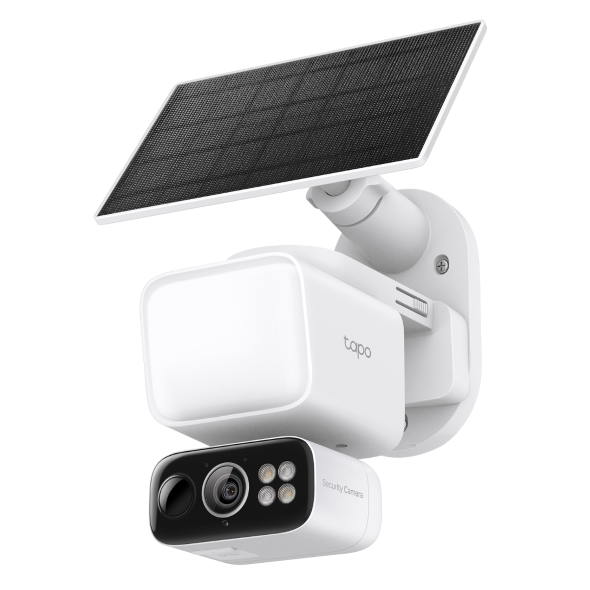 Solar-Powered Floodlight Pan/Tilt Security Camera Kit
วิดีโอการตั้งค่า
-
How to Set Up Your Solar-Powered Floodlight Pan/Tilt Security Camera Kit
Say goodbye to limitations with a wire-free design powered by high-efficiency solar charging and a customizable 800-lumen floodlight. Stay one step ahead with advanced features like 360° AI tracking, free person/pet/vehicle detection, and patrol mode for dynamic, all-around monitoring.
เพิ่มเติม พับเก็บ -
How to Mount Your Solar-Powered Floodlight Pan/Tilt Security Camera Kit
Say goodbye to limitations with a wire-free design powered by high-efficiency solar charging and a customizable 800-lumen floodlight. Stay one step ahead with advanced features like 360° AI tracking, free person/pet/vehicle detection, and patrol mode for dynamic, all-around monitoring.
เพิ่มเติม พับเก็บ
คำถามที่พบบ่อย
- How to Set Up Your Tapo Camera Using the Tapo App
- รายการกล้องที่รองรับฮับ Tapo H200/H500
- Set Privacy Zone for Tapo Camera and Doorbell
- How to check and improve the network connection stability of Tapo&Kasa smart devices
- How to Connect Tapo and Kasa Smart Devices to Google Home
- How to Factory Reset Your Tapo Camera: Two Methods
- ทำไมฉันถึงลงทะเบียนไม่ได้?
- จะค้นหาเวอร์ชั่นฮาร์ดแวร์บนอุปกรณ์ TP-Link ได้อย่างไร
- How to Find the Model Number of Your TP-Link Device
- Fail to configure Tapo Camera
- Tapo Care การยกเลิกและการขอคืนเงิน
- How to update or change the payment method for Tapo Care or Kasa Care
- วิธีเพิ่มกล้องใหม่เข้าไปในแผน Tapo Care ของฉัน
- What if I can’t find my Tapo camera on Tapo app?
- How to use Encrypt microSD Card Function on Tapo Camera
- How to fix no sound or audio quality issues on Tapo Camera/Doorbell
- What if I forget my TP-Link ID password for TP-Link Tapo/Kasa device
- ควรทำอย่างไรหากไม่ได้รับอีเมลเมื่อลงทะเบียนบัญชีระบบคลาวด์หรือรีเซ็ตรหัสผ่าน?
- How to make Tapo devices work with IFTTT
- Why do I need to give Local Network permission to TP-Link apps in iOS devices?
- What can I do if Tapo/Kasa Smart Devices fail to update the firmware?
- How to install and format SD card for Tapo camera
- What should I do if the SD card cannot be formatted/recognized?
- How to view camera SD card recordings on a computer
- How to edit Home and Away Mode for Tapo/Kasa Cameras and Doorbells on the Tapo app
- What should I do if I encounter issues while playing back videos from an SD card?
- How to configure Home feature and Room feature in Tapo app
- Why do I receive a "We Noticed a New Login" email?
- What should I do if Tapo/Kasa notifications are delayed or not working?
- How to cast TP-Link Camera/Doorbell to TV via Tapo Smart HomeBase
- General Questions about Tapo/Kasa Geofencing
- How to find serial number on TP-Link devices
- ทำไมฉันถึงไม่ได้รับรหัสยืนยันทาง SMS จากแอป Tapo
- ฉันจะเปิดใช้งานการจับภาพ 24/7 บน Battery Camera ได้อย่างไร?
- How to use Timed Panoramic Photography function in Tapo app
- What is Video Summary
- Cannot make my TP-Link smart devices work with Alexa
- How to use Alexa Snapshot with Tapo Cameras
- How to configure the Notification feature for the Tapo & Kasa devices on the Tapo app
- How to fix a flickering issue on Live View of the Tapo Camera
- How to set up routines for Tapo devices via Alexa app
- How to stream Tapo / Kasa Camera on Google device
- วิธีการสร้างแผนที่ 3 มิติในแอป Tapo สำหรับ Pad / Tablet
- The most frequent asked questions about TP-Link Sales
- How can I delete my TP-Link cloud account?
- How can I conduct 3DS authentication when purchasing Tapo Care
- How to unlink third-party accounts from your TP-Link ID
- How to verify if it’s the hardware issue of TP-Link smart home
- ทำไม TP-Link ต้องการที่อยู่อีเมลของฉัน
- Cannot make TP-Link smart devices work with Google Home
- Tapo/Kasa Devices are showing offline after changing or resetting the router.
- TP-Link ID คืออะไร