

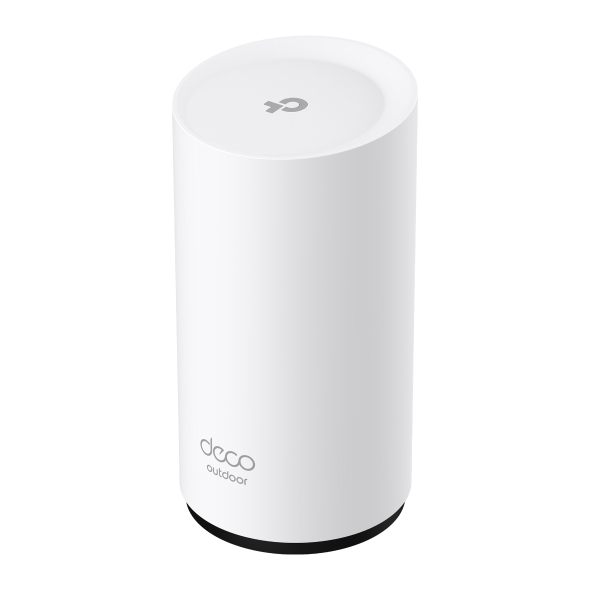


Deco BE25-Outdoor
Router WiFi 7 Mesh Para Exterior/Interior BE3600
- WiFi Dual Band de 3,6 Gbps – 2882 Mbps (5 GHz) + 688 Mbps (2,4 GHz).†
- Ligações com fios de 2,5 Gbps – As portas de 2×2,5 Gbps garantem a máxima flexibilidade e um rendimento melhorado.§
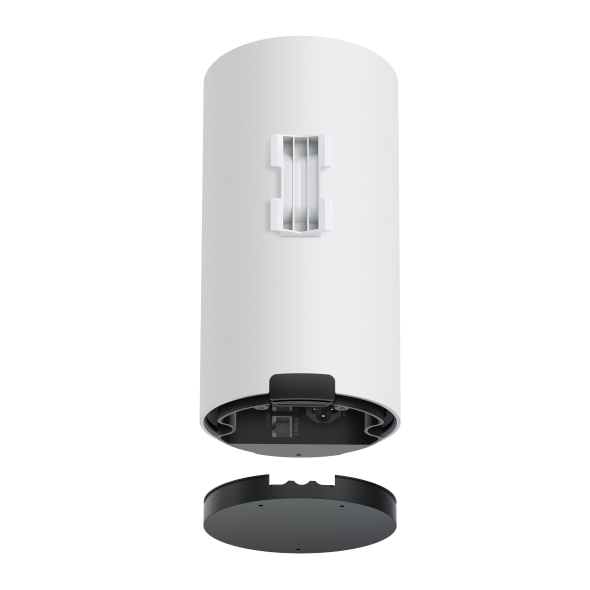
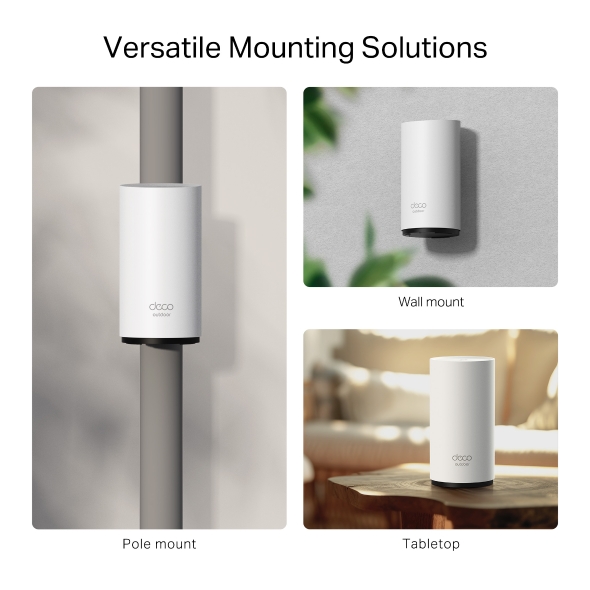
- Várias opções de montagem - Montagem em poste, montagem na parede e montagem em mesa
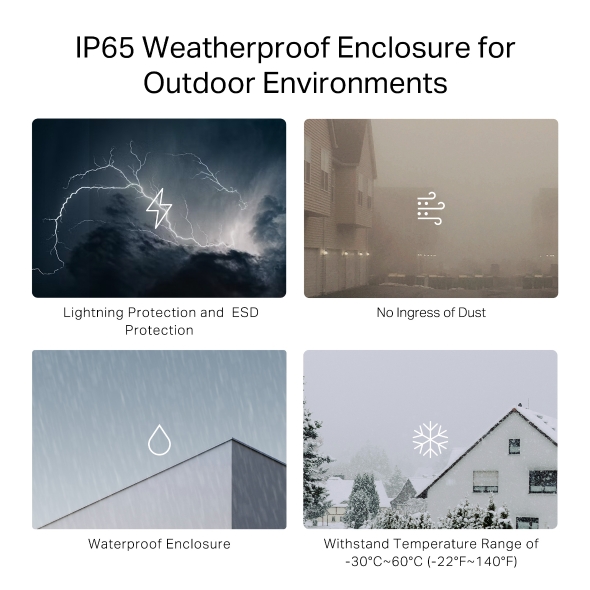
- Funcionamento ao ar livre - Resistência à poeira e à água IP65 líder do setor*
- Alimentação por Ethernet - Fornece conexão de dados e energia elétrica com um único cabo
- Backhaul combinado sem fios e com fios – Liga um backhaul sem fios e com fios a cada unidade simultaneamente para melhorar o rendimento geral e reduzir a latência.
- Operação Multi-Link (MLO) – Envia e recebe dados simultaneamente em diferentes bandas e canais para aumentar o rendimento, reduzir a latência e melhorar a fiabilidade.△
- Roaming contínuo impulsionado por IA – Forma uma rede unificada com AI-Roaming integrado, criando a solução Wi-Fi ideal para a sua casa.
- TP-Link HomeShield – Oferece proteção de rede abrangente, controles parentais robustos e segurança IoT em tempo real.**
- Compatibilidade universal – Compatível com todas as gerações de WiFi e funciona com qualquer provedor de serviços de Internet (ISP) e modem.☆
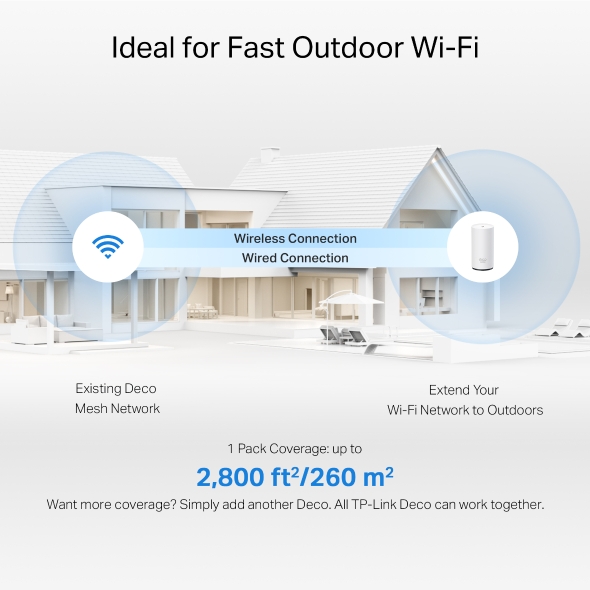
Wi-Fi de alta velocidade para Mesh exterior
Sistema Mesh WiFi 7 para toda a casa BE3600
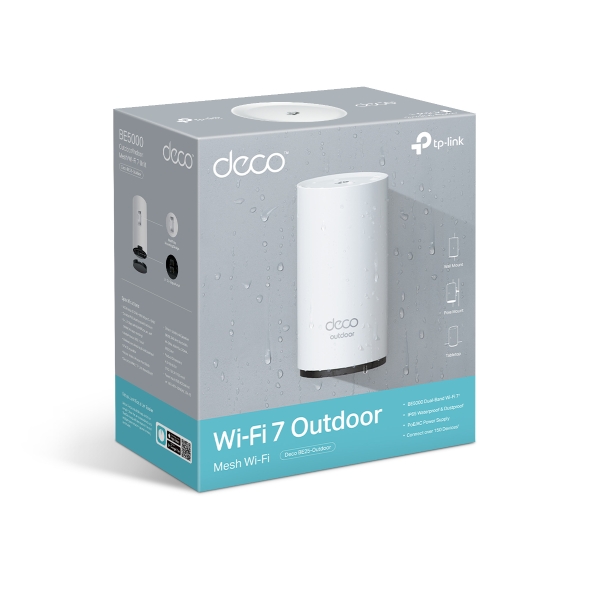
Deco BE25-Outdoor


WiFi 7 Dual-Band
Velocidades até 3600 Mbps
IP65
À prova de água e poeira
Um Mesh WiFi exterior Multi-Gigabit rápido
Suporta alimentação PoE/AC
Ligue mais de
150 dispositivos
Backhaul combinado com e sem fios
TP-Link HomeShield
Operação Multi-Link
4K-QAM
Roaming AI contínuo
WiFi 7, WiFi como nunca antes
O WiFi 7 chegou com um desempenho de cortar a respiração - oferecendo maior throughput, menor latência, maior resistência a interferências e maior eficiência. Junte-se à liga dos profissionais e experimente o desempenho puro da próxima geração de WiFi.
Throughput extremamente elevado
Velocidade WiFi 7 extremamente rápida até 3.6 Gbps
O mais recente 4K-QAM aumenta as velocidades Wi-Fi até 3.6 Gbps.† — ideal para tarefas que exigem muita largura de banda, como cloud gaming e vídeo 8K. As famílias podem desfrutar de transmissões ao vivo imersivas com vídeo perfeito e áudio claro sem buffering.
Mesh para vários cenários ao ar livre
O Deco BE25-Outdoor é adequado para vários cenários de utilização ao ar livre, incluindo piscinas, cafés e jardins. Pode fornecer Wi-Fi conveniente e de alta velocidade para dispositivos exteriores, como câmaras exteriores, visualização ao ar livre e clientes exteriores.
Soluções Wi-Fi para utilização ao ar livre
Antena inteligente potente anti-interferência
Concebidas para combater eficazmente interferências de estações base exteriores, as nossas antenas inteligentes detetam automaticamente interrupções de sinal, garantindo uma experiência WiFi ininterrupta onde quer que esteja.
Estrutura resistente às intempéries IP65 para
ambientes exteriores
Classificada como IP65 nos testes de Proteção contra Intrusão, uma estrutura resistente às intempéries protege o Deco BE25-Outdoor contra condições exteriores adversas, como entrada de poeiras, choque, vibração, humidade e muito mais. *
Soluções de montagem versáteis
Os nossos kits de montagem são flexíveis e permitem instalação em poste, parede e mesa, tanto no interior como no exterior.
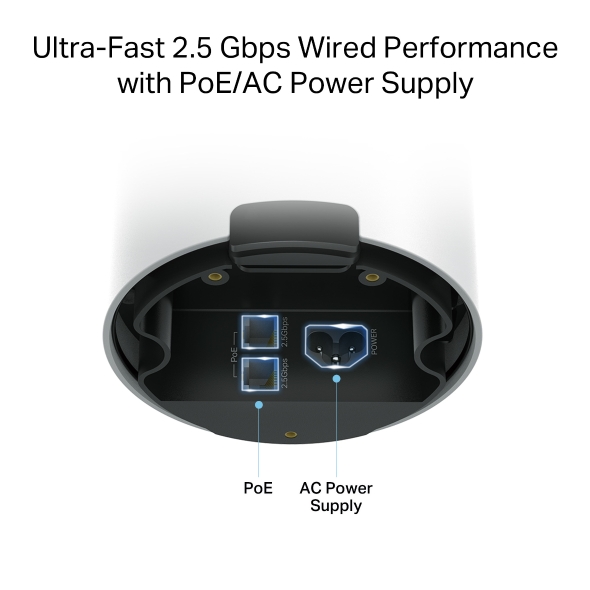
Desempenho por cabo ultra-rápido de 2.5 Gbps com alimentação PoE/AC
O Deco BE25-Outdoor suporta PoE (Power over Ethernet), bem como alimentação AC, permitindo operar em ambientes exteriores complexos. Duas portas de 2.5 Gbps com PoE ajudam a eliminar cabos e adaptadores de energia extra. Ideal para famílias e agregados domésticos ocupados.§
2,5× mais rápido
do que portas Gigabit
*Entrada de alimentação: IEEE 802.3at PoE ou 100-240V~50/60Hz 0.5A AC

Segurança inteligente para uma vida inteligente
O HomeShield é um serviço integrado, que disponibiliza um conjunto de serviços para proteger todos os seus dispositivos de forma abrangente, com várias funcionalidades em casa ou em movimento. Com o HomeShield, experiências de internet mais seguras trazem mais felicidade à sua vida inteligente.**
App KidShield
App Segurança dos Dispositivos
-
Basta configurar o seu gateway e obter segurança de rede para toda a casa. O HomeShield analisa a sua rede ao digitalizar e identificar potenciais riscos, travando-os antes que prejudiquem a sua rede.*
-
Os Controlos parentais protegem as crianças, ajudando-as a manter hábitos digitais saudáveis. Os pais podem definir bloqueio de apps, filtragem web, restrições do YouTube, SafeSearch e limites de tempo online para manter as crianças seguras enquanto se divertem online.*
-
App KidShield
App Segurança dos Dispositivos
Os dispositivos mantêm-se seguros em qualquer lugar com a app de segurança dos dispositivos. E através do KidShield, os pais podem monitorizar as localizações dos seus filhos. Assim, as crianças mantêm-se digitalmente protegidas mesmo fora de casa.*
Compatível com Cliente e Servidor VPN
Permite que dispositivos da sua rede doméstica acedam a servidores VPN remotos sem necessidade de instalar software VPN em cada dispositivo. Pode criar diferentes tipos de ligação VPN, incluindo OpenVPN, PPTP e VPN L2TP/IPSec. Além disso, o Deco pode executar simultaneamente ligações VPN e internet normal, oferecendo segurança e flexibilidade.
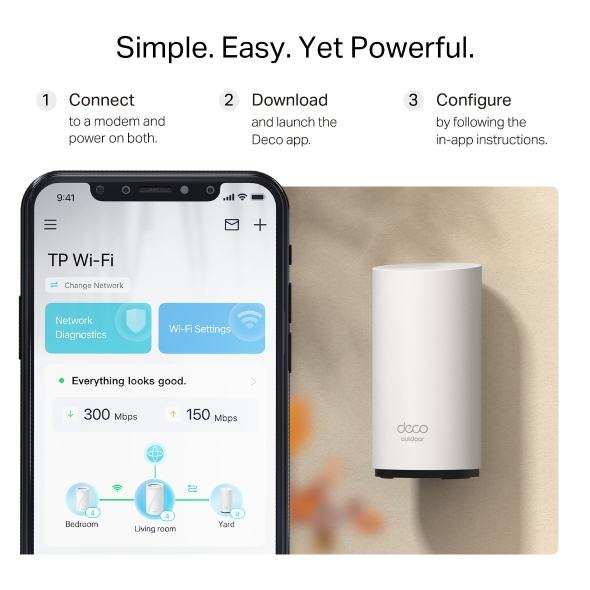
Simples. Fácil. E poderoso.
Configure e gira a sua rede a qualquer hora e em qualquer lugar na aplicação TP-Link Deco. Em apenas três passos simples, toda a sua casa ficará coberta com WiFi forte e fiável.
-
1 LIGUE
a um modem e ligue ambos. -
2 DESCARREGUE
e abra a aplicação Deco. -
3 CONFIGURE
seguindo as instruções na aplicação.
Gestão fácil
Gira o seu WiFi em casa ou fora através da aplicação Deco. Veja todos os dispositivos ligados, priorize os seus e configure uma rede de convidados.
Controlo por voz
Utilize um dispositivo compatível com Amazon Alexa ou Google Assistant para controlar o Deco BE25-Outdoor apenas com a sua voz.
Todos os Decos funcionam juntos
O Deco BE25-Outdoor é compatível com todos os outros modelos Deco para formar uma rede Mesh. Expanda a cobertura Mesh WiFi a qualquer momento adicionando mais unidades Deco.
-
Cave

-
Quintal

-
Garagem

O verdadeiro Roaming sem falhas
As unidades Deco trabalham em conjunto para formar uma rede unificada, com um único nome de rede. O seu telefone ou tablet liga-se automaticamente ao Deco mais rápido, à medida que se desloca pela sua casa. A transição demora menos de 0,3 segundos e é suave e impercetível, criando uma verdadeiramente experiência online sem falhas.
-
Seleção de Percurso Adaptável
A Tecnologia Mesh TP-Link escolhe de forma dinâmica a melhor rota e banda para as suas ligações e aplicações, garantindo um Wi-Fi rápido, independentemente do local onde se encontra em casa.
-
Self-Healing
Se um Deco tiver um problema, o sistema reencaminhará automaticamente os dados através dos outros Decos para se certificar de que permanece online.
Wi-Fi + Powerline
A técnologia PowerLine utilizam o circuito elétrico da sua casa para ligar a Decos, contornando até mesmo as paredes e tetos mais espessos.
A banda dupla Wi-Fi e a Powerline trabalham em conjunto para transmitir dados entre as unidades Deco. A velocidade total da rede é consideravelmente melhorada quando comparada com a utilização exclusiva de Wi-Fi.
- Wi-Fi + Powerline:
- Hybrid Wi-Fi System Boosted Speeds
- Wi-Fi Mesh Convencional:
- Sistema Wi-Fi Padrão
- Powerline
- Nota:Wi-Fi + Powerline é só para o Deco P9
Mesh IoT
Ao contrário dos hubs inteligentes tradicionais, a Tecnologia TP-Link Mesh fornece cobertura completa de IoT doméstica com Wi-Fi, Bluetooth e Zigbee integrados num único sistema. Desfrute da magia da sua casa inteligente em todas as divisões com a Tecnologia Mesh TP-Link. Diga adeus a inúmeros hubs.
- - - - Wi-Fi
- - - - Zigbee
- - - - Bluetooth
Wi-Fi 6 Mesh
Com tecnologia Wi-Fi 6,
O sistema Wi-Fi mesh casa inteira foi concebido para proporcionar um enorme impulso na cobertura, velocidade, e capacidade total. Entre no mais recente Wi-Fi mesh para desfrutar da futura rede que carrega mais depressa e que se liga mais.
-
Cobertura mais ampla
-
Mais ligações
-
Velocidade Wi-Fi 6 mais rápida
Mesh Orientado por IA
Equipado com tecnologia Mesh AI, o Deco aprende automaticamente e melhora-se a si próprio através da experiência.
Isto proporciona o Wi-Fi mesh ideal exclusivo para a sua casa e ambiente de rede.
Ande pela sua casa e desfrute de uma transmissão sem falhas à velocidade mais rápida possível.
Porquê a tecnologia mesh TP-Link
uma solução líder do sector?
| Comparativo | |||
| Modelo | TP-Link Deco | Netgear Orbi | Google WiFi |
| Wireless Backhaul | Tri-Band(2.4G+5G_1+5G_2)¹ | Single-Band(5G_1 Only) | Dual-Band(2.4G+5G) |
| Protocolo Mesh Suportado | IEEE 802.11k/v/r | IEEE 802.11k/v | IEEE 802.11s |
| Verdadeiro Roaming sem Falhas | ✔ | × | × |
| APS (Seleção de Caminho adaptável) | ✔ | × | ✔ |
| IoT Mesh | ✔² | × | × |
| Mesh Wi-Fi 6 | ✔5 | ✔ | × |
| Mesh movido por IA | ✔6 | × | × |
| Powerline Backhaul | ✔³ | × | × |
| Wireless + Largura de banda Powerline | ✔⁴ | × | × |
| Band Steering | ✔ | ✔ | ✔ |
| AP Steering | ✔ | ✔ | ✔ |
| Auto-Regeneração | ✔ | ✔ | ✔ |
| Notas: 1&2 Apenas para Deco M9 Plus;5 para Deco X20;Deco X90;6 apenas para Deco X90. | |||
Modelos Deco
Deco
-
 Brevemente
Deco X50-PoE
AX3000 Whole Home Mesh WiFi 6 System com PoE
-
 Novo
NovoDeco BE65
BE9300 Sistema Mesh Wi-Fi 7 para Toda a Casa
-
 Novo
NovoDeco X50-5G
DECO AX3000 Sistema Mesh WiFi 6 Gateway 5G
-

Deco S7
Sistema Wi-Fi Mesh AC1900
-
_Overview_normal_20211225093625r.png)
Deco X50
Sistema Mesh AX3000 WiFi 6 para a Casa Completa
-
 Brevemente
Deco XE200
AXE11000 Whole Home Mesh Wi-Fi 6E System
-
 Novo
NovoDeco XE75
Sistema Wi-Fi 6E AXE5400 Tri-Band Mesh
-
_normal_20230201014412u.png) Hot Buys
Hot BuysDeco M4
AC1200 Whole Home Mesh Wi-Fi System
Gestão da Rede Deco na Ponta dos Seus Dedos!
A aplicação Deco é a forma mais fácil de configurar, gerir e monitorizar o seu Sistema Wi-Fi Mesh para Toda a Casa através dos seus equipamentos iOS ou Android.
A Configuração Ficou Muito Mais Fácil
Retire o Deco da caixa, instale a aplicação e depois basta seguir as indicações no ecrã. A aplicação Deco encarregar-se-á do resto e colocará a sua rede a funcionar em minutos.
-
Ligue o Deco ao seu Router/Modom por cabo e ligue os dois equipamentos
-
Faça o download e inicie a aplicação Deco
-
Siga as instruções para configurar o seu sistema Deco.
Gestão Simples
Deco torna mais fácil gerir o seu Wi-Fi a partir de qualquer lugar, quer esteja no sofá, no trabalho, ou em qualquer outro lucal.
-
Painel de Gestão Simples
Veja o funcionamento da sua rede, verifique os equipamentos ligados e obtenha todas as características que o seu router oferece.
-
Múltiplos Decos, Uma Aplicação
A aplicação Deco gere todas as suas redes Deco, e todos os equipamentos ligados ao seu Wi-Fi Deco.
-
Verifique os Equipamentos Ligados
Veja uma lista dos equipamentos ligados, com a capacidade de fazer uma pausa e retomar o acesso à Internet, testar a velocidade da Internet e estabelecer prioridades ou bloquear equipamentos.
-
Gestão Remota
Controle remotamente a sua rede com um toque no seu telefone - onde quer que esteja.
Robustos Controlos Parentais
Controlos parentais simples e intuitivos, fazem com que seja fácil manter os seus filhos seguros enquanto estão online.
-
Crie facilmente um perfil para cada membro da família e defina limites de tempo personalizados e permissões de tempo online. Atribua equipamentos a perfis de modo a que as regras se extendam aos equipamentos individuais, bem como aos membros da família.
-
Mantenha a sua família segura online através de definições de segurança com um só toque, que bloqueiam conteúdos com base na sua faixa etária.
-
Estabeleça limites para o tempo que cada pessoa da sua família pode passar na internet.
-
Com os relatórios, pode verificar que sites os seus filhos visitam e quanto tempo passam em cada um deles. É uma excelente maneira de saber que os seus filhos estão seguros enquanto se estão a divertir online.
-
Faça uma pausa do Wi-Fi para jantar e noites de jogos em família. Basta tocar num botão para suspender o acesso à Internet para todos na sua casa.
Uma Aplicação Intuitiva Cheia de Funcionalidades
Resumo da Utilização Mensal
Veja todos os meses uma lista completa dos detalhes da sua rede, incluindo utilização, conteúdos bloqueados, ameaças à segurança e muito mais.
Domótica
Facilite a sua vida com poderosas ferramentas de automação e controlo de voz.
*Atualmente apenas para Deco M9 Plus
Atalhos Flexíveis
Controlo abrangente todos os equipamentos IoT no Smartphone ou Tablet com apenas um clique.
*Atualmente apenas para Deco M9 Plus
Proteja a Sua Rede
O Antivírus incorporado ajuda-o a defender-se contra websites maliciosos e acesso à internet mais seguro.
*Atualmente apenas para Deco M9 Plus, Deco P7 e Deco M5
Priorize os Seus Equipamentos
Com a app terá poder para prioritizar equipamentos para obterem maiores velocidades e maior largura de banda ou definir essa mesma prioridade para uma duração de tempo específica.
Definir Prioridades para Aplicações
Defina maior largura de banda para as atividades mais importantes para si com controlos simples.
*Atualmente apenas para Deco M9 Plus, Deco P7 e Deco M5
Partilhar Wi-Fi com Amigos
Partilhe com os seus convidados a informação da rede Wi-Fi Guest de forma simplificada
Verifique a Velocidade
Faça um teste de velocidade para garantir que está a receber as velocidades de internet que está a pagar.
Veja todos os equipamentos na sua rede e a largura de banda que estão a usar.
O Nosso Suporte Apoia-o Sempre
Tem questões sobre Deco? A ajuda está a apenas um clique de distância. Encontre as respostas na aplicação Deco e não hesite em contactar-nos apenas com um simples clique.
Suporte Técnico| Standards and Protocols | Wi-Fi 7IEEE 802.11be/ax/ac/n/a 5 GHzIEEE 802.11be/ax/n/b/g 2.4 GHz |
|---|---|
| WiFi Speeds | BE50005 GHz: 4324 Mbps (802.11be)2.4 GHz: 688 Mbps (802.11be) |
| WiFi Range | Broader Whole Home Coverage TP-Link Mesh TechnologyOptional Ethernet backhaul work together to link Deco units to provide seamless coverageAI-Driven MeshIntelligently learns the network environment to provide ideal Wi-Fi unique to your home4× High-Performance Antennas (Internal)Multiple antennas form a signal-boosting array to cover more directions and large areas |
| WiFi Capacity | Very High Dual-BandDistribute devices to different bands for optimal performanceOFDMASimultaneously communicates with multiple WiFi 7 clients4 StreamsMore than enough bandwidth for connected devices |
| Working Modes | Router ModeAccess Point Mode |
| Advanced Features | • Multi-Link Operation (MLO)• 240 MHz Channel• 4K-QAM• Multi-RUs• Works with Alexa and Google Assistant |
| Network Security | SPI FirewallAccess ControlHomeShield Security Real-Time IoT ProtectionMalicious Site BlockerIntrusion Prevention SystemDDoS Attack PreventionHome Network Scanner |
|---|---|
| Guest Network | 1× 5 GHz Guest Network1× 2.4 GHz Guest Network Effective TimeBandwidth Control |
| VPN Server | • OpenVPN Server• PPTP VPN Server• L2TP/IPSec VPN Server |
| VPN Client | • OpenVPN Client• PPTP VPN Client• L2TP/IPSec VPN Client |
| WiFi Encryption | WPA-Personal WPA2-Personal WPA3-Personal |
| Ethernet Ports | • 2× 2.5 Gbps(PoE and WAN/LAN auto-sensing) |
|---|---|
| Buttons | 1× Reset Button1× WPS |
| Power | Power Input IEEE 802.3at PoE or 100-240V~50/60Hz 0.5A AC |
| Advanced Features | • Reboot Schedule• Tapo/Kasa Onboarding• IoT network & Device Isolation• Static Routing Function• Node/Band Connection Preference |
|---|---|
| Protocols | IPv4 IPv6 |
| Service Kits | HomeShieldLearn More> |
| Parental Controls | HomeShield Parental Controls Youtube RestrictionSafeSearchCustom ProfilesProfessional Content Filter LibraryFamily TimeBedtimeOff TimeTime RewardsFamily Online Time RankingPause the InternetWeekly and Monthly Reports |
| WAN Types | Dynamic IPStatic IPPPPoEPPTPL2TP |
| Quality of Service | HomeShield QoS QoS by Device |
| Cloud Service | OTA Firmware UpgradeTP-Link ID DDNS |
| NAT Forwarding | Port Forwarding UPnP |
| IPTV | IGMP ProxyIGMP SnoopingBridge Tag VLAN |
| DHCP | Address ReservationDHCP Client ListServer |
| DDNS | TP-Link |
| Management Features | Deco App |
| Network Services Enabled by Default | Web Server Manage and configure device through web (HTTP/HTTPS)• Port: 80/443 Protocol: TCP DNS DNS• Port: 53 Protocol: TCP & UDP DHCP Server IP address assignment (DHCP)• Port: 67 Protocol: UDP App management Manage and configure device through app• Port: 22 Protocol: TCP• Port: 20001 Protocol: TCP• Port: 30001 Protocol: TCP• Port: 20002 Protocol: UDP |
|---|---|
| Dimensões (L x P x A) | 4.3 × 4.8 × 8.5 in (110 × 121.3 × 215.5 mm) |
|---|---|
| Package Content | Deco BE25-Outdoor Unit1 Deco BE25-Outdoor unit1 RJ45 Ethernet cable1 Power adapter1 Installation Guide1 Wall/Pole Mounting Kit (Pole Mounting Strap, Plastic Wall Anchors, Self-tapping Screws ) |
| Certificações | CE, FCC, RoHS |
|---|---|
| Temperatura e Humidade | Operating Temperature: -30°C~60°C (-22 °F~140 °F)Operating Humidity: 10%~90% RHStorage Humidity: 5%~90% RH |
†As taxas máximas de sinal sem fios são as taxas físicas derivadas das especificações da norma IEEE 802.11. A ligação a mais de 150 dispositivos baseia-se em dados de testes laboratoriais, que analisaram as ligações de diferentes dispositivos nas bandas de 5 GHz e 2,4 GHz simultaneamente. Estes dispositivos simularam um cenário doméstico típico, executando aplicações simultâneas na mesma sala, incluindo vídeo 4K, vídeo 1080p, vídeo 720p, download de ficheiros, navegação na Web, câmaras IP e outros dispositivos IoT. A taxa de transferência de dados sem fios real, a cobertura sem fios e os dispositivos conectados não são garantidos e variam de acordo com fatores do provedor de serviços de Internet, condições da rede, limitações do cliente e fatores ambientais, incluindo materiais de construção, obstáculos, volume e densidade do tráfego e localização do cliente.
△A utilização de Wi-Fi 7 (802.11be), Wi-Fi 6 (802.11ax) e funcionalidades que incluem Multi-Link Operation (MLO), 4K-QAM, Multi-RUs, OFDMA, MU-MIMO e BSS Color requer que os clientes também suportem as funcionalidades correspondentes.
§Velocidades de Internet de 2,5 Gbps requerem planos de serviço e equipamentos compatíveis. Todas as portas WAN/LAN funcionarão como portas WAN ou LAN. Apenas uma porta pode funcionar como porta WAN de cada vez.
*A proteção contra raios e descargas eletrostáticas pode ser obtida através da configuração adequada do produto, ligação à terra e blindagem dos cabos. Consulte o manual de instruções e um profissional de TI para obter ajuda na configuração deste produto.
**O HomeShield inclui funcionalidades básicas e avançadas. As funcionalidades avançadas requerem uma subscrição paga. Para mais detalhes, visite tp-link.com/homeshield. Algumas funcionalidades estão em desenvolvimento e serão suportadas com atualizações de software subsequentes.
☆As gerações WiFi representam o padrão sem fios IEEE 802.11 a/b/g/n/ac/ax/be. Os utilizadores podem necessitar de um modem adicional compatível com o seu fornecedor de serviços de Internet para obter acesso à Internet.
A velocidade real da rede pode ser limitada pela taxa da porta Ethernet WAN ou LAN do produto, pela taxa suportada pelo cabo de rede, por fatores do provedor de serviços de Internet e por outras condições ambientais.
Este Deco pode não suportar todos os recursos obrigatórios, conforme ratificado na especificação IEEE 802.11be.
Podem ser necessárias atualizações de software adicionais para a disponibilidade dos recursos.
Google e Google Home são marcas comerciais da Google LLC.