
¿Cómo agregar una red Deco nueva a través de la app Deco?
Nota: No se recomienda agregar más de 10 unidades Deco en una misma red Deco.
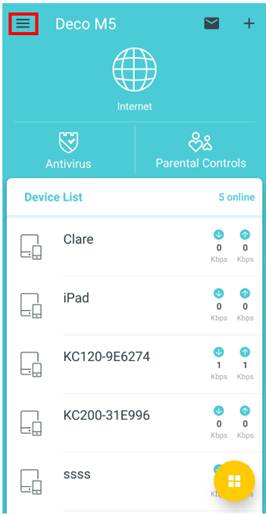
1. Inicie la app Deco y pulse en el ícono ≡ ubicado en la parte superior izquierda.
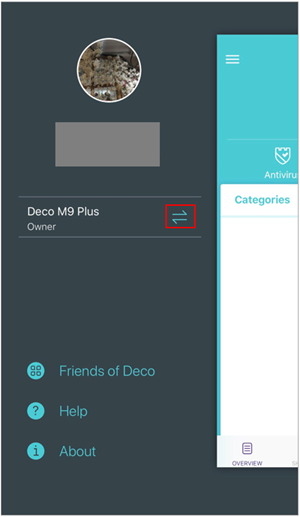
2. Pulse sobre las flechas.
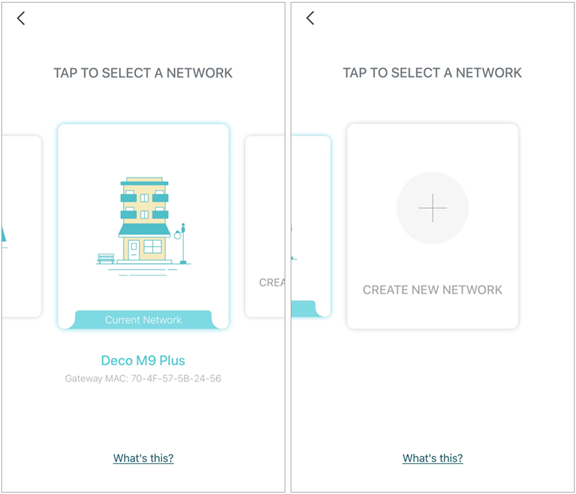
3. Deslice a la izquierda y pulse sobre CREATE NEW NETWORK.
 4. Siga las instrucciones paso a paso hasta finalizar la configuración.
O siga las intrucciones que se indican aquí.
Looking For More
¿Es útil esta pregunta frecuente?
Sus comentarios nos ayudan a mejorar este sitio.

-Flarge1560310831908gnormal_1587022111972i.jpg)


TP-Link Community
Still need help? Search for answers, ask questions, and get help from TP-Link experts and other users around the world.