
Download für Archer GE400
IMPORTANT:
Model and hardware version availability varies by region. Please refer to your TP-Link regional website to determine product availability.
- Product Overview
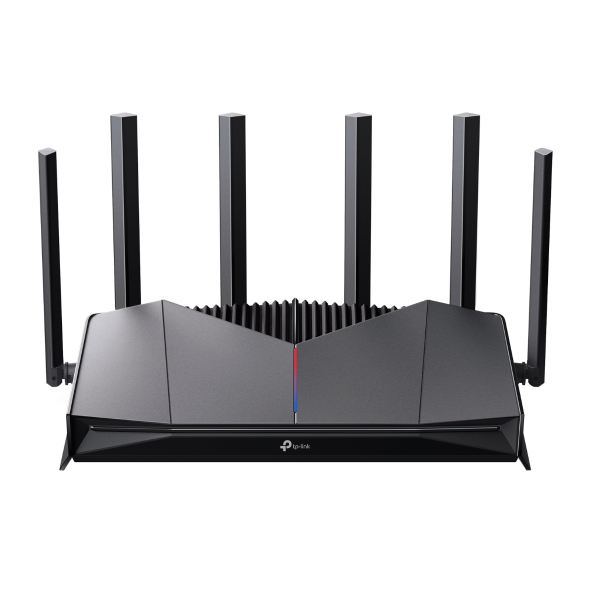 BE6500 Dual-Band Wi-Fi 7 Gaming Router
Setup Video
-
TP Link Gaming Router Unboxing and Setup on the Tether APP
This Video will use GE230 as an example to show you how to set up a TP-Link gaming router on the Tether app. It is simple and convenient to set up and use due to the intuitive Tether app. Upgrade your battle station with the TP-Link Gaming Router series. Featuring ultra-fast Multi-Gigabit ports and intelligent Game QoS prioritization, it maximizes bandwidth, minimizes jitter, and optimizes traffic for the ultimate, lag-free competitive experience.
More Fold
Häufig gestellte Fragen
- Wi-Fi-Heatmap in der TP-Link Tether-App verwenden
- So stellen Sie das Anmeldepasswort Ihres TP-Link Routers wieder her
- So fügen Sie Ihrem EasyMesh-Netzwerk einen Satellitenrouter oder Range Extender hinzu
- Was soll ich tun, wenn ich die Bestätigungs-E-Mail für die Registrierung einer TP-Link ID oder das Zurücksetzen des Passworts nicht erhalte?
- So ändern Sie die WLAN-Einstellungen eines TP-Link WLAN-Routers
- So richten Sie Ihren TP-Link WLAN-Router über die Webverwaltungsseite ein (klassische Benutzeroberfläche)
- So erhalten Sie eine Benachrichtigung, wenn sich ein neues Gerät mit Ihrem Wi-Fi verbindet
- Was passiert, wenn die Kindersicherung bei Deco nicht funktioniert?
- How to Use iPerf to Test the Speed on TP-Link Routers
- Wie richte ich ein IoT-Netzwerk auf einem TP-Link-WLAN-Router ein?
- Was kann ich tun, wenn die Internetverbindung nicht stabil ist, wenn das Gerät mit dem TP-Link-Router verbunden ist?
- How Can I Get the Invoice for My HomeShield Subscription?
- Ändern Sie die DNS-Server auf dem drahtlosen TP-Link-Router und dem DSL-Modem-Router (neue Benutzeroberfläche)
- How to configure IPTV function on TP-Link Wi-Fi router
- Norton 360 Deluxe TP-Link Edition: Regional Feature Availability
- Can TP-Link router be configured using screen reader and pure keyboard operation?
- What should I do when email shows that the link expired when I register cloud account or reset my password?
- How to set up VPN Client on computer and phone
- How to set up Port Forwarding on the Main router when VPN Server is set on the TP-Link Router and Deco
- UPnP on TP-Link Routers and Deco: What It Is and How to Manage It
- How to share network on Tether App
- How to get configuration files from a Wireguard service provider
- Wie richte ich eine Zugriffskontrollliste im Access Point-Modus auf einem TP-Link-WLAN-Router ein?
- How to setup TP-Link Wi-Fi Router with Singtel on Tether App
- Warum kann ich nicht auf tplinkwifi.net zugreifen?
- Why do I receive a "We Noticed a New Login" email?
- Troubleshooting: The internet connection is unstable when connected to the EasyMesh Network
- Why Did You Receive an Email or App Notification About Potential Account Vulnerabilities?
- Brief introduction of Wireless Channel, Channel Width and DFS
- Wie man das Systemprotokoll der Tether-App sammelt
- Allgemeine Fragen zur VPN-Funktion auf TP-Link Routern und Deco
- Wie richte ich WTFast® GPN auf dem TP-Link Gaming Router ein?
- How to install and activate Avira Prime after you subscribe Homeshield Total Security Package
- How to set the Surfshark WireGuard manually on TP-Link Wireless Router
- How to choose right TP-Link product for your internet service
- Warum muss ich TP-Link-Apps in IOS 14 lokale Zugriffsrechte erteilen?
- How to setup TP-Link Wi-Fi Router with Singtel on web management page
- Einrichten von WireGuard VPN auf einem TP-Link Wireless-Router
- Wie Sie die PPPoE-Einwahl-Einstellungen Ihres alten Routers auf den TP-Link Wireless Router übertragen
- Wie registriere ich ein TP-Link-Produkt mit meiner TP-Link-ID?
- Wie erhalte ich mit dem TP-Link Gaming Router und WTFast die beste Online-Spieleverbindung?
- The Weak Security and Privacy Warning on the iOS14 or iOS15
- How to Connect a TP-Link Router to Starlink
- Allgemeine Fragen zu Wi-Fi 7 Mesh Deco Products
- The lighting rules of Wi-Fi Router products
- Wie verbinde ich mich mit Wireless Netzwerken auf verschiedenen Betriebssystemen?
- Wie finde ich die Seriennummer auf TP-Link-Geräten?
- Troubleshooting a Single Device Not Connecting to Your TP-Link Wireless Network
- Wenn Sie vorgehen bei Problemen mit der Remote-Verbindung Ihres Deco haben?
- Wie finde ich die Modellnummer meines TP-Link Geräts?
- Wie finde ich die Hardware Version auf einem TP-Link Gerät?
Von United States?
Erhalten Sie Produkte, Events und Leistungen speziell für Ihre Region