
Common Error Codes and Messages in the TP-Link Web Management Page
If a TP-Link error code or message appears on your web management page, it is typically triggered by a specific action or misconfigured setting — and in most cases, it can be resolved without contacting support. This page covers 7 common error cases: error code 1, error code 9805, error code 1001, error code 8005, Invalid RSA Public Key, error code 80002, and the Page Unresponsive error.
Key Takeaways
- Error codes in the TP-Link web management page are typically triggered by incorrect settings or actions on the device.
- Error code 1 is usually caused by a misconfigured setting. Resetting the device to factory defaults resolves it.
- Error code 8005 occurs when the wrong firmware file is used during an upgrade. The file must match the exact device model and hardware version.
- Error code 80002 ("Unknown error") typically occurs when the connection between the client device and the router drops during configuration. Reconnecting and re-entering the interface resolves it.
- The "Page Unresponsive" error when logging into the web interface can be fixed by rebooting the router or clearing the browser's cache and history.
Common TP-Link Error Codes and Fixes
Error Code 1
This is mainly caused by a TP-Link device module becoming unresponsive due to incorrect settings.
It is recommended to reset your TP-Link device to its default settings by pressing and holding the reset button for 10 seconds. Then check whether this error code happens again. If this error code disappears and the TP-Link device starts working properly after a reset, please check which settings you had set that triggered this problem.
Error Code 9805: 5GHz Network Unavailable
This error code is related to the wireless part of the TP-Link device. Thus, please check:
1. Check whether the wireless function of the TP-Link device is still providing internet access.
2. Make sure that there are no other obvious anomalies on the TP-Link web interface.
3. Reboot the TP-Link device to have a try.
4. Reset the TP-Link device to its default settings to check whether it could solve this issue.
Error Code 1001: Keyword Already Exists
This error code is triggered by the Address Reservation part on the TP-Link device. If a new address reservation entry shares the same description or IP address as an existing one, the router will report this error.
Thus, please make sure that you didn’t name two Address Reservation items with the same descriptions or IP addresses. Or you can try deleting all Address Reservation items and then re-adding them without duplicates.
Error Code 8005: Firmware Upgrade Failed
This error code occurs only when you upgrade the TP-Link device's firmware incorrectly. Please refer to: What should I do if I fail to upgrade the firmware of my TP-Link router?
Invalid RSA Public Key Error
This error code is related to the browser's buffer memory when you were logging in to the TP-Link device's web interface. Clear the web browser's cache and browsing history to fix this issue, or try a different browser.
Error Code 80002: Unknown Error
This error code generally appears when certain options in the TP-Link web interface are selected, and the connection between client devices and TP-Link products is lost. Thus, when you meet this error code, reconnect to the TP-Link device and log back into the web interface to save the changes
Page Unresponsive When Logging In
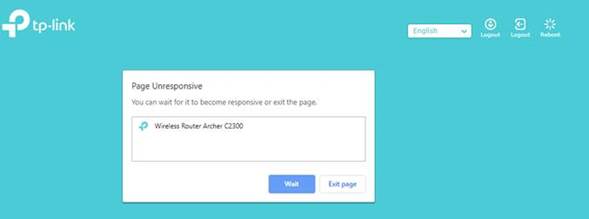
Please reboot TP-Link products or clear the history of the web browsers you use to log in to TP-Link devices when you see this error code.
Please contact TP-Link Technical Support with your problem description and the results of the troubleshooting steps suggested above if the problem persists.
For more details on each function, visit the Download Center to download the manual for your product.
Looking For More
Byla tato FAQ užitečná?
Vaše zpětná vazba nám pomůže zlepšit naše webové stránky

TP-Link Community
Still need help? Search for answers, ask questions, and get help from TP-Link experts and other users around the world.