
için İndir Tapo C675D KIT
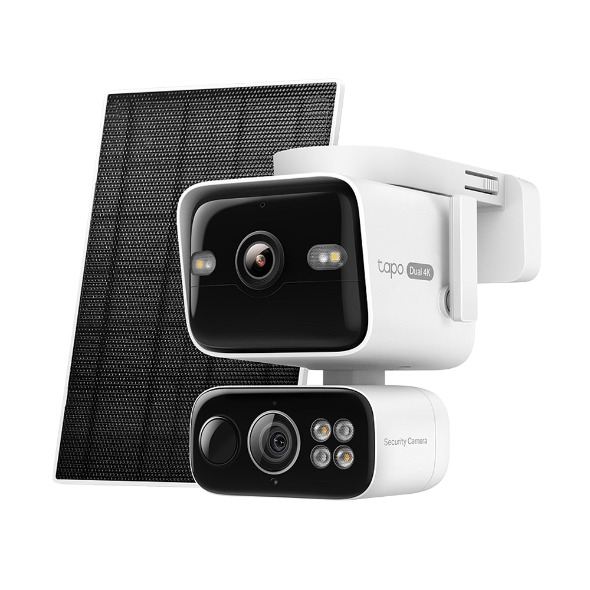 Güneş Enerjili Çift Lensli Pan/Tilt Güvenlik Kamerası Kiti
Kurulum Videosu
-
How to Set Up Your Solar-Powered Dual Lens Pan/Tilt Security Camera Kit | Tapo C675D KIT
Elevate your home security with the Solar-Powered Dual-Lens Pan/Tilt Security Camera Kit. Benefit from effortless solar power and ensure comprehensive protection with two 4K lenses that double the coverage, allowing you to capture more with just one device. Experience enhanced visibility and clarity using the telephoto lens, along with features like Synchronized Smart Tracking and One-Tap Smart Focus for a broader and clearer view.
Daha Fazla Dosya -
How to Mount Your Solar-Powered Dual Lens Pan/Tilt Security Camera Kit | Tapo C675D KIT
Elevate your home security with the Solar-Powered Dual Lens Pan/Tilt Security Camera Kit. Benefit from effortless solar power and ensure comprehensive protection with two 4K lenses that double the coverage, allowing you to capture more with just one device. Experience enhanced visibility and clarity using the telephoto lens, along with features like Synchronized Smart Tracking and One-Tap Smart Focus for a broader and clearer view.
Daha Fazla Dosya
SSS
- Tapo Camera Not Connecting to Wi-Fi: How to Fix It
- Understanding AI Chat Usage Limits in Aireal
- What Is Wake-Up Sensitivity on the Tapo Battery Camera or Doorbell
- Tapo uygulamasında Tapo ve Kasa cihazları için Bildirim özelliği nasıl yapılandırılır?
- How to Configure Homes and Rooms in the Tapo App
- How to Factory Reset Your Tapo Camera: Two Methods
- TP-Link cloud Hesabimini Nasıl SİLEBİLİRİM
- How to Set Up Geofencing on the Tapo/Kasa App
- How to Configure the Smart Dual Tracking Feature for Tapo Dual-Lens Camera
- How to Configure the Tap to Focus Feature for Tapo Dual-Lens Camera
- How to Connect Tapo and Kasa Smart Devices to Google Home
- How to Stream Tapo / Kasa Camera on Google Device
- Why Can't I Receive the SMS Verification Code from the Tapo App? How to Fix It
- Tapo kamera nasıl kurulur
- Tapo Care Hakkında Genel Sorular
- How to Enable and Use AI Zoom on Tapo Cameras
- Tapo Care iptal ve iade
- Tapo Cihazlarınızı ve Tapo Kısayollarınızı kontrol etmek için Widget'lar nasıl kullanılır?
- What to Do When You Can't Find Your Tapo Camera on the Tapo App
- How to Get Diagnostic Logs from Tapo Cameras and Doorbells
- Tapo SD Card Playback Issues: Fix Video Playback Problems on Your Camera
- How to Enable and Use Snooze Alerts on Tapo Cameras and Doorbells
- Announcement: IFTTT Services Ending for Tapo and Kasa Products
- How to Reset a Forgotten TP-Link ID Password for Tapo and Kasa Devices
- How to Redeem Your Tapo Care Redemption Code
- Tapo Camera Battery Draining Fast? Find Out How to Fix It!
- Kasa and Tapo Smart Devices Not Working with Alexa: Troubleshooting Guide
- Tapo Care planıma yeni kameralar nasıl eklenir?
- Tapo uygulamasında Tapo Kasa Kameralar için Ev ve Uzak Modu nasıl düzenlenir?
- Tapo&Kasa akıllı cihazların ağ bağlantısı kararlılığı nasıl kontrol edilir ve iyileştirilir?
- Tapo Care aboneliğimi nasıl yükseltirim veya düşürürüm?
- Fail to sign up or activate the TP-Link ID
- How to Fix No Sound and Audio Quality Issues on Your Tapo Camera or Doorbell
- Tapo Kameranın Canlı Görüntüleme özelliğinde titreme sorununu giderme
- How to Troubleshoot Tapo and Kasa Notifications Not Working or Delayed
- General Questions about Tapo/Kasa Geofencing
- What is Video Summary
- How to set up routines for Tapo devices via Alexa app
- Tapo / Kasa cihazımın Amazon Alexa ile nasıl Çalışır
- Tapo kameram için SD kart nasıl takılır?
- Tapo Kamera için gizlilik alanı nasıl ayarlanır?
- Tapo Kamera'nın video netliğini ve kalitesini nasıl iyileştirebilirsiniz?
- The most frequent asked questions about TP-Link Sales
- How can I conduct 3DS authentication when purchasing Tapo Care
- How to unlink third-party accounts from your TP-Link ID
- How to verify if it’s the hardware issue of TP-Link smart home
- Why does TP-Link require my email address?
- Why do I receive a "We Noticed a New Login" email?
- How to create 3D Map in the Tapo App for Pad
- How to update or change the payment method for Tapo Care or Kasa Care
- Tapo/Kasa Devices Appear Offline After Changing or Resetting the Router
- Bulut hesabını kaydettiğimde veya şifremi sıfırladığımda e-posta almazsam ne yapmalıyım?
- Why do I need to give Local Network permission to TP-Link apps in iOS devices?
- How to view camera SD card recordings on a computer
- TP-Link cihazınızımın model numarasını nasıl bulabilirim?
- How to Fix Tapo or Kasa Camera and Doorbell SD Card Not Formatting or Being Recognized
- What can I do if Tapo/Kasa Smart Devices fail to update the firmware?
- Tapo and Kasa Smart Devices Not Working with Google Home: Troubleshooting Guide
- TP-Link ID Explained: What It Is and How to Create One
- Donanım Sürümünü Nasıl Öğrenebilirim?
- How to Find the Serial Number (S/N) on Your TP-Link Device
Ürün Yazılımı Sürüm Notu
Ürün yazılımını güncellemek için SSS bölümüne bakın.
|
Tapo C675D(EU)_V1_1.1.7 Build 260714 |
|---|
| Yayın Tarihi: 2026-08-11 |
|
Modifications and Bug Fixes: |
|
Tapo C675D(EU)_V1_1.1.6 Build 260610 |
|---|
| Yayın Tarihi: 2026-07-02 |
|
Modifications and Bug Fixes: |
|
Tapo C675D(EU)_V1_1.1.2 Build 260319 |
|---|
| Yayın Tarihi: 2026-04-03 |
|
Modifications and Bug Fixes: |
|
Tapo C675D(EU)_V1_1.0.2 Build 251201 |
|---|
| Yayın Tarihi: 2026-04-02 |
|
Modifications and Bug Fixes: |