
için İndir Tapo C260
- Ürün Açıklama
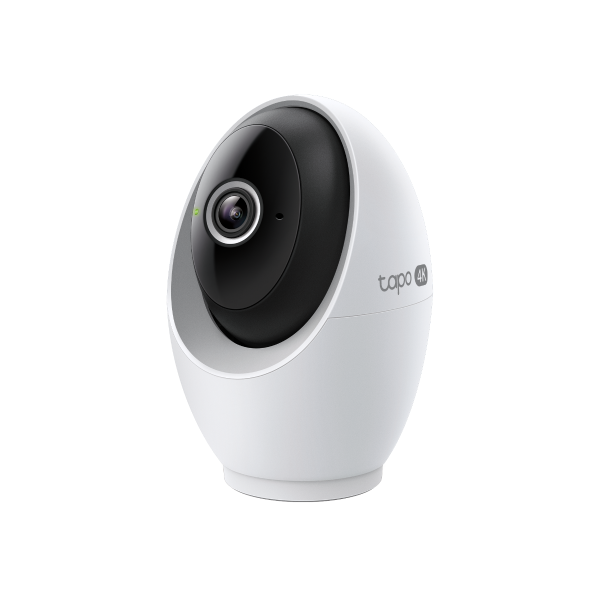 Pan/Tilt AI Home Security Wi-Fi Camera
Kurulum Videosu
-
How to Mount Tapo Pan/Tilt AI Home Security Wi-Fi Camera (Tapo C260)
Tapo 4K Clarity, Every Detail, Every Moment, Captured. Tapo C260 records all of life's wonderful moments with exceptional clarity. The free and powerful Al recognizes and tags strangers, family, and friends for easy identification.
Daha Fazla Dosya -
How to Set Up Tapo Pan/Tilt AI Home Security Wi-Fi Camera (Tapo C260)
Tapo 4K Clarity, Every Detail, Every Moment, Captured. Tapo C260 records all of life's wonderful moments with exceptional clarity. The free and powerful Al recognizes and tags strangers, family, and friends for easy identification.
Daha Fazla Dosya
SSS
- Tapo uygulamasında Tapo ve Kasa cihazları için Bildirim özelliği nasıl yapılandırılır?
- Tapo Camera Not Connecting to Wi-Fi: How to Fix It
- Understanding AI Chat Usage Limits in Aireal
- How to Configure Homes and Rooms in the Tapo App
- How to Factory Reset Your Tapo Camera: Two Methods
- TP-Link cloud Hesabimini Nasıl SİLEBİLİRİM
- Tapo kamerayı RTSP/ONVIF Protokolü aracılığıyla PC/NAS/NVR'da nasıl görüntüleyebilirsiniz?
- How to Set Up Geofencing on the Tapo/Kasa App
- How to Connect Tapo and Kasa Smart Devices to Google Home
- How to Stream Tapo / Kasa Camera on Google Device
- How to troubleshoot Smart Camera Tampering Detection issues
- How to Cast TP-Link Camera/Doorbell to TV via Tapo Smart CentralHub
- Why Can't I Receive the SMS Verification Code from the Tapo App? How to Fix It
- How to Set Up a Tapo Smart Device (Bluetooth) via the Tapo App
- Tapo kamera nasıl kurulur
- Tapo Care Hakkında Genel Sorular
- How to Enable and Use AI Zoom on Tapo Cameras
- Tapo Care iptal ve iade
- Tapo Cihazlarınızı ve Tapo Kısayollarınızı kontrol etmek için Widget'lar nasıl kullanılır?
- What to Do When You Can't Find Your Tapo Camera on the Tapo App
- Tapo Akıllı Hub Uyumlu Kamera Listesi
- How to Get Diagnostic Logs from Tapo Cameras and Doorbells
- Tapo SD Card Playback Issues: Fix Video Playback Problems on Your Camera
- Announcement: IFTTT Services Ending for Tapo and Kasa Products
- How to Reset a Forgotten TP-Link ID Password for Tapo and Kasa Devices
- Frequently Asked Questions about Face Management
- How to Redeem Your Tapo Care Redemption Code
- Kasa and Tapo Smart Devices Not Working with Alexa: Troubleshooting Guide
- Tapo Care planıma yeni kameralar nasıl eklenir?
- Tapo uygulamasında Tapo Kasa Kameralar için Ev ve Uzak Modu nasıl düzenlenir?
- Tapo&Kasa akıllı cihazların ağ bağlantısı kararlılığı nasıl kontrol edilir ve iyileştirilir?
- Tapo Care aboneliğimi nasıl yükseltirim veya düşürürüm?
- Fail to sign up or activate the TP-Link ID
- How to Fix No Sound and Audio Quality Issues on Your Tapo Camera or Doorbell
- Tapo Kameranın Canlı Görüntüleme özelliğinde titreme sorununu giderme
- How to Troubleshoot Tapo and Kasa Notifications Not Working or Delayed
- General Questions about Tapo/Kasa Geofencing
- How to use Timed Panoramic Photography function in Tapo app
- What is Video Summary
- How to set up routines for Tapo devices via Alexa app
- Tapo / Kasa cihazımın Amazon Alexa ile nasıl Çalışır
- Tapo kameram için SD kart nasıl takılır?
- Tapo Kameranız/Kapı Ziliniz için statik IP nasıl ayarlanır?
- Tapo Kamera için gizlilik alanı nasıl ayarlanır?
- How to optimize facial recognition performance of Tapo Security Device
- The most frequent asked questions about TP-Link Sales
- How can I conduct 3DS authentication when purchasing Tapo Care
- How to unlink third-party accounts from your TP-Link ID
- How to verify if it’s the hardware issue of TP-Link smart home
- Why does TP-Link require my email address?
- Why do I receive a "We Noticed a New Login" email?
- How to create 3D Map in the Tapo App for Pad
- How to update or change the payment method for Tapo Care or Kasa Care
- Tapo/Kasa Devices Appear Offline After Changing or Resetting the Router
- Tapo cihazları SmartThings uygulaması ile çalışacak şekilde nasıl yapılandırılır
- Bulut hesabını kaydettiğimde veya şifremi sıfırladığımda e-posta almazsam ne yapmalıyım?
- Why do I need to give Local Network permission to TP-Link apps in iOS devices?
- How to view camera SD card recordings on a computer
- TP-Link cihazınızımın model numarasını nasıl bulabilirim?
- How to Fix Tapo or Kasa Camera and Doorbell SD Card Not Formatting or Being Recognized
- What can I do if Tapo/Kasa Smart Devices fail to update the firmware?
- Tapo and Kasa Smart Devices Not Working with Google Home: Troubleshooting Guide
- How to Reduce Noise on Tapo Cameras
- TP-Link ID Explained: What It Is and How to Create One
- Donanım Sürümünü Nasıl Öğrenebilirim?
- How to Find the Serial Number (S/N) on Your TP-Link Device
Ürün Yazılımı Sürüm Notu
Ürün yazılımını güncellemek için SSS bölümüne bakın.
|
Tapo C260(EU)_V1_1.3.2 Build 260902 |
|---|
| Yayın Tarihi: 2026-09-29 |
|
Modifications and Bug Fixes: |
|
Tapo C260(EU)_V1_1.2.3 Build 260805 |
|---|
| Yayın Tarihi: 2026-08-25 |
|
Modifications and Bug Fixes: |
|
Tapo C260(EU)_V1_1.1.21 Build 260615 |
|---|
| Yayın Tarihi: 2026-07-14 |
|
Modifications and Bug Fixes: |
|
Tapo C260(EU)_V1_1.1.12 Build 260128 |
|---|
| Yayın Tarihi: 2026-02-03 |
|
Modifications and Bug Fixes: |
|
Tapo C260(EU)_V1_1.1.9 Build 251226 |
|---|
| Yayın Tarihi: 2026-01-26 |
|
Modifications and Bug Fixes: |
|
Tapo C260(EU)_V1_1.1.8 Build 251205 |
|---|
| Yayın Tarihi: 2025-12-24 |
|
Modifications and Bug Fixes: |
|
Tapo C260(EU)_V1_1.0.21 Build 250728 |
|---|
| Yayın Tarihi: 2025-08-26 |
|
Modifications and Bug Fixes: |
Apps

- TP-Link Tapo
- TP-Link Tapo provides the easiest way to manage and control your smart life products.


