
Pobierz TL-MR100P
- Przegląd produktów
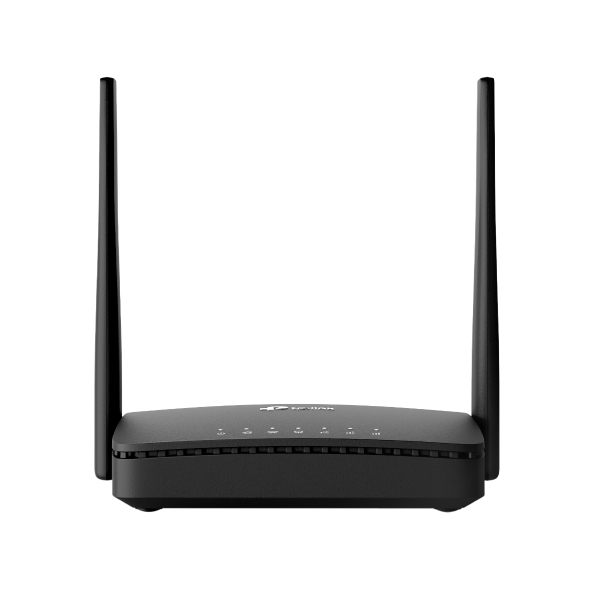 Bezprzewodowy router 4G LTE, standard N, 300 Mb/s
FAQ
- How to Change Time Settings on the TP-Link 5G/4G LTE Router
- Jak zmienić nazwę użytkownika i hasło konta administratora?
- How to choose the encryption method for my IoT devices on an ISP-Customized Wi-Fi7 Router
- How to test the speed of the TP-Link ISP-customized Router
- How to configure Cell Lock on the TP-Link 4G Routers
- How to make applications free from port restriction by DMZ on TP-Link ISP-customized Router
- Port forwarding: How to set up Virtual Server on TP-Link ISP-customized Router
- What if the internet connection is slow when the device is connected to the TP-Link ISP-customized devices?
- How to set up an IPv6 connection on TP-Link ISP-customized devices
- How to back up and restore the configuration file of TP-Link ISP-customized devices
- How to create Static Route on TP-Link ISP-customized Router
- What should I do if my TP-Link ISP-customized 4G/5G Router cannot detect SIM card?
- How to set up Parent Control on TP-Link ISP-customized Modem Router
- How to change the LAN IP address of TP-Link ISP-customized Modem Router
- How to reset TP-Link Wireless 4G LTE Router to factory defaults
- Co należy zrobić, jeśli profil APN nie został znaleziony, lub korzysta ze złego APN? Router 4G LTE TP-Link
- How to set up 3G/4G/5G Backup on TP-Link LTE router under wireless router mode
- How to configure Address Reservation of TP-Link Wireless N 4G LTE Router (new logo)
- How to bind IP Address and MAC Address of TP-Link Wireless N 4G LTE Router (new logo)
- How to troubleshoot if I have low speed with TP-Link Wireless 4G LTE Router working as 3G 4G Router Mode
- Jak rozwiązać problemy ze zdalnym zarządzaniem Routera LTE działającego w trybie Routera 3G/4G?
- TP-Link LTE Router keeps disconnecting
- 4G 5G Routers (Including Deco, LTE Gateway and MiFi) have no Internet due to 464XLAT technology used by some operators (e.g., Jio, Globe)
- How to set up Access Control for website blocking with TP-Link Wireless N 4G LTE Router (new logo)
- How can I check if my SIM card is working via phone?
- How to select 4G band manually on the web interface of LTE Gateway Routers
- Co należy zrobić, jeśli nie otrzymuje emaila weryfikacyjnego podczas rejestrowania konta lub resetowania hasła?
- Komunikat o Słabych zabezpieczeniach i Ostrzeżenie dotyczące prywatności na urządzeniach z iOS 14 i iOS15
- What should I do if my TP-Link 4G LTE Router cannot detect SIM card?
- How to check the 4G band working on our smartphones
- Troubleshooting Guide of DDNS function on TP-Link Wi-Fi Router, LTE Gateway Router or Deco Router
- How to configure data settings of TP-Link Wireless N 4G LTE Router in 3G/4G Router Mode (new logo)
- How to set up Port Forwarding feature on TP-Link Wireless N 4G LTE Router (new UI)
- How to configure Dynamic DNS of TP-Link Wireless N 4G LTE Router (new logo)
- Jak skonfigurować reguły lokalnego i zdalnego zarządzania na routerze 4G LTE TP-Link (nowe logo)?
- Jak zainstalować kartę SIM w routerze LTE?
- Dlaczego nie mogę uzyskać dostępu do tplinkwifi.net?
- Why do I need to give Local Network permission to TP-Link apps in iOS devices?
- No internet connection when the TP-Link 5G/4G Router is working with a SIM card
- How to set up TP-Link 5G/4G Router on web management page
- Troubleshooting a Single Device Not Connecting to Your TP-Link Wireless Network
- Co należy zrobić, jeśli nie mogę połączyć się z Deco zdalnie?
- Gdzie znajdują się oznaczenia modeli produktów TP-Link?
- How to Fix Slow Internet on a TP-Link Router
- How to configure IPv6 of TP-Link Wireless 3G/4G/5G Router
- How to log in to web management page of TP-Link 5G/4G Router
- How to connect computers/phones to a wireless network
- How to Find the Serial Number (S/N) on Your TP-Link Device
- Jak sprawdzić wersję sprzętową urządzenia TP-Link?
Aktualizacja oprogramowania pozwala na rozwiązanie problemów ze starszą wersją oprogramowania oraz może dodać nowe funkcje routera i zwiększyć jego wydajność.
Aktualizacja
WAŻNE: Aby zapobiec problemom podczas aktualizacji, zapoznaj się z poniższymi punktami:
- Użyj pliku Firmware dostępnego na lokalnej stronie TP-Link, z regionu w którym zakupiłeś/aś swoje urządzenie TP-Link. W przeciwnym razie naruszy to warunki gwarancji. Kliknij tutaj, aby zmienić stronę jeśli będzie to konieczne.
- Sprawdź wersję sprzętową i oprogramowania Twojego urządzenia. Aktualizacja z użyciem nieodpowiedniego pliku Firmware może uszkodzić Twoje urządzenie i naruszyć warunki gwarancji.
(Zazwyczaj wersja V1.x=V1.0, V2.x=V2.0 itd, lub Vx.x6/Vx.x8=Vx.x0, np V1.26/V1.28=V1.20)
Jak sprawdzić wersję sprzętową urządzenia TP-Link? - NIE odłączaj urządzenia od prądu podczas trwania aktualizacji. Może to spowodować trwałe uszkodzenia.
- Aby zapobiec nieoczekiwanemu rozłączeniu, NIE przeprowadzaj aktualizacji pliku ISP za pomocą połączenia bezprzewodowego jeżeli nie jest to konieczne (na przykład gdy urządzenie TP-Link nie ma portu LAN/Ethernet).
- Zalecamy wyłączyć wszystkie aplikacje korzystające z internetu lub rozłączyć połączenie z Internetem na urządzeniu przed przeprowadzeniem aktualizacji.
- Przed rozpoczęciem aktualizacji rozpakuj pobrany plik za pomocą programu do dekompresji, takiego jak np. 7Zip lub WinRAR.
- W przypadku kamer VIGI, konieczna może być etapowa aktualizacja oprogramowania z zachowaniem kolejności jego poszczególnych wersji wydania. W razie problemów prosimy o kontakt z naszą infolinią.
|
TL-MR100P(EU)_V1_1.1.0 Build 251214 |
Pobierz | |
|---|---|---|
| Data publikacji: 2026-02-27 | Język: Wielojęzyczne | Rozmiar pliku: 16.23 MB |
|
First firmware released. |
||
Korzystanie z firmware'u innej firmy
W przypadku niektórych modeli produktów TP-LINK istnieje możliwość zastąpienia firmware'u udostępnionego przez TP-LINK firmwarem oferowanym przez inną firmę. Jednakże, firma TP-LINK nie jest zobowiązana do wykonywania żadnych prac konserwacyjnych i nie oferuje wsparcia technicznego dla takich produktów. Nie gwarantuje także stabilności oraz poprawności działania firmware'u innej firmy. Uszkodzenie produktu, spowodowane korzystaniem z firmware'u innej firmy, powoduje utratę jego gwarancji.
Centrum GPL
Produkty TP-LINK korzystają częściowo z oprogramowania stworzonego przez strony trzecie, w tym z kodu źródłowego oprogramowania zgodnego z licencją GNU General Public Licence (“GPL“), w wersji 1/wersji 2/wersji 3 lub licencji GNU Lesser General Public License ("LGPL"). Aby korzystać z oprogramowania, musisz się zgodzić się na warunki użytkowania produktów na licencji GPL.
Aby spełnić warunki licencji GPL, firma TP-LINK, jeżeli to konieczne, wysyła pocztą kody źrółowe GPL dla konkretnych oprogramowań na płycie CD do odczytu elektronicznego lub drogą mailową. Więcej informacji można uzyskać dla określonych produktów lub oprogramowań. Poprzez Centrum GPL firma TP-LINK zapewnia możliwość bezpłatnego pobierania kodów źródłowych oprogramowań zgodnych z licencją GPL oraz stosowanych w produktach TP-LINK.
Warunki licencji GPL znajdziesz, wydrukujesz i pobierzesz tutaj.
Dostępne programy rozprowadzane są BEZ GWARANCJI; nie obejmuje ich także gwarancja PRZYDATNOŚCI HANDLOWEJ oraz PRZYDATNOŚCI DO OKREŚLONEGO CELU. Więcej informacji dostępnych jest na stronie GNU GPL.
Kod GPL
Emulatory
Wersja oprogramowania |
Tryb pracy |
Język |
|
|---|---|---|---|
251214(EU) |
- |
Wielojęzyczne |
Uwaga:
1. Emulator to wirtualny interfejs graficzny strony konfiguracyjnej produktu. Szczegółowe informacje o funkcjach i specyfikacji poszczególnych produktów znajdują się na stronach produktowych.
2. Upewnij się, że wersja firmware'u jest zgodna z wersją podaną w emulatorze. Każda wersja firmware'u ma własny interfejs graficzny i funkcjonalności.
3. Pamiętaj, że emulatory nie są dostępne dla wszystkich wersji firmware'u.
z United States?
Uzyskaj produkty, wydarzenia i usługi przeznaczone dla Twojego regionu.