
How to Extend the Battery Life of Your Tapo Camera or Doorbell
Battery-powered cameras and doorbells can drain faster when they wake up frequently or stay active for extended periods. This guide explains how battery consumption works and provides practical tips to optimize wake-up settings, installation, and device configurations to maximize battery life.
Key Takeaways
- Reduce unnecessary wake-ups by lowering Wake-up Sensitivity when appropriate.
- Optimize installation location by avoiding busy streets, direct sunlight, heat sources, and moving vegetation.
- Adjust device settings such as video quality, frame rate, night vision, and clip recording parameters to conserve power.
- Be aware of environmental factors, especially low temperatures, which can temporarily reduce battery performance and shorten battery life.
How Battery Cameras and Doorbells Consume Power
To conserve battery power, battery-powered cameras and doorbells typically remain in a low-power sleep mode when idle. Battery consumption increases when the device wakes up frequently or remains active for extended periods.
The device wakes up when:
- You interact with it through the Tapo app, such as viewing the live stream.
- The PIR sensor detects infrared heat changes.
- The Radar sensor detects motion (on supported models).
For more information, refer to What is the Wake-up Sensitivity of my battery camera/doorbell?
Common Scenarios That Drain Battery Faster
Battery life may decrease significantly if the camera or doorbell is installed in an area with frequent activity or environmental changes, such as:
- Busy roads or streets with constant vehicle and pedestrian movement
- Areas exposed to direct sunlight or heat sources
- Locations with moving vegetation, such as trees or shrubs
In these environments, the device may wake up frequently and stay active longer, resulting in faster battery drain.
How to Improve Battery Life
Step 1. Adjust Wake-up Sensitivity
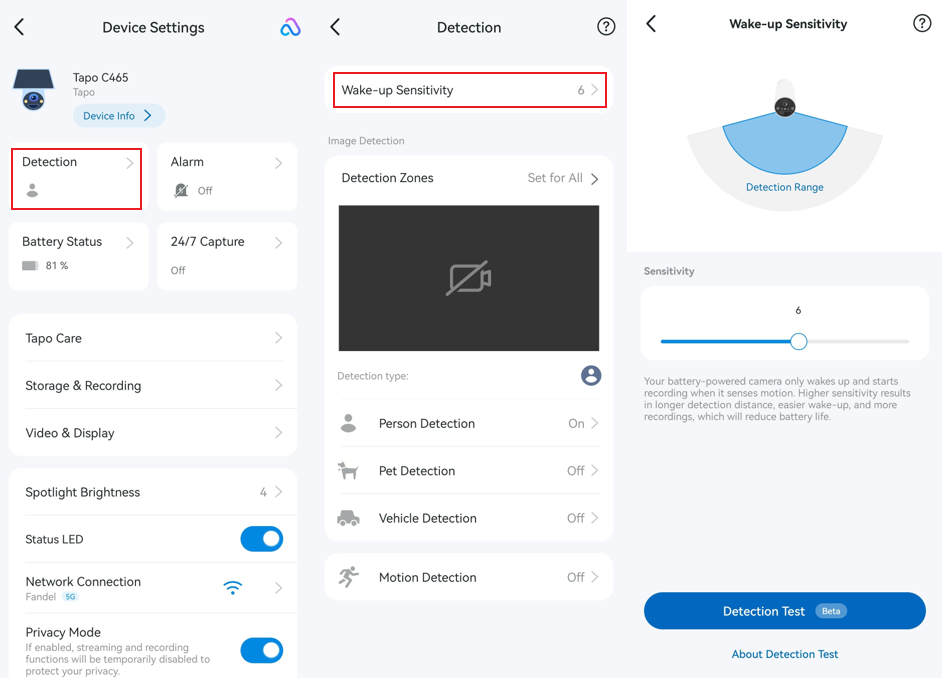
Wake-up Sensitivity determines how easily the device is activated by its PIR or radar sensor. Higher sensitivity increases the detection range but may also lead to more frequent wake-ups and shorter battery life.
For Devices with PIR Sensor Only
Go to camera/doorbell Device Settings > Detection > Wake-up Sensitivity and lower the sensitivity if the device is being triggered too often.
For Devices with Both PIR and Radar Sensor (Tapo D260)
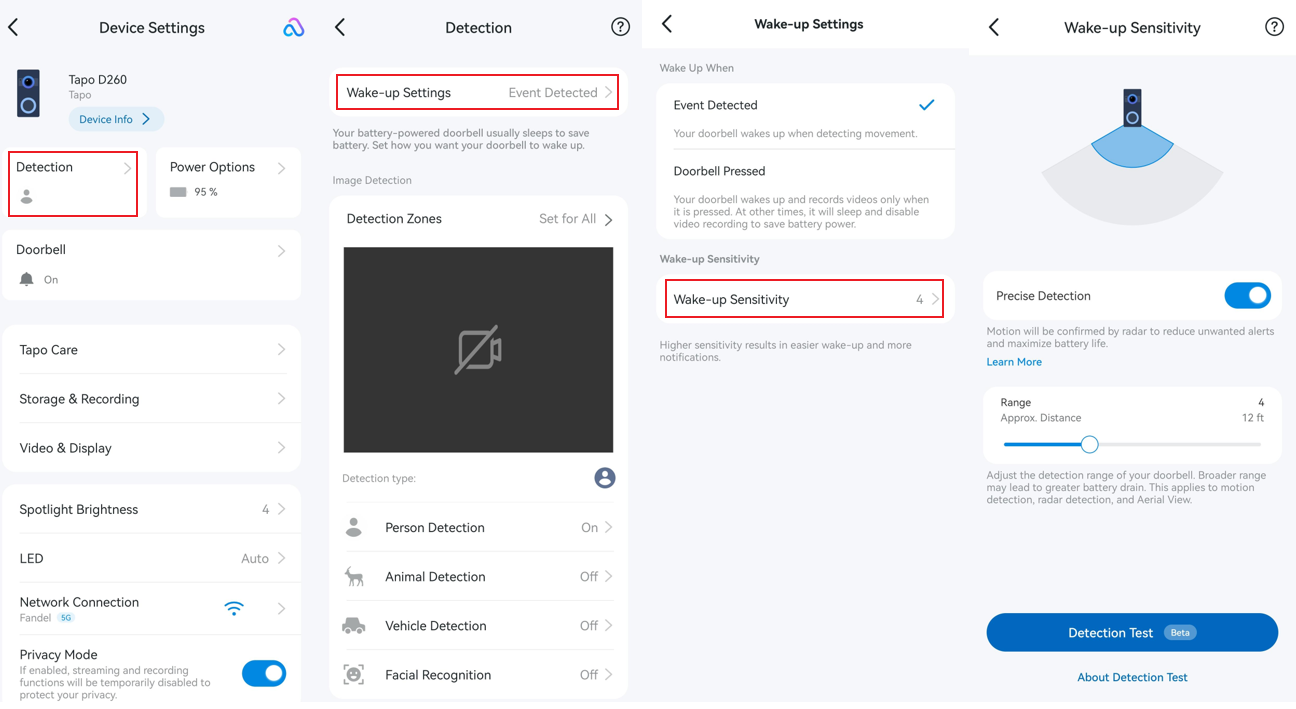
Go to Device Settings > Detection > Wake-up Settings > Wake-up Sensitivity, enable Precise Detection, and adjust the radar detection range to cover only your doorstep or entry area.
This helps filter out unrelated movement, such as passing vehicles, pedestrians or activity on nearby roads or sidewalks. Reducing unnecessary wake-ups can significantly improve battery life.
Step 2. Optimize the Installation Location
Proper installation can significantly reduce unnecessary wake-ups. Best practices:
- Avoid pointing the device toward busy streets, moving trees, direct sunlight, or strong light sources.

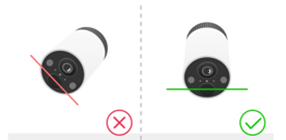
- Keep the motion sensor lens level whenever possible.
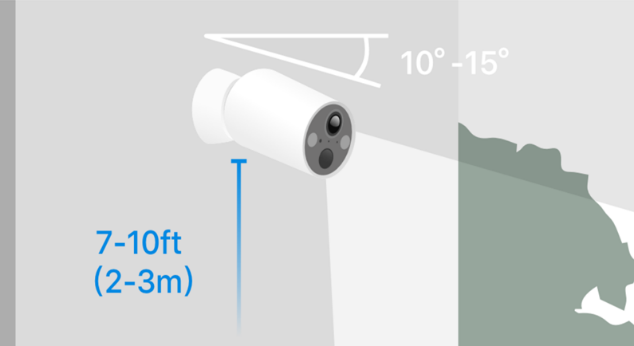
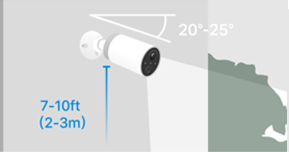
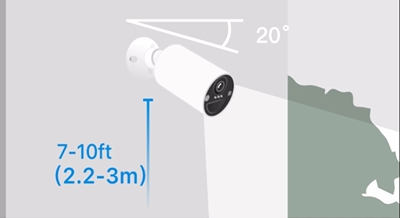
- Install the device approximately 7–10 ft (2–3 m) above the ground, and tilt downwards at a suggested angle in the QIG or App. Here, we take the Tapo C4XX Series as an example.
■ Tapo C410 Series: 10° ~ 15°
■ Tapo C420 Series: 20° ~ 25°
■ Tapo C425 Series: 20°
Step 3. Adjust Camera or Doorbell Settings
You can further extend battery life by adjusting camera or doorbell recording settings.
- Go to Device Settings > Video & Display > Video Quality and select a lower video resolution.
- Go to Device Settings > Video & Display > Night Mode Settings and reduce the night vision viewing distance if applicable.
- Go to Device Settings > Video & Display > Frame Rate and lower the frame rate.
- Go to Device Settings > Storage & Recording > Clips Settings, increase the retrigger intervals between events, reduce the record buffer and the maximum clip length.
Step 4. Consider Ambient Temperature
Tapo battery-powered cameras and doorbells are designed to operate between -20°C and 45°C (-4°F to 113°F).
Low temperatures can temporarily reduce battery performance and shorten battery life. This is normal behavior for lithium batteries.
Q&A
Q1: Why Is My Camera/Doorbell Battery Draining Quickly Even Though It Records Few Video Clips?
The number of recorded clips does not reflect how often the device wakes up.
A camera or doorbell can be triggered by heat sources or movement, such as sunlight, people, vehicles, or other environmental changes. Even if these triggers don't result in recorded clips because of detection settings or event filtering, the wake-up process still consumes power.
If battery drain is higher than expected, review the Wake-up Sensitivity settings and installation location to minimize unnecessary wake-ups.
Q2: Do Events Filtered by AI Still Consume Power?
Yes. AI filtering occurs after the device completes the wake-up process. Although filtered events do not generate recordings or notifications, the wake-up process still consumes battery power.
If you notice a large number of Filtered by AI events under camera/doorbell Device Settings > Battery Status > Wake-up Times, it is recommended to:
- Adjust the installation position to avoid monitoring areas with frequent environmental movement, such as swaying vegetation, busy streets, or other high-activity zones.
- Use a wedge mount to adjust viewing angle if needed (doorbells only).
Reducing unnecessary wake-ups can significantly improve battery life.
Is this faq useful?
Your feedback helps improve this site.

TP-Link Community
Still need help? Search for answers, ask questions, and get help from TP-Link experts and other users around the world.