
Stáhnout pro TC34
- Product Overview
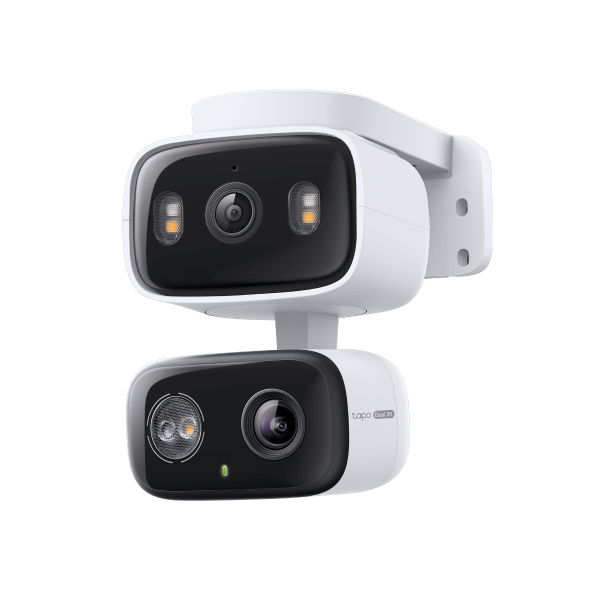 Vnitřní/Venkovní duální objektiv otočná/naklápěcí bezpečnostní kamera
FAQ
- Jak nastavit Tapo kameru
- Which TP-Link Tapo Cameras/Devices Are Compatible with Tapo Hub
- Set Privacy Zone for Tapo Camera and Doorbell
- How to check and improve the network connection stability of Tapo&Kasa smart devices
- How to Reduce Noise on Tapo Cameras
- How to Connect Tapo and Kasa Smart Devices to Google Home
- Jak resetovat kameru Tapo
- Proč se nemohu zaregistrovat?
- Jakou aplikaci pro Windows/Mac použít k ovládání Tapo? (RTSP/ONVIF)
- Jak zjisti hardwarovou verzi vašeho TP-Link zařízení?
- How to Find the Model Number of Your TP-Link Device
- Fail to configure Tapo Camera
- Zrušení a vrácení peněz u služby Tapo Care
- How to update or change the payment method for Tapo Care or Kasa Care
- How to add new cameras to my Tapo Care plan
- Co mám dělat když, nemohu najít kameru v aplikaci TAPO?
- How to fix no sound or audio quality issues on Tapo Camera/Doorbell
- Co mám dělat, když zapomenu heslo ke cloudovému účtu (cyhtrá zásuvka Tapo, chytrá kamera, inteligentní žárovka)
- Co mám dělat, když nedostanu potvrzovací email při registraci nového účtu, nebo zapomenutého hesla.
- How to make Tapo devices work with IFTTT
- Why do I need to give Local Network permission to TP-Link apps in iOS devices?
- Co dělat, pokud selhala aktualizace firmwaru mých Tapo smart zařízení (smart zásuvka, chytrá kamera, chytrá žárovka)?
- Jak nainstalovat SD kartu pro mojí kameru Tapo
- What should I do if the SD card cannot be formatted/recognized?
- Jak mohu zobrazit videozáznamy kamery z SD karty na počítači?
- How to edit Home and Away Mode for Tapo/Kasa Cameras and Doorbells on the Tapo app
- What should I do if I encounter issues while playing back videos from an SD card?
- How to configure Home feature and Room feature in Tapo app
- Why do I receive a "We Noticed a New Login" email?
- What should I do if Tapo/Kasa notifications are delayed or not working?
- General Questions about Tapo/Kasa Geofencing
- How to find serial number on TP-Link devices
- What is Video Summary
- Cannot make my TP-Link smart devices work with Alexa
- How to use Alexa Snapshot with Tapo Cameras
- How to configure the Notification feature for the Tapo & Kasa devices on the Tapo app
- How to fix a flickering issue on Live View of the Tapo Camera
- How to stream Tapo / Kasa Camera on Google device
- How to improve video clarity and quality of Tapo Camera
- How to connect Tapo Wi-Fi Cameras/doorbells with Tapo Hub
- The most frequent asked questions about TP-Link Sales
- How can I delete my TP-Link cloud account?
- How can I conduct 3DS authentication when purchasing Tapo Care
- How to unlink third-party accounts from your TP-Link ID
- How to verify if it’s the hardware issue of TP-Link smart home
- Proč vyžaduje TP-Link emailovou adresu?
- How to create 3D Map in the Tapo App for Pad
- Co mám dělat, když nemůžu přimět Tapo zařízení (chytrá zásuvka, chytrá kamera, inteligentní žárovka) pracovat s Alexa nebo Google Home
- Tapo/Kasa Devices are showing offline after changing or resetting the router.
- Co je TP-Link ID?
Firmware Release Note
Refer the FAQ to update firmware.
|
TC34(EU)_V1_1.1.4 Build 260122 |
|---|
| Datum vydání: 2026-03-05 |
|
Modifications and Bug Fixes: |
|
TC34(EU)_V1_1.1.3 Build 260108 |
|---|
| Datum vydání: 2026-02-06 |
|
Modifications and Bug Fixes: |
|
TC34(EU)_V1_1.1.2 Build 250926 |
|---|
| Datum vydání: 2025-11-13 |
|
Modifications and Bug Fixes: |
|
TC34(EU)_V1_1.1.0 Build 250922 |
|---|
| Datum vydání: 2025-10-22 |
|
Modifications and Bug Fixes: |
|
TC34(EU)_V1_1.0.4 Build 250618 |
|---|
| Datum vydání: 2025-07-28 |
|
Modifications and Bug Fixes: |
|
TC34(EU)_V1_1.0.3 Build 250509 |
|---|
| Datum vydání: 2025-06-05 |
|
Modifications and Bug Fixes: |