
Stáhnout pro Tapo C260
- Product Overview
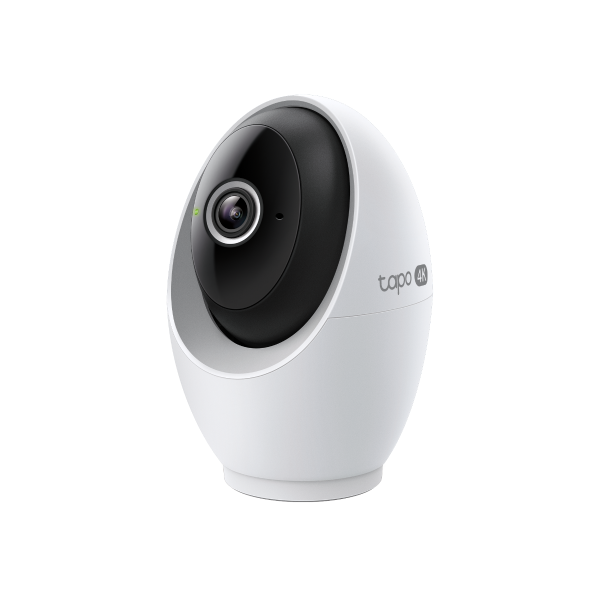 Domácí bezpečnostní otočná Wi-Fi kamera s AI
Setup Video
-
How to Mount Tapo Pan/Tilt AI Home Security Wi-Fi Camera (Tapo C260)
Tapo 4K Clarity, Every Detail, Every Moment, Captured. Tapo C260 records all of life's wonderful moments with exceptional clarity. The free and powerful Al recognizes and tags strangers, family, and friends for easy identification.
Více Fold -
How to Set Up Tapo Pan/Tilt AI Home Security Wi-Fi Camera (Tapo C260)
Tapo 4K Clarity, Every Detail, Every Moment, Captured. Tapo C260 records all of life's wonderful moments with exceptional clarity. The free and powerful Al recognizes and tags strangers, family, and friends for easy identification.
Více Fold
FAQ
- Jak nastavit Tapo kameru
- Which TP-Link Tapo Cameras/Devices Are Compatible with Tapo Hub
- Set Privacy Zone for Tapo Camera and Doorbell
- How to check and improve the network connection stability of Tapo&Kasa smart devices
- How to Reduce Noise on Tapo Cameras
- How to Connect Tapo and Kasa Smart Devices to Google Home
- Jak resetovat kameru Tapo
- How to Connect Tapo and Kasa Devices to Samsung SmartThings
- Proč se nemohu zaregistrovat?
- Jakou aplikaci pro Windows/Mac použít k ovládání Tapo? (RTSP/ONVIF)
- Jak zjisti hardwarovou verzi vašeho TP-Link zařízení?
- How to Find the Model Number of Your TP-Link Device
- How to set up TP-Link Tapo smart device (Bluetooth) via the Tapo app
- Fail to configure Tapo Camera
- Zrušení a vrácení peněz u služby Tapo Care
- How to update or change the payment method for Tapo Care or Kasa Care
- Frequently asked questions about Face Management
- How to add new cameras to my Tapo Care plan
- Co mám dělat když, nemohu najít kameru v aplikaci TAPO?
- How to fix no sound or audio quality issues on Tapo Camera/Doorbell
- Co mám dělat, když zapomenu heslo ke cloudovému účtu (cyhtrá zásuvka Tapo, chytrá kamera, inteligentní žárovka)
- Co mám dělat, když nedostanu potvrzovací email při registraci nového účtu, nebo zapomenutého hesla.
- How to make Tapo devices work with IFTTT
- Why do I need to give Local Network permission to TP-Link apps in iOS devices?
- Co dělat, pokud selhala aktualizace firmwaru mých Tapo smart zařízení (smart zásuvka, chytrá kamera, chytrá žárovka)?
- Jak nainstalovat SD kartu pro mojí kameru Tapo
- What should I do if the SD card cannot be formatted/recognized?
- Jak mohu zobrazit videozáznamy kamery z SD karty na počítači?
- How to edit Home and Away Mode for Tapo/Kasa Cameras and Doorbells on the Tapo app
- What should I do if I encounter issues while playing back videos from an SD card?
- How to configure Home feature and Room feature in Tapo app
- Why do I receive a "We Noticed a New Login" email?
- What should I do if Tapo/Kasa notifications are delayed or not working?
- How to cast TP-Link Camera/Doorbell to TV via Tapo Smart HomeBase
- General Questions about Tapo/Kasa Geofencing
- How to find serial number on TP-Link devices
- What is Video Summary
- Cannot make my TP-Link smart devices work with Alexa
- How to configure the Notification feature for the Tapo & Kasa devices on the Tapo app
- How to fix a flickering issue on Live View of the Tapo Camera
- How to set up routines for Tapo devices via Alexa app
- How to stream Tapo / Kasa Camera on Google device
- Why cannot I receive the SMS verification code from Tapo app?
- How to optimize facial recognition performance of Tapo Security Device
- The most frequent asked questions about TP-Link Sales
- How can I delete my TP-Link cloud account?
- How can I conduct 3DS authentication when purchasing Tapo Care
- How to set a static IP for your Tapo Camera/Doorbell
- How to unlink third-party accounts from your TP-Link ID
- How to verify if it’s the hardware issue of TP-Link smart home
- Proč vyžaduje TP-Link emailovou adresu?
- How to create 3D Map in the Tapo App for Pad
- Co mám dělat, když nemůžu přimět Tapo zařízení (chytrá zásuvka, chytrá kamera, inteligentní žárovka) pracovat s Alexa nebo Google Home
- Tapo/Kasa Devices are showing offline after changing or resetting the router.
- Co je TP-Link ID?
Firmware Release Note
Refer the FAQ to update firmware.
|
Tapo C260(EU)_V1_1.1.12 Build 260128 |
|---|
| Datum vydání: 2026-02-03 |
|
Modifications and Bug Fixes: |
|
Tapo C260(EU)_V1_1.1.9 Build 251226 |
|---|
| Datum vydání: 2026-01-26 |
|
Modifications and Bug Fixes: |
|
Tapo C260(EU)_V1_1.1.8 Build 251205 |
|---|
| Datum vydání: 2025-12-24 |
|
Modifications and Bug Fixes: |
|
Tapo C260(EU)_V1_1.0.21 Build 250728 |
|---|
| Datum vydání: 2025-08-26 |
|
Modifications and Bug Fixes: |
|
Tapo C260(EU)_V1_1.0.15 Build 250508 |
|---|
| Datum vydání: 2025-05-29 |
|
Modifications and Bug Fixes: |
Apps

- TP-Link Tapo
- TP-Link Tapo provides the easiest way to manage and control your smart life products.


