
How to reset TP-Link Wireless 4G LTE Router to factory defaults
 258309
This Article Applies to:
Introduction
A hard reset will restore your device to factory default settings. You should reconfigure the device from scratch or you can load the configuration file you have backed up before the reset.
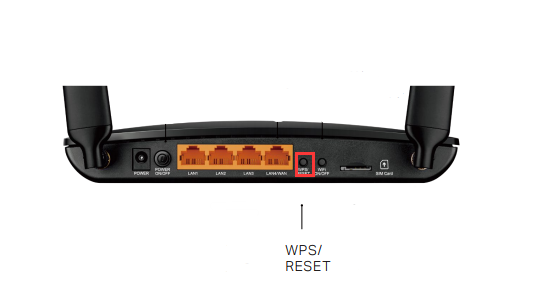
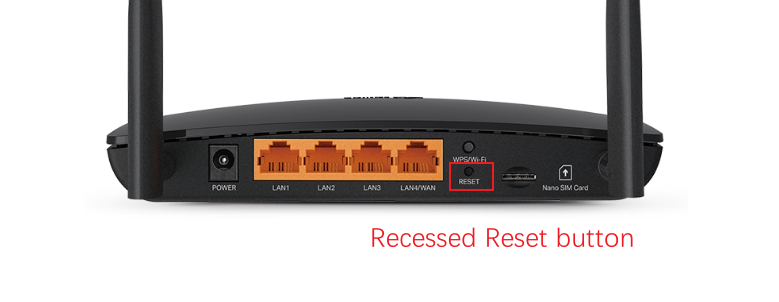
The physical reset button has two different forms, varying by the model:
- WPS/RESET button: To use WPS function, please push the button for less than 5 seconds, and then the WPS LED will flash; to reset the router, please push the button for at least 10 seconds.
- Recessed Reset button: WPS and WiFi functions share a single button, and the reset button has been changed to a recessed design. You could push the button for less than 1 second to activate the WPS function, and press and hold for more than 5 secondsto toggles Wi-Fi on/off.
Configuration
Method 1: Via RESET button
- WPS/RESET button: With the Router powered on, press and hold the button (more than 10 seconds) until the SYS LED becomes quick-flash from slow-flash. Then release the button and wait the Router to reboot to its factory default settings.
- Recessed Reset button: With the Router powered on, press and hold for 2 seconds until the SYS LED becomes quick-flash from slow-flash. Then release the button and wait for the router to reboot to its factory default settings.
Method 2: Via Web Interface
You may refer to log in to web management page, then go to Advanced > System Tools > Backup & Restore > Factory Default Restore page, then click on the Factory Restore and wait the Router to reboot to its factory default settings.

Note:
- Make certain that the router is powered on before it restarts completely.
- The default IP address/domain name can be found at the bottom label of the product.
Get to know more details of each function and configuration please go to Download Center to download the manual of your product.
Полезен ли беше този ЧЗВ?
Вашите отзиви помагат за подобряване на този сайт.


