
如何在 MacBook 上安裝 TP-Link Cloud 網站所需的外掛程式(Plug-in)?
備註:本常見問題 (FAQ) 適用於所有 TP-Link 雲端攝影機,包括 NC200、NC210、NC220、NC230、NC250 等。在此我們以 NC200 為例。
最近,TP-Link 雲端網站已改用 Flash 外掛程式,對 Mac OS 具有良好的兼容性。
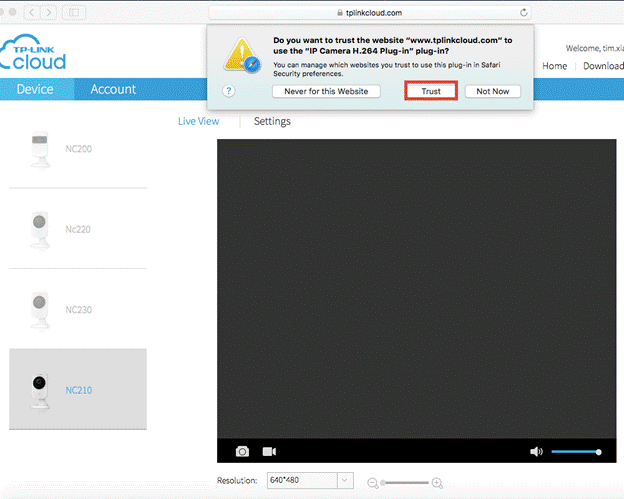
如果這是您第一次在我們的雲端網站 (www.tplinkcloud.com) 上檢視您的攝影機影片,頁面中將會出現一個提示,要求您信任「IP Camera H.264 Plug-in」,然後點擊信任 (Trust) 並重新整理頁面,您就能夠在我們的雲端網站上檢視影片。
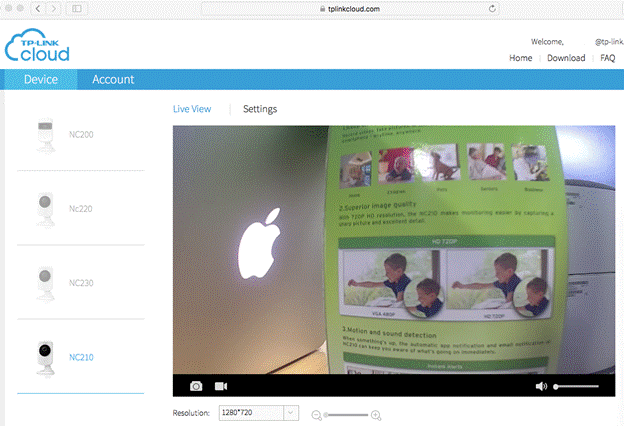
您可以在 Safari 偏好設定 (Safari Preference) >> 安全性設定 (Security setting) 中查看此外掛程式:
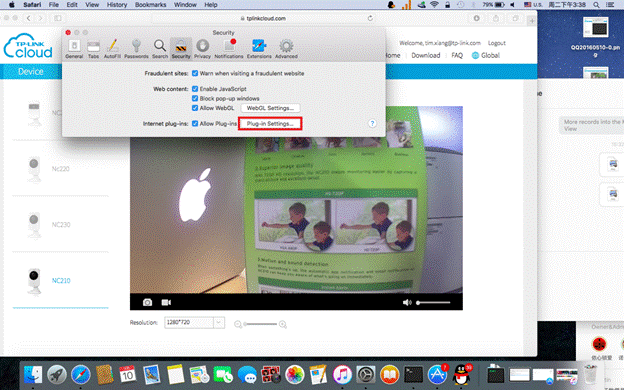
點擊「外掛程式設定 (Plug-in Settings)」以檢視「IP Camera H.264 Plug-in」的狀態:
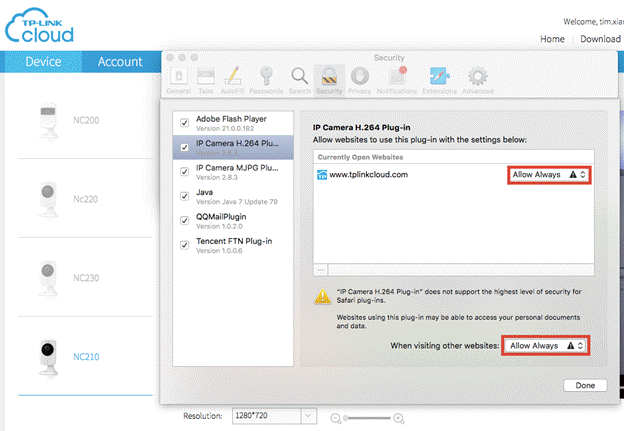
您可以將 IP Camera H.264 Plug-in 的狀態更改為一律允許 (Allow Always) 模式。
這篇faq是否有用?
您的反饋將幫助我們改善網站


TP-Link Community
Still need help? Search for answers, ask questions, and get help from TP-Link experts and other users around the world.