Click to skip the navigation bar

如何為 4G/5G Deco 產品手動選擇 4G/5G 頻段

進一步的協助
更新七月 17, 2026

預設情況下,4G/5G Deco 產品會自動在 4G/5G 網路上選擇最佳頻段。然而,如果您的裝置經常斷線或意外切換頻段,手動選擇特定的 4G/5G 頻段可能會有助於提高穩定性。

這裡我們以 Deco X20-4G 為例:

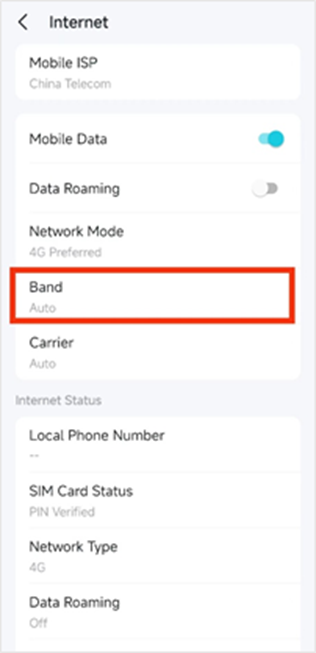
步驟 1:開啟 Deco App,點擊 更多(More)-> 網際網路(Internet)-> 頻段(Band)。

Deco app’s "More" menu, showing options like Deco Lab, Reports, Data Settings, Wi-Fi Settings, Guest Network, WPS, Internet, QoS, and Block List.Deco app’s "Internet" menu, showing options like Mobile ISP, Mobile Data, Data Roaming, Network Mode and Band.

步驟 2:頻段預設設定為「自動」(Auto);關閉「自動」後,裝置將會搜尋附近可用的 4G 頻段。

Deco app’s "Band" page, showing options to turn on Auto or turn off Auto.Deco app’s "Band" page, showing “Auto” option is off. The interface is currently processing, with a loading indicator showing 'Searching...' to indicate that the device is scanning for available LTE frequency bands.

步驟 3:選擇您想要的 4G 頻段,然後點擊右上角的「儲存」(Save)。接著,返回網際網路頁面,在「網際網路狀態」區塊下檢查目前的頻段。

Deco app’s "Band" page, with the option set to 'Auto Off' and a list of selectable frequency bands. A 'Save' button is located in the upper right corner, along with a note explaining that users can enable specific 4G carrier aggregation by selecting the corresponding bands.Deco app’s "Internet" page, displaying the current Band setting and Internet status.


注意:

1) 如果您所居住的區域中,電信業者不支援所選的 4/5G 頻段,裝置可能會降回 3/4G 網路或完全失去訊號。

2) 如果顯示的頻段與您的選擇不同,它可能已經降回 WCDMA (3G)/4G,這屬於正常現象。如果您當地的 4/5G 訊號覆蓋良好且穩定,您可以在「更多」>「網際網路」下,將網路模式從「4G/5G 偏好」更改為「僅限 4G/5G」以固定頻段。

3) 選擇多個頻段進行載波聚合(Carrier Aggregation)並不保證一定會發生聚合,因為這取決於基地台的能力。


若要了解各項功能和設定的更多詳細資訊,請前往 下載中心 下載您產品的使用手冊。


Related FAQs

Looking For More

這篇faq是否有用?

您的反饋將幫助我們改善網站

Recommend Products

Community

TP-Link Community

Still need help? Search for answers, ask questions, and get help from TP-Link experts and other users around the world.

Visit the Community >