How to extend the battery life of Tapo Camera/Doorbell
 130621
Introduction
The actual battery life may vary depending on the camera’s configuration settings, usage scenario, and environmental factors. Some customers may feel the camera’s battery life does not last as expected, and here we will introduce how to extend the battery life of cameras.
Configuration
Part 1: How does the battery-powered camera consume power?
For the sake of power saving, the camera is usually in a sleep state (low power consumption), however, if the camera is woken up frequently and maintains the ON state for a long time, the camera consumes power quickly.
Click this link to know how the battery-powered camera wakes up.
Part 2. The typical usage scenario consumes the battery power quickly.
The camera is installed in a location where the environment changes significantly. For example, the camera is used to monitor the streets or roads that have heat sources to wake up the camera frequently, and it’s easy for the camera to detect events, and then the ON state of the camera may last for a long time. This usage scenario will cost the battery power quickly.
Part 3. How to extend the battery life of the camera
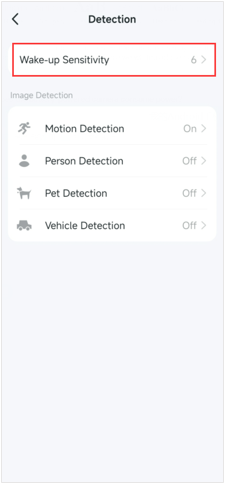
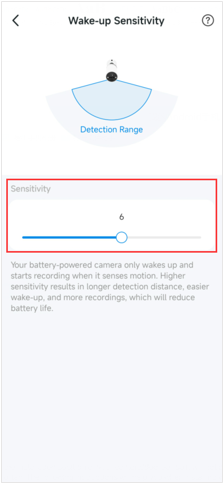
Step1. Open the Tapo app, tap your battery-powered camera model card to go to Live View > tap the icon at the top right corner > Device Settings > Detection> Wake-up Sensitivity to adjust the sensitivity according to your needs.
Higher sensitivity results in easier wake-up and more recordings, which will reduce battery life.
Step 2. Adjust the installation position of your camera/doorbell so it will not be woken up too often. The following instructions will help you when installing your camera/doorbell:
- Avoid pointing the camera directly at swaying trees, busy streets, and street lamps or sunlight.

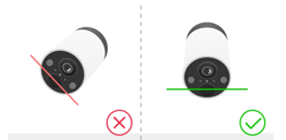
- Keep the motion sensor lens level for best results.
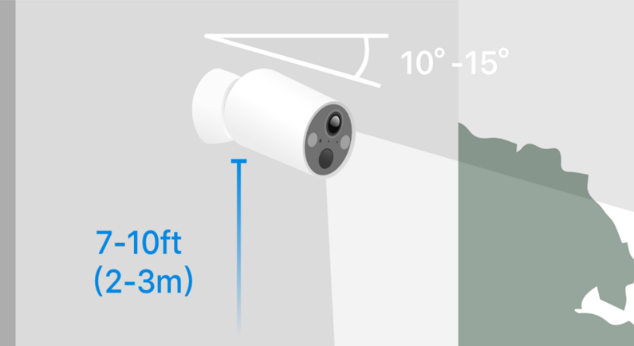
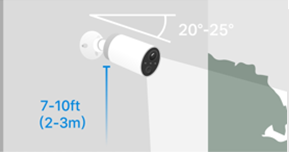
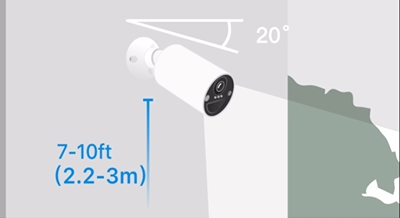
- It's recommended to install it 7-10 ft above the ground and tilt downwards at a suggested angle in the QIG or App. Here take Tapo C4XX Series as example.
■ Tapo C410 Series: 10° ~ 15°
■ Tapo C420 Series: 20° ~ 25°
■ Tapo C425 Series: 20°
Step 3. You can also adjust other settings to save your battery.
- Go to the camera’s Device Settings>Video & Display> Video Quality to set the video quality to a lower resolution.
- Go to the Night Mode Settings on the Video & Display page to reduce the viewing distance of night vision.
- Go to the Frame Rate on the Video & Display page to lower the frame rate.
- Go to the camera’s Device Settings > Storage & Recording>Clips Settings to increase the retrigger intervals between recorded events, and reduce the record buffer and the maximum clip length.
Step 4. Tapo battery-powered cameras or doorbells can operate properly within the temperature of -20℃~45℃(-4°F ~113 °F ). The battery life may get shorter if the temperature is too low.
QA
Q1: Why does my camera consume power quickly even when there are not many detection video clips?
A1: The number of the detection video clips of the camera does not reflect the number of times the camera is woken up.
You can refer to the link to know how the camera wakes up. There can be many heat sources that wake up the camera, such as sunlight, people, objects, etc., but the camera may not necessarily record clips due to the impact of camera detection settings and other configurations after it wakes up.
Q2: Do events filtered by AI still consume power?
A2: Yes. Even though events judged as invalid are filtered out by AI to avoid unnecessary recordings and alerts, the doorbell still performs the detection process before the AI makes its decision. This detection activity consumes energy, which can increase overall battery usage. If you notice a large number of “Filtered By AI” events, it is recommended to follow the above suggestion to adjust the installation position or use a wedge to change the viewing angle. A common reason for excessive filtered events is that the camera lens faces areas with frequent dynamic changes, such as vegetation that moves easily in the wind or busy streets with constant activity.
Get to know more details of each function and configuration please go to Download Center to download the manual of your product.
¿Es útil esta pregunta frecuente?
Sus comentarios nos ayudan a mejorar este sitio.