
Frequently Asked Questions About the TP-Link Deco X50-PoE Feature
The Deco X50-PoE is the first Deco model to support Power over Ethernet (PoE), which delivers both power and data through a single Ethernet cable. This eliminates the need for a separate power outlet, simplifying installation and giving you more flexibility in where you place the device. This page covers the most common questions about the Deco X50-PoE's PoE feature.
Key Takeaways
- The Deco X50-PoE supports the IEEE 802.3at and IEEE 802.3bt PoE standards. It does not support IEEE802.3af.
- Power consumption via PoE is up to 18W for the US version and up to 14.4W for the EU version.
- A DC power adapter is included in the product package as an alternative power source.
- TP-Link recommends using a Cat5e or higher network cable, which supports speeds up to 2.5Gbps.
- The maximum PoE transmission distance is 100 meters.
- The Deco X50-PoE supports both router mode and access point mode when connected via PoE.
- The Deco X50-PoE can only receive power through its PoE port. It cannot supply PoE power to other devices.
Deco X50-PoE Common Questions
Q1: What PoE standards does Deco X50-PoE support?
IEEE802.3at standard and IEEE802.3bt standard. Learn more about PoE technology
Q2: How much power does Deco X50-PoE consume when powered by PoE?
US version: Up to 18W.
EU version: Up to 14.4W.
Q3: Does Deco X50-PoE support DC power supply?
Yes, a DC power adapter is included in the product package.
Q4: Does Deco X50-PoE have any requirements for the PoE-powered network cable?
We recommend using a standard Cat5e or higher network cable (Cat5e and above support 2.5 Gbps).
Q5: What is the maximum transmission distance of a PoE connection?
Up to 100 meters.
Q6: Which PoE power supply mode does the Deco X50-PoE support?
Deco X50-PoE supports both Alternative A and Alternative B.
Alternative A: Supply power using the data line pairs 1/2 and 3/6 of the Ethernet cable.
Alternative B: Supply power using the spare line pairs 4/5 and 7/8 of the Ethernet cable.
Q7: How to choose a PoE switch for Deco X50-PoE
Here are some key factors in choosing a PoE switch:
PoE standard: Use the IEEE802.3at or IEEE802.3bt standard.
Number of ports: Select the number of PoE ports according to the number of your PoE-powered devices.
Transmission rate: For faster speed, a gigabit switch is recommended (Deco X50-PoE has a 2.5G port; you can also buy a switch with a 2.5G port).
PoE Power Budget: A PoE switch's power budget is the total amount of power output available to the PoE ports of the switch. The total power required by all PoE devices should not exceed the PoE switch’s overall power budget. Otherwise, the powered devices may be unstable or even unable to be powered on.
To illustrate, here is a rough calculation: you have 3 Deco X50-PoE (US version) that need to be powered via PoE. The maximum power consumption of one Deco X50-PoE is 18W. Considering the additional consumption of the Ethernet cable and leaving a certain margin, we count it as 20W (If EU version, count it as 16W). So, you need to buy a PoE switch with a PoE power budget of at least 60W. Suppose you also have two PoE-powered IP cameras, each with a power draw of 15W. Then you need to buy a PoE switch with a PoE power budget higher than 90W.
Q8: Are there recommended PoE switches or adapters?
If you have not yet purchased PoE equipment, here are some recommended options:
Home PoE switch products:
|
Model |
PoE power budget |
Introduction page |
|
TL-SG105PE (5-Port Gigabit Easy Smart Switch with 4-Port PoE+) |
65W |
|
|
TL-SG1008MP (8-Port Gigabit Desktop/Rackmount Switch with 8-Port PoE+) |
153W |
|
|
TL-SG1210P (10-Port Gigabit Desktop Switch with 8-Port PoE+) |
63W |
For more switch models, please refer to the POE Switches Buying Guide
PoE adapter:
PoE+ Injector 【TL-POE160S】 https://www.tp-link.com/us/business-networking/accessory/tl-poe160s/#overview
Q9: Why can't the PoE switch/adapter power X50-PoE, or is the power supply unstable?
- Check whether the LED on the PoE port of the switch or adapter is lit. Check that the Ethernet cable and port are firmly connected.
- Check whether the PoE switch or PoE adapter supports the IEEE 802.3at or IEEE 802.3bt standard. Deco X50-PoE doesn’t support IEEE802.3af.
- Use a qualified Cat5e or higher Ethernet cable. Changing another Ethernet cable is possible. The length of the Ethernet cable should be within 100m.
- The total power required by all PoE devices should not exceed the PoE switch’s overall power budget. Otherwise, the powered devices may be unstable or even unable to be powered on.
Q10: How to connect Deco X50-PoE to a PoE switch in different operation modes
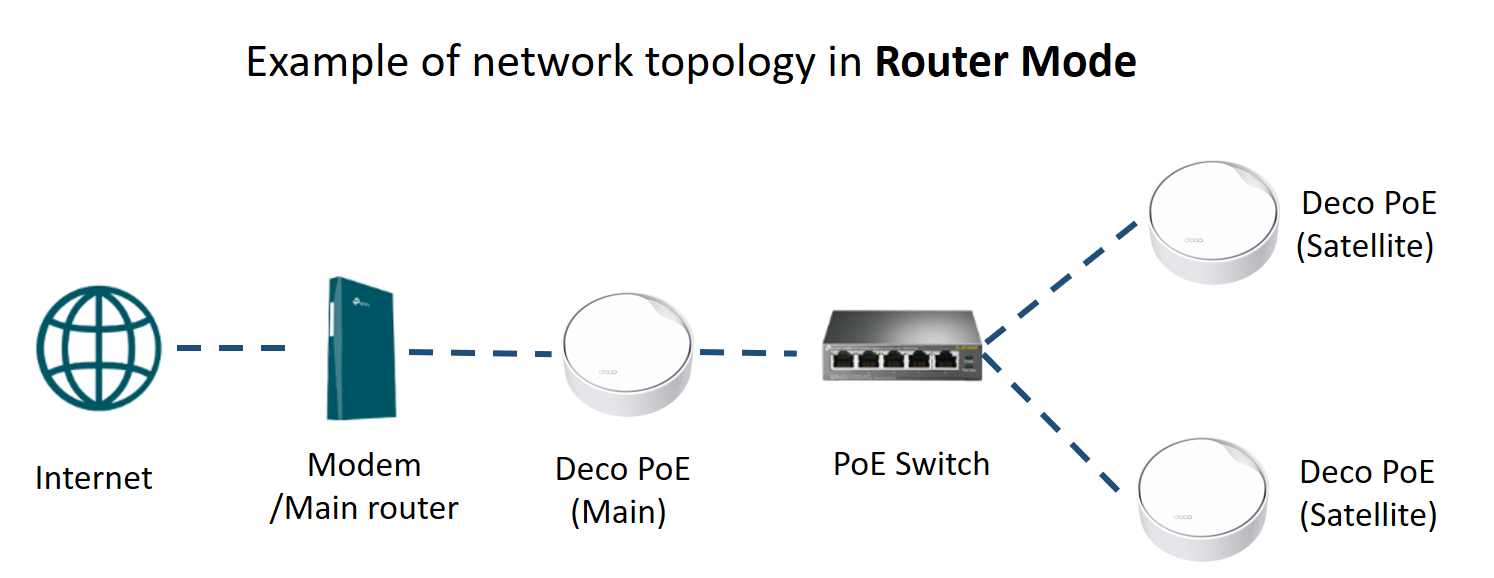
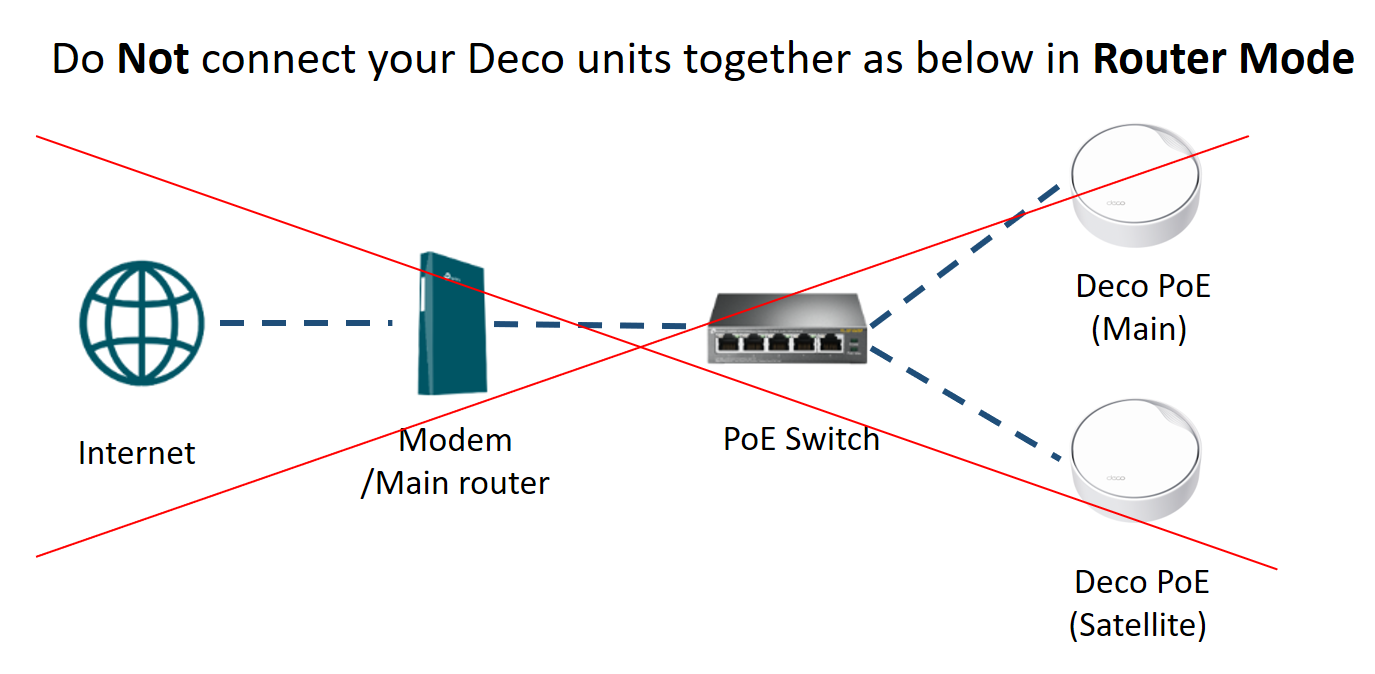
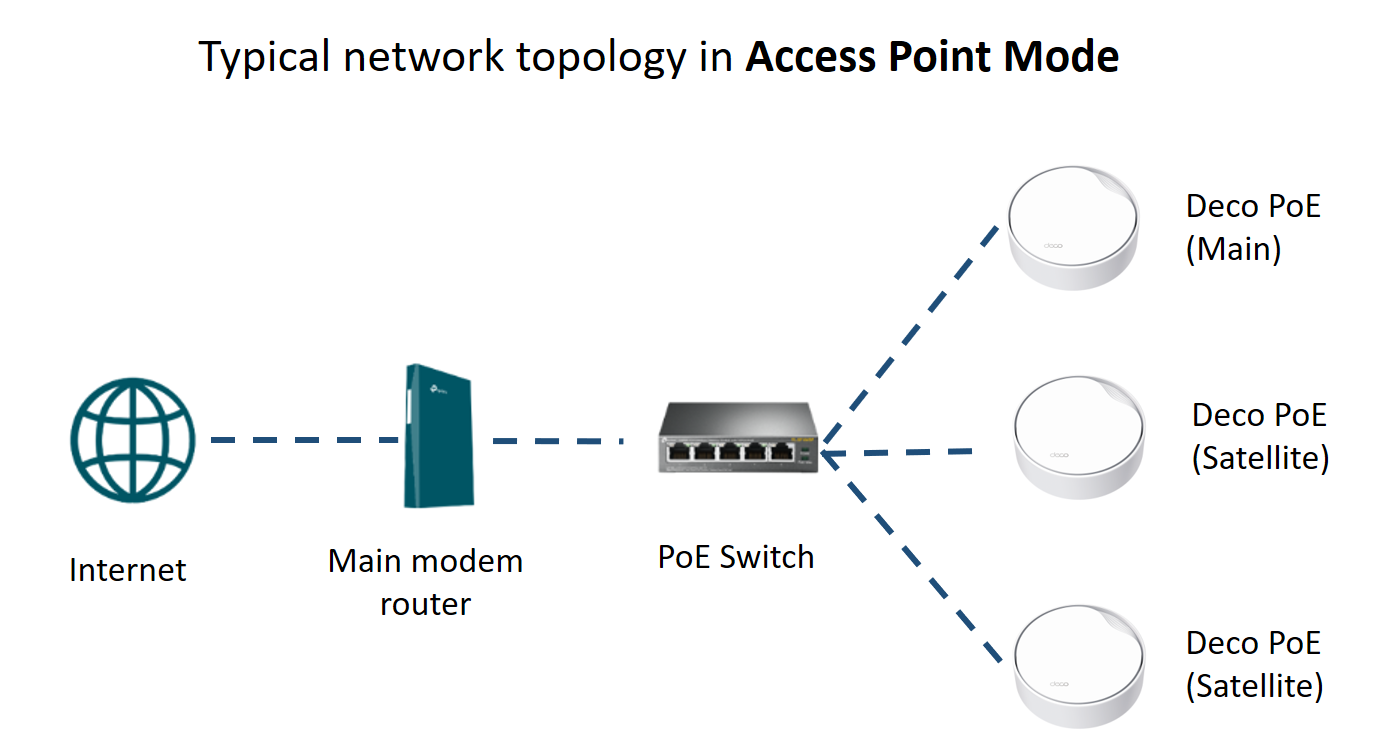
Deco X50-PoE supports router mode and access point mode.
Router Mode: Deco works in router mode by default. In router mode, the satellite Deco should be wired to the LAN port of the main Deco, or to a switch connected to the main Deco's LAN port, to avoid a network loop.
Access Point Mode: If there is a main router in front of Deco, Deco can be set to work under access point mode. In Access Point mode, you can wire the satellite Deco to any Deco unit or the front main router through a switch.
Q11: Can I power other PoE-supported devices via the PoE ports on Deco X50-PoE?
No, Deco X50-PoE could only receive power via its PoE port from a PSE device (such as a PoE switch).
Learn more details about each function and configuration. Please go to the Download Center to download the manual for your product.
Looking For More
Questa faq è utile?
Your feedback helps improve this site.


TP-Link Community
Still need help? Search for answers, ask questions, and get help from TP-Link experts and other users around the world.