
如何啟用Deco 的WPS功能?
WPS (Wi-Fi Protected Setup) 可以幫助您透過簡單的操作,快速且安全地連接到網路。本文將引導您如何透過 WPS 快速將新的無線設備添加到 Deco 的網路中。
注意:WPS 功能目前僅在部分 Deco 型號上提供,其他 Deco 型號未來將透過韌體更新支援此功能。
這裡我們以 Deco M5 為例。
1. 在 Deco App 上,點擊 更多 (More),然後點擊 WPS。
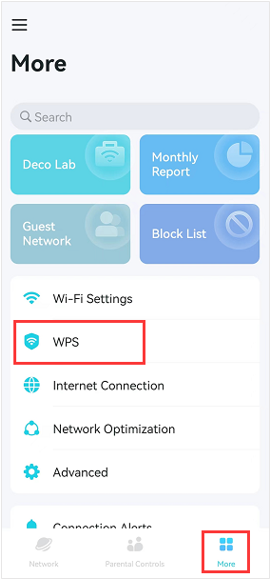
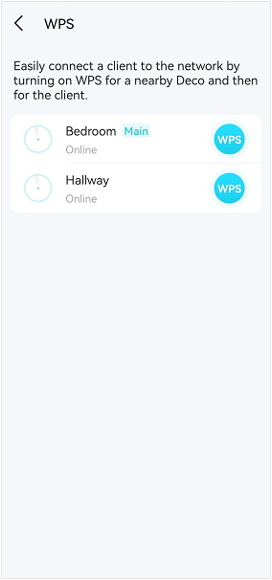
2. 在距離您的無線設備較近的 Deco 單位上,點擊 Deco 側邊的藍色 WPS 按鈕以開始掃描程序。
掃描程序將持續兩分鐘。請在兩分鐘倒數期間內,按下您無線設備上的 WPS 按鈕,然後等待無線設備連線至 Deco 網路。
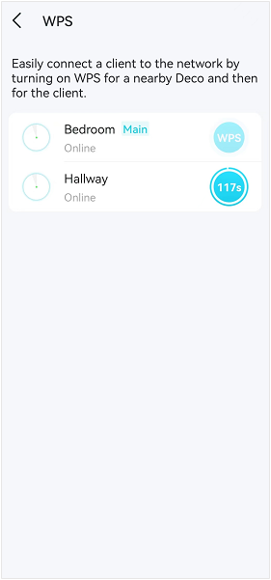
欲了解各項功能與配置的更多詳情,請前往 下載中心 下載您產品的手冊。
Looking For More
這篇faq是否有用?
您的反饋將幫助我們改善網站
_US_1.0_F_normal_20231213092414n.png)



TP-Link Community
Still need help? Search for answers, ask questions, and get help from TP-Link experts and other users around the world.