What is Mesh WiFi?
A guide to how a mesh Wi-Fi system covers every room in your home.
What is a mesh network? It's two or more devices that work together as one wireless system, instead of a single router broadcasting from just one spot. If you've dealt with weak Wi-Fi in a back bedroom or a home office, a mesh system from TP-Link's Deco lineup can close those gaps for good.
Key Takeaways
-
Mesh Wi-Fi uses two or more nodes that work together to build one whole-home network.
-
A range extender requires that you reconnect to a new network as you move through the house. Mesh Wi-Fi skips that step: your devices roam between nodes without dropping the connection.
-
Mesh systems use self-healing technology. If one node loses connection, the network reroutes traffic through the other nodes, keeping you online.
-
TP-Link's Deco systems scale to fit your home: the Deco X20 covers up to 5,800 square feet in a three-pack, while the Wi-Fi 7 Deco BE65 and Deco BE85 each support over 200 connected devices.
-
Select Deco systems add built-in security through TP-Link HomeShield, including automatic firmware updates, WPA3 encryption, and content filtering, with core protection free and more features on a subscription.
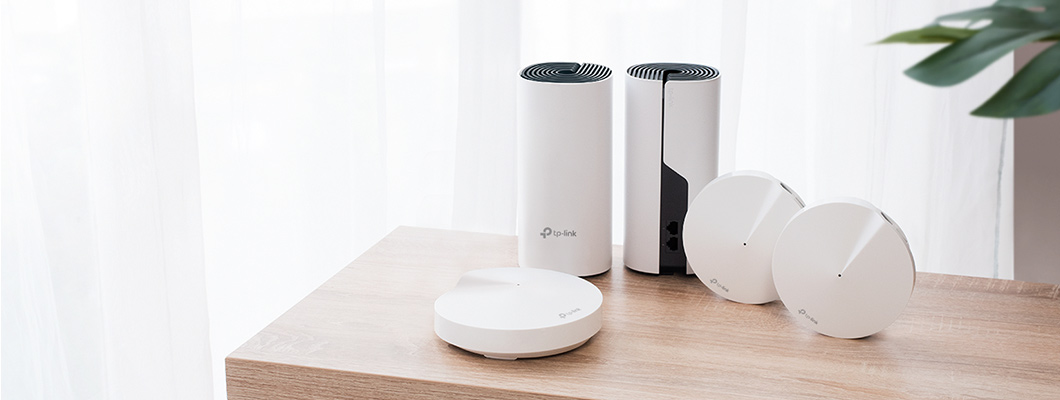
What is Mesh WiFi?
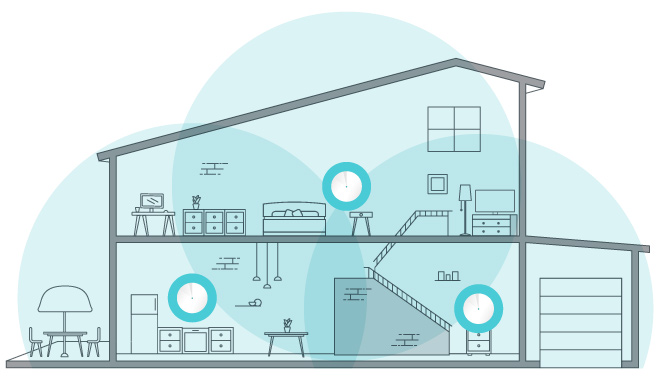
A mesh network is what you get when two or more nodes share the job of extending Wi-Fi throughout your home. A mesh router is one of those nodes: a standalone unit that works with partner nodes instead of broadcasting Wi-Fi alone, as a traditional router does.
Add more nodes, and you stretch Wi-Fi signal into rooms a single router struggles to reach. That's the idea behind whole-home mesh Wi-Fi coverage. The sections below walk through how that coverage works.
Who Needs a Mesh Wi-Fi System, and Why?
Mesh Wi-Fi fits mid-size and large homes with weak or spotty Wi-Fi coverage. This is especially true for homes with two or more floors, thick interior walls, or an unusual layout. A range extender can fix one weak spot in a smaller home, but it won't match a mesh Wi-Fi system's speed or steady coverage across a bigger home.
A mesh Wi-Fi system also handles more people and devices at the same time. Picture a household streaming video in the living room, gaming down the hall, and running a handful of smart plugs and cameras all at once. A single router can start to lag under that load, but multiple mesh nodes share the work instead, so everyone stays connected without the network slowing down. Select Deco systems cover up to 9,600 square feet in a three-pack, with a guided setup you can finish in minutes.
Benefits of a Whole-Home Mesh Wi-Fi System
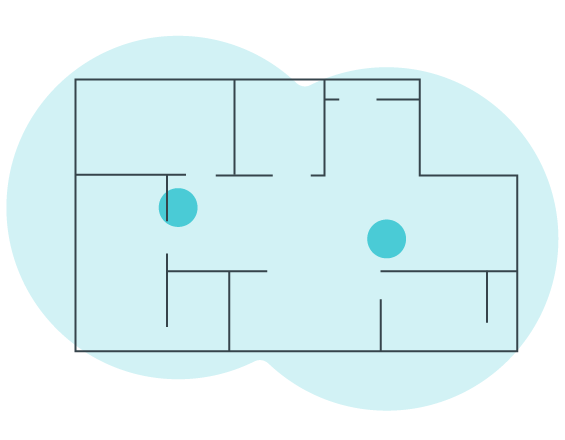
One Network for Your Entire Home
Mesh technology keeps you online even if one node loses its connection. Walk upstairs, and you stay on the same network, instead of signing into a different one every time you change rooms..
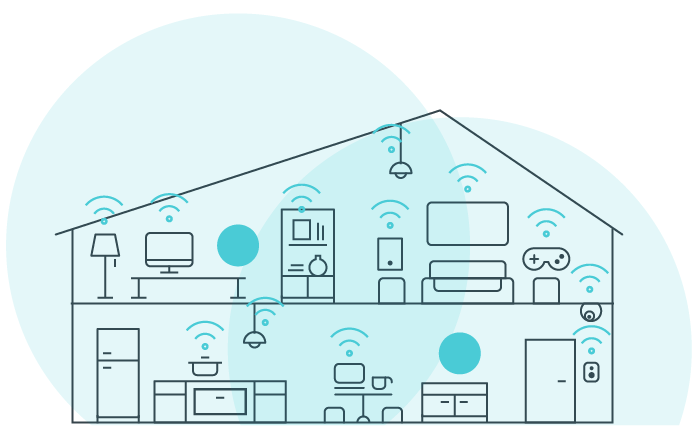
Stable Long-Range Connectivity
Each mesh node passes the signal along to the next one. That means you get a strong connection at the top of the stairs and down in the basement alike. A mesh router solves the range problem a single router can't.

Easy Setup and Management
Most mesh systems walk you through setup with a companion app, so you can toggle network settings, check speeds, and turn on parental controls without any technical skill.

Control Your Smart Home
Systems like the Deco BE25 or Deco BE85 pair with Alexa or Google Assistant for voice control, and the Deco app lets you manage your network alongside any Wi-Fi-connected smart home gear from one place. Both run on Wi-Fi 7, which gives your network room for more smart plugs, bulbs, and cameras without slowing everything else down.
Deco Mesh WiFi Home Security
Select Deco systems pair whole-home mesh coverage with security built into several layers: the hardware itself, the traffic moving across your network, and the content that reaches your family's screens. TP-Link HomeShield powers much of this, with its core protections included at no extra cost and advanced tools available by subscription. Here's what that protection covers.

Hardware Security
Deco stays current with free, automatic firmware updates, and its firewall only lets approved traffic reach your devices.

Advanced Encryption
Deco automatically encrypts every wireless connection. That covers the link between Deco units, and the link between a Deco unit and your devices.

Real-Time Antivirus
Select Deco models with HomeShield protect every connected device from viruses, malware, and ransomware. That includes devices that don't usually have their own protection, like Wi-Fi cameras and smart locks.1

Content Filtering
Set up separate profiles and filter content using preset or custom lists. Deco also blocks unsafe websites on its own, using a list that updates automatically.
How Does Mesh Wi-Fi Work?
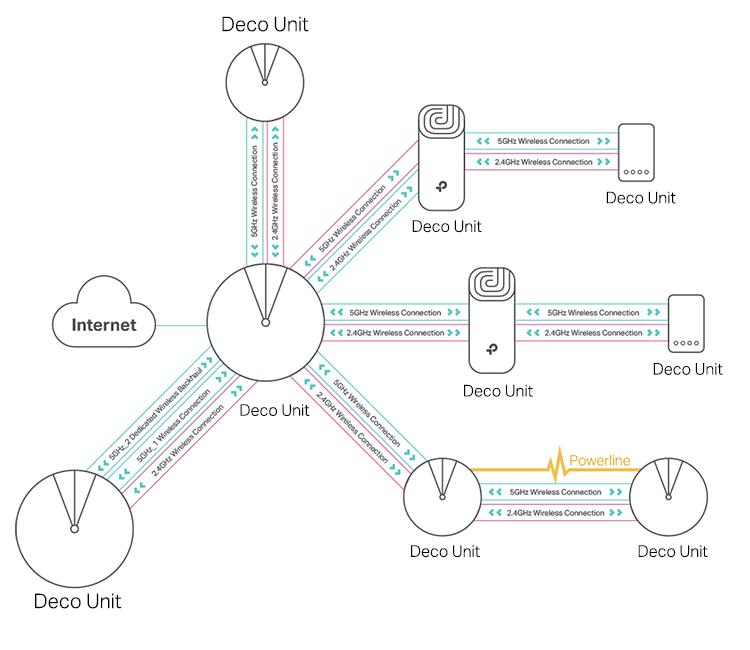
Mesh Wi-Fi passes your connection from node to node like a relay, so even the node farthest from your main router still delivers full-strength Wi-Fi.
The nodes also work together to spread devices across the best available frequency. Your laptop might stream a video call on one band while a smart speaker sits on another, so neither one competes for the same signal. If one node drops offline, the rest automatically pick up its traffic. Your smart lights and cameras keep working without you having to reset anything.
What’s the difference between Mesh WiFi and a Range Extender?
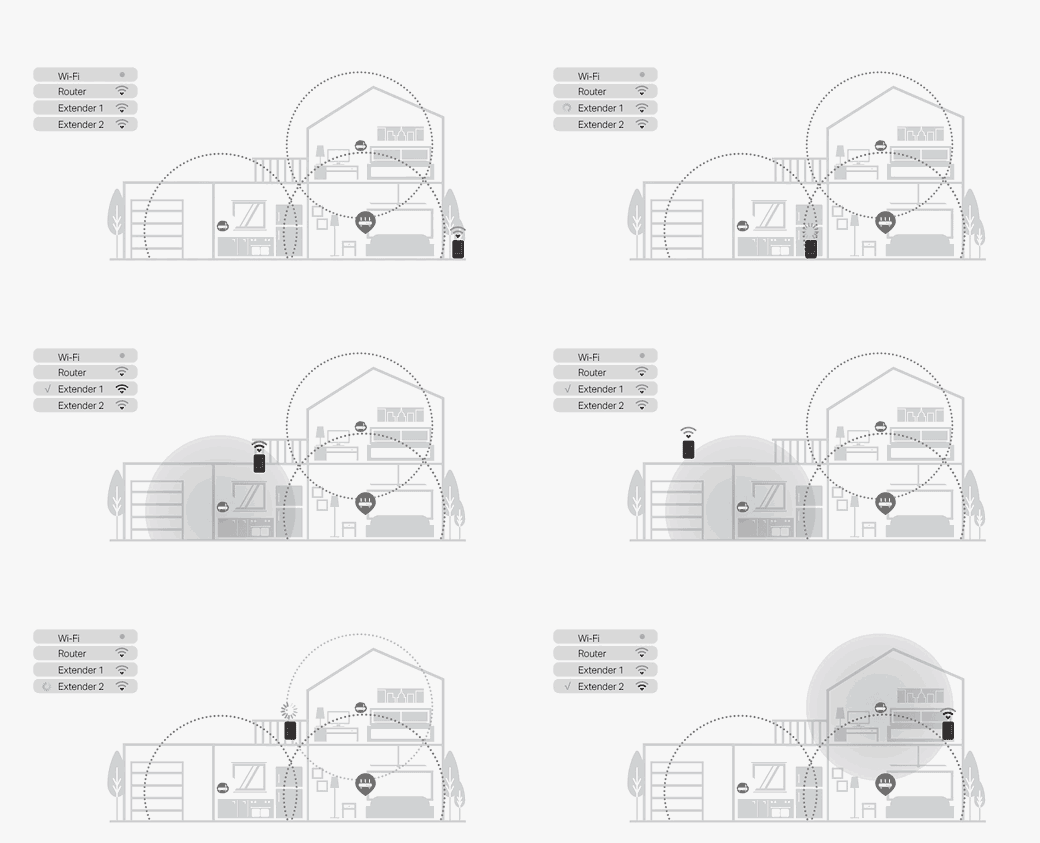
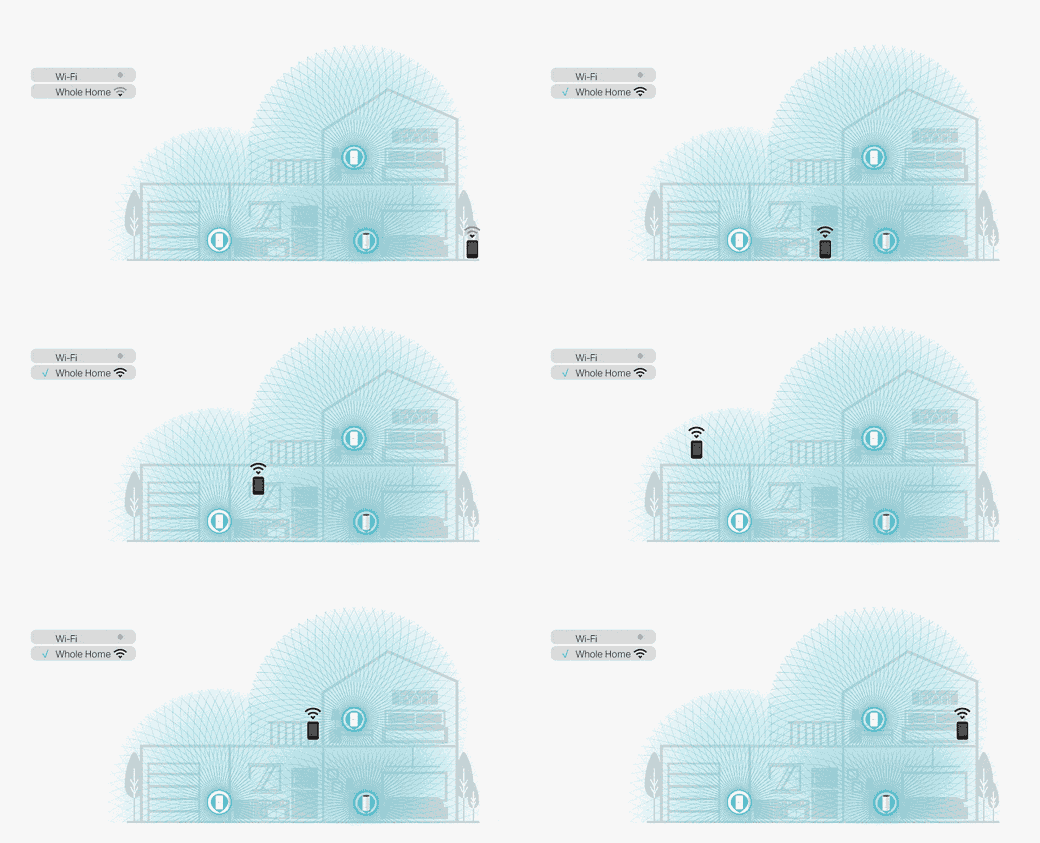
A Wi-Fi mesh system carries a single, uninterrupted signal as you walk from room to room. A range extender does this differently: once you move out of range of your main router, it asks you to manually connect to a separate network to keep your Wi-Fi going.
For one weak spot, a range extender is a reliable, low-cost fix. For coverage across a larger or multi-story home, mesh Wi-Fi's faster, steadier signal usually wins out. See a full breakdown in our guide to mesh Wi-Fi versus range extenders.
Learn More About Mesh Wi-Fi Networking
Here's where to go next if you want to dig deeper into mesh Wi-Fi.
How mesh Wi-Fi unifies your whole-home network
Why mesh Wi-Fi covers a whole home so well
Frequently Asked Questions
Does mesh Wi-Fi replace my existing router?
Yes, a Deco mesh Wi-Fi system replaces your current router and takes over broadcasting Wi-Fi for your whole home. Once it's set up, you can remove your old router and any range extenders from the network. The Deco nodes handle coverage on their own. If you need to keep your current router, like one required by your internet provider, Deco can run in Access Point mode instead, adding coverage while your router continues to manage the network.
What are the best mesh Wi-Fi systems?
TP-Link's best mesh Wi-Fi systems for whole-home coverage depend on your home's size and how many devices you connect. Larger or multi-story homes do best with a three-pack, while a two-pack often covers a mid-size home well. If you also want the newest Wi-Fi standard, check whether a model supports Wi-Fi 6E or Wi-Fi 7 before you compare pack sizes.
What is the best router for a large home?
For the largest homes, look to Wi-Fi 7: the Deco BE95 and Deco BE85 each cover up to 9,600 square feet in a three-pack, with the BE95's quad-band setup edging ahead on raw speed. For Wi-Fi 6E, the Deco XE75 Pro covers up to 7,200 square feet in a three-pack. If Wi-Fi 6 fits your needs better, the Deco W7200 is a strong tri-band option, covering up to 5,500 square feet as a two-pack.
Is mesh Wi-Fi better than a traditional router?
Mesh Wi-Fi works better than a traditional router mainly in larger or multi-story homes, where one router's signal might not reach every room. In a small apartment or studio, a traditional router or a system like the Deco BE25 may cover everything you need without added nodes.
Can I add more Deco units to my existing mesh network?
Yes, Deco systems are built to grow with your home, and every Deco model works together in the same mesh network. Adding a unit is as simple as powering it on and following the setup steps in the Deco app. See TP-Link's guide to adding Deco units for the full walkthrough.
Will mesh systems work with brick, stucco, or concrete walls?
Yes, mesh Wi-Fi systems work in homes with brick, stucco, or concrete walls. Thick walls can still slow speeds a little. Placing nodes closer to those walls, instead of as far apart as possible, usually brings coverage back to full strength. For more on choosing the right setup for dense materials, see our guide to the best mesh Wi-Fi for thick walls.
How many devices can connect to a Deco mesh network?
The number depends on your Deco system. Select systems, like the Deco XE75 Pro and Deco BE85, connect over 200 devices at once. That's enough for a home full of phones, smart home gear, and streaming devices. Check your specific model's product page for its exact device limit.
How many Deco units can I use in one home?
TP-Link recommends up to six Deco units for most models on a single mesh network. Select Wi-Fi 6, 6E, and 7 systems, including the Deco XE75 Pro and Deco BE85, support more units if you need them. A typical three-pack already covers most mid-size to large homes. See TP-Link's guide to Deco unit limits for more detail.
Where can I buy mesh Wi-Fi products?
You can browse TP-Link's Deco mesh Wi-Fi systems directly, or find a retailer near you through TP-Link's where-to-buy page.


_Overview_normal_20211130005706l.png)