
Why my default wireless network name/SSID has been changed after upgrading the firmware?
 222426
This Article Applies to:
Causation
In previous firmware, we use like “TP-Link_2.4GHz_130918” and “TP-Link_5GHz_130917” to define the default SSID of 2.4GHz and 5GHz, which may cause that some smart phone cannot display the whole part of the SSID. Therefore, it’s unable to make a distinction between 2.4GHz and 5GHz.Latter firmware have shorten the default SSID to eliminate this issue.
How to find the new wireless network name/SSID?
1. As per the LAN MAC address on the back of the label.
This is the label of Archer C5 as an example.
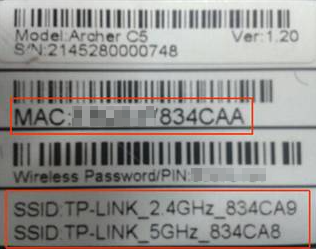
LAN MAC address of Archer C5 is “XX-XX-XX-83-4C-AA” The last digit A stands for 10.
The original 2.4GHz SSID is “TP-Link_2.4GHz_834CA9”;
The original 5GHz SSID is “TP-Link_5GHz_834CA8”.
Compared with the original default SSID:
The new 2.4GHz SSID is TP-Link_4CAA, which is defined by the last 4 digits of the MAC Address.
The new 5GHz SSID is TP-Link_4CA9_5G, which is defined by the last 4 digits of MAC address-1_5G of the MAC Address.
2. Login to the management page of router. Please refer to [FAQ ID: 87] , if you don’t know how to login.
Click Wireless 2.4GHz/5GHz to find the new SSID.

Is this faq useful?
Your feedback helps improve this site.
_normal_1591166327443v.png)

TP-Link Community
Still need help? Search for answers, ask questions, and get help from TP-Link experts and other users around the world.