
How to reserve LAN IP addresses on TD-W9970 (new logo)
When you specify a reserved IP address for a PC on the LAN, that PC will always receive the same IP address each time when it accesses the DHCP server. Reserved IP addresses should be assigned to the servers that require permanent IP settings.
1. Log into web management page of the modem router.
How to login to the web management page of TD-W9970_(new logo)?
2. Go to DHCP Server → Address Reservation. You can view and add a reserved address for clients via the next screen.
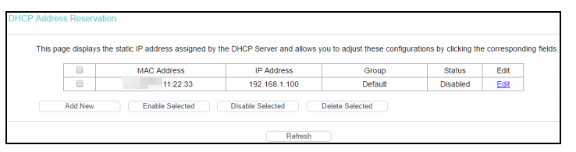
3. Click Add New.
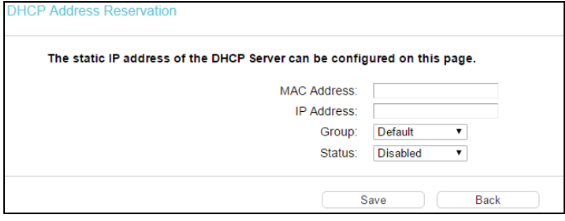
4. Enter the MAC address (in XX:XX:XX:XX:XX:XX format.) and IP address (in dotted-decimal notation) of the computer for which you want to reserve an IP address.
5. Click Save.
Get to know more details of each function and configuration please go to Download Center to download the manual of your product.
A fost util acest FAQ?
Părerea ta ne ajută să îmbunătățim acest site.


TP-Link Community
Still need help? Search for answers, ask questions, and get help from TP-Link experts and other users around the world.