
How to Clean the Sensors of Tapo Robot Vacuum
You may refer to either this video or the steps below:
Wipe the sensors with a clean, damp cloth, then dry them with a dry cloth. Clean once a month.
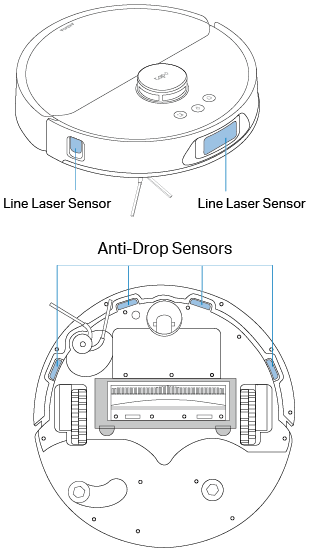
Wipe the sensors with a clean, damp cloth, then dry them with a dry cloth. Clean once a month.
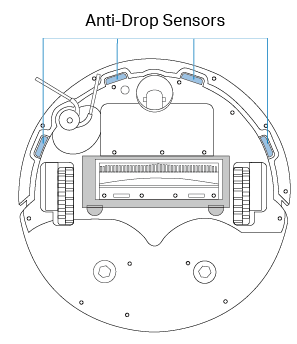
Wipe the LiDAR and sensors with a clean, dry cloth.
Note: Using a wet cloth may cause damage.
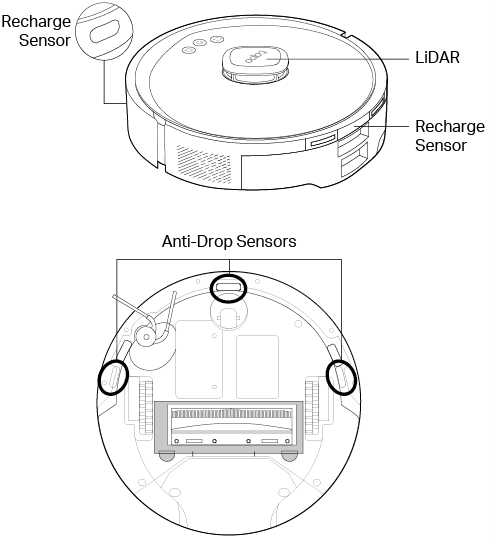
Wipe the LiDAR and sensors with a clean, dry cloth. Clean once a month.
Note: Using a wet cloth may cause damage.

Clean the LiDAR area with a cotton swab.
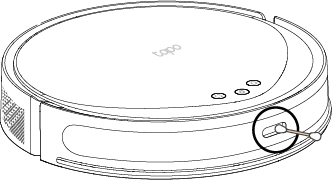
Wipe the sensors with a clean, dry cloth. Clean once a month.
Note: Using a wet cloth may cause damage.

Wipe the sensors with a clean, dry cloth. Clean once a month.
Note: Using a wet cloth may cause damage.


Wipe the sensors with a clean, dry cloth. Clean once a month.
Note: Using a wet cloth may cause damage.


Clean the LiDAR area with a cotton swab.
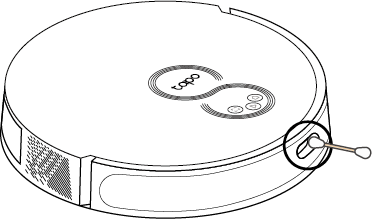
Wipe the sensors with a clean, dry cloth. Clean once a month.
Note: Using a wet cloth may cause damage.


Wipe the sensors with a clean, dry cloth. Clean once a month.
Note: Using a wet cloth may cause damage.


Wipe the sensors with a clean, dry cloth. Clean once a month.
Note: Using a wet cloth may cause damage.


Wipe the sensors with a clean, dry cloth. Clean once a month.
Note: Using a wet cloth may cause damage.


Wipe the sensors with a clean, dry cloth. Clean once a month.
Note: Using a wet cloth may cause damage.


Looking For More
Is this faq useful?
Your feedback helps improve this site.



TP-Link Community
Still need help? Search for answers, ask questions, and get help from TP-Link experts and other users around the world.