


1_normal_20240524080127v.jpg)
(EU)_1.0-151x151x276.5mm-7022510704_normal_20240524080128n.png)


1_large_20240524080127i.jpg)


(EU)_1.0-151x151x276.5mm-7022510704_large_20240524080128a.png)
Deco BE65
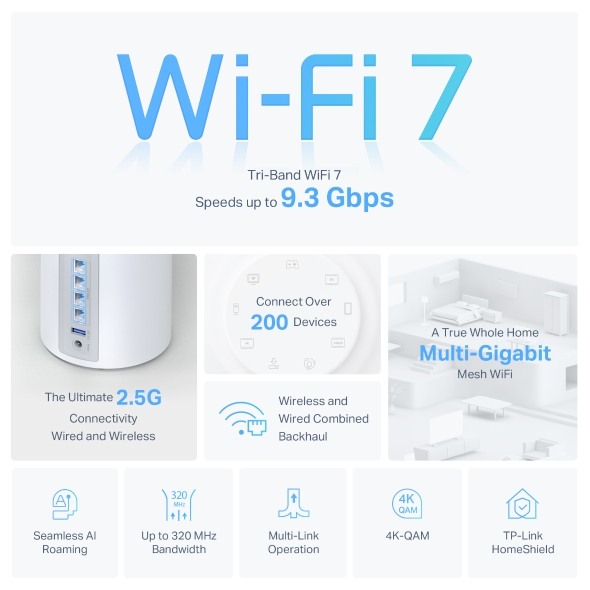
Sistema Wi-Fi 7 Mesh BE9300 de Triple Banda
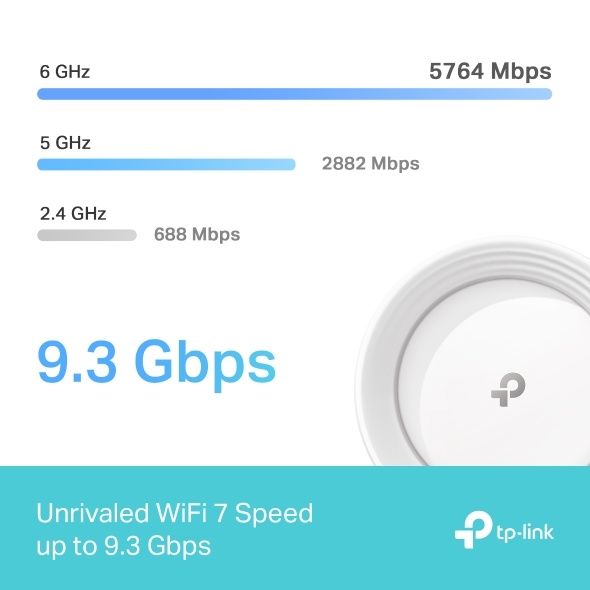
- WiFi 7 Tri-Banda de 9.3 Gbps – 5765 Mbps (6 GHz) + 2882 Mbps (5 GHz) + 688 Mbps (2.4 GHz).†
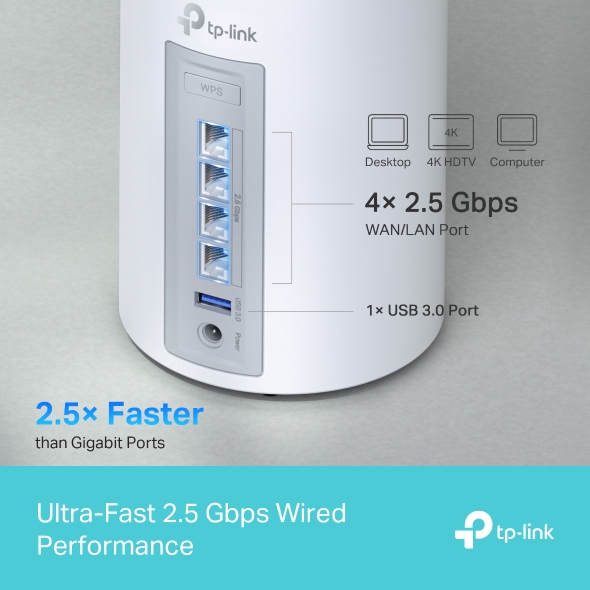
- Conexiones por Cable de 2.5 Gbps – 4 × puertos de 2.5 Gbps que aseguran máxima flexibilidad y mayor rendimiento.§
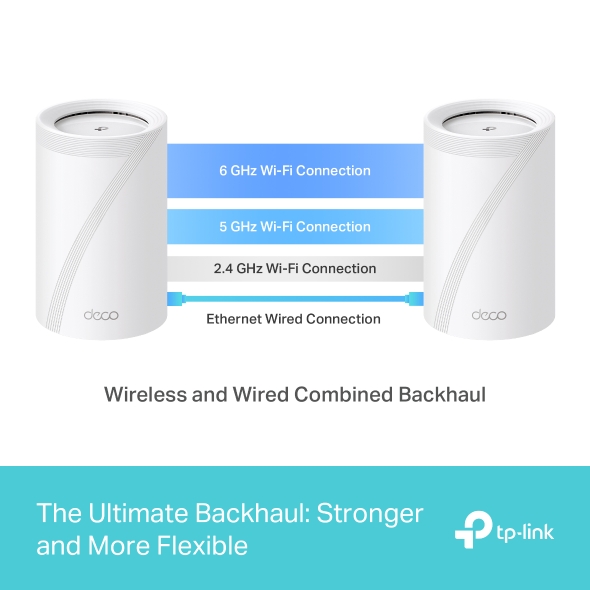
- Backhaul Combinado Inalámbrico y por Cable – Conecta simultáneamente un backhaul inalámbrico y uno por cable en cada unidad para mejorar el rendimiento general y reducir la latencia.
- Operación de Enlace Múltiple (MLO) – Envía y recibe datos simultáneamente a través de diferentes bandas y canales para aumentar el rendimiento, reducir la latencia y mejorar la fiabilidad.△
- Canales de 320 MHz – Duplican el ancho de banda y permiten muchas más transmisiones simultáneas a las velocidades más rápidas posibles.△
- Funciona en la Banda de 6 GHz – Minimiza la congestión con un espectro exclusivo (greenfield), ofreciendo conexiones rápidas y estables.△
- TP-Link HomeShield – Ofrece protección integral de red, controles parentales avanzados y seguridad IoT en tiempo real.*
- Compatibilidad Universal – Compatible con todas las generaciones de WiFi y funciona con cualquier proveedor de servicios de internet (ISP) y módem.☆



Internet en Toda la Casa
con Wi-Fi 7 Mesh IA a Máxima Velocidad
Sistema Wi-Fi 7 Mesh BE9300 de Triple Banda
Deco BE65
-v1/img/tag-homeshield.png)

Wi-Fi 7 de Triple Banda
Hasta 9,3 Gbps
Roaming IA Inteligente
Ancho de Banda hasta 320MHz
Multi-Link Operation MLO
4K-QAM
Conectividad
Multi-Gigabit
Wi-Fi 7 Mesh
Conecta más de
200 Dispositivos
Puertos 2.5G
Ethernet
Backhaul Combinado
Seguridad HomeShield
Wi-Fi 7, más Rendimiento para la Red de tu Hogar
Wi-Fi 7 ofrece un rendimiento superior a las anteriores generaciones Wi-Fi, alcanzando una mayor velocidad con menos latencia e interferencias.
-
Rendimiento Extraordinario

-
Wi-Fi 6
-
Wi-Fi 5
-
4,2 Veces Más Rápido
que WiFi 6E Mesh※
-
4 Veces Menos Latencia
Para el Streaming y Gaming Online※※
-
Mayor Capacidad
Más de 200 dispositivos a la vez†
Señal más Potente con Wi-Fi 7 Mesh IA
La tecnología Wi-Fi 7 de Triple Banda amplía el espectro de red disponible para evitar las interferencias con los vecinos y disfrutar de una velocidad ultrarrápida hasta 9,3Gbps gracias a la banda de 6GHz.†
-
6 GHz
5760 Mbps
-
5 GHz
2880 Mbps
-
2,4 GHz
574 Mbps
Mayor Rendimiento y Cobertura
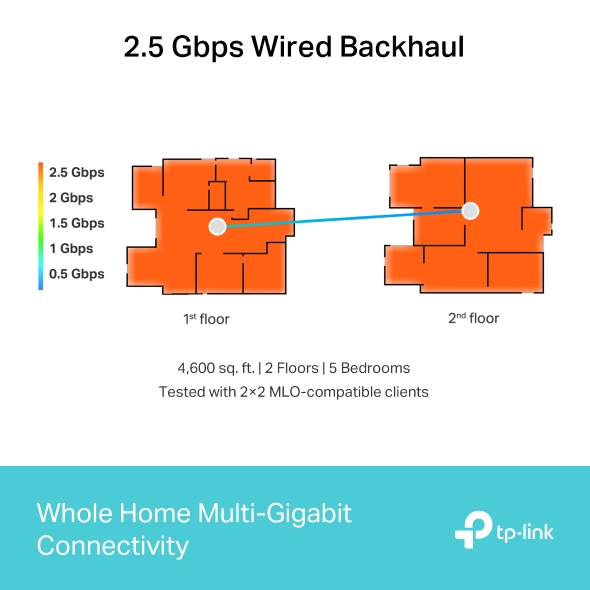
Mapa de Calor Deco BE65
428m2 | 2 Plantas | 5 Habitaciones
Test realizado con dispositivos compatibles con MLO 2×2 MLO
428m2 | 2 Plantas | 5 Habitaciones
Test realizado con dispositivos compatibles con MLO 2×2 MLO
-
 Backhaul por cable a 2.5 Gbps
La mayor parte del hogar disfrutará de la conexión 2.5 Gbps. Se alcanzan los 2 Gbps en los límites de la casa debido al gran número de paredes.***
-
Backhaul Wi-Fi
El Deco BE65 de la planta baja es el mismo que el del ejemplo anterior con backhaul por cable. Debido a las paredes y el techo, el Deco BE65 de la primera planta recibe aproximadamente 1.5Gbps.***
2.5Gbps de Velocidad por Cable
Los puertos de 2.5 Gbps y el puerto USB 3.0 lo convierten en la mejor opción para crear una red en casa preparada para el futuro.§
2,5 Veces más Rápido
que los Puertos Gigabit

Portátil

TV 4K

Ordenador
4 Puertos 2.5 Gbps
WAN/LAN
1 Puerto USB 3.0
Backhaul para Mejorar el Rendimiento
Desarrollado con nuestra tecnología, Deco BE65 puede conectar mediante backhaul inalámbrico y por cable de forma simultánea utilizando la tecnología Wi-Fi 7 y MLO. Así se mejora el rendimiento de la red, se reduce la latencia y se aumenta la cobertura.
Backhaul combinado inalámbrico y por cable

Protege tu Red y Todo lo que Hay en Ella
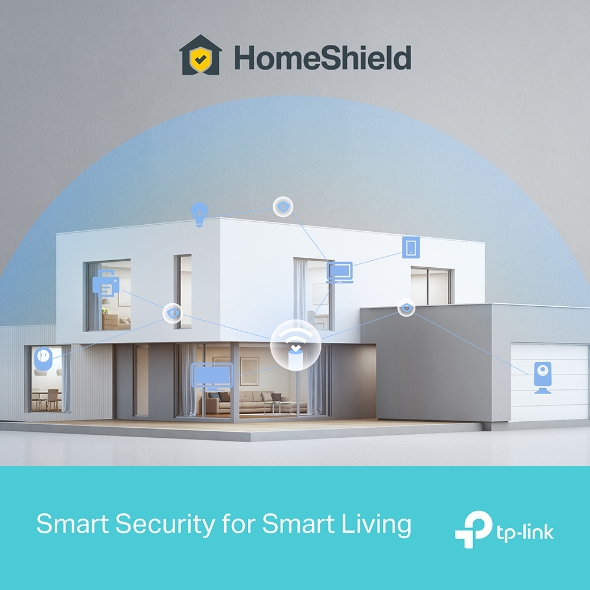
El servicio de seguridad avanzada TP-Link HomeShield mantiene segura la red de acceso a internet en casa, los equipos conectados a ella y los dispositivos inteligentes IoT.
-
Protección de la Red
HomeShield escanea la red, identifica riesgos y los bloquea para mantener tu privacidad y los dispositivos conectados bien protegidos.*
-
Control Parental Avanzado
Administra el tiempo de conexión de los niños bloqueando el contenido inapropiado de la web o de aplicaciones para crear unos hábitos digitales saludables.*
-
Protección Dentro y Fuera de Casa
App KidShield
App Devices Security
Los dispositivos están protegidos en cualquier lugar con la App Devices Security. Con KidShield, se puede conocer la ubicación de los menores para protegerles digitalmente incluso fuera de casa.*
Compatible con Servidor y Cliente VPN
Accede a servidores VPN remotos sin instalar software en cada dispositivo. Se pueden crear diferentes tipos de conexión VPN como OpenVPN, PPTP o L2TP/IPSec VPN. Además, Deco puede realizar conexiones a la VPN y a Internet al mismo tiempo.
Red Exclusiva para el Hogar Inteligente
Configura una red Wi-Fi exclusiva para los dispositivos inteligentes IoT, aumentando la seguridad con la protección HomeShield y el cifrado avanzado WPA3.
Una Sola Red Wi-Fi IA para Toda la Casa
Streaming sin Cortes al Moverte por la Casa
Todas las unidades Deco trabajan juntas creando una red unificada bajo un mismo nombre y contraseña. Con la tecnología de Roaming mediante IA, tu móvil, tablet, portátil o consola se conecta automáticamente a la unidad Deco que mejor señal ofrezca a medida que te mueves por la casa, sin cortes.‡
-
Un Solo Nombre Wi-Fi en Toda la Casa
-
Algoritmos Inteligentes Avanzados
-
Autoaprendizaje AI-Driven Mesh
-
Fácil Configuración
Fácil Configuración
Con la aplicación Deco podrás configurar todo el sistema Wi-Fi 7 Mesh en pocos minutos, fácilmente siguiendo los pasos indicados en la App. No es necesario tener conocimientos técnicos.
-
1 CONECTA
la unidad principal Deco a un módem y enciende ambos. -
2 DESCARGA
la App Deco y ábrela. -
3 CONFIGURA
el sistema siguiendo los pasos de la App.
Uso Sencillo
Controla la red Wi-Fi desde casa o fuera de ella con el móvil, revisa los dispositivos conectados y crea un red para invitados fácilmente.
Todos los Decos Pueden Trabajar Juntos
Deco BE65 es compatible con todos los demás modelos Deco para formar una red Wi-Fi Mesh. Amplía la cobertura a toda la casa simplemente añadiendo otro Deco.
-
Sótano

-
Patio

-
Garaje

Itinerancia Perfecta
Las unidades Deco funcionan en conjunto formando una red unificada con un solo nombre de red. Tu teléfono o tablet se conecta automáticamente al Deco más rápido mientras te mueves por tu casa. El cambio tarda menos de 0.3 segundos y es fluído e imperceptible, creando una experiencia online perfecta.
-
Enrutamiento Adaptativo
La Tecnología Mesh de TP-Link elige dinamicamente la mejor ruta y banda para tus conexiones y aplicaciones, garantizando una Wi-Fi rápida sin importar donde te encuentras en tu casa.


-
Autocuración
Si un Deco presenta algún problema, el sistema enrutará de manera automática tus datos vía los demás Deco asegurando que estés online.
Wi-Fi + Powerline
Las conexiones powerline usan la red eléctrica de tu casa para unir los Decos, traspasando hasta los muros más gruesos y techos.
El Wi-Fi de banda dual y el powerline funcionan en conjunto para transmitir los datos entre las unidades Deco. La velocidad de red total se ve muy mejorada en comparación a usar solo Wi-Fi.
- Wi-Fi + Powerline:
- Sistema Wi-Fi Híbrido Más Velocidad
- Wi-Fi Mesh Tradicional:
- Sistema Wi-Fi Tradicional
- Powerline
- Nota:Wi-Fi + Powerline solo en Deco P9
IoT Mesh
A diferencia de los centros inteligentes tradicionales, la tecnología TP-Link Mesh proporciona cobertura IoT para todo el hogar con Wi-Fi, Bluetooth y Zigbee integrados en un solo sistema. Disfruta de la magia de tu hogar inteligente en todas las habitaciones con la tecnología TP-Link Mesh. Di adiós a innumerables hubs.
- - - - Wi-Fi
- - - - Zigbee
- - - - Bluetooth
Wi-Fi 6 Mesh
Armado con tecnología Wi-Fi 6,
el Wi-Fi Mesh para todo el hogar Deco está diseñado para dar un gran impulso en la cobertura, la velocidad y la capacidad total. Conéctate al último Wi-Fi Mesh para disfrutar de la red futura que se carga más rápido y se conecta más.
-
Cobertura Amplia
-
Más Conexiones
-
Wi-Fi 6 Velocidades Más Rápidas
Mesh Impulsada por IA
Armado con la tecnología IA Mesh, Deco aprende y se mejora automáticamente a partir de la experiencia. Esto hace que Wi-Fi mesh sea ideal para crear un entorno de red único. Camina por tu casa y disfruta de una transmisión fluida a las velocidades más rápidas posibles.
Por qué TP-Link Mesh Technology
es una Solución Líder en la Industria?
| Tabla Comparativa | |||
| Model Number | TP-Link Deco | Netgear Orbi | Google WiFi |
| Wireless Backhaul | Tri-Band(2.4G+5G_1+5G_2)¹ | Single-Band(5G_1 Only) | Dual-Band(2.4G+5G) |
| Mesh Protocol Supported | IEEE 802.11k/v/r | IEEE 802.11k/v | IEEE 802.11s |
| True Seamless Roaming | √ | × | × |
| APS(Adaptive Path Selection) | √ | × | √ |
| IoT Mesh | √² | × | × |
| Wi-Fi 6 Mesh | √5 | √ | × |
| AI-Driven Mesh | √6 | × | × |
| Powerline Backhaul | √³ | × | × |
| Wireless + Powerline Bandwidth | √⁴ | × | × |
| Band Steering | √ | √ | √ |
| AP Steering | √ | √ | √ |
| Self-Healing | √ | √ | √ |
| Notes: 1&2 For Deco M9 Plus Only;5 for Deco X20;Deco X90;6 for Deco X90 only. Spec sourced by Dec. 2019 |
|||
Series Deco
Deco
-

Deco BE65
BE11000 Whole Home Mesh WiFi 7 System
-
_Overview_normal_20230128023814m.png)
Deco X60
AX5400 Whole Home Mesh Wi-Fi 6 Unit
-

Deco X20
AX1800 Whole Home Mesh Wi-Fi 6 System
-

Deco S7
AC1900 Whole Home Mesh Wi-Fi System
¡La gestión de la red Deco a tu alcance!
La aplicación Deco proporciona la forma más sencilla de configurar, administrar y monitorear su sistema Wi-Fi en malla para toda la casa Deco a través de sus dispositivos iOS o Android.
La configuración ahora es mucho más sencilla
Desempaquete Deco, instale la aplicación y luego simplemente siga las instrucciones en pantalla. La aplicación Deco se encargará del resto y pondrá su red en funcionamiento en minutos.
-
Conecte Deco a su módem de cable y encienda ambos dispositivos
-
Descargue y ejecute la aplicación Deco
-
Siga las instrucciones de la aplicación para configurar su sistema Deco.
Gestión sencilla
Deco te permite administrar fácilmente tu Wi-Fi desde cualquier lugar, ya sea que estés en el sofá, en el trabajo o en cualquier otro lugar.
-
Panel de control de gestión simple
Visualiza el estado de funcionamiento de tu red, verifica los dispositivos conectados y obtén todas las funcionalidades que ofrece tu router.
-
Múltiples Decos, una aplicación
La aplicación Deco administra todas tus redes Deco y los dispositivos conectados a tu Deco Wi-Fi.
-
Comprobar los dispositivos conectados
Vea una lista de sus dispositivos conectados con la capacidad de pausar y reanudar el acceso a Internet, probar la velocidad de Internet y priorizar o bloquear los dispositivos.
-
Gestión remota
Tome el control remoto de la red con un toque en su teléfono, sin importar dónde se encuentre.
Controles parentales potentes
Los controles parentales simples e intuitivos facilitan la protección de sus hijos mientras están en línea.
-
Cree fácilmente un perfil para cada miembro de la familia y establezca límites de tiempo personalizados y permisos de tiempo en línea. Asigne dispositivos a perfiles para que las reglas se extiendan a dispositivos individuales y a miembros de la familia.
-
Mantenga a su familia segura en línea con configuraciones de seguridad de un solo toque que bloquean contenido según la edad apropiada.
-
Establezca límites sobre el tiempo que cada persona de su familia puede pasar en línea.
-
Con Insights, puedes consultar qué sitios visitan tus hijos y cuánto tiempo pasan en cada uno. Es una excelente manera de saber que tus hijos están seguros mientras se divierten en línea.
-
Tómate un descanso del Wi-Fi para cenar o disfrutar de las noches de juegos en familia. Solo tienes que pulsar un botón para suspender el acceso a Internet de todos los miembros de tu hogar.
Una aplicación intuitiva y llena de funciones
Resumen de uso mensual
Vea una lista completa de los detalles de su red cada mes, incluido el uso,
el contenido bloqueado, las amenazas de seguridad y más.
Automatización del hogar
Hazte la vida más fácil con potentes herramientas de automatización y control por voz.
*Actualmente solo para Deco M9 Plus
Atajo flexible
Controle de forma flexible todos los dispositivos desde su teléfono o tableta con solo un clic.
*Actualmente solo para Deco M9 Plus
Proteja su red
El antivirus incorporado le ayuda a defenderse de sitios web maliciosos y a proteger sus pagos en línea.
*Actualmente solo para Deco M9 Plus, Deco P7 y Deco M5
Prioriza tus dispositivos
Elija qué dispositivos tendrán siempre las conexiones más rápidas
o establezca prioridad durante un período de tiempo específico.
Establecer prioridades de aplicación
Asigne más ancho de banda a las actividades más importantes para usted con controles simples.
*Actualmente solo para Deco M9 Plus, Deco P7 y Deco M5
Comparte Wi-Fi con amigos
Configure perfiles de Wi-Fi separados para invitados y comparta la contraseña para
que les resulte más fácil conectarse.
Comprueba tu velocidad
Realiza una prueba de velocidad para asegurarte de que estás obteniendo la velocidad de Internet por la que estás pagando.
Observa todos los dispositivos de tu red y descubre cuánto ancho de banda están utilizando.
Nuestro apoyo siempre te respalda
¿Tienes preguntas sobre Deco? La ayuda está siempre a un clic de distancia. Encuentra las respuestas en la aplicación Deco y no dudes en contactarnos con un simple clic.
Apoyo| Standards and Protocols | Wi-Fi 7 IEEE 802.11be/ax 6 GHz IEEE 802.11be/ax/ac/n/a 5 GHz IEEE 802.11be/ax/n/b/g 2.4 GHz |
|---|---|
| WiFi Speeds | BE9300 6 GHz: 5765 Mbps (802.11be) 5 GHz: 2882 Mbps (802.11be) 2.4 GHz: 688 Mbps (802.11be) |
| WiFi Range | Cobertura más amplia en todo el hogar Tecnología Mesh TP-Link El backhaul Ethernet opcional trabaja conjuntamente para enlazar las unidades Deco y proporcionar una cobertura sin fisuras Malla basada en IA Aprende de forma inteligente el entorno de red para proporcionar una Wi-Fi ideal y exclusiva para su hogar 4× Antenas de alto rendimiento (internas) Varias antenas forman una matriz de señal de refuerzo para cubrir más direcciones y grandes áreas Tri-banda Una banda de 6 GHz recién inaugurada aporta más ancho de banda y velocidades más rápidas |
| WiFi Capacity | Muy alta Tri-banda Distribuye los dispositivos en diferentes bandas para un rendimiento óptimo 2×2 MU-MIMO Se comunica simultáneamente con varios clientes MU-MIMO OFDMA Se comunica simultáneamente con múltiples clientes WiFi 7 6 streams Ancho de banda más que suficiente para los dispositivos conectados |
| Working Modes | Modo Router Modo punto de acceso |
| Advanced Features | • Funcionamiento multienlace (MLO) • Canal de 320 MHz • 4K-QAM • Multi-RUs • Funciona con el asistente de Google |
| Network Security | Cortafuegos SPI Control de acceso Seguridad HomeShield Protección IoT en tiempo real Bloqueador de sitios maliciosos Sistema de prevención de intrusiones Prevención de ataques DDoS Escáner de red doméstica |
|---|---|
| Guest Network | 1× Red de invitados a 6 GHz 1× Red de invitados a 5 GHz 1× Red de invitados a 2.4 GHz Tiempo efectivo Control de ancho de banda |
| VPN Server | • Servidor OpenVPN • Servidor VPN PPTP • Servidor VPN L2TP/IPSec |
| VPN Client | • Cliente OpenVPN • Cliente VPN PPTP • Cliente VPN L2TP/IPSec |
| WiFi Encryption | WPA-Personal WPA2-Personal WPA3-Personal |
| Ethernet Ports | • 4× 2.5 Gbps *Por unidad de deco Soporta auto-detección WAN/LAN |
|---|---|
| USB Support | 1 Puerto USB 3.0 Servidor FTP Servidor multimedia Servidor Samba |
| Botones | 1× Botón de reinicio 1× WPS |
| Advanced Features | • Calendario de reinicio • Tapo/Kasa Onboarding • Aislamiento de redes y dispositivos IoT • Función de enrutamiento estático • Preferencia de conexión nodo/banda |
|---|---|
| Protocols | IPv4 IPv6 |
| Service Kits | HomeShield Más información> |
| Parental Controls | Control parental HomeShield Restricción de Youtube SafeSearch Perfiles personalizados Biblioteca profesional de filtros de contenido Tiempo en familia Hora de acostarse Tiempo libre Recompensas de tiempo Clasificación del Tiempo Familiar en Internet Pausa Internet Informes semanales y mensuales |
| WAN Types | IP dinámica IP estática PPPoE PPTP L2TP |
| Quality of Service | QoS de HomeShield QoS por dispositivo |
| Cloud Service | Actualización de firmware OTA ID de TP-Link DDNS |
| NAT Forwarding | Reenvío de puertos UPnP |
| IPTV | IGMP Proxy IGMP Snooping Puente Etiqueta VLAN |
| DHCP | Reserva de direcciones Lista de clientes DHCP Servidor |
| DDNS | TP-Link |
| Management Features | App Deco |
| Network Services Enabled by Default | Web Server Manage and configure device through web (HTTP/HTTPS)• Port: 80/443 Protocol: TCP DNS DNS• Port: 53 Protocol: TCP & UDP DHCP Server IP address assignment (DHCP)• Port: 67 Protocol: UDP App management Manage and configure device through app• Port: 22 Protocol: TCP• Port: 20001 Protocol: TCP• Port: 30001 Protocol: TCP• Port: 20002 Protocol: UDP |
|---|---|
| Dimensions (W×D×H) | 107,5 × 107,5 × 176 mm |
|---|---|
| Package Content | Deco BE65 (paquete de 3) 3 unidades Deco BE65 1 cable Ethernet RJ45 3 adaptadores de corriente Guía rápida de instalación Deco BE65 (paquete de 2) 2 unidades Deco BE65 1 cable Ethernet RJ45 2 adaptadores de corriente Guía rápida de instalación Deco BE65 (paquete de 1) 1 unidad Deco BE65 1 cable Ethernet RJ45 1 Adaptador de corriente Guía rápida de instalación |
| Certificaciones | CE, FCC |
|---|---|
| Ambiente | Temperatura de funcionamiento: 0°C~40°C (32 °F~104 °F) Temperatura de almacenamiento: -40°C~60°C (-40 °F~140 °F) Humedad de funcionamiento: 10%~90% HR Humedad de almacenamiento: 5%~90% HR |
†Las velocidades máximas de señal inalámbrica son las velocidades físicas derivadas de las especificaciones del estándar 802.11 del IEEE. La conexión a más de 200 dispositivos se basa en datos de pruebas de laboratorio, que analizaron las conexiones de diferentes dispositivos en las bandas de 6 GHz, 5 GHz y 2,4 GHz simultáneamente. Estos dispositivos simularon un escenario doméstico típico ejecutando aplicaciones simultáneas en la misma habitación que incluían vídeo 4K, vídeo 1080p, vídeo 720p, descarga de archivos, navegación web, cámaras IP y otros dispositivos IoT. El rendimiento real de los datos inalámbricos, la cobertura inalámbrica y los dispositivos conectados no están garantizados y variarán como resultado de los factores del proveedor de servicios de Internet, las condiciones de la red, las limitaciones del cliente y los factores ambientales, incluidos los materiales de construcción, los obstáculos, el volumen y la densidad del tráfico y la ubicación del cliente.
‡Los clientes deben ser compatibles con 802.11k/v/r y pueden requerir una configuración adicional. El rendimiento puede variar en función del dispositivo cliente.
△El uso de Wi-Fi 7 (802.11be), Wi-Fi 6 (802.11ax) y funciones como Multi-Link Operation (MLO), 320 MHz de ancho de banda, 4K-QAM, Multi-RUs, OFDMA, MU-MIMO y BSS Color requiere que los clientes también admitan las funciones correspondientes. El ancho de banda de 320 MHz sólo está disponible en la banda de 6 GHz. Al mismo tiempo, es posible que los anchos de banda de 160 MHz y 240 MHz o el ancho de banda de 320 MHz no estén disponibles en la banda de 5 GHz o en la banda de 6 GHz, respectivamente, en algunas regiones/países debido a restricciones normativas. El ancho de canal doble y la velocidad se refieren a 320 MHz frente a 160 MHz para Wi-Fi 6 mesh.
§Las velocidades de Internet de 2,5 Gbps requieren planes de servicio y equipos compatibles. Todos los puertos WAN/LAN funcionarán como puertos WAN o LAN. Sólo un puerto puede servir como puerto WAN a la vez.
*HomeShield incluye el plan básico gratuito. El Plan Pro es de pago. Visite tp-link.com/homeshield para obtener más información. Algunas funciones están en desarrollo y serán compatibles con las actualizaciones de software posteriores.
**El uso de WAP3 requiere que los clientes también admitan la función correspondiente.
***La prueba se realizó en un chalet de dos plantas de 4.600 pies cuadrados y 5 dormitorios con un interior de paneles de yeso. La Deco BE65 se probó con clientes 2×2 compatibles con MLO. El rendimiento de la red doméstica puede variar en función de las velocidades de la red, el acceso por fibra o Ethernet, las interferencias WiFi, los obstáculos, las paredes, las zonas y los clientes.
※3,6× más velocidad Wi-Fi se refiere a las velocidades teóricas de los clientes Wi-Fi 7 cuando se conectan al Deco BE65 en comparación con una malla Wi-Fi 6 o Wi-Fi 6E. Los clientes Wi-Fi 7 necesitan ser compatibles con Multi-Link Operation (MLO) y la banda de 6 GHz para alcanzar hasta 8,6 Gbps cuando se conectan a las bandas de 5 GHz y 6 GHz del Deco BE65 simultáneamente. Wi-Fi 6 y Wi-Fi 6E mesh solo pueden proporcionar 2402 Mbps en las bandas de 5 GHz o 6 GHz por separado.
※※4× Menor Latencia se refiere a la mejora de latencia de la malla Wi-Fi 7 en comparación con la malla Wi-Fi 6/6E, basada en datos de pruebas de laboratorio. Las condiciones de prueba tenían la misma interferencia inalámbrica de frecuencia única de 5 GHz o 6 GHz y probaron las latencias máximas de clientes Wi-Fi 7 (con MLO activado) que se conectaban a las bandas de 5 GHz y 6 GHz de Deco BE65 (con MLO activado) simultáneamente y a las bandas de 5 GHz o 6 GHz de una malla Wi-Fi 6/6E (sin la función MLO).
☆Las generaciones Wi-Fi representan el estándar inalámbrico IEEE 802.11 a/b/g/n/ac/ax/be. Es posible que los usuarios necesiten un dispositivo de módem adicional compatible con su proveedor de servicios de Internet para obtener acceso a Internet.
La velocidad real de la red puede estar limitada por la velocidad del puerto Ethernet WAN o LAN del producto, la velocidad soportada por el cable de red, factores del proveedor de servicios de Internet y otras condiciones ambientales.
Es posible que este Deco no admita todas las funciones obligatorias ratificadas en la especificación IEEE 802.11be.
Es posible que sea necesario actualizar el software para disponer de estas funciones.