
How to Spot and Test a Fake Micro SD Card
Note: The micro SD card is not included with the purchase of the camera. You need to purchase one yourself.
A fake SD card can cause serious problems: lost recordings, data corruption, and formatting errors that seem to come out of nowhere. This guide covers how to identify a fake micro SD card and how to test micro SD card integrity using third-party tools. While the examples here focus on TP-Link camera use, the information applies broadly to anyone who wants to verify an SD card before use.
Key Takeaways
- The most common type of fake SD card is a reduced-capacity card. These cards are modified to report a much larger storage size than they actually contain. For example, a 32GB card may appear as 128GB on your device. Any data written beyond the real capacity becomes corrupted or unavailable.
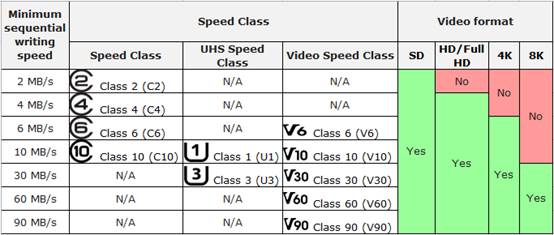
- TP-Link cameras support micro SD cards (sold separately) up to 512GB and require a minimum speed rating of Class 10 or UHS 1, which guarantees a minimum write speed of 10MB/s. Cards with less than 500MB or 5% of total capacity remaining before first insertion cannot record.
- You can identify a fake micro SD card by inspecting the product packaging for missing labels, warranty information, and a proper UPC, and by testing with third-party tools such as H2testw (Windows), F3 (Mac), or SD Insight (Android).
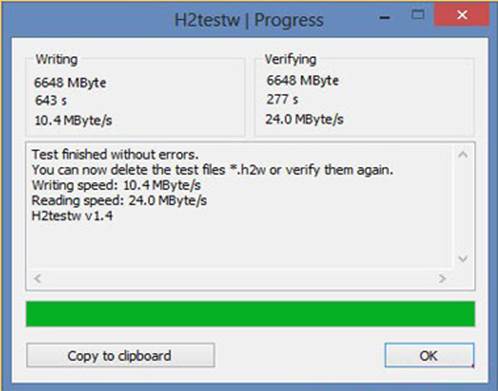
- If a card is counterfeit, H2testw will report errors and reveal the actual usable storage capacity versus what the card advertises.
- To avoid fake SD cards: always buy from an authorized seller, avoid unusually cheap cards, inspect packaging carefully, avoid used or refurbished cards, and replace cards every few years.
Micro SD Card and Fake SD Card
An SD card is a small electronic storage medium used by a wide range of devices, including smartphones, gaming devices, camcorders, and cameras. Most smartphones and security cameras use the micro SD card format.
TP-Link cameras support micro SD cards (sold separately) with up to 512GB capacity. It is recommended to use a card with a Class 10 or UHS 1 speed rating, which requires a minimum write speed of 10MB/s. If the remaining space on an SD card is less than 500MB or 5% of total capacity before the first insertion into the camera, recording will not be possible.
The most common fake SD card is the fake capacity expanded card. These cards use illegal means and tools to make a small-capacity card appear much larger. For example, a 32GB card may display as 128GB on your computer or other devices. This kind of card usually has a lower price than genuine products.
Because the capacity is falsified, any space beyond the original capacity cannot be used normally. As long as stored files exceed the actual capacity, those files will be unavailable.
TP-Link cameras format the SD card in FAT32 format and create index files to save video data. This process reads and writes the entire space of the SD card to check whether it is valid. If your SD card is an expanded card, it will not format successfully and will not work properly with the camera.
Note: For Tapo cameras, the SD card must be formatted in the app for local recording.
Types of Fake SD Cards
Counterfeit SD cards come in several forms. Here are the most common types to watch out for.
- Reduced Read/Write Speed: The card displays speed ratings like "maximum 95MB/s read and 90MB/s write" and a V30 label, which is supposed to guarantee a minimum write speed of 30MB/s. In practice, actual transfer speeds when copying files using a fast SD card reader may not exceed 5 to 10MB/s.
- Reduced Capacity: The card reports a large storage size when inserted into a computer, camera, or other device, but actually contains only a fraction of that capacity. This happens because the card's microchip has been reprogrammed to report a different size to the host device. Reduced-capacity fake micro SD cards are the most dangerous type because they will almost certainly result in data loss.
- Fake Brand: These SD cards carry well-known brand labels but are manufactured with cheap components by unknown makers. They can be difficult to spot and may require contacting the manufacturer to verify a serial number. Checking verified buyer reviews on reputable retailers can also help.
- Unrealistic Capacity: Some cards advertise storage sizes that simply do not exist. If you see a micro SD card listing a capacity of 2TB, for example, that capacity is not currently available, and the card is counterfeit.
- Bogus/Non-Working: Some SD cards sold at extremely low prices by unknown sellers do not work at all.
Fake SD Card Issues
The problems caused by a fake SD card range from sluggish transfer speeds to full data loss. The most damaging scenario involves reduced-capacity cards: everything appears to work normally at first, but once the amount of stored data exceeds the card's true capacity, all data written beyond that point becomes corrupted. The failure is gradual and may not be obvious until well into regular use.
How to Identify a Fake SD Card
If you've already purchased one, here's how to test your SD card and spot a fake.
- Inspect Product Packaging: Make sure the package contains necessary information about the product, such as its specifications and card speed, as well as all the appropriate labels, warranty info, and a proper UPC. You may also verify the card directly with the SD card manufacturer.
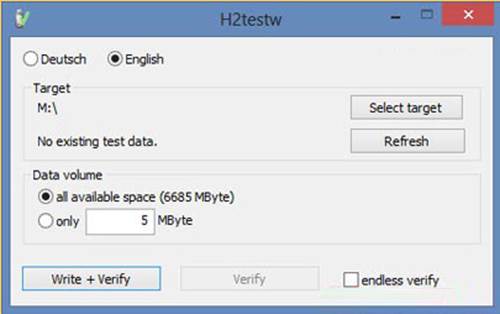
- Test the SD card with third-party software: Make sure you format the SD card before you start this step (back up the data in advance if needed). You can verify whether you can write files to the advertised capacity of your SD card using the software H2testw. Install H2testw on your Windows computer (you can also run a similar tool called F3 on Mac OS, and an app called SD Insight on an Android device), then run the test. It will show you the real capacity of your SD card.
Here is an example for testing with H2testw. Note that you should check "all available space" before testing and select "Write + Verify" to start. If the SD card you are using is fake, it will report errors and show how much actual data was written and read from the card.
Memory Card Buying Tips
Follow these tips to avoid buying a fake or low-quality micro SD card (sold separately).
- Always buy from an authorized seller.
- Be careful about cheap SD cards.
- Always inspect and test each card to ensure it is genuine.
- Do not buy used or refurbished SD cards.
- Replace SD cards once every few years to reduce potential failure.
If you are having trouble getting your SD card to work after purchase, see what to do if the SD card cannot be formatted or recognized. You can also review microSD card compatibility for Tapo and Kasa security cameras to confirm your card meets the required specifications.
Looking For More
Ez a GY.I.K. hasznos volt?
Véleménye segíti az oldal fejlesztését



TP-Link Community
Still need help? Search for answers, ask questions, and get help from TP-Link experts and other users around the world.