
Catalogue
UH5010C_User Guide
1 Product Overview
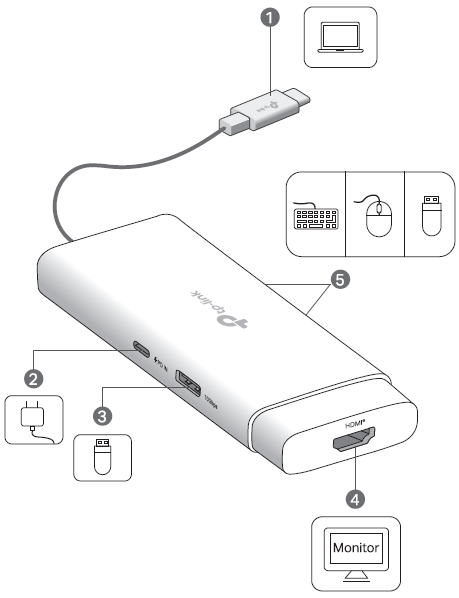
Ports
|
① USB-C Connector |
For connecting to your host device. |
| ② USB-C PD Input (Power Delivery) Port* | For unidirectionally charging your host device when connected to a PD charger. Input support: PD 3.1; up to 140WΔ Output to host: Up to 125WΔ * Does not support video output, data transfer, or reverse charging. |
| ③ USB-A 10Gbps Port | USB 10Gbps; Up to 10 Gbps data transfer Max Output: 5V/1.5A * Does not support fast charging or video transmission. |
| ④ HDMI® Port | Up to 4K@60Hz (backward compatible: 2K@85Hz, 1080P@144Hz, 480P@60Hz) * Please ensure the connected host device's USB-C port supports video output and DP Alt Mode. |
| ⑤ USB-A 480Mbps Port×2 | USB 2.0; Up to 480Mbps data transfer Max Output: 5V/0.5A * Does not support fast charging or video transmission. |
Specifications
|
Input |
PD: 5V/3A, 9V/3A, 12V/3A, 15V/3A, 20V/5A, 28V/5A USB-C Connector: 5V/3A |
| Supported Systems | Windows, macOS, iPadOS, iOS, ChromeOS, Linux, Android |
ΔThe maximum power indicated is the input power to this port. The hub uses a portion of the input power for itself and connected devices, so the maximum output to your host device is 125W.
Note: The ports' actual performance may vary based on your host device specifications.
2 Using the Hub
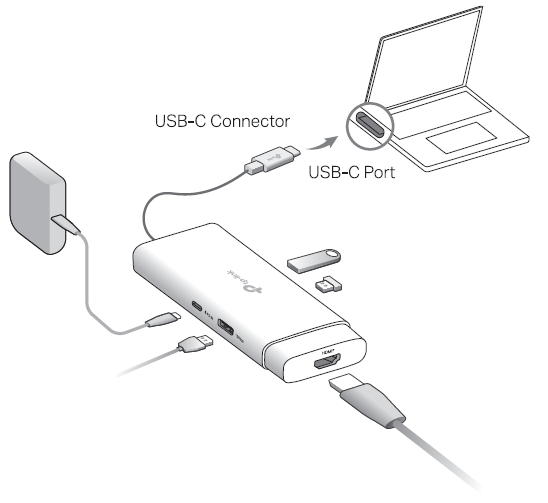
This hub supports the Plug and Play feature. Plug the USB-C connector into your host device, then plug in your external peripheral into the corresponding port of the hub.
Note: A PD charger is not included in the package. If you wish to use a PD charger to charge your host device, please refer to Tips (2B). The other ports will function normally without a PD charger connected.)
Tips:
1. When not in use, please unplug or remove the external peripherals from the hub first, and then unplug the hub from your host device.
2. If you need to connect a PD charger to the hub's USB-C PD port, please:
A) Notice that it only has the charging function and is input only.
B) Use an original or certified PD charger to charge your host device. The output of the PD charger should meet the input specifications of the USB-C PD port.
3 Frequently Asked Questions (FAQ)
Q: Why does my computer say "Abnormal supply voltage detected", "Low charging power" or "using a non-original charger"?
A: This is normal. The hub's power is shared between the hub itself, the connected devices, and charging, which slows the charging speed when compared to connecting directly to the charger. If your host device's battery is extremely low, connect it directly to the charger first for the quickest recharge, then charge it through the hub.
Authentication
CE Mark Warning

TP-Link hereby declares that the USB Type-C 5-in-1 Hub is in compliance with the essential requirements and other relevant provisions of directives 2014/30/EU, (EU) 2023/988, 2011/65/EU, and (EU)2015/863.
The original EU declaration of conformity may be found at https://www.tp-link.com/en/support/ce/
TP-Link hereby declares that the USB Type-C 5-in-1 Hub is in compliance with the essential requirements and other relevant provisions of the Electromagnetic Compatibility Regulations 2016 and Electrical Equipment (Safety) Regulations 2016.
The original UK declaration of conformity may be found at https://www.tp-link.com/support/ukca/
The terms HDMI, HDMI High-Definition Multimedia Interface, HDMI trade dress and the HDMI Logos are trademarks or registered trademarks of HDMI Licensing Administrator, Inc.

FCC compliance information statement

Product Name: USB Type-C 5-in-1 Hub
Model Number: UH5010C
Responsible Party:
TP-Link Systems Inc.
Address: 10 Mauchly, Irvine, CA 92618
Website: http://www.tp-link.com/us/
Tel: +1 626 333 0234
Fax: +1 909 527 6804
E-mail: sales.usa@tp-link.com
This equipment has been tested and found to comply with the limits for a Class B digital device, pursuant to part 15 of the FCC Rules. These limits are designed to provide reasonable protection against harmful interference in a residential installation. This equipment generates, uses and can radiate radio frequency energy and, if not installed and used in accordance with the instructions, may cause harmful interference to radio communications. However, there is no guarantee that interference will not occur in a particular installation. If this equipment does cause harmful interference to radio or television reception, which can be determined by turning the equipment off and on, the user is encouraged to try to correct the interference by one or more of the following measures:
- Reorient or relocate the receiving antenna.
- Increase the separation between the equipment and receiver.
- Connect the equipment into an outlet on a circuit different from that to which the receiver is connected.
- Consult the dealer or an experienced radio/ TV technician for help.
This device complies with part 15 of the FCC Rules. Operation is subject to the following two conditions:
- This device may not cause harmful interference.
- This device must accept any interference received, including interference that may cause undesired operation.
Any changes or modifications not expressly approved by the party responsible for compliance could void the user’s authority to operate the equipment.
We, TP-Link Systems Inc., has determined that the equipment shown as above has been shown to comply with the applicable technical standards, FCC part 15. There is no unauthorized change is made in the equipment and the equipment is properly maintained and operated.
Issue Date: 2026-06-12
Industry Canada Statement
CAN ICES-003 (B)/NMB-003(B)
安全諮詢及注意事項
請使用原裝電源供應器或只能按照本產品注明的電源類型使用本產品。
清潔本產品之前請先拔掉電源線。請勿使用液體、噴霧清潔劑或濕布進行清潔。
注意防潮,請勿將水或其他液體潑灑到本產品上。
插槽與開口供通風使用,以確保本產品的操作可靠並防止過熱,請勿堵塞或覆蓋開口。
請勿將本產品置放於靠近熱源的地方。除非有正常的通風,否則不可放在密閉位置中。
不要私自拆開機殼或自行維修,如產品有故障請與原廠或代理商聯繫。
限用物質含有情況標示聲明書
| 設備名稱:USB Type-C 5-in-1 Hub 型號(型式):UH5010C Equipment name Type designation (Type) |
||||||
|---|---|---|---|---|---|---|
| 單元 Unit |
限用物質及其化學符號 Restricted substances and its chemical symbols |
|||||
| 鉛 Lead (Pb) |
汞 Mercury (Hg) |
鎘 Cadmium (Cd) |
六價鉻 Hexavalent chromium (Cr+6) |
多溴聯苯 Polybrominated biphenyls (PBB) |
多溴二苯醚 Polybrominated diphenyl ethers (PBDE) |
|
| PCB | ○ | ○ | ○ | ○ | ○ | ○ |
| 外殼 | ○ | ○ | ○ | ○ | ○ | ○ |
|
電源供應板 |
○ | ○ | ○ | ○ | ○ | ○ |
| 其他及其配件 | − | ○ | ○ | ○ | ○ | ○ |
| 備考1.〝超出0.1 wt %〞及〝超出0.01 wt %〞係指限用物質之百分比含量超出百分比含量基準值 Note 1:“Exceeding 0.1 wt %” and “exceeding 0.01 wt %” indicate that the percentage content of the restricted substance exceeds the reference percentage value of presence condition. 備考2.〝○〞係指該項限用物質之百分比含量未超出百分比含量基準值。 Note 2:“○” indicates that the percentage content of the restricted substance does not exceed the percentage of reference value of presence. 備考3.〝-〞係指該項限用物質為排除項目。 Note 3:The “−” indicates that the restricted substance corresponds to the exemption. |
||||||

Продукт сертифіковано згідно с правилами системи УкрСЕПРО на відповідність вимогам нормативних документів та вимогам, що передбачені чинними законодавчими актами України.

Safety Information
• When the product has a power button, the power button is one of the ways to shut off the product; when there is no power button, the only way to completely shut off power is to disconnect the product or the power adapter from the power source.
• Do not attempt to disassemble, repair, or modify the device. If you need service, please contact us.
• Keep the device away from water, fire, humidity or hot environments.
• This equipment can be powered only by equipments that comply with Power Source Class 2 (PS2) or Limited Power Source (LPS) defined in the standard of IEC 62368-1.
• Operating Temperature: 0°C~40°C (32°F~104°F), 運作溫度: 0°C~40°C (32°F~104°F)
Explanation of the symbols on the product label 產品標籤上符號的解釋
The product label is on the bottom of the product and its power supply. Symbols may vary from products. 符號可能因產品而異 注意:產品標籤可以在產品底部和其I.T.E.電源供應器上找到。
| Symbol 符號解釋 |
Explanation 解釋 |
|---|---|
 |
Class II equipment II类设备 |
 |
Alternating current 交流電 |
 |
DC voltage 直流電壓 |
 |
Polarity of output terminals 輸出端子極性 |
 |
Indoor use only 僅限室內使用 |
 |
Energy efficiency Marking 能源效率標示 |
 |
Caution 警告 |
 |
Operator’s manual 操作手冊 |
 |
RECYCLING This product bears the selective sorting symbol for Waste electrical and electronic equipment (WEEE). This means that this product must be handled pursuant to European directive 2012/19/EU in order to be recycled or dismantled to minimize its impact on the environment. User has the choice to give his product to a competent recycling organization or to the retailer when he buys a new electrical or electronic equipment. 回收利用 本產品標示有「廢棄電氣電子設備(WEEE)」的分類回收標誌。這表示本產品必須依據歐盟指令 2012/19/EU 進行妥善回收或拆 解,以減少對環境的影響。 使用者可選擇將本產品交給合格的回收機構,或在購買新電器或電子設備時,交回給零售商進行回收處理。 |