

1_normal_20241023033631o.jpg)
(EU)2.0-276.5x237x147.5mm-7022513526_normal_20241024025426z.png)


1_large_20241023033631v.jpg)


(EU)2.0-276.5x237x147.5mm-7022513526_large_20241024025426l.png)
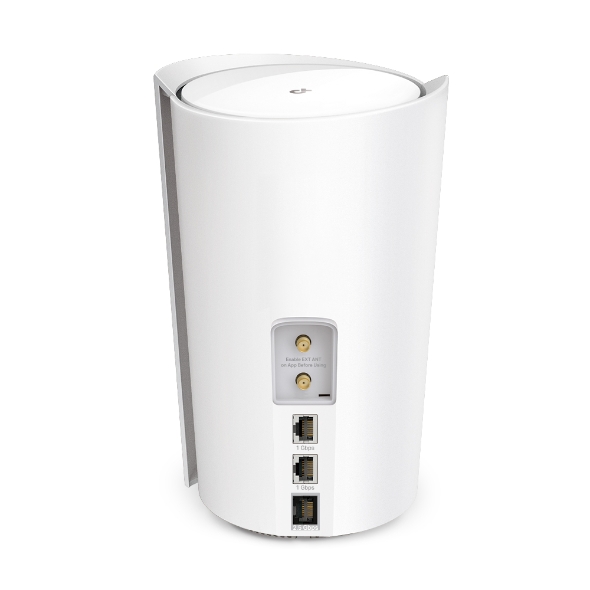
5G AX3000 Whole Home Mesh WiFi 6 Gateway (Availability based on regions)
- Ultra-Fast Broadband Connection: Supports Sub-6 GHz 5G technology boosts download speeds up to 4.67 Gbps§
- Ultra-Low Latency: 5G brings responsive network connections with only 1 ms latency§
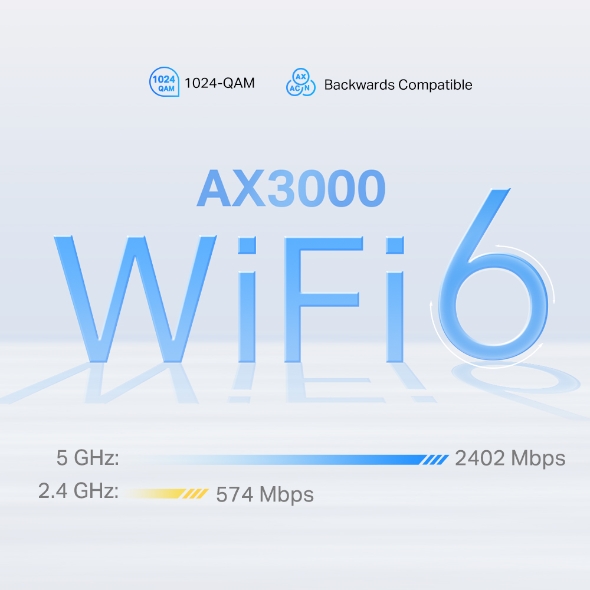
- AX3000 Dual-Band Wi-Fi 6 Speed: 2402 Mbps (5 GHz) + 574 Mbps (2.4 GHz)†
- 2.5 Gigabit Wired Connections: 1× 2.5 Gbps port + 2× Gigabit port**
- Mesh Network: Deco mesh technology ensures strong Wi-Fi signals everywhere‡
- Flexible Network Access: 4G, 5G, Fixed-Line Internet Access
- Simplified Setup: Easily set up and manage your network with the TP-Link Deco app
- TP-Link HomeShield: Provides comprehensive network protection, robust parental controls, and real-time loT security*
Cutting-Edge 5G,
Ultra-Fast Experience
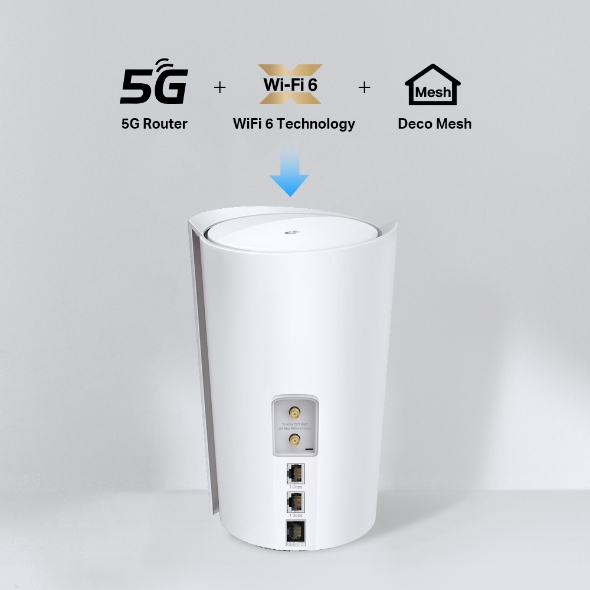
5G AX3000 Whole Home WiFi 6 Router
Deco X50-5G


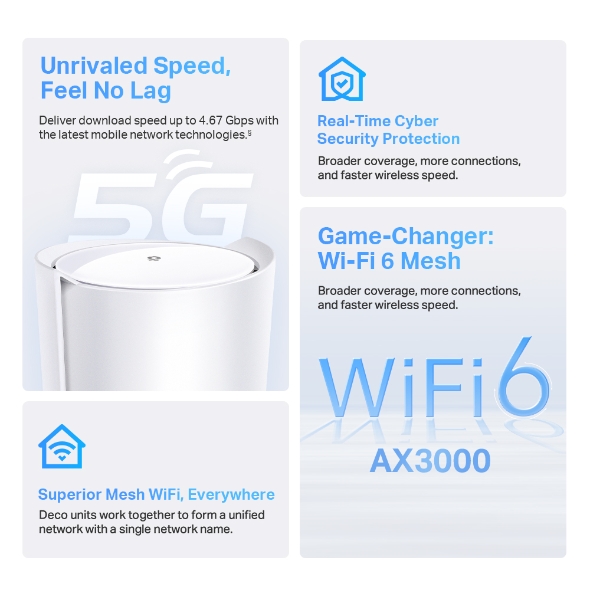
Unrivaled 5G
5G connections with speed up to 4.67 Gbps.§
Superior Mesh WiFi,
Everywhere
Real-Time Cyber
Security Protection
SIM Card Plug
and Play
AX3000
Dual-Band Wi-Fi
Wi-Fi 6
Broader coverage, more connections,
and faster wireless speed.
Lower Latency,
Enhanced Capacity
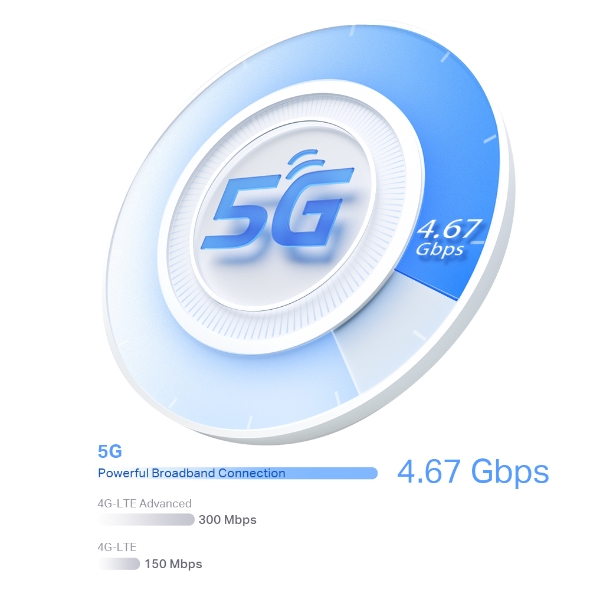
With massive MIMO, optimized OFDM, and more, 5G technologies brings fast responsive network connections to tomorrow’s mobile devices, with only 1 ms latency. Enjoy your online streaming, gaming, and AR / VR without congestion. §
-
5G
4.67 Gbps
-
4G-LTE Advanced
300 Mbps
-
4G-LTE
150 Mbps
Plug and Play, Enjoy 5G Network Everywhere
Simple, just one SIM card
Traditional broadband or cable installation is expensive and time-consuming for your vacation home, farm, or suburban warehouse. Long contract periods also create headaches for short-rentals, pop-up venues, and temporary shops to access the internet. Deco X50-5G ensures a comfortable and no-block network installation. Plug in your SIM card and enjoy high-speed internet!
-
Lodging
-
Farm & Finca
-
Temporary Store
-
Holiday Home
WiFi 6 Upgrades Everything
Armed with WiFi 6 technology, Deco whole home mesh WiFi is designed to deliver a huge boost in coverage, speed, and total capacity. Get on the latest mesh WiFi to enjoy the future network that loads faster and connects more. △
-
Wi-Fi 6 Speeds up to
3.0 Gbps -
Seamless Coverage
up to 230 m2 -
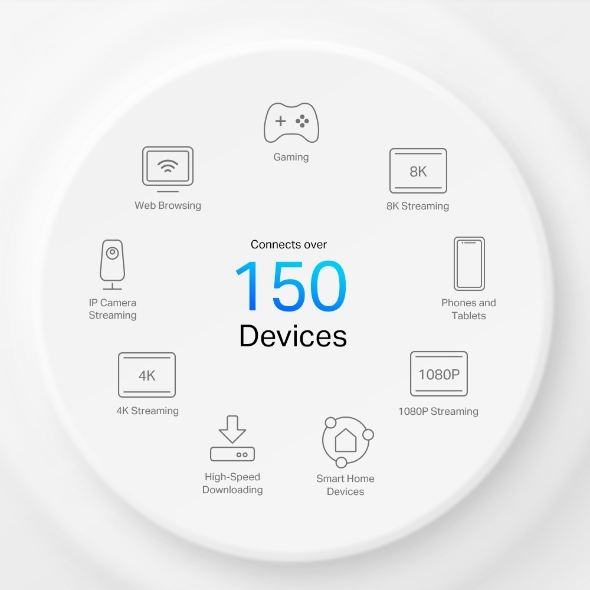
Connects over
150 Devices
-
1024-QAM
-
Backwards Compatible
5 GHz:
2402Mbps
2.4 GHz:
574Mbps
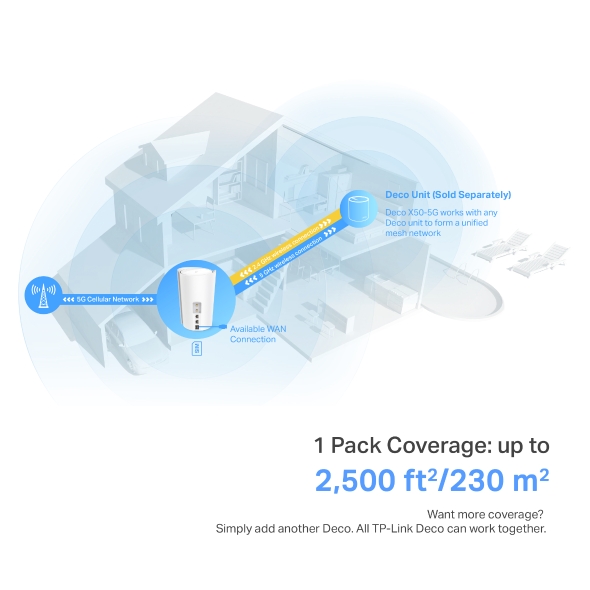
Available WAN Connection
Deco Unit (Sold Separately)
Deco X50-5G works with any Deco unit to form a unified mesh network
1 Pack Coverage: up to
2,500 ft2/230 m2
Want more coverage?
Simply add another Deco. All TP-Link Deco can work together.
5G Cellular Network
2.4 GHz wireless connection
5 GHz wireless connection
Deco products are aimed to dramatically improve capacity and efficiency in traffic-dense environments. No matter how many screens or devices are on at once, everyone is able to enjoy a more efficient network that loads faster without dragging down performance.†
Gaming
8K Streaming
Phones and
Tablets
1080P Streamings
Smart Home
Devices
High-Speed
Downloading
4K Streaming
IP Camera
Streaming
Web Browsing
connects over
150
devices
Better Signal for Connections Everywhere
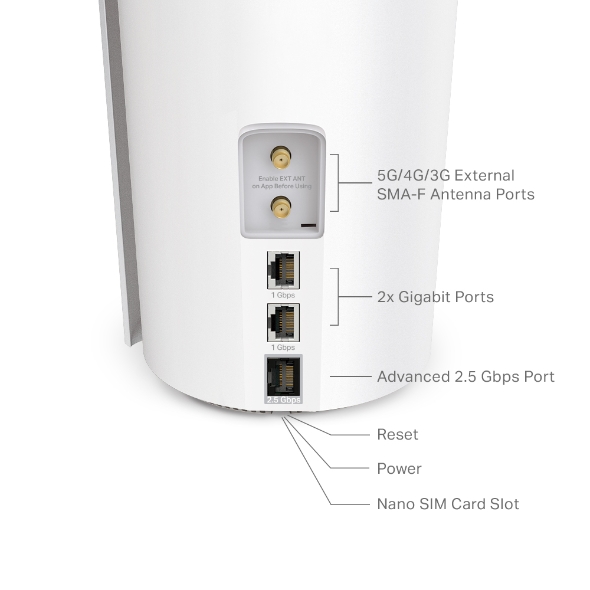
With advanced 2.5 Gigabit port, Deco X50-5G provides reliable, warp-speed connections for high-intensive wired devices. When it’s set as a wireless router, both Ethernet ports support being used as backup broadband access points.
Furthermore, two external antenna ports allow external antenna access which can receive 5G/4G signals more effectively, resulting in improved 5G/4G performance.
-
5G/4G/3G External SMA-F Antenna Ports
-
2× Gigabit WAN/LAN Ports
-
2.5 Gigabit WAN/LAN Port
Seamless Roaming with One WiFi Name
TP-Link Mesh means Deco units work together to form one unified network. Your phone or tablet automatically connects to the fastest Deco as you move through your home, creating a truly seamless WiFi experience.‡
-
Whole Home Coverage
Eliminate weak signal areas throughout your house
-
Smart Roaming
Uninterrupted streaming when moving between rooms
-
One WiFi Name
No more switching WiFi network names
-
Unified Management
Control your home WiFi by managing the central node via the Deco App

Smart Security for Smart Living
HomeShield provides a series of built-in services that protect all your devices comprehensively with various features for when you’re at home or on the go. With HomeShield, safer internet experiences bring more happiness to your smart living.
-
Parental Controls
Simply configure your gateway and achieve whole home network security. HomeShield examines your network by scanning and identifying potential risks, stopping them in their tracks before they harm your network.*
-
Maintain Protection Away from Home
Parental Controls protect your kids, while helping them maintain healthy digital habits. Parents can set app blocking, web filtering, YouTube restrictions, SafeSearch, and online time limits to keep kids safe while they’re having fun online.*
-
Quality of Service (QoS)
KidShield App
Devices Security App
Devices remain secure everywhere with devices security app. And through KidShield, parents can monitor their kids’ locations and set geofencing. This way, kids stay digitally protected even on the go.*
Simple. Easy. Yet Powerful.
Setup and manage your network anytime and anywhere on the friendly TP-Link Deco app. In just three easy steps your entire home can be blanketed in strong and reliable WiFi.
CONNECT
to a modem and power on both.
DOWNLOAD
and launch the Deco app.
CONFIGURE
by following the in-app instructions.



Easy Management
Manage your WiFi at home or away on the Deco app. See every connected device, prioritize your own, and set up a guest network.
Voice Control
Use an Amazon Alexa or Google Assistant-enabled device to control Deco X50-5G with just your voice.


All Decos Work Together
Deco X50-5G is compatible with every other Deco model to form a Mesh network. Expand Mesh WiFi coverage anytime by adding more Decos.
-
Suterén

-
Dvůr

-
Garáž

Skutečně bezproblémový roaming
Jednotky Deco mezi sebou spolupracují, aby vytvořily sjednocenou síť s jedním názvem. Váš telefon nebo tablet se automaticky připojují k nejrychlejší jednotce Deco, jak se pohybujete po domě. Přepnutí trvá méně než 0,3 sekundy a probíhá hladce a bez povšimnutí, takže se můžete spolehnout na nepřerušované internetové připojení.
-
Adaptivní výběr cesty připojení
Technologie TP-Link Mesh dynamicky vybírá nejvhodnější cestu a pásmo pro vaše připojení a aplikace, čímž zaručuje rychlé Wi-Fi připojení odkudkoliv v rámci vaší domácnosti.
-
Automatické odstranění problémů
Pokud se u některé z jednotek Deco vyskytnou potíže, systém automaticky přesměruje data přes ostatní jednotky, abyste zůstali připojení.
Wi-Fi + Powerline
Připojení Powerline využívá existující elektrické okruhy v domě k propojení jednotek Deco, aby signál prošel i těmi nejtlustšími zdmi a stropy.
Dvoupásmová Wi-Fi síť a Powerline síť mezi sebou spolupracují a přenášejí data mezi jednotkami Deco. Celková rychlost sítě je tak mnohem vyšší než při použití samotné Wi-Fi sítě.
- Wi-Fi + Powerline:
- Hybridní Wi-Fi systém s vylepšenou rychlostí
- Tradiční Mesh Wi-Fi síť:
- Standardní Wi-Fi systém
- Powerline
- Note:Wi-Fi + Powerline is only for Deco P9
IoT Mesh
Na rozdíl od tradičních chytrých hubů technologie TP-Link Mesh zajišťuje IoT pokrytí celé domácnosti pomocí Wi-Fi, Bluetooth a Zigbee integrovaných do jednoho systému. Užívejte si kouzelné možnosti chytré domácnosti v každé místnosti s technologií TP-Link Mesh. Zapomeňte na nespočet hubů.
- - - - Wi-Fi
- - - - Zigbee
- - - - Bluetooth
Wi-Fi 6 Mesh
S technologií Wi-Fi 6 za zády
je Deco Wi-Fi Mesh systém pokrývající celou domácnost navržen k tomu, aby zajistil výrazné zlepšení v pokrytí, rychlosti a celkové kapacitě. Pořiďte si nejnovější Wi-Fi Mesh systém a získejte výhody sítě budoucnosti, která poskytuje vyšší přenosovou rychlost a připojí více zařízení.
-
Širší
pokrytí -
Více připojených zařízení
-
Vyšší přenosové rychlosti Wi-Fi 6
Systém Mesh s umělou inteligencí (AI)
Jednotka Deco je vybavena technologií AI Mesh, díky které se automaticky učí a zlepšuje své chování podle získaných zkušeností. Umí tak poskytnout ideální Mesh Wi-Fi síť přesně podle požadavků vaší domácnosti a síťového prostředí. Pohybujte se po domácnosti a dopřejte si ničím nerušené streamování s nejrychlejšími možnými přenosovými rychlostmi.
Proč je technologii TP-Link Mesh
upřednostňovaným řešením v odvětví?
| Srovnání s konkurencí | |||
| Model | TP-Link Deco | Netgear Orbi | Google WiFi |
| Wireless Backhaul | Tri-Band(2.4G+5G_1+5G_2)¹ | Single-Band(5G_1 Only) | Dual-Band(2.4G+5G) |
| Podpora protokolu Mesh | IEEE 802.11k/v/r | IEEE 802.11k/v | IEEE 802.11s |
| True Seamless Roaming | ✔ | × | × |
| APS(Adaptive Path Selection) | ✔ | × | ✔ |
| IoT Mesh | ✔² | × | × |
| Wi-Fi 6 Mesh | ✔5 | ✔ | × |
| AI-Driven Mesh | ✔6 | × | × |
| Powerline Backhaul | ✔³ | × | × |
| Wireless + Powerline Bandwidth | ✔⁴ | × | × |
| Band Steering | ✔ | ✔ | ✔ |
| AP Steering | ✔ | ✔ | ✔ |
| Self-Healing | ✔ | ✔ | ✔ |
| Notes: 1&2 For Deco M9 Plus Only;5 for Deco X20;Deco X90;6 for Deco X90 only. Spec sourced by Dec. 2019 |
|||
Deco
Deco
-
 New
NewDeco X50-PoE
AX3000 Domácí Wi-Fi 6 mesh systém s PoE
-

Deco X20
AX1800 Wi-Fi 6 mesh systém
-
 New
NewDeco BE65
Mesh systém BE9300 s Wi-Fi 7 pro pokrytí celé domácnosti
-
 New
NewDeco BE85
Třípásmový mesh systém BE19000 s Wi-Fi 7 pro celoplošné pokrytí domácnosti
-
 New
NewDeco X50-5G
5G AX3000 domácí mesh systém s Wi-Fi 6 (Dostupnost v závislosti na regionu)
-

Deco X60
AX5400 Wi-Fi 6 mesh systém
-

Deco S7
Wi-Fi mesh systém AC1900 pro celoplošné pokrytí domácnosti
-
_Overview_normal_20211225093625r.png)
Deco X50
AX3000 Wi-Fi 6 mesh systém pro celou domácnost
-
_normal_20230201014412u.png)
Deco M4
AC1200 WI-Fi mesh systém
Správa sítě Deco na dosah ruky!
Aplikace Deco představuje nejsnadnější způsob nastavení, správy a monitorování vašeho Deco Mesh systému Wi-Fi pro celou domácnost na zařízeních iOS nebo Android.
Nastavení je nyní mnohem jednodušší
Rozbalte jednotku Deco, nainstalujte aplikaci a potom jednoduše postupujte podle pokynů na displeji. O zbytek se postará jednotka Deco, která aktivuje a zprovozní síť během několika málo minut.
-
Připojte jednotku Deco ke kabelovému modemu a zapněte obě zařízení.
-
Stáhněte si aplikaci Deco a spusťte ji.
-
Nakonfigurujte systém Deco podle pokynů v aplikaci.
Snadná správa
Deco usnadňuje správu vaší Wi-Fi sítě, ať sedíte na gauči, jste v práci, nebo se nacházíte kdekoli jinde.
-
Přehledný řídicí panel pro správu
Sledujte provozní stav sítě, monitorujte připojená zařízení a získejte všechny funkce nabízené routerem.
-
Několik jednotek Deco, jedna aplikace
Aplikace Deco se postará o správu všech vašich sítí Deco a zařízení připojených k Deco Wi-Fi síti.
-
Kontrola připojených zařízení
Zobrazte si seznam připojených zařízení s možností pozastavení a obnovení přístupu k internetu, testu rychlosti internetového připojení a upřednostnění nebo blokování vybraných zařízení.
-
Vzdálená správa
Ovládejte síť vzdáleně přes svůj telefon – z libovolného místa.
Robustní rodičovská kontrola
Jednoduchá, intuitivní rodičovská kontrola pomáhá zajistit bezpečnost vašich dětí v on-line světě.
-
Snadno vytvoříte profil pro každého člena rodiny a nastavíte specifické časové limity a množství povoleného času tráveného on-line. Přiřaďte zařízení k profilům, aby se pravidla rozšířila na jednotlivá zařízení i na členy rodiny.
-
Keep your family safe online with one-touch security settings that block content based on age-appropriateness.
-
Set limits on how much time each person in your family can spend online.
-
With Insights, you can check out which sites your children visit and how much time they spend on each. It’s a great way to know your children are safe while they’re having fun online.
-
Take a break from Wi-Fi for dinner and family game nights. Just tap a button to suspend internet access for everyone in your home.
Intuitivní aplikace s mnoha funkcemi
Přehled měsíčního využívání
Prohlédněte si podrobný seznam údajů o vaší síti za měsíc, včetně využívání, blokovaného obsahu, bezpečnostních hrozeb a dalších položek.
Home Automation
Make your life easy with powerful automation and voice control tools.
*Currently only for Deco M9 Plus
Flexible Shortcut
Flexibly control all devices from your phone or tablet with just one click.
*Currently only for Deco M9 Plus
Protect Your Network
Built-in Antivirus helps you defend against malicious website and guard your online payment.
*Currently only for Deco M9 Plus, Deco P7 and Deco M5
Prioritize Your Devices
Choose which devices always have the fastest connections
or set priority for a specific time duration.
Set Application Priorities
Allocate more bandwidth for the activities most important to you with simple controls.
*Currently only for Deco M9 Plus, Deco P7 and Deco M5
Share Wi-Fi with Friends
Set up separate Wi-Fi profiles for guests and share the password to
make it easier for them to hop online.
Check Your Speed
Run a speed test to ensure you’re getting the internet speeds you’re paying for.
View every device on your network and see how much bandwidth they’re using.
Naše podpora vám kryje záda
Máte otázky k systému Deco? Pomoc je vždy nablízku. Odpovědi najdete v aplikaci Deco, a pokud ne, stačí jedno kliknutí a můžete nás kontaktovat.
Podpora| Standards and Protocols | Wi-Fi 6IEEE 802.11ax/ac/n/a 5 GHzIEEE 802.11ax/n/b/g 2.4 GHz |
|---|---|
| WiFi Speeds | AX30005 GHz: 2402 Mbps (802.11ax)2.4 GHz: 574 Mbps (802.11ax) |
| WiFi Range | 1-3 Bedroom Houses (1-pack) TP-Link Mesh TechnologyOptional Ethernet backhaul work together to link Deco units to provide seamless coverage8× LTE/5G internal antennas + 3× Wi-Fi internal antennas + 2× external SMA-F antenna interfaceMultiple antennas form a signal-boosting array to cover more directions and large areasSIM Card Format: Nano-SIM |
| WiFi Capacity | High Dual-BandDistribute devices to different bands for optimal performanceMU-MIMOSimultaneously communicates with multiple MU-MIMO clientsOFDMASimultaneously communicates with multiple WiFi 6 clients4 StreamsMore than enough bandwidth for connected devices |
| Working Modes | 5G/4G Router, Router, Access Point |
| Network Security | SPI FirewallAccess ControlHomeShield Security Real-Time IoT ProtectionMalicious Site BlockerIntrusion Prevention SystemDDoS Attack PreventionHome Network Scanner |
|---|---|
| Guest Network | 1× 5 GHz Guest Network1× 2.4 GHz Guest Network |
| WiFi Encryption | WPA-Personal WPA2-Personal WPA3-Personal |
| Ports and Connections | 1× 2.5 Gigabit port + 2× 1 Gigabit ports (WAN/LAN auto-sensing)Compatibility5G: N1/N3/N5/N7/N8/N20/N28/N38/N40/N41/N77/N784G FDD-LTE: B1/B3/B5/B7/B8/B20/B284G TDD-LTE: B38/B40/B41/B42/B433G: B1/B5/B8 |
|---|---|
| Protocols | IPv4IPv6 |
|---|---|
| Service Kit | HomeShieldLearn More> |
| WAN Types | Dynamic IPStatic IPPPPoEL2TPPPTP |
| Quality of Service | HomeShield QoS QoS by Device |
| Cloud Service | OTA Firmware UpgradeTP-Link IDDDNS |
| NAT Forwarding | Port Forwarding UPnP |
| IPTV | IGMP ProxyIGMP SnoopingBridgeTag VLAN |
| DHCP | Address ReservationDHCP Client ListServer |
| DDNS | TP-Link |
| Management Features | Deco App |
| Network Services Enabled by Default | Web Server Manage and configure device through web (HTTP/HTTPS)• Port: 80/443 Protocol: TCP DNS DNS• Port: 53 Protocol: TCP & UDP DHCP Server IP address assignment (DHCP)• Port: 67 Protocol: UDP App management Manage and configure device through app• Port: 22 Protocol: TCP• Port: 20001 Protocol: TCP• Port: 30001 Protocol: TCP• Port: 20002 Protocol: UDP |
|---|---|
| WiFi Transmission Power | CE: ≤20 dBm (2.4 GHz),≤23 dBm (5 GHz) |
|---|---|
| Dimensions (W×D×H) | 8.3 × 5.1 × 4.8 in (210.5 × 130 × 123mm) |
|---|---|
| Certification | CE, RCM |
|---|---|
| Package Content | 1-pack1 Deco X50-5G unit1 RJ45 Ethernet Cable1 Power AdapterQuick Installation Guide |
| Environment | Operating Temperature: 0°C~40°C (32°F~104°F)Storage Temperature: -40°C~60°C (-40°F~140°F)Operating Humidity: 10%~90%RHStorage Humidity: 5%~90%RH |
†Maximum wireless signal rates are the physical rates derived from IEEE Standard 802.11 specifications. Actual wireless data throughput and wireless coverage, and quantity of connected devices are not guaranteed and will vary as a result of network conditions, client limitations, and environmental factors, including building materials, obstacles, volume and density of traffic, and client location.
‡Clients need to support 802.11k/v/r and may require additional set up. Performance may vary depending on the client’s device.
§Actual 5G downlink speeds vary between households. Factors affecting 5G speeds include the internet service level, real-time network capacity, equipment and client limitations, and environmental factors.
△Uses of WiFi 6 and other features including OFDMA, MU-MIMO, 1024-QAM, and BSS Color require clients to also support the corresponding features.
*HomeShield includes the Free Basic Plan. Fees apply for the Pro Plan. Visit tp-link.com/homeshield for more information.
**All WAN/LAN ports will operate as either WAN or LAN ports. Only one port can serve as a WAN port at a time.
Actual network speed may be limited by the rate of the product's Ethernet WAN or LAN port, the rate supported by the network cable, Internet service provider factors and other environmental conditions.