
Frequently Asked Questions About Tapo Smart Light Strip
General Questions
Q1. Tapo & Kasa Light Strip Comparison
|
|
Tapo L900 |
Tapo L901 |
Tapo L920 |
Tapo L930 |
KL400 |
KL420 |
KL430 |
|
Change Color |
Y |
N |
Y |
Y |
Y |
Y |
Y |
|
Light Temperature |
N |
N |
N |
Y |
N |
N |
Y |
|
Different Color Zones |
N |
N |
Y |
Y |
N |
Y |
Y |
|
Sync-to-Sound |
Y |
N |
Y |
Y |
N |
N |
N |
|
PU coating |
N |
N |
Y |
Y |
N |
Y |
Y |
|
Lighting Effects |
Y |
N |
Y |
Y |
Y |
Y |
Y |
Q2. Can I Use Tapo Light Strips Outdoors?
All Tapo light strips are designed for indoor use only.
Although the L920 and L930 models have a PU coating, outdoor exposure will shorten their lifespan and damage the controller and connector because they are not weather-proofed.
Q3. For the Tapo L920/L930, What Is the Minimum Segment Length that Can Be Controlled Separately?
Tapo 5m L920 and L930 support 50 separate color zones, so the minimum length is 10cm per segment, each consisting of 3 LEDs.
Q4. How Many Lumens Can Tapo Light Strip Provide?
Tapo L900-5 provides 400 lm, Tapo L920-5 provides 500 lm, and Tapo L930-5 provides 1000 lm.
Note: Tapo L900 and Tapo L920 don't have the white LED required for relevant certification. This value is just for reference for the two models.
Q5. What Are the CRI and Color Temperature Values for the Tapo Light Strip?
CRI of L930 will be higher than 80; The range of the color temperature for the L930 is 2,500-6,500 K
Since the L900 and L920 don't have white LEDs, there is no such value for certification.
Q6. Why Does My Tapo Light Strip LED Look Brighter After Part of It Was Cut?
This is normal for light strips.
After you cut part of the light strip, the device's load will be lower than before. This means there are fewer LEDs in the light strip. So, each LED bulb may get a little more current, and the LEDs will look brighter than before.
Q7. How Many LED Bulbs Are in the 5-meter Light Strip?
There are 30 small LEDs every meter. So if your light strip is Tapo L900-5 or Tapo L920-5, which is 5 meters long, there will be 150 small LEDs (5 x 30 = 150).
Q8: What Should I Do If the Light Strip Installed with 3M Adhesive Easily Falls Off?
- Please install the Light Strip on clean, smooth, dry surfaces such as painted walls, glass, and metal. It may not adhere well to textured surfaces, rough materials, or surfaces with dust or moisture.
- Do not move the light strip after attaching it.
- Support the controller or use extra adhesive to secure it and prevent it from pulling down the Light Strip.
- Consider using additional adhesive or mounting clips for extra support.
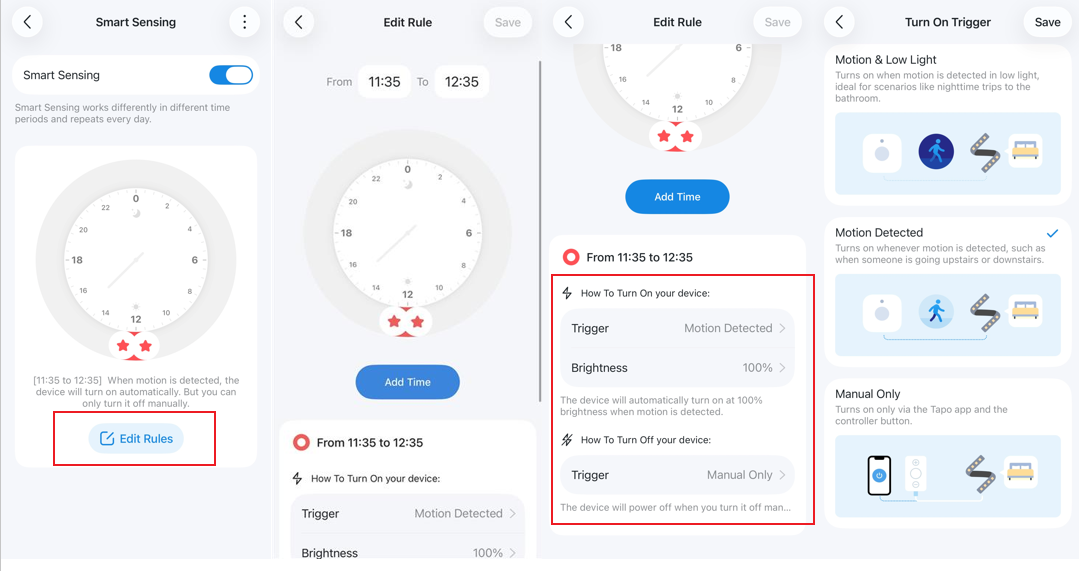
Q9: What’s the Smart Sensing Feature on the Tapo Light Strip?
Selected Tapo light strip models come with a built-in sensor that supports both motion detection and ambient light sensing.
Configuration: No manual sensor setup is required—you can use the Smart Sensing function right after you finish configuring the light strip, since the light strip and sensor are sold as a complete set and pre-configured at the factory.
Supported Features:
- Motion & Low Light: Turns on when motion is detected in low light, making it ideal for nighttime trips to the bathroom.
- Motion Detected: Turns on whenever motion is detected, regardless of lighting conditions, such as when someone is going upstairs or downstairs.
Settings adjustment:
1. Go to the Tapo app > select the device > tap Smart Sensing > Edit Rules.
2. Select an active time directly from the options above or adjust the time using the time dial.
3. If you want to set different triggers for different time periods, click Add Time and configure the corresponding trigger.
Sync-to-Sound Feature
Q1: Do Tapo Light Strips Currently Support Group Control for the Sync-to-Sound Feature?
Currently, the music sync feature does not support group control. However, we plan to gradually introduce this functionality in the future to enhance the user experience.
Q2. The Working Mechanism of "Sync-to-Sound".
The app collects environmental sound with the smartphone's microphone. Then, the app transforms the sound into a control signal and uses it to change the lighting effect.
Q3. The Light Strips Blink All the Time, Even When There Is No Sound. Is It Abnormal?
This is normal. The light strip will play a regular loop when 'Sync-to-Sound' is enabled. Once it detects sound, it will change color and rhythm accordingly.
By the way, the light strip is more sensitive to strong and hard-beating music.
Q4. Can I Close the App or Leave It Running in the Background While "Sync-to-Sound" Is Playing?
No. 'Sync-to-Sound' will stop working when the app is closed or running in the background because the smartphone stops the app from using the microphone when it runs in the background. Thus, you need to keep the APP running when using Sync-to-Sound.
Looking For More
¿Es útil esta pregunta frecuente?
Sus comentarios nos ayudan a mejorar este sitio.

TP-Link Community
Still need help? Search for answers, ask questions, and get help from TP-Link experts and other users around the world.