
Frequently Asked Questions About Third-Party Compatibility
Third-Party Compatibility allows Tapo and Kasa devices to integrate with platforms such as Home Assistant, offering greater flexibility for smart home management. This FAQ explains how the feature works, how to enable it, important security considerations, and what to do if integration issues occur.
Key Takeaways
- Third-Party Compatibility enables Tapo and Kasa devices to work with platforms such as Home Assistant.
- The feature is disabled by default and must be manually enabled in the Tapo or Kasa app.
- Using third-party platforms may require sharing TP-Link account credentials and can introduce additional security risks.
- For the highest level of security and privacy, TP-Link recommends using the official Tapo or Kasa app.
- TP-Link does not guarantee compatibility with third-party platforms; consult the platform's official support resources if integration issues occur.
Q&A
Q1: What is Third-Party Compatibility, and what does it do?
Third-Party Compatibility is designed for users who want to manage their Tapo or Kasa devices through third-party platforms and applications. When enabled, your smart devices integrate seamlessly with third-party ecosystems like Home Assistant, boosting your smart home connectivity.
However, please note that enabling this feature may reduce the security protections provided by the Tapo and Kasa ecosystem. Third-party applications may require your TP-Link account credentials and are not reviewed or validated through TP-Link's security testing process. As a result, there may be an increased risk of unauthorized access to your account, devices, or personal information.
For the best security and privacy protection, we recommend managing your devices through the official Tapo or Kasa app, both of which undergo rigorous security testing and validation. How to Enable Third-Party Compatibility
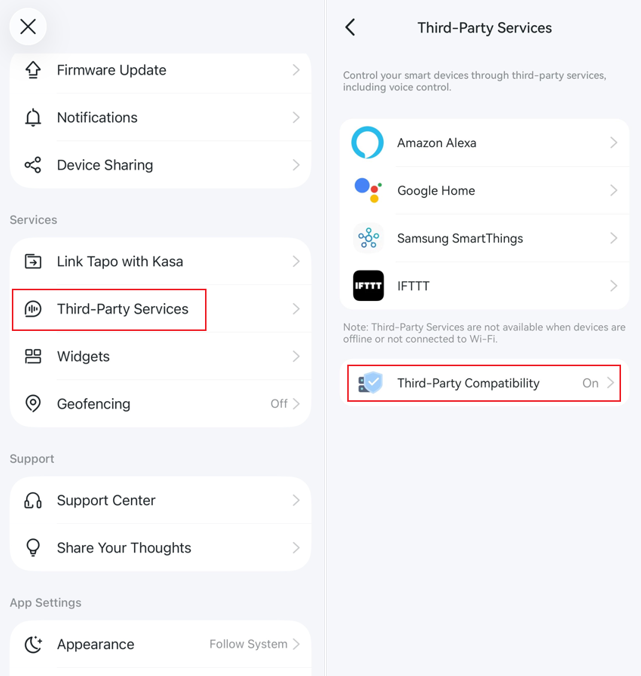
Q2: How do I enable Third-Party Compatibility in the Tapo or Kasa app?
Tapo App: Go to Me > Third-Party Services > Third-Party Compatibility and enable it. You can access the Me page by tapping Me in the bottom-right corner or your profile picture in the top-left corner.
Kasa App: Go to Me > Settings > Third-Party Compatibility and enable it.
Q3: My Tapo/Kasa device cannot be integrated with Home Assistant or another third-party platform. What should I do?
1. Make sure Third-Party Compatibility is enabled
Third-Party Compatibility is disabled by default to help protect your account, devices, and data.
Enabling this feature is optional and should be based on your needs and risk tolerance. While it may improve compatibility with platforms such as Home Assistant, it may also introduce security and privacy risks that would otherwise be mitigated.
By enabling Third-Party Compatibility, you acknowledge and accept any associated security and privacy risks.
2. Contact the third-party platform for assistance
TP-Link does not officially advertised support for compatibility with Home Assistant or other third-party platforms. Enabling Third-Party Compatibility does not guarantee successful integration.
If integration still fails after enabling the feature, please refer to the third-party platform's official documentation, community forums, or support resources for further assistance.
Looking For More
Is this faq useful?
Your feedback helps improve this site.



TP-Link Community
Still need help? Search for answers, ask questions, and get help from TP-Link experts and other users around the world.