
How to Replace the Battery for Tapo Smart Button
 57893
57893Appearance:
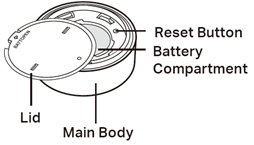
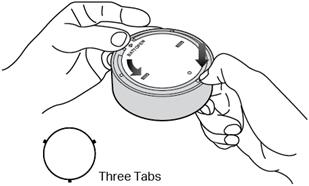
1. Hold the main body by the small tabs to prevent free rotation. Then twist the lid anticlockwise and remove the lid.
2. Remove the old battery.
3. Insert the new battery into the battery compartment, making sure the battery is level and its positive side is facing up.
4. Put the lid back on the device.
QA
Q1: How do I check the battery level through the app?
A1: The current battery level is not displayed in the app.
Q2: How do I know when the battery is low so I can replace it?
A2: You will receive a notification in the app when the battery level is low.
To get to know more details of each function and configuration please go to Download Center to download the manual of your product.
Is this faq useful?
Your feedback helps improve this site.



TP-Link Community
Still need help? Search for answers, ask questions, and get help from TP-Link experts and other users around the world.